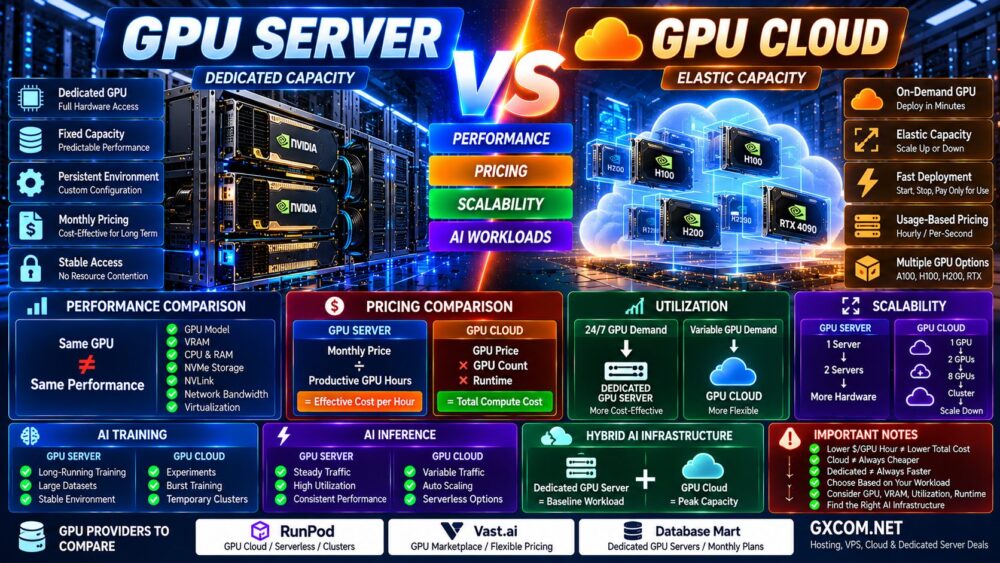
AI infrastructure can be deployed in two very different ways: rent a dedicated GPU server for continuous access to the hardware, or use GPU cloud infrastructure that can be provisioned when workloads need it.
Both approaches can provide powerful NVIDIA GPUs such as the A100, H100, H200, RTX 4090, and newer accelerators. The real difference is not simply GPU performance.
It is how you consume the infrastructure.
GPU Server → Dedicated Capacity → Longer-Term Workloads
GPU Cloud → On-Demand Capacity → Flexible Workloads
In this GPU Server vs GPU Cloud comparison, we examine performance, pricing, utilization, scalability, storage, networking, AI training, inference, LLM workloads, and how to calculate the real cost of GPU infrastructure.
GPU Server vs GPU Cloud: Quick Comparison
| Feature | Dedicated GPU Server | GPU Cloud |
|---|---|---|
| GPU Access | Dedicated | Instance dependent |
| Pricing | Usually monthly | Hourly / per-second / usage based |
| Deployment | Provider dependent | Usually rapid |
| Scaling | Add physical capacity | Highly flexible |
| Long-Term Workloads | Potentially cost-effective | Can become expensive |
| Short Jobs | Potential idle capacity | Excellent fit |
| Hardware Control | High | Platform dependent |
| AI Training | Excellent | Excellent |
| Inference | Excellent for steady demand | Excellent for variable demand |
| Best For | Predictable GPU utilization | Dynamic GPU utilization |
What Is a Dedicated GPU Server?
A dedicated GPU server is a physical server with one or more GPUs allocated to a customer.
A typical configuration may include:
- NVIDIA GPU
- Dedicated CPU cores
- Large system RAM
- NVMe storage
- Dedicated network interface
- Linux or Windows
- CUDA environment
- Root or administrator access
Instead of starting and stopping compute whenever required, the customer normally rents the complete server for a defined billing period.
This makes dedicated GPU servers particularly interesting when GPUs are used continuously.
What Is GPU Cloud?
GPU cloud provides accelerator resources through cloud infrastructure rather than requiring customers to maintain a continuously rented physical GPU server.
Depending on the platform, deployment models can include:
- GPU virtual machines
- GPU containers
- Dedicated GPU instances
- Serverless GPU
- Multi-GPU clusters
- Interruptible or spot GPU instances
The major advantage is flexibility.
You may be able to deploy a GPU, run the workload, terminate the instance, and stop paying for compute.
Deploy → Run → Finish → Terminate
GPU Server vs GPU Cloud Performance
A dedicated GPU server is not automatically faster than GPU cloud.
Likewise, GPU cloud is not inherently slower than a dedicated server.
If both environments provide the same GPU, performance differences can come from the rest of the system.
Compare:
- Exact GPU model
- GPU form factor
- VRAM
- CPU
- System RAM
- NVMe storage
- PCIe configuration
- NVLink
- Network bandwidth
- Virtualization
- Software stack
For multi-GPU AI, topology becomes particularly important.
Same GPU ≠ Same AI Server Performance.
The Most Important Metric: GPU Utilization
The biggest economic difference between GPU server and GPU cloud is often utilization.
Imagine a GPU workload running:
24 Hours × 30 Days = 720 GPU Hours
If the GPU is heavily utilized throughout the month, a fixed-price dedicated GPU server can become attractive.
Now consider a development workload using a GPU for only 60 hours during the same month.
Paying for an entire dedicated server may leave hundreds of hours of expensive GPU capacity unused.
This is where GPU cloud can become much more efficient.
GPU Cost Is Not Just Price.
GPU Cost = Price × Utilization.
GPU Providers Worth Comparing
Once you understand your utilization pattern, compare infrastructure providers according to the workload rather than choosing solely by the GPU model.
For flexible cloud GPU workloads, RunPod and Vast.ai are useful platforms to compare. For longer-running dedicated GPU infrastructure, Database Mart provides monthly GPU server configurations.
| Provider | Infrastructure Model | Useful For |
|---|---|---|
| RunPod | GPU Cloud / Serverless / Clusters | Training, inference and flexible workloads |
| Vast.ai | GPU Marketplace / Cloud | Price-sensitive and flexible GPU compute |
| Database Mart | Dedicated GPU Servers | Long-running GPU workloads |
GPU inventory, availability, pricing, and configurations change frequently. Always verify the exact GPU, VRAM, CPU, RAM, storage, network, billing model, and location before deploying.
GPU Server vs GPU Cloud Pricing
The two models are usually priced differently.
Dedicated GPU Server:
Monthly Server Price + Optional Software + Additional Services
GPU Cloud:
GPU Runtime + CPU/RAM + Storage + Network + Additional Cloud Services
The mistake is comparing only:
Monthly Price vs Hourly Price.
Instead compare the total cost of completing the workload.
How to Calculate the Real GPU Cost
For GPU cloud:
Hourly GPU Price × GPU Count × Runtime = Compute Cost
Then add applicable:
- Storage
- Network transfer
- Persistent volumes
- Snapshots
- Other platform services
For a dedicated GPU server:
Monthly Server Price ÷ Productive GPU Hours = Effective Cost per Productive Hour
This produces a much more useful comparison.
Example: Why Utilization Changes Everything
Suppose a GPU cloud instance costs $2 per hour.
At 100 hours per month:
$2 × 100 = $200
At 700 hours:
$2 × 700 = $1,400
If an equivalent dedicated GPU server costs substantially less than the latter figure per month, the dedicated option may become economically attractive.
But if the workload only requires 100 hours, renting the dedicated server may waste most of its available capacity.
This example is illustrative rather than a current provider quote.
GPU Server vs GPU Cloud for AI Training
Training workloads can fit either model.
GPU cloud is particularly attractive for:
- Experiments
- Occasional training
- Short fine-tuning jobs
- Changing GPU requirements
- Temporary multi-GPU clusters
Dedicated GPU servers become more interesting when:
- Training runs continuously
- GPU utilization is predictable
- The same hardware is needed for months
- Large local datasets are repeatedly reused
- Persistent environments are valuable
GPU Server vs GPU Cloud for LLM Inference
Inference economics depend heavily on traffic patterns.
Consider two applications:
Application A: Stable 24/7 Inference Traffic
A dedicated GPU server may achieve high utilization because the GPU continuously serves requests.
Application B: Irregular Traffic Spikes
Cloud or serverless GPU infrastructure can be attractive because compute capacity can follow demand.
Some serverless GPU services can even scale workers toward zero during periods without requests.
Steady Demand → Dedicated Capacity
Variable Demand → Elastic Capacity
GPU Server vs GPU Cloud for LLMs
Large language models require more than GPU compute.
Evaluate:
- VRAM
- Memory bandwidth
- Context length
- KV cache
- Quantization
- GPU count
- Inter-GPU communication
- Storage
- Network
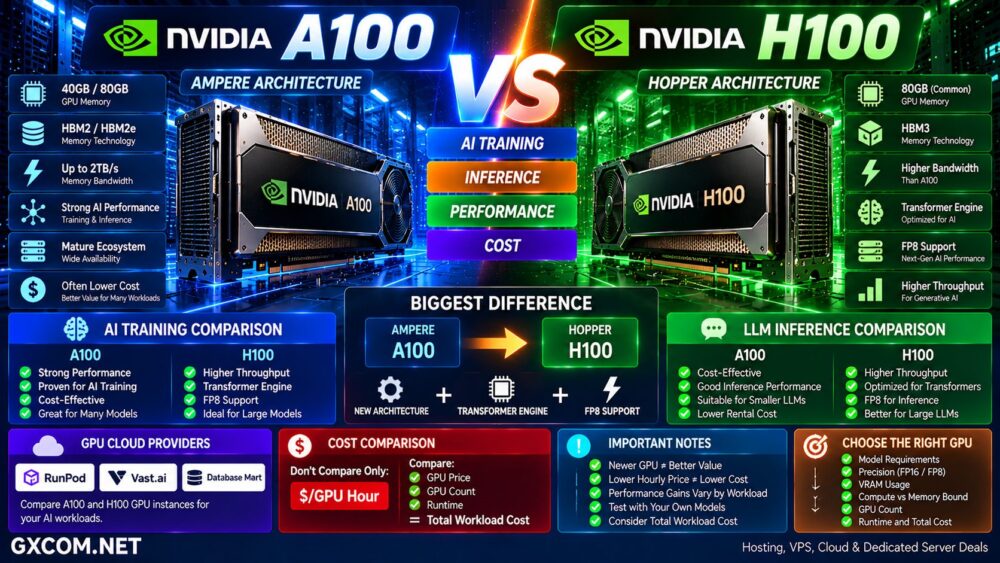
If you are deciding between specific NVIDIA accelerators, see our
NVIDIA A100 vs H100 comparison
and
NVIDIA H100 vs H200 comparison.
GPU Server vs GPU Cloud Scalability
Scalability is one of GPU cloud's biggest strengths.
A cloud workflow may look like:
1 GPU → 2 GPUs → 8 GPUs → Multi-Node Cluster → Scale Down
The organization does not necessarily need to maintain all of that capacity continuously.
Dedicated GPU infrastructure scales differently:
Server 1 → Add Server 2 → Add Server 3
This can work extremely well for stable workloads but is less elastic.
GPU Availability Matters
Cloud scalability has an important limitation: requested GPUs must actually be available.
High-demand accelerators can experience inventory constraints by provider and region.
A dedicated server reservation can provide predictable access to a specific GPU.
This matters for production workloads where capacity must be available continuously.
Cloud Scalability ≠ Guaranteed GPU Availability.
GPU Server vs GPU Cloud Storage
AI datasets and models can consume large amounts of storage.
Dedicated GPU servers commonly include local SSD or NVMe storage as part of the server configuration.
GPU cloud platforms may separate compute and persistent storage.
This can provide flexibility but can also affect total cost.
Before comparing providers, calculate:
Model Storage + Dataset Storage + Checkpoints + Persistent Volumes.
GPU Server vs GPU Cloud Networking
Networking becomes critical for distributed AI.
A single GPU workload may not require sophisticated networking.
An eight-GPU or multi-node training cluster can be very different.
Compare:
- NVLink
- NVSwitch
- InfiniBand
- High-speed Ethernet
- Inter-node bandwidth
- Internet bandwidth
- Data transfer pricing
Fast GPUs + Slow Network = Expensive Bottleneck.
GPU Server vs GPU Cloud for Development
GPU cloud is often particularly convenient during development.
Developers can experiment with different GPUs without committing to one server configuration.
For example:
RTX 4090 → A100 → H100 → H200
The team can benchmark the workload and determine which accelerator provides the best economics before committing to long-term infrastructure.
This follows one of the most useful rules in AI infrastructure:
Benchmark First. Commit Later.
GPU Server vs GPU Cloud for Startups
AI startups often face rapidly changing infrastructure requirements.
During early development, GPU utilization may be unpredictable.
GPU cloud can reduce commitment while allowing teams to test multiple accelerator types.
As the product matures and GPU demand becomes predictable, dedicated infrastructure may deserve evaluation.
A common progression is:
Experiment → Cloud GPU → Measure Utilization → Optimize → Dedicated Capacity
Hybrid GPU Infrastructure
The choice does not have to be entirely dedicated or entirely cloud.
A hybrid architecture can use:
Dedicated GPU Servers → Baseline Workload
GPU Cloud → Peak Capacity
This can combine predictable long-term capacity with elastic resources during training bursts or traffic spikes.
For larger AI operations, this model can be more efficient than forcing every workload onto a single infrastructure type.
GPU Server vs GPU Cloud: Pros and Cons
| Dedicated GPU Server | GPU Cloud | |
|---|---|---|
| Pricing Model | Usually monthly | Usage based |
| GPU Access | Predictable | Availability dependent |
| Scaling | Physical capacity | Flexible |
| Short Workloads | Potentially inefficient | Excellent |
| Continuous Workloads | Potentially cost-effective | Cost depends on rate and utilization |
| Experimentation | Limited to installed GPUs | Easy to change GPU |
| Environment | Persistent | Flexible |
| Main Advantage | Dedicated capacity | Elastic capacity |
Choose a Dedicated GPU Server If…
- Your GPU runs continuously
- Your utilization is predictable
- You need guaranteed GPU access
- You want a persistent environment
- You store large datasets locally
- You need full server control
- A monthly server produces lower total workload cost
Choose GPU Cloud If…
- Your GPU usage is irregular
- You run temporary training jobs
- You want to test different GPU models
- You need rapid deployment
- You need temporary multi-GPU capacity
- Your inference traffic changes significantly
- You want to avoid paying for idle GPUs
Questions to Ask Before Choosing
- Which GPU does the workload require?
- How much VRAM is required?
- How many GPU hours will you use each month?
- Is demand stable or variable?
- How many GPUs are required?
- Do you need NVLink?
- Do you need multi-node training?
- How much storage is required?
- How much network traffic will you generate?
- Are data transfer charges applicable?
- Do you need guaranteed GPU availability?
- Can workloads tolerate interruptions?
- What is the cost per completed training job?
- What is the cost per inference request or token?
- What is the total monthly infrastructure cost?
GPU Server vs GPU Cloud: Which Is Better for AI?
Neither GPU servers nor GPU cloud are universally better for AI.
Dedicated GPU servers are particularly attractive when workloads run continuously and GPU utilization is predictable. Paying a fixed monthly price can make economic sense when expensive accelerators remain productive for most of the billing period.
GPU cloud is particularly attractive when demand changes. Developers can deploy GPUs when required, experiment with different accelerators, scale training infrastructure, and avoid continuously paying for idle compute.
The decision should therefore start with workload behavior rather than infrastructure preference.
Continuous Demand → Evaluate Dedicated GPU Server
Variable Demand → Evaluate GPU Cloud
Baseline + Traffic Spikes → Evaluate Hybrid GPU Infrastructure
Do not compare infrastructure using GPU hourly price alone.
Use this decision path:
AI Workload → GPU → VRAM → GPU Count → Utilization → Runtime → Storage → Network → Availability → Total Cost → Right Infrastructure.
The best AI infrastructure is the one that delivers the required performance while minimizing idle GPU capacity and total workload cost.