NVIDIA H100 and H200 are two of the most important data center GPUs for generative AI, large language models, machine learning, and high-performance computing.
They are also closely related.
Both are based on NVIDIA's Hopper architecture, but the H200 significantly increases GPU memory capacity and memory bandwidth by introducing HBM3e.
That makes the real NVIDIA H100 vs H200 decision more nuanced than simply asking which GPU is newer.
For some AI workloads, the H200's larger memory can substantially improve model deployment and inference efficiency. For others, an H100 may still deliver excellent performance at a more attractive rental price.
This comparison examines AI performance, VRAM, memory bandwidth, LLM inference, training, power, multi-GPU scaling, GPU cloud pricing, and which GPU makes sense for different workloads.
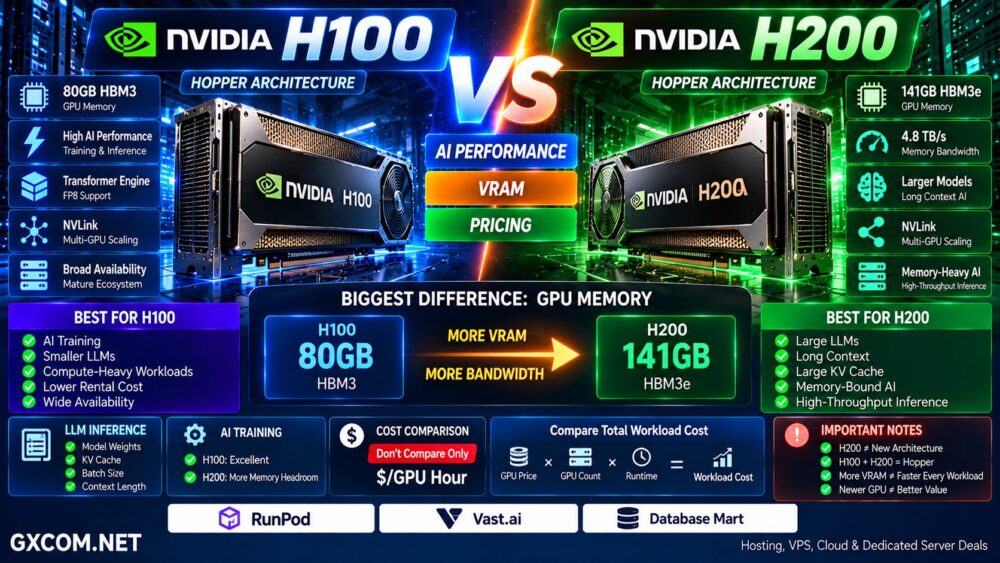
NVIDIA H100 vs H200: Quick Comparison
| Feature | NVIDIA H100 | NVIDIA H200 |
|---|---|---|
| Architecture | Hopper | Hopper |
| GPU Memory | Up to 80GB HBM3 on common H100 SXM configurations | 141GB HBM3e |
| Memory Bandwidth | Lower than H200 | 4.8TB/s |
| NVLink | Supported | Supported |
| AI Training | Excellent | Excellent |
| LLM Inference | Excellent | Stronger for memory-intensive workloads |
| Large Models | May require more GPUs | Larger memory per GPU |
| Cloud Availability | Very broad | Growing / broad |
| Rental Cost | Often lower | Often higher |
| Best Value | Workload dependent | Workload dependent |
What Is the NVIDIA H100?
The NVIDIA H100 Tensor Core GPU is based on NVIDIA's Hopper architecture and was designed for data center AI, HPC, inference, and large-scale accelerated computing.
H100 introduced important technologies for modern AI workloads, including:
- Fourth-generation Tensor Cores
- Transformer Engine
- FP8 support
- High-bandwidth memory
- NVLink
- Multi-Instance GPU (MIG)
- Confidential computing capabilities
H100 quickly became a major GPU for training and serving large language models.
It remains widely available through GPU cloud platforms, dedicated GPU servers, and enterprise AI infrastructure.
What Is the NVIDIA H200?
The NVIDIA H200 is also based on Hopper architecture.
Its most important improvement is the memory subsystem.
H200 provides:
- 141GB HBM3e GPU memory
- 4.8TB/s memory bandwidth
- Hopper Tensor Core architecture
- NVLink connectivity
- Multi-Instance GPU support
- Enterprise AI and HPC capabilities
The additional memory capacity is particularly important for large language models because model weights, KV cache, activations, and inference workloads can consume enormous amounts of VRAM.
H100 → Hopper + High AI Compute
H200 → Hopper + Much Larger and Faster Memory
H100 vs H200: The Biggest Difference Is Memory
It is tempting to think of H200 as an entirely new GPU generation.
That is not the best way to understand it.
Both GPUs use Hopper architecture.
The major H200 upgrade is:
More VRAM + More Memory Bandwidth.
NVIDIA H200 provides 141GB of HBM3e memory with 4.8TB/s of bandwidth.
Compared with the commonly deployed 80GB H100 SXM configuration, this dramatically increases the amount of AI model data that can remain directly in GPU memory.
For memory-bound workloads, this can be extremely important.
Why VRAM Matters for AI
GPU memory is one of the most important specifications when deploying large AI models.
VRAM may need to hold:
- Model weights
- KV cache
- Activations
- Training states
- Batch data
- Temporary tensors
When a model cannot fit efficiently on one GPU, it may need to be divided across multiple GPUs.
That creates additional communication requirements.
Model → GPU 1 + GPU 2 + GPU 3 + GPU 4
If a larger-memory GPU allows the same workload to use fewer GPUs, the architecture may become simpler and potentially more efficient.
H100 vs H200 for LLM Inference
LLM inference is one of the strongest use cases for H200.
Large language model serving can become heavily dependent on memory capacity and bandwidth.
The H200's 141GB HBM3e allows larger models, larger batch sizes, and larger KV caches to remain in GPU memory.
NVIDIA has demonstrated significant H200 inference gains on selected LLM workloads compared with H100, particularly where the larger memory system reduces communication overhead or memory bottlenecks.
However, the performance difference varies by:
- Model
- Precision
- Quantization
- Batch size
- Context length
- Inference framework
- Number of GPUs
More VRAM ≠ Same Performance Gain on Every Model.
GPU Cloud Platforms to Compare for H100 and H200
For most developers and smaller AI teams, purchasing an H100 or H200 system is unnecessary. Renting GPU compute allows the infrastructure to be matched to the duration and size of the workload.
Platforms such as RunPod and Vast.ai are particularly relevant when comparing on-demand GPU infrastructure, while Database Mart and GPU-oriented server providers can be useful when evaluating longer-running GPU server configurations.
| Provider | Best Comparison Point |
|---|---|
| RunPod | On-demand GPU cloud, deployment and AI workloads |
| Vast.ai | Marketplace GPU pricing and available configurations |
| Database Mart | GPU server configurations and longer-running workloads |
GPU inventory and pricing can change rapidly, so compare the exact GPU model, VRAM, CPU, system RAM, storage, networking, billing model, and availability before deploying.
Do not compare providers from the GPU name alone.
H100 + Slow Storage + Weak Network ≠ Optimized AI Infrastructure.
H100 vs H200 for AI Training
Both GPUs are powerful training accelerators.
The H200's larger memory can provide an advantage when training or fine-tuning models that require substantial VRAM.
More GPU memory can allow:
- Larger models
- Larger batch sizes
- Fewer memory compromises
- Reduced model partitioning
- More flexible fine-tuning
But training performance does not depend on VRAM alone.
For distributed training, networking and inter-GPU communication can become just as important.
A multi-GPU cluster should therefore be evaluated as a complete system.
H100 vs H200 for Fine-Tuning
Fine-tuning requirements vary enormously.
Techniques such as LoRA and QLoRA can significantly reduce memory requirements compared with full model training.
That means an H100 may already provide more than enough memory for many fine-tuning projects.
H200 becomes more attractive when:
- The model is very large
- Batch sizes need to increase
- Context windows are large
- Memory is already the bottleneck
- Multiple H100 GPUs are required primarily because of VRAM
H100 vs H200 Memory Bandwidth
Capacity is only half of the memory story.
Bandwidth determines how quickly the GPU can move data between memory and its compute resources.
H200 reaches 4.8TB/s of memory bandwidth.
This is particularly valuable for memory-bandwidth-bound workloads.
A simplified performance model is:
Compute-Bound Workload → GPU Compute Matters More
Memory-Bound Workload → VRAM Bandwidth Matters More
Understanding which bottleneck applies to your workload is critical before paying more for H200.
H100 vs H200 for Large Language Models
Large language models are one of the clearest reasons to consider H200.
As model size and context length increase, GPU memory requirements rise rapidly.
More memory per GPU can reduce the number of accelerators required simply to fit a model.
This does not necessarily mean H200 will always produce lower total cost.
You must compare:
GPU Price × Number of GPUs × Runtime
rather than:
Hourly Price of One GPU.
H100 vs H200 for RAG
Retrieval-Augmented Generation systems combine model inference with retrieval, embedding, vector search, and application logic.
The GPU requirement depends heavily on which components run on the accelerator.
For large production LLM inference, H200's memory capacity can be valuable.
For smaller RAG applications, an H100 — or even a less expensive GPU — may provide sufficient performance.
Do not select H200 simply because the application uses generative AI.
H100 vs H200 for HPC
Both H100 and H200 support high-performance computing workloads.
H200 can be particularly attractive for applications constrained by memory capacity or memory bandwidth.
Examples can include:
- Scientific simulation
- Computational chemistry
- Genomics
- Physics
- Engineering
- Data analytics
Compute-heavy workloads that fit comfortably within H100 memory may show a smaller benefit from moving to H200.
H100 vs H200 Power Consumption
Power should be considered at the complete system level.
H200 SXM configurations can operate at up to 700W configurable TDP, depending on the platform.
But wattage alone does not determine efficiency.
The more useful metric is:
Useful AI Work / Energy Consumed.
If a GPU completes the workload faster or reduces the number of GPUs required, higher individual GPU power does not automatically mean higher total energy cost.
H100 vs H200 Multi-GPU Scaling
Large AI models frequently require multiple GPUs.
Both H100 and H200 support high-speed NVIDIA NVLink connectivity in appropriate server configurations.
A typical large AI server may use:
8 GPUs → NVLink / NVSwitch → High-Speed GPU Fabric
For distributed workloads, also evaluate:
- NVLink topology
- NVSwitch
- InfiniBand or Ethernet
- Network bandwidth
- CPU
- System RAM
- NVMe storage
Eight expensive GPUs connected through inadequate networking can create a very expensive bottleneck.
H100 vs H200 Pricing
There is no single universal H100 or H200 rental price.
GPU cloud pricing depends on:
- Provider
- Region
- SXM vs PCIe configuration
- Dedicated vs shared GPU
- CPU
- System RAM
- Storage
- Network
- On-demand vs reserved billing
- Marketplace supply
H100 infrastructure is generally more mature and broadly available, which can make it attractive when the price difference to H200 is substantial.
H200 may justify a premium when its larger VRAM allows a workload to use fewer GPUs or deliver materially higher throughput.
How to Compare Real GPU Cloud Cost
Do not compare only:
$ / GPU Hour
Instead calculate:
GPU Hourly Cost × GPUs Required × Hours Required = Workload Cost
For inference, an even better metric may be:
Total Cost / Tokens Served
For training:
Total Cost / Training Job Completed
A more expensive GPU can sometimes produce a lower workload cost if it finishes the job faster or requires fewer accelerators.
When H100 Can Be the Better Value
H100 remains highly capable and may provide better economics when:
- Your model fits comfortably in available VRAM
- Your workload is primarily compute bound
- H100 rental pricing is significantly lower
- You need broad provider availability
- You already operate optimized H100 infrastructure
- Your software stack is tuned for H100
For many AI workloads, upgrading hardware simply because a newer option exists is unnecessary.
Measure the Bottleneck First.
When H200 Makes More Sense
H200 becomes particularly attractive when:
- 80GB of VRAM is limiting your workload
- You serve very large language models
- You need larger KV caches
- You use long context windows
- Your workload is memory-bandwidth bound
- You need fewer GPUs to hold a model
- Inference throughput benefits from additional memory
The biggest reason to move from H100 to H200 should usually be a measurable workload advantage rather than the model number.
H100 vs H200 for Startups
Most AI startups should avoid purchasing expensive GPU infrastructure before utilization becomes predictable.
Platforms such as RunPod and Vast.ai allow teams to compare GPU availability and rent compute according to workload demand.
A sensible progression can be:
Experiment → Rent GPU → Measure Utilization → Optimize → Scale
Only after workloads become continuous and predictable does longer-term dedicated GPU infrastructure become more important to evaluate.
Should You Upgrade From H100 to H200?
Do not upgrade automatically.
First measure:
- Current VRAM utilization
- Memory bandwidth utilization
- GPU compute utilization
- Batch size
- Model parallelism
- Communication overhead
- Tokens per second
- Cost per inference request
If your H100 workload is constrained by GPU memory capacity or memory bandwidth, H200 can be a compelling upgrade.
If the workload is already compute-bound and comfortably fits in H100 memory, the economic benefit may be smaller.
H100 vs H200: Pros and Cons
| NVIDIA H100 | NVIDIA H200 | |
|---|---|---|
| Architecture | Hopper | Hopper |
| VRAM | Lower | 141GB HBM3e |
| Memory Bandwidth | High | 4.8TB/s |
| LLM Inference | Excellent | Excellent for memory-heavy workloads |
| Training | Excellent | Excellent |
| Availability | Very broad | Broadening |
| Rental Pricing | Often more affordable | Usually premium |
| Main Advantage | Mature price/performance | Memory capacity and bandwidth |
Choose NVIDIA H100 If…
- Your workload fits comfortably within H100 VRAM
- You prioritize lower GPU rental cost
- You need broad cloud availability
- You run compute-heavy workloads
- You already have optimized H100 deployments
- H200 does not materially reduce workload cost
Choose NVIDIA H200 If…
- You need more than H100's common 80GB memory capacity
- You serve large LLMs
- You need 141GB HBM3e per GPU
- Your workload benefits from 4.8TB/s memory bandwidth
- You use large batches or KV caches
- You want to reduce model partitioning across GPUs
- The performance gain offsets the higher rental price
Questions to Ask Before Renting H100 or H200
- How much VRAM does the model require?
- Is the workload compute bound or memory bound?
- What precision will you use?
- Will the model be quantized?
- What context length is required?
- What batch size will you run?
- How many GPUs are required?
- Is NVLink available?
- What network architecture connects multiple GPU nodes?
- How much system RAM is included?
- What NVMe storage is included?
- Is the GPU dedicated?
- How is bandwidth charged?
- What is the hourly price?
- What is the total cost of completing the workload?
NVIDIA H100 vs H200: Which GPU Should You Choose?
NVIDIA H100 and H200 are both powerful Hopper-generation data center GPUs.
The H200's defining advantage is its substantially larger and faster HBM3e memory subsystem.
That makes H200 especially compelling for large language model inference, long-context workloads, large KV caches, memory-intensive AI, and workloads that otherwise require additional GPUs primarily because of memory limitations.
H100 remains an extremely capable accelerator and can provide excellent value when workloads fit comfortably within its memory and cloud rental pricing is lower.
The correct decision is therefore not:
H200 Is Newer → Choose H200.
Instead:
Model → VRAM → Memory Bandwidth → Compute → GPU Count → Runtime → Rental Price → Total Workload Cost.
For AI infrastructure, the fastest GPU is not necessarily the most cost-effective GPU.
Measure how your workload uses compute and memory, then compare current H100 and H200 pricing from GPU providers before deploying.