Adding more GPUs sounds like an obvious way to accelerate artificial intelligence workloads. If one GPU can train or serve a model, four GPUs should be four times faster—or so the assumption goes.
Real-world AI infrastructure is more complicated.
A single powerful GPU can outperform a poorly configured multi-GPU system for certain workloads. Meanwhile, models that exceed the memory capacity of one accelerator may require multiple GPUs simply to run. Distributed training also introduces synchronization, communication, and infrastructure costs that do not exist on a single GPU.
For developers, AI startups, and infrastructure buyers, the Single GPU vs Multi-GPU Server decision therefore involves more than counting graphics cards.
This guide compares GPU memory, AI training, fine-tuning, LLM inference, parallelism, scaling efficiency, networking, and total infrastructure costs. It also explains when to consider GPU hosting providers such as RunPod, Vast.ai, Cherry Servers, Vultr, and ServerMania.
Editorial note: The cost examples in this article use hypothetical rates to explain infrastructure economics. They are not current provider quotations or independently measured performance benchmarks. GPU configurations, availability, and pricing should be verified before purchasing.
Single GPU vs Multi-GPU Server: Quick Verdict
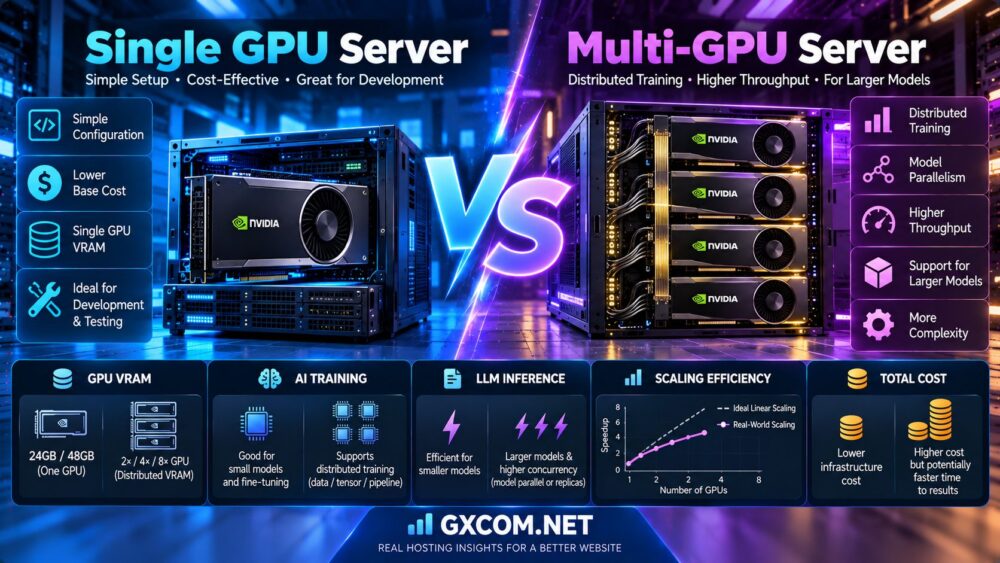
Choose a single GPU server when your model fits comfortably in one GPU, your workload does not require large-scale parallel training, and simplicity or cost efficiency is a priority.
Choose a multi-GPU server when the model exceeds single-GPU memory capacity, training throughput justifies distributed execution, or production inference requires more concurrent capacity.
Do not upgrade solely because a multi-GPU server has more total VRAM or a higher theoretical compute rating. First identify whether your workload is limited by memory capacity, compute throughput, memory bandwidth, communication, or request concurrency.
| Factor | Single GPU Server | Multi-GPU Server |
|---|---|---|
| Hardware | One GPU accelerator | Two or more GPUs |
| Deployment complexity | Generally simpler | Higher configuration complexity |
| GPU memory | Limited to one GPU's memory | Distributed memory with appropriate software |
| Model training | Good for smaller jobs and experimentation | Supports distributed training |
| Model fine-tuning | Suitable for many parameter-efficient methods | Useful for larger or more demanding jobs |
| Inference concurrency | One serving instance with available capacity | Multiple replicas or distributed inference |
| Communication overhead | No inter-GPU communication | May require GPU-to-GPU communication |
| Scaling efficiency | No multi-GPU scaling overhead | Depends on workload and architecture |
| Base infrastructure cost | Typically lower | Typically higher |
| Best fit | Smaller models, development, moderate inference | Large models, distributed training, high throughput |
What Is a Single GPU Server?
A single GPU server is a physical or virtual server configured with one GPU accelerator.
The GPU may be a consumer-oriented graphics card, a professional workstation accelerator, or a data center GPU, depending on the provider and workload.
How Single GPU Computing Works
The application uses one GPU for supported accelerated operations, such as neural network training, tensor computation, or model inference.
Model weights, intermediate activations, and runtime buffers must fit within the available GPU memory unless the software uses techniques such as CPU offloading.
Single GPU Advantages
- Simpler software configuration
- No cross-GPU synchronization
- Lower baseline infrastructure complexity
- Suitable for development and testing
- Potentially efficient for smaller inference workloads
- Often easier to monitor and troubleshoot
Single GPU Limitations
The primary constraints are available VRAM, compute throughput, memory bandwidth, and supported concurrency.
When a model exceeds the GPU's memory capacity, developers may need quantization, offloading, a larger GPU, or a multi-GPU architecture.
What Is a Multi-GPU Server?
A multi-GPU server contains two or more GPU accelerators that can be used by supported applications.
Configurations may include two, four, or eight GPUs within one physical server. Larger distributed systems can extend across multiple servers.
How Multi-GPU Computing Works
Multi-GPU software distributes computation, data, model parameters, or independent inference requests across accelerators.
The architecture determines whether GPUs cooperate on one model or process separate workloads.
Multi-GPU Advantages
- More aggregate compute capacity
- Ability to distribute models across multiple GPUs
- Higher potential training throughput
- More capacity for concurrent inference requests
- Support for larger distributed workloads
Multi-GPU Limitations
- Additional GPU rental or acquisition costs
- Communication and synchronization overhead
- More complex scheduling and debugging
- Greater power and cooling requirements for owned hardware
- Potentially poor scaling efficiency
GPU VRAM: Does Multi-GPU Memory Add Together?
GPU memory is one of the most misunderstood parts of multi-GPU infrastructure.
Four GPUs with 24GB of memory each provide 96GB of aggregate physical GPU memory, but that memory is not automatically available as one unified 96GB allocation to every application.
Single GPU Memory
A single GPU has a defined memory capacity available to the application, subject to runtime overhead and other allocations.
Multi-GPU Memory
Each GPU normally maintains its own memory space.
Distributed software can place different model components or data on different devices.
Model Sharding
Model sharding distributes model parameters or other state across multiple GPUs.
This can enable workloads that cannot fit on one accelerator.
Tensor Parallelism
Tensor parallelism divides supported operations across multiple devices and requires communication between them.
VRAM Verdict
If the model fits comfortably on one GPU, a larger single accelerator may be simpler than coordinating multiple smaller GPUs.
If the model exceeds single-device memory capacity, distributed execution may be necessary.
For practical memory sizing, read our 24GB vs 48GB GPU Server Comparison, which covers model weights, KV cache, context length, and inference memory requirements.
Single GPU vs Multi-GPU for AI Training
AI training can benefit from multiple GPUs, but the improvement depends on how the training workload is divided.
Single GPU Training
A single GPU is often sufficient for smaller neural networks, experiments, prototypes, and selected fine-tuning tasks.
It avoids inter-GPU communication and simplifies checkpointing and debugging.
Multi-GPU Training
Multiple GPUs can increase training throughput when the framework and workload support efficient parallel execution.
However, data loading, synchronization, and communication can limit scaling.
Training Speed vs Time to Accuracy
Higher throughput does not always translate directly into proportionally shorter time to reach a target model quality.
Changes in global batch size, learning rate schedules, optimizer behavior, and training configuration may affect convergence.
Training Recommendation
Start with one GPU when the model and training process fit the available memory and performance budget.
Move to multiple GPUs when profiling shows a clear benefit or the workload cannot fit on one device.
Data Parallelism Explained
Data parallelism is a common approach to distributed training.
Each GPU processes a different portion of the training batch while participating in the same training process.
How Data Parallelism Works
- The model is replicated across participating GPUs.
- Each GPU receives a different subset of training data.
- Each GPU computes local forward and backward passes.
- Gradient information is synchronized across devices.
- Model parameters are updated consistently.
Distributed Data Parallel
Frameworks such as PyTorch support DistributedDataParallel for coordinating training across GPUs.
Communication Overhead
Gradient synchronization requires communication that can reduce scaling efficiency.
When Data Parallelism Helps
Data parallelism is useful when the model fits on each GPU and the training workload can benefit from processing more examples in parallel.
Important Limitation
Conventional data parallelism replicates the model. It does not automatically solve the problem of a model that cannot fit in one GPU's memory.
Tensor Parallelism Explained
Tensor parallelism divides selected neural network computations across multiple GPUs.
Instead of storing and processing an entire supported operation on one device, participating GPUs perform portions of the work.
Why Tensor Parallelism Matters
Tensor parallelism can help deploy models that exceed the memory capacity of one GPU.
It is used in some large-scale training and inference architectures.
Communication Requirements
Tensor parallelism often requires frequent communication between GPUs during execution.
Communication latency and bandwidth can strongly influence performance.
Single GPU vs Tensor Parallelism
When a model fits comfortably on one powerful GPU, splitting it across multiple devices may introduce unnecessary overhead.
Best Use Case
Tensor parallelism becomes more relevant when model size or computation requirements justify distributed execution.
Pipeline Parallelism Explained
Pipeline parallelism divides model layers or stages across multiple devices.
Different GPUs process different stages of the model.
How Pipeline Parallelism Works
Intermediate activations move between devices as data progresses through the model.
Microbatching
Microbatches can help keep multiple pipeline stages busy.
Pipeline Bubbles
Some stages may remain idle while waiting for work, reducing overall utilization.
Best Use Case
Pipeline parallelism can be useful for models that benefit from splitting layers across devices, especially when combined with other parallel strategies.
FSDP and Sharded Training
Fully Sharded Data Parallel and related approaches distribute model states across GPUs.
Depending on the implementation and configuration, parameters, gradients, and optimizer states can be sharded to reduce per-device memory requirements.
Why Sharding Helps
Large training jobs may otherwise require more memory than one accelerator can provide.

Trade-Off
Sharding can introduce communication and memory-management overhead.
When to Consider It
Evaluate sharded training when memory constraints prevent conventional single-GPU or replicated data-parallel execution.
Single GPU vs Multi-GPU for LLM Inference
Inference scaling is different from training scaling.
During inference, the objective may be lower latency, higher throughput, more concurrent users, or the ability to run a larger model.
Single GPU Inference
A single GPU can serve a model efficiently when weights, KV cache, and runtime buffers fit within available VRAM.
Inference engines can use batching to process multiple requests on the same GPU.
Multi-GPU Model Parallel Inference
A large model may be partitioned across multiple GPUs when it cannot fit on one device.
This enables larger deployments but introduces communication overhead.
Multi-GPU Replica Inference
When a model fits on one GPU, a server with multiple GPUs can run independent replicas.
Requests can be routed between replicas to increase aggregate serving capacity.
Inference Recommendation
Determine whether the bottleneck is model memory, individual request latency, or total concurrent throughput before choosing a multi-GPU design.
Multi-GPU Inference: Replicas vs Model Parallelism
| Factor | Independent Replicas | Model Parallelism |
|---|---|---|
| Model placement | Full model on each GPU or replica group | Model distributed across GPUs |
| Main objective | Increase request capacity | Fit or accelerate a larger model |
| Memory requirement | Model must fit each replica | Model state is partitioned |
| Cross-GPU communication | Often limited between independent replicas | Can be substantial |
| Best fit | Higher concurrency with smaller models | Models exceeding one GPU's memory |
For example, a model that fits on one 48GB GPU may be deployed as several independent serving replicas across multiple GPUs.
A model that requires more memory than any available single GPU may instead need tensor parallelism or another supported distribution method.
These two strategies solve different problems and should not be treated as interchangeable.
Does Four GPUs Deliver Four Times the Performance?
Not necessarily.
Multi-GPU scaling depends on the workload, framework, interconnect, communication pattern, and software configuration.
Ideal Scaling
In an ideal scenario, four GPUs would deliver four times the throughput of one GPU.
Actual Scaling
Real workloads experience synchronization, scheduling, and communication overhead.
Scaling Efficiency Formula
Scaling efficiency = Measured speedup / Number of GPUs × 100%.
If four GPUs deliver 3.2 times the throughput of one GPU, scaling efficiency is:
3.2 / 4 × 100% = 80%.
This is a hypothetical example, not a measured result for a particular GPU model.
Why Scaling Efficiency Falls
- Gradient synchronization
- GPU-to-GPU communication
- Data loading bottlenecks
- Small batch sizes
- CPU or storage limitations
- Uneven workload distribution
- Pipeline idle time
Scaling Verdict
More GPUs increase theoretical resources, but software must use those resources efficiently.
PCIe vs NVLink for Multi-GPU Servers
GPU interconnects are particularly important for workloads that exchange data frequently between accelerators.
PCI Express
PCIe provides a standard connection between GPUs, CPUs, and other system components.
Its available bandwidth depends on the generation, lane allocation, system topology, and device capabilities.
NVLink
Supported NVIDIA GPU platforms may provide NVLink connectivity for higher-bandwidth GPU communication.
NVLink availability and topology vary significantly by GPU generation and product.
Not Every GPU Supports NVLink
Do not assume that two NVIDIA GPUs can communicate through NVLink simply because both are installed in one server.
Topology Matters
GPU placement, PCIe switches, NUMA domains, and supported peer-to-peer communication paths affect performance.
Interconnect Verdict
For tightly coupled model-parallel training or inference, inspect the actual GPU topology rather than relying only on GPU count.
Multi-GPU Servers Across Multiple Nodes
Distributed GPU infrastructure can extend beyond a single physical machine.
Single-Node Multi-GPU
All GPUs reside in one server and communicate through supported local interconnects.
Multi-Node GPU Clusters
GPUs are distributed across multiple servers and communicate over the network.
Network Considerations
Bandwidth, latency, congestion, RDMA support, and collective communication performance can affect distributed workloads.
Cluster Complexity
Multi-node systems require additional orchestration, storage planning, fault handling, and monitoring.
Recommendation
Scale within one node when practical, then evaluate multi-node infrastructure when model size or training requirements justify the additional complexity.
Single GPU vs Multi-GPU for Fine-Tuning
Fine-tuning requirements depend on model size, precision, optimizer, sequence length, and training method.
LoRA and Parameter-Efficient Fine-Tuning
Parameter-efficient methods can reduce the amount of trainable state compared with full fine-tuning.
Some workloads can run on a single GPU with suitable memory and configuration.
QLoRA
Quantization-aware approaches can further reduce model memory requirements for certain fine-tuning workflows.
Full Fine-Tuning
Updating all model parameters can require significantly more memory for gradients, optimizer states, and activations.
Multi-GPU Fine-Tuning
Multiple GPUs may become necessary when model states or desired training throughput exceed single-GPU capabilities.
Fine-Tuning Verdict
Start by estimating actual training memory requirements. A single high-memory GPU may be sufficient for some parameter-efficient tasks, while larger full fine-tuning workloads may need distributed training.
GPU Memory vs GPU Compute Performance
VRAM capacity and compute throughput are different resources.
High VRAM, Moderate Compute
A GPU with substantial memory may fit a large model but still deliver limited token generation throughput.
High Compute, Limited VRAM
A fast accelerator may struggle to run a model if the required weights and KV cache exceed available memory.
Memory Bandwidth
Memory bandwidth can be particularly important for some inference workloads.
Precision Support
FP16, BF16, FP8, and quantized formats have different hardware and software requirements.
Recommendation
Compare model fit, memory bandwidth, compute capability, and software support together.
Single GPU vs Multi-GPU Server Costs
GPU count is only one factor in infrastructure pricing.
GPU Rental Cost
Cloud providers may charge by allocated GPU time, instance time, or another product-specific billing unit.
CPU and RAM
Multi-GPU configurations may require additional host CPU resources and system memory.
Storage
Training datasets, model checkpoints, and cached weights can require significant storage.
Networking
Multi-node training may require high-performance networking.
Operational Overhead
Distributed training introduces additional monitoring, troubleshooting, and orchestration responsibilities.
Idle Capacity
Paying for several GPUs while the workload uses only one can substantially increase effective cost.
Hypothetical Single GPU vs Multi-GPU Cost Comparison
Consider the following illustrative rates:
- Single GPU instance: $1.00 per hour.
- Four-GPU server: $4.00 per hour.
- Single GPU workload completion time: 100 hours.
- Four-GPU measured speedup: 3.2 times.
| Metric | Single GPU | Four GPUs |
|---|---|---|
| Hourly infrastructure cost | $1.00 | $4.00 |
| Speedup | 1.0× | 3.2× |
| Job completion time | 100 hours | 31.25 hours |
| GPU infrastructure cost | $100 | $125 |
| Time saved | — | 68.75 hours |
| Scaling efficiency | — | 80% |
All rates and speedup figures are hypothetical. This example excludes storage, networking, setup time, retries, taxes, and operational expenses. It also assumes the same training outcome and equivalent per-GPU compute capability.
In this example, four GPUs finish the workload much sooner but cost 25% more in direct GPU rental charges.
That additional expense may still be worthwhile when faster model delivery has business value.
How to Calculate Multi-GPU Cost Efficiency
A useful comparison measures the cost of completing the same workload.
Total job cost = Hourly infrastructure rate × Job completion hours.
For multiple GPUs:
Multi-GPU completion time = Single-GPU completion time / Measured speedup.
Therefore:
Multi-GPU job cost = Multi-GPU hourly rate × Single-GPU completion time / Measured speedup.
When the hourly rate scales exactly with GPU count, a multi-GPU configuration needs nearly ideal scaling to match the direct GPU cost of one GPU.
However, real infrastructure prices are not always proportional to GPU count, and faster completion may reduce other expenses or improve business outcomes.
When Multi-GPU Is More Cost-Effective
Multi-GPU infrastructure may be economically attractive when:
- The model cannot fit on one available GPU.
- Faster training substantially reduces time to market.
- Higher throughput improves revenue or service capacity.
- Multi-GPU rental rates offer favorable economics.
- Independent inference replicas maintain high utilization.
- Distributed execution reduces total completion costs after measurement.
Conversely, a multi-GPU server may waste money when the application cannot use the additional accelerators efficiently.
Single GPU vs Multi-GPU for Serverless Inference
GPU count and serverless deployment are separate infrastructure decisions.
Single GPU Serverless Workers
A serverless endpoint may execute inference on a single GPU worker and scale the number of workers according to demand.
Multi-GPU Serverless Workers
Some platforms and configurations support workers that use multiple GPUs for larger models or specialized workloads.
Multiple Single-GPU Workers
For models that fit on one GPU, scaling independent workers can sometimes be simpler than dividing one model across several GPUs.
Cold Starts
Multi-GPU workers may require additional provisioning and initialization steps, depending on the platform and model.
Serverless Recommendation
Compare worker startup time, warm capacity, model memory, request throughput, and billable utilization.
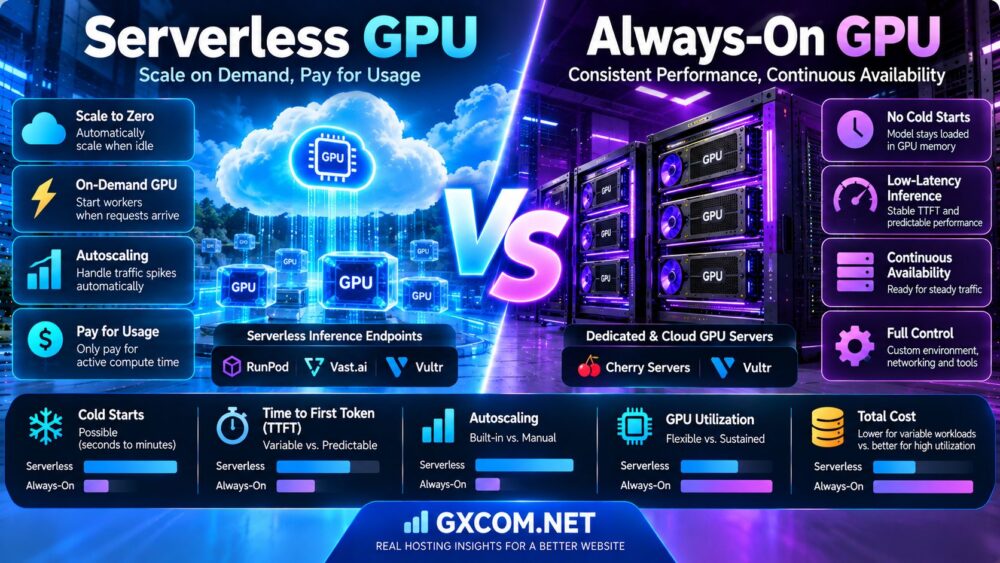
Our Serverless GPU vs Always-On GPU Comparison explains cold starts, TTFT, autoscaling, and cost trade-offs in greater detail.
RunPod for Single GPU and Multi-GPU Workloads
RunPod offers GPU infrastructure suitable for evaluating model development, inference, and supported multi-GPU deployments.
Single GPU Experiments
Developers can evaluate a compatible GPU configuration for model testing and fine-tuning.
Multi-GPU Training
Available GPU configurations may support distributed workloads when the selected hardware, runtime, and networking meet application requirements.
Inference Deployment
RunPod also offers serverless inference products, making it relevant when comparing persistent GPU instances with demand-based execution.
What to Verify
Check GPU count, VRAM, interconnect support, regional availability, storage behavior, and billing rules before deployment.
Vast.ai for Flexible GPU Rental
Vast.ai operates a marketplace for GPU compute rentals.
It can be useful when evaluating different GPU types and host configurations.
Single GPU Rental
Single-GPU instances may suit experiments, inference, and smaller training workloads.
Multi-GPU Rental
Some marketplace offers may include multiple GPUs, subject to host inventory and configuration.
Marketplace Considerations
Compare hardware topology, storage, host reliability, availability, and interruption terms.
For more details, read our Vast.ai GPU Marketplace Review.
Cherry Servers for Dedicated Multi-GPU Infrastructure
Cherry Servers provides bare-metal infrastructure and GPU-related server offerings.
It may be relevant for organizations seeking greater hardware control or persistent AI infrastructure.
Dedicated GPU Advantages
Dedicated hardware can support customized operating environments and predictable resource allocation.
Multi-GPU Considerations
Verify the exact GPU models, number of accelerators, PCIe topology, supported interconnects, memory capacity, and network configuration.
Best Fit
Dedicated GPU infrastructure can be attractive for sustained workloads when utilization and operational requirements justify the commitment.
Vultr for Cloud GPU Deployment
Vultr offers cloud GPU infrastructure alongside other cloud services.
It may be relevant for developers deploying AI applications within an existing cloud environment.
Single GPU Cloud Workloads
Single-GPU configurations can support development, inference, and suitable training tasks.
Multi-GPU Availability
Available GPU counts and hardware options depend on the selected product and region.
Cloud Infrastructure Integration
Networking, automation, storage, and operational tooling should be included in the deployment evaluation.
ServerMania for Dedicated GPU Server Planning
ServerMania offers dedicated infrastructure services and may be relevant for organizations comparing custom server requirements.
For GPU-specific projects, buyers should request confirmation of available accelerator models, supported GPU counts, server topology, and deployment terms.
Long-Running AI Workloads
Dedicated infrastructure may be worth evaluating for sustained AI workloads where persistent capacity is important.
Configuration Verification
Do not assume that every standard dedicated server supports multiple GPUs or that a particular GPU configuration is currently in stock.
Cloud GPU vs Dedicated Multi-GPU Servers
After deciding how many GPUs are needed, the next question is whether to rent cloud GPU instances or deploy dedicated hardware.
Cloud GPU Advantages
Cloud GPU infrastructure can offer flexible provisioning and shorter deployment commitments, depending on the product.
Dedicated GPU Advantages
Dedicated servers can offer persistent hardware allocation and greater control over supported configurations.
Cost Considerations
Intermittent workloads may favor flexible rental, while sustained utilization may justify dedicated infrastructure.
For a broader comparison, read our Cloud GPU vs Dedicated GPU Server Guide.
How to Benchmark Single GPU vs Multi-GPU Performance
Meaningful comparisons require consistent workloads and clear performance metrics.
- Select the same model and dataset.
- Use equivalent GPU architectures where practical.
- Record precision and quantization settings.
- Match software versions and training configurations.
- Measure single-GPU throughput.
- Measure multi-GPU throughput.
- Calculate actual speedup and scaling efficiency.
- Record GPU memory usage.
- Measure inter-GPU communication overhead.
- Monitor CPU, storage, and network bottlenecks.
- Measure time to reach the same training objective.
- Track total billable infrastructure hours.
- Calculate cost per completed job.
- Repeat tests under representative load.
Inference Benchmarking
For inference, also measure time to first token, time per output token, completed requests per second, concurrent users, and p95 latency.

Training Benchmarking
For training, track samples or tokens processed per second, step time, synchronization overhead, and time to target quality.
Common Multi-GPU Server Mistakes
Mistake 1: Assuming VRAM Automatically Combines
Multiple GPUs do not automatically expose their memory as one unified pool to every application.
Mistake 2: Expecting Linear Speedup
Communication and synchronization can prevent ideal scaling.
Mistake 3: Ignoring GPU Interconnects
PCIe and supported NVLink topology can affect distributed workloads.
Mistake 4: Using Model Parallelism Unnecessarily
Splitting a model that already fits on one GPU may increase overhead.
Mistake 5: Ignoring Inference Replicas
Independent replicas may be more appropriate for increasing concurrency.
Mistake 6: Comparing Different GPU Generations
Hardware differences can distort conclusions about scaling efficiency.
Mistake 7: Measuring Only Hourly Cost
Cost per completed training job or inference request can be more informative.
Mistake 8: Ignoring Idle GPUs
Unused accelerators can increase total cost without improving performance.
Single GPU vs Multi-GPU: Workload Recommendations
| Workload | Starting Recommendation | Reason |
|---|---|---|
| Small model experimentation | Single GPU | Simpler and potentially lower cost |
| LoRA fine-tuning | Single GPU first | Memory-efficient methods may fit |
| Large full fine-tuning | Multi-GPU evaluation | Higher memory and training requirements |
| Model larger than one GPU's VRAM | Multi-GPU or larger GPU | Requires additional memory capacity |
| Small model, many inference users | Multi-GPU replicas | Can increase concurrent serving capacity |
| Large-model inference | Model-parallel multi-GPU | May be needed for model placement |
| Occasional inference jobs | Single GPU or serverless | May reduce idle capacity costs |
| Continuous large-scale training | Benchmark multi-GPU | Potential throughput benefits |
| Production AI cluster | Topology-aware multi-GPU | Requires deliberate scaling design |
Frequently Asked Questions
Is a multi-GPU server better than a single GPU?
Not always. Multi-GPU servers are useful when workloads need additional memory or compute capacity, but smaller applications may perform efficiently on one GPU.
Does two GPUs double AI training speed?
Not necessarily. Actual speedup depends on workload parallelism, communication overhead, data loading, and software configuration.
Does four GPUs mean four times the VRAM?
Four GPUs provide four times the aggregate memory if each GPU has the same capacity, but applications must explicitly support distributed memory usage.
Can multiple GPUs share model memory?
Supported distributed inference and training frameworks can partition model state across GPUs, but the memory does not automatically behave as one unified allocation.
What is data parallelism?
Data parallelism processes different portions of training data on multiple devices while coordinating model updates.
What is tensor parallelism?
Tensor parallelism divides supported model computations across multiple GPUs.
What is pipeline parallelism?
Pipeline parallelism distributes model stages across devices and coordinates execution between them.
What is FSDP?
Fully Sharded Data Parallel distributes model states across GPUs to reduce per-device memory requirements for supported training workloads.
Do I need NVLink for multi-GPU training?
Not every workload requires NVLink. Its benefits depend on GPU support, topology, communication requirements, and the training architecture.
Can I train an LLM on one GPU?
Some smaller models and parameter-efficient fine-tuning workloads can run on one GPU. Larger training jobs may require distributed infrastructure.
Is one 48GB GPU better than two 24GB GPUs?
It depends on model memory, workload, interconnect, and software. One 48GB GPU may be simpler for a model that fits entirely in its memory.
Is multi-GPU inference faster?
It can increase throughput or support larger models, but individual request latency may not improve and can sometimes increase.
Should I use GPU replicas or tensor parallelism?
Use independent replicas when the model fits on each GPU and you need more serving capacity. Consider tensor parallelism when the model requires distributed execution.
What is GPU scaling efficiency?
Scaling efficiency compares measured speedup with the ideal speedup implied by the number of GPUs.
Why is multi-GPU training inefficient sometimes?
Communication, synchronization, small batch sizes, data loading, and hardware topology can limit performance.
Is a multi-GPU server more expensive?
It generally has a higher baseline infrastructure cost, but total cost per completed workload depends on pricing and achieved speedup.
Can RunPod support multi-GPU workloads?
RunPod offers GPU infrastructure with configuration-dependent GPU options. Verify supported multi-GPU configurations for the selected product.
Can Vast.ai provide multi-GPU instances?
Marketplace listings may offer multi-GPU configurations depending on host inventory and availability.
Should I choose cloud GPUs or dedicated GPU servers?
Cloud GPUs may suit flexible demand, while dedicated servers may be attractive for persistent workloads requiring greater hardware control.
When should I upgrade from one GPU to multiple GPUs?
Upgrade when measured memory limits, throughput requirements, or training deadlines justify the additional hardware and operational cost.
Final Verdict: Single GPU vs Multi-GPU Server
The best Single GPU vs Multi-GPU Server choice depends on the specific AI workload.
For smaller models, development, and moderate inference traffic, a single GPU can provide an efficient and straightforward starting point.
For large-model training, memory-intensive inference, or high-concurrency production systems, multi-GPU infrastructure may offer important advantages.
However, more GPUs do not guarantee proportional performance improvements.
Before upgrading, measure model memory, training throughput, inference latency, communication overhead, and total cost per completed workload.
Choose the GPU architecture that delivers the required performance at an acceptable total cost—not simply the configuration with the highest GPU count.
MODEL SIZE → VRAM REQUIREMENTS → TRAINING OR INFERENCE → PARALLELISM → GPU TOPOLOGY → SCALING EFFICIENCY → TOTAL COST