NVIDIA A100 and H100 are two of the most widely recognized data center GPUs for artificial intelligence, machine learning, large language models, and high-performance computing.
But they belong to different generations.
The A100 is based on NVIDIA's Ampere architecture, while the H100 introduced the newer Hopper architecture with fourth-generation Tensor Cores, Transformer Engine, and FP8 support designed specifically for increasingly large AI models.
That does not automatically mean every workload should move to H100.
A100 GPU instances can often be rented for less, and the 80GB version remains capable of handling demanding AI and HPC workloads.
In this NVIDIA A100 vs H100 comparison, we examine AI training, inference, VRAM, memory bandwidth, Transformer Engine, power, multi-GPU scaling, cloud pricing, and total workload cost.
NVIDIA A100 vs H100: Quick Comparison
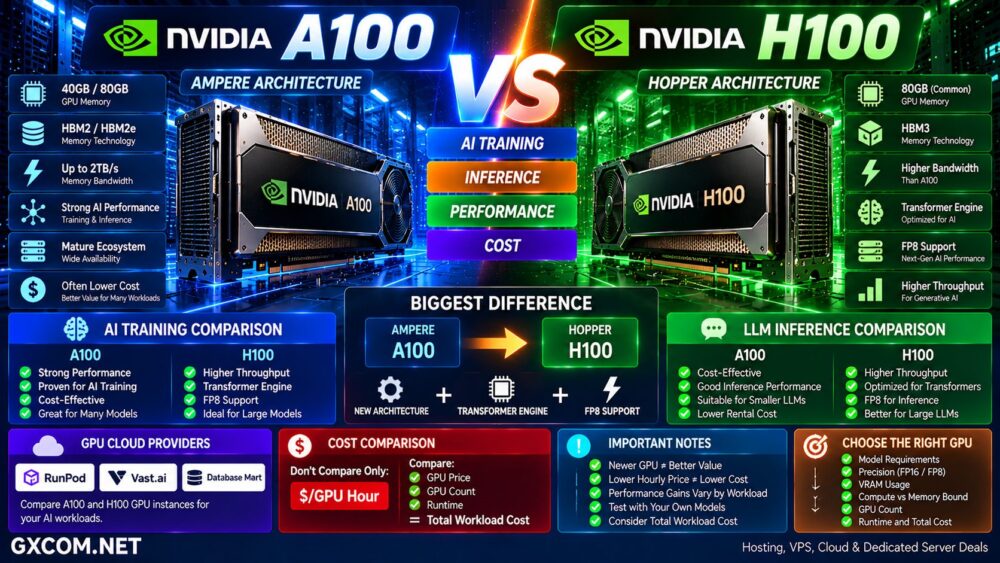
| Feature | NVIDIA A100 | NVIDIA H100 |
|---|---|---|
| Architecture | Ampere | Hopper |
| GPU Memory | 40GB / 80GB | Commonly 80GB in H100 SXM deployments |
| Memory Technology | HBM2 / HBM2e | HBM3 on H100 SXM |
| Memory Bandwidth | Up to about 2TB/s | Higher than A100 |
| Transformer Engine | No | Yes |
| FP8 AI | No native Transformer Engine FP8 path | Yes |
| AI Training | Excellent | Significantly stronger for suitable workloads |
| LLM Inference | Strong | Excellent |
| GPU Cloud Cost | Often lower | Usually higher |
| Best Value | Budget-sensitive workloads | Performance-sensitive AI |
What Is the NVIDIA A100?
NVIDIA A100 is an Ampere-generation data center GPU designed for AI training, inference, data analytics, and HPC.
It was one of the most important accelerators in the expansion of modern AI infrastructure and remains widely available through GPU cloud and server providers.
A100 is available in different configurations, including 40GB and 80GB models.
The A100 80GB uses HBM2e memory and provides more than 2TB/s of memory bandwidth in its SXM configuration.
A100 also supports Multi-Instance GPU technology, allowing one physical accelerator to be divided into multiple isolated GPU instances.
For organizations that do not require the newest Hopper features, A100 can still offer substantial AI compute at potentially lower rental prices.
What Is the NVIDIA H100?
NVIDIA H100 is the Hopper-generation successor to A100.
Hopper was designed around increasingly demanding AI workloads, including large transformer models and generative AI.
Important H100 technologies include:
- Fourth-generation Tensor Cores
- Transformer Engine
- FP8 support
- Higher AI compute throughput
- Higher memory bandwidth
- Improved NVLink connectivity
- Multi-Instance GPU
- DPX instructions for selected HPC workloads
The Transformer Engine is particularly important because it can dynamically use lower-precision formats such as FP8 for supported transformer workloads while maintaining model accuracy requirements.
A100 → Ampere AI Accelerator
H100 → Hopper AI Accelerator + Transformer Engine
A100 vs H100: Architecture Matters More Than the Name
The move from A100 to H100 is more substantial than simply increasing GPU memory.
H100 introduced architectural improvements designed specifically for modern transformer-based AI.
That matters for workloads such as:
- Large language model training
- LLM inference
- Generative AI
- Recommendation systems
- Natural language processing
- Large-scale deep learning
However, applications must actually benefit from these capabilities.
An older or compute-light workload will not automatically achieve the maximum performance advantage simply by moving to H100.
A100 vs H100 AI Performance
H100 can deliver substantially higher AI performance than A100, but there is no single multiplier that accurately represents every workload.
Performance depends on:
- Model architecture
- Precision
- Batch size
- Framework
- Sequence length
- GPU count
- Software optimization
- Interconnect
NVIDIA's MLPerf results have demonstrated large H100 improvements over A100 on selected training and inference workloads.
But the correct purchasing question is not:
How Much Faster Is H100?
It is:
How Much Faster Is H100 on My Workload?
Where to Rent A100 and H100 GPUs
For many developers, AI startups, researchers, and smaller businesses, renting GPU infrastructure makes more sense than purchasing A100 or H100 hardware.
GPU platforms such as RunPod and Vast.ai are useful when comparing on-demand GPU compute, while Database Mart can also be evaluated for longer-running GPU server requirements.
| Provider | What to Compare |
|---|---|
| RunPod | GPU availability, deployment, hourly cost and AI workloads |
| Vast.ai | Marketplace pricing and available GPU configurations |
| Database Mart | GPU server configurations and longer-running workloads |
GPU inventory and prices change frequently, so compare the exact A100 or H100 configuration before deploying.
Also compare CPU, system RAM, NVMe storage, networking, GPU interconnect, location, and billing model.
GPU Model Alone ≠ Complete AI Server Performance.
A100 vs H100 for AI Training
Training is one of the strongest reasons to choose H100.
Large transformer models can take advantage of Hopper's Transformer Engine and FP8 capabilities to increase throughput.
Higher throughput can potentially reduce:
- Training time
- GPU hours
- Cluster occupancy
- Time to experiment
- Time to production
A100 remains capable of serious training workloads, particularly when its lower rental price compensates for longer runtime.
Therefore, compare the cost of completing the training job rather than the hourly GPU price alone.
A100 vs H100 for LLM Inference
H100 was designed for the transformer era and is particularly strong for large language model inference.
Transformer Engine, FP8, higher compute performance, and faster memory can provide major benefits for suitable inference workloads.
But A100 remains useful for:
- Smaller language models
- Quantized models
- Lower-volume inference
- Batch processing
- Development environments
- Cost-sensitive deployments
A production service handling very high inference volume may justify paying more for H100 if higher throughput reduces the number of GPUs required.
A100 vs H100 VRAM
VRAM is critical for modern AI because model weights, activations, KV cache, and other data must fit within GPU memory.
A100 configurations include 40GB and 80GB models.
H100 is also commonly deployed with 80GB in high-performance server configurations.
Therefore, moving from an A100 80GB to an H100 80GB is not primarily about doubling memory capacity.
It is primarily about architecture, compute capability, memory bandwidth, Transformer Engine, and newer AI features.
For workloads where substantially more than 80GB per GPU is the main requirement, also see our
NVIDIA H100 vs H200 comparison.
A100 vs H100 Memory Bandwidth
The A100 80GB SXM provides approximately 2TB/s of memory bandwidth.
H100 significantly increases available memory bandwidth in its high-performance configurations.
This matters because AI performance can be limited by how quickly data moves between GPU memory and compute resources.
Compute-Bound → Tensor Performance Matters
Memory-Bound → Memory Bandwidth Matters
Measure the actual bottleneck before choosing the more expensive accelerator.
Why FP8 Changes the Comparison
FP8 is one of H100's most important advantages for modern AI.
Lower numerical precision can reduce memory requirements and increase AI throughput when supported appropriately by the model and software stack.
Hopper's Transformer Engine was designed to automatically manage precision for transformer workloads.
This is one reason H100 can produce very large gains over A100 in some generative AI workloads even when both GPUs have similar amounts of VRAM.
A100 vs H100 for Fine-Tuning
H100 is attractive for large-scale fine-tuning where training throughput is important.
However, techniques such as LoRA and QLoRA can significantly reduce GPU resource requirements.
For many smaller fine-tuning projects, A100 may already provide sufficient performance.
A sensible decision process is:
Model → Fine-Tuning Method → VRAM → Runtime → GPU Price → Total Job Cost.
A100 vs H100 for HPC
Both GPUs were designed for more than generative AI.
A100 remains a strong HPC accelerator with FP64 Tensor Core capability and high memory bandwidth.
H100 increases double-precision Tensor Core performance and introduces DPX instructions that can accelerate selected dynamic programming algorithms.
H100 may therefore offer substantial benefits for appropriate scientific and engineering applications.
But HPC workloads vary enormously, so application-specific benchmarks remain essential.
A100 vs H100 Multi-GPU Scaling
Large AI workloads often use multiple GPUs.
In this environment, GPU performance is only one component of the system.
Also compare:
- NVLink
- NVSwitch
- InfiniBand
- Ethernet fabric
- CPU
- System RAM
- NVMe storage
- Node architecture
A powerful H100 cluster connected through inadequate networking can waste expensive GPU capacity.
Fast GPU + Slow Fabric = Expensive Bottleneck.
A100 vs H100 Power Consumption
Higher-performance H100 configurations can consume more power than A100 configurations.
However, TDP alone does not determine energy efficiency.
If H100 completes a training or inference workload substantially faster, the total energy consumed per completed job may still be competitive or lower.
The useful metric is:
Performance per Watt
and ultimately:
Energy per Completed Workload.
A100 vs H100 GPU Cloud Pricing
A100 is an older GPU generation and can often be rented at lower hourly prices than H100.
That does not automatically make it cheaper.
Consider:
A100 Hourly Price × GPU Count × Runtime
versus:
H100 Hourly Price × GPU Count × Runtime
If H100 reduces runtime or GPU count enough, its higher hourly rate may still produce a lower total workload cost.
Conversely, if the workload does not benefit significantly from Hopper, A100 can provide much better value.
Don't Compare Only $/GPU Hour
Hourly pricing is useful for budgeting, but it is not the final metric.
For training, calculate:
Total Training Cost = GPU Price × GPU Count × Training Time
For inference, consider:
Cost per Token / Request / Throughput Target
For batch AI:
Cost per Completed Job
The cheapest GPU hour is not necessarily the cheapest AI workload.
When A100 Is the Better Choice
- You prioritize lower rental pricing
- Your model fits within available A100 VRAM
- Your workload does not require FP8
- You run smaller or established AI models
- You need an affordable development environment
- Training speed is not the primary constraint
- A100 produces lower total workload cost
A100 should not be dismissed simply because H100 is newer.
For the right workload and price, it remains a useful AI accelerator.
When H100 Is the Better Choice
- You train large transformer models
- You need FP8 and Transformer Engine
- You need higher AI throughput
- You run high-volume LLM inference
- Training time is expensive
- You need stronger multi-GPU AI performance
- Higher throughput offsets the rental premium
Should You Upgrade From A100 to H100?
Do not upgrade solely because H100 is newer.
First benchmark your current workload.
Measure:
- GPU utilization
- VRAM utilization
- Training throughput
- Inference throughput
- Memory bandwidth utilization
- GPU communication
- Tokens per second
- Job completion time
- Total GPU cost
Then test the same workload on H100.
The migration makes financial sense when the additional performance creates a measurable improvement in total workload economics.
A100 vs H100: Pros and Cons
| NVIDIA A100 | NVIDIA H100 | |
|---|---|---|
| Architecture | Ampere | Hopper |
| AI Training | Strong | Excellent |
| LLM Inference | Strong | Excellent |
| Transformer Engine | No | Yes |
| FP8 | Limited compared with Hopper | Core AI advantage |
| Cloud Availability | Broad | Broad |
| Rental Price | Often lower | Usually higher |
| Main Advantage | Cost-effective mature AI compute | Modern transformer performance |
Questions to Ask Before Renting A100 or H100
- What model will you run?
- How much VRAM does it require?
- Can the workload use FP8?
- Does it benefit from Transformer Engine?
- Is the workload compute or memory bound?
- How many GPUs are required?
- What GPU form factor is provided?
- Is NVLink available?
- How much system RAM is included?
- What NVMe storage is included?
- What network bandwidth is available?
- Is the GPU dedicated?
- What is the hourly rental price?
- How long will the job run?
- What is the total workload cost?
NVIDIA A100 vs H100: Which GPU Should You Choose?
NVIDIA A100 remains a capable data center GPU for AI training, inference, HPC, development, and cost-sensitive workloads.
NVIDIA H100 represents a major architectural step forward, particularly for transformer-based AI.
Its Hopper architecture, Transformer Engine, FP8 capabilities, higher compute throughput, and faster memory system make it particularly attractive for large language model training and high-throughput inference.
But newer does not automatically mean better value.
If A100 completes your workload efficiently at a substantially lower rental rate, there may be little reason to pay an H100 premium.
If H100 dramatically reduces training time, increases inference throughput, or reduces the number of GPUs required, the more expensive GPU can become the cheaper infrastructure.
Do Not Choose by GPU Name.
Use this decision path:
Model → Precision → VRAM → Compute → Bandwidth → GPU Count → Runtime → GPU Price → Total Workload Cost.
The best GPU is not necessarily the one with the lowest hourly price or the highest benchmark result. It is the GPU that completes your real AI workload at the performance, availability, and total cost your project requires.