Choosing between the NVIDIA L4 and L40S is not simply a matter of buying more GPU performance. The right accelerator depends on model size, video processing requirements, inference concurrency, and the actual cost of completing each workload.
In this NVIDIA L4 vs L40S comparison, we examine GPU memory, AV1 video acceleration, LLM inference, power consumption, and cloud rental economics. We also explain where to find suitable GPU hosting and when paying for an L40S makes financial sense.
NVIDIA L4 vs L40S: Quick Verdict
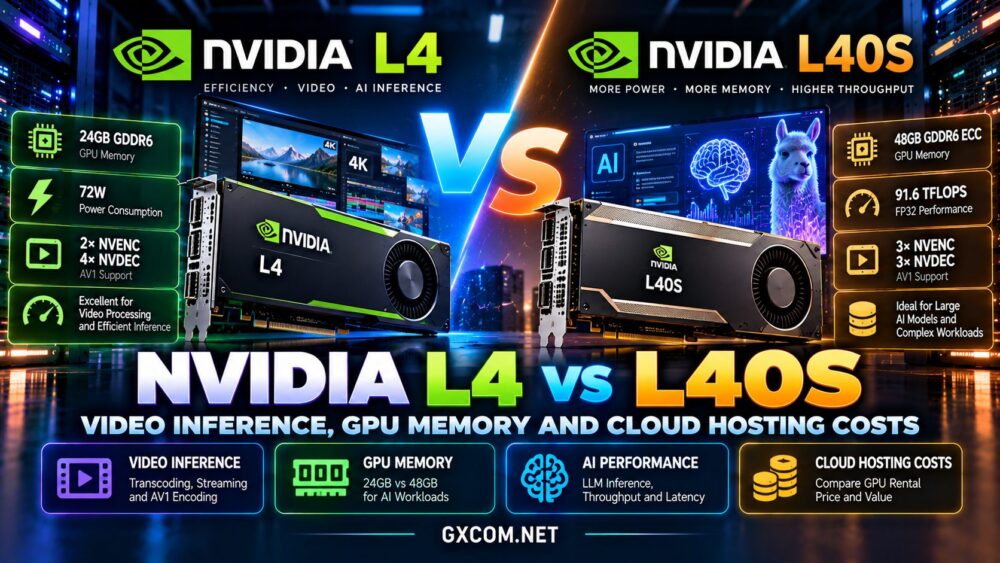
NVIDIA L4 is an excellent candidate for efficient video processing, compact AI inference, and applications that fit comfortably within 24GB of GPU memory. Its low-power design makes it particularly attractive for dense deployments.
NVIDIA L40S is better suited to memory-intensive inference, larger generative AI workloads, and applications requiring substantially greater compute throughput. Its 48GB memory capacity provides more room for model weights, KV cache, and batching.
Our recommendation: Choose L4 when efficiency and sufficient memory matter more than maximum throughput. Consider L40S when additional VRAM or computing power reduces the cost per completed task.
Explore our NVIDIA GPU server providers guide for a broader infrastructure shortlist.
NVIDIA L4 vs L40S Specifications
| Specification | NVIDIA L4 | NVIDIA L40S |
|---|---|---|
| Architecture | Ada Lovelace | Ada Lovelace |
| GPU memory | 24GB GDDR6 | 48GB GDDR6 ECC |
| Memory bandwidth | 300GB/s | 864GB/s |
| FP32 performance | 30.3 TFLOPS | 91.6 TFLOPS |
| Video encoders | 2 NVENC | 3 NVENC |
| Video decoders | 4 NVDEC | 3 NVDEC |
| Maximum power | 72W | 350W |
| Form factor | Single-slot, low-profile | Dual-slot PCIe |
| NVLink / MIG | Not supported | Not supported |
These are NVIDIA reference specifications. Actual cloud performance also depends on the host CPU, memory, storage, driver versions, and deployment configuration.
GPU Memory: Is 24GB or 48GB Enough?
VRAM capacity is often the first practical limitation in AI hosting.
The L4 provides 24GB, which can accommodate many compact language models, computer vision applications, and quantized inference workloads.
The L40S doubles that capacity to 48GB. This can enable larger models, longer context windows, bigger batches, or additional concurrent requests.
Why Model Size Matters
Model weights are only part of GPU memory usage. Runtime buffers, attention KV cache, framework overhead, and temporary tensors consume additional space.
A model that appears to fit based on weight size alone may fail during inference when context length or concurrency increases.
Quantization can reduce memory requirements, but it may affect quality, compatibility, and throughput depending on the model and inference engine.
Memory winner: L40S. Its larger capacity provides more flexibility, although an L4 remains sufficient for many optimized applications.

Video Inference and AV1 Encoding
Video workloads require a different evaluation from conventional LLM inference.
Both accelerators support hardware-accelerated video processing and AV1, making them relevant to transcoding, video analytics, and AI-enhanced media pipelines.
Why the L4 Is Attractive for Video
NVIDIA designed the L4 with power-efficient video and AI acceleration in mind. Its 72W power envelope and compact form factor are useful for dense server installations.
The L4 includes two NVENC engines and four NVDEC engines, allowing hardware-assisted encoding and decoding without relying entirely on CPU processing.
For large numbers of relatively lightweight video streams, efficient GPU utilization can be more valuable than maximum theoretical floating-point performance.
When L40S Makes Sense
The L40S includes three NVENC and three NVDEC engines, alongside substantially greater general-purpose compute capacity.
It may be preferable when video pipelines combine encoding with demanding neural network processing, image generation, or complex visual effects.
However, three encoders do not automatically mean proportionally higher throughput. Codec, resolution, presets, decoder load, and processing stages determine the real bottleneck.
Video verdict: Test L4 first for efficient transcoding and video analytics. Consider L40S when GPU compute or memory limits constrain the pipeline.
LLM Inference: Throughput, Latency and Batching
The L40S offers substantially higher theoretical compute performance and memory bandwidth than the L4.
These advantages can improve throughput when inference software effectively utilizes the additional resources.
But LLM serving performance depends on model architecture, precision, batch size, context length, and memory access patterns.
Small and Quantized Models
An L4 may provide competitive economics for smaller quantized models that fit comfortably in memory.
If the workload is lightly utilized, renting a more powerful accelerator may simply increase idle spending.
Larger Models and Concurrent Requests
The L40S becomes more attractive when 24GB is insufficient or when higher concurrency makes additional memory and throughput valuable.
Measure time to first token, output tokens per second, request latency, and successful requests per hour.
Do not infer production performance directly from published TFLOPS.
Our AI GPU VPS providers comparison explores related deployment choices.
Power Efficiency and Infrastructure Density
The L4 has a maximum power rating of 72W, compared with 350W for the L40S.
This difference matters to organizations operating physical servers, where cooling, rack density, and power provisioning affect infrastructure costs.
Cloud customers generally pay for GPU capacity rather than purchasing electricity separately, but provider power economics influence rental pricing.
A lower-power GPU is not automatically cheaper per inference. A faster accelerator can sometimes finish enough additional work to offset its higher hourly cost.
Compare completed workloads per dollar, not watts or theoretical performance in isolation.
L4 vs L40S Cloud Hosting Costs
GPU rental prices change with availability, region, contract terms, and provider infrastructure.
Rather than relying on a fixed hourly price, calculate:
Cost per completed job = total compute, storage, and transfer charges divided by successful jobs.
For inference services, measure cost per million generated tokens at a defined latency target.
RunPod: Integrated GPU Deployment
RunPod lists L4 and L40S GPU options in its cloud catalog. Its Pods and Serverless products support different development and inference workflows.
Compare the current GPU rate, available region, persistent storage charges, and deployment model before ordering.
Vast.ai: Marketplace GPU Rentals
Vast.ai provides a marketplace where available GPU offers vary by host and rental conditions.
It can be useful for cost-sensitive experiments, but buyers should examine host reliability, interruption terms, network performance, and additional charges.
Our RunPod vs Vast.ai comparison examines these purchasing differences in detail.
Other GPU Hosting Alternatives
Vultr
Vultr offers cloud infrastructure and GPU-related products for teams that need compute alongside broader cloud services.
Check its current accelerator catalog rather than assuming that L4 and L40S instances are available in every location.
Read our Vultr NVIDIA GPU cloud review for additional context.
GPU Mart
GPU Mart is another option for buyers exploring GPU VPS and dedicated GPU servers.
Confirm the actual accelerator model, VRAM allocation, operating system support, and rental conditions. Do not assume every advertised GPU server uses L4 or L40S hardware.
For broader budgeting considerations, see our affordable GPU servers guide.
How to Benchmark L4 and L40S Fairly
Use the same model, framework, precision, and input data on both GPUs.

For video, record streams processed per second, codec settings, resolution, GPU utilization, and processing latency.
For LLMs, test several concurrency levels and measure throughput alongside response-time percentiles.
Include model loading time, memory usage, failed requests, and storage costs in the evaluation.
Finally, compare total expenditure over a representative operating period instead of extrapolating from a short synthetic benchmark.
Frequently Asked Questions
Is NVIDIA L40S faster than L4?
L40S has substantially higher theoretical compute performance and memory bandwidth. Actual speed differences depend on the application and software configuration.
Does L40S have twice the VRAM of L4?
Yes. L40S has 48GB of GDDR6 memory, while L4 has 24GB.
Which GPU is better for video transcoding?
L4 is an efficient starting point for many transcoding workloads. L40S may be advantageous when additional compute or memory is required.
Can L4 run language models?
Yes. L4 supports AI inference, including language models that fit within its available memory after accounting for runtime overhead.
Does L40S support NVLink or MIG?
No. NVIDIA lists neither NVLink nor Multi-Instance GPU support for L40S.
Final Verdict: NVIDIA L4 or L40S?
This NVIDIA L4 vs L40S comparison highlights a choice between efficient, compact acceleration and greater memory and compute capacity.
Choose NVIDIA L4 for suitable 24GB inference workloads, efficient video pipelines, and deployments where power or rental efficiency is important.
Choose NVIDIA L40S for larger models, demanding generative AI applications, and workloads that benefit from 48GB VRAM and higher throughput.
RunPod and Vast.ai are useful starting points for comparing GPU rental options, while Vultr and GPU Mart offer alternative infrastructure approaches.
Before purchasing, benchmark your real workload and calculate cost per successful result. The best GPU is not necessarily the fastest one; it is the one that meets performance targets at a sustainable operating cost.