Deploying a large language model is no longer just a question of choosing the right GPU. The way that GPU is provisioned, kept available, scaled, and billed can have an equally important impact on application performance and infrastructure costs.
For teams building AI chatbots, retrieval-augmented generation applications, document processing systems, and commercial inference APIs, the choice often comes down to Serverless GPU vs Always-On GPU.
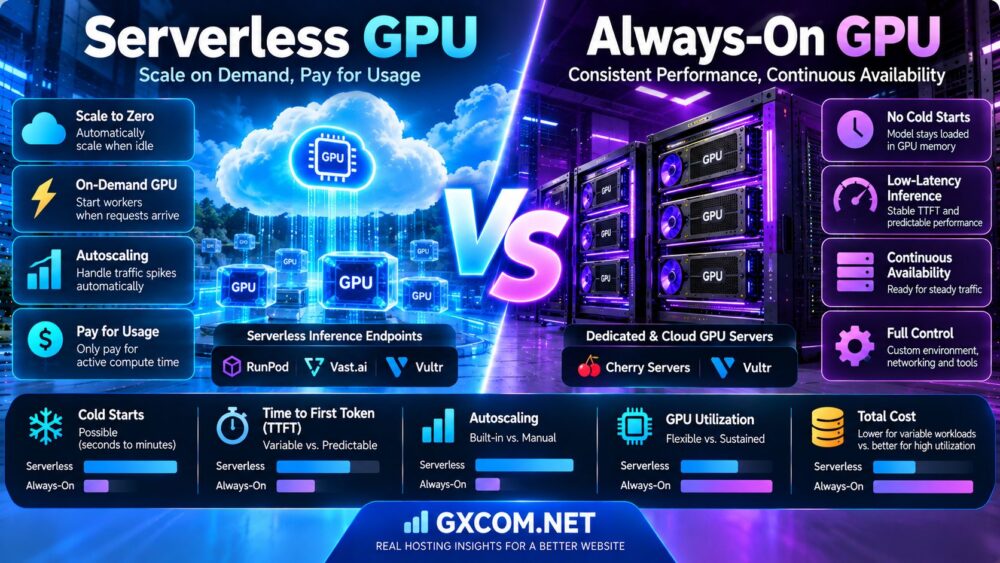
Serverless GPU platforms can start workers when requests arrive and scale down when demand disappears. Always-on GPU instances remain allocated, keeping the inference environment available for continuous traffic.
The trade-off is clear in principle: serverless deployment can reduce idle compute expenses, while always-on infrastructure can avoid scale-from-zero cold starts and provide more predictable baseline capacity.
In practice, the decision depends on cold-start frequency, model loading time, time to first token, concurrent requests, GPU utilization, scaling limits, and the complete cost of operating the service.
This guide explains both deployment models, compares their strengths and limitations, and examines GPU hosting options from RunPod, Vast.ai, Cherry Servers, and Vultr.
Editorial methodology: This comparison draws on provider documentation and established inference-serving concepts reviewed in October 2026. Cost calculations are illustrative, not provider quotations. GXCOM.NET has not independently benchmarked the specific hosting configurations discussed.
Serverless GPU vs Always-On GPU: Quick Verdict
Choose Serverless GPU when inference demand is intermittent, unpredictable, or concentrated into short bursts, and your application can tolerate occasional startup delays.
Choose Always-On GPU when traffic is steady, latency requirements are strict, or the cost of keeping models warm is justified by sustained GPU utilization.
Consider a hybrid architecture when you need predictable baseline response times but also want to scale additional workers during traffic spikes.
| Factor | Serverless GPU | Always-On GPU |
|---|---|---|
| Provisioning | Workers start according to demand and scaling rules | Instance remains allocated |
| Cold starts | Possible after scale-to-zero | Usually avoided during normal steady operation |
| Idle compute cost | Potentially low when scaled to zero | Usually continues while allocated |
| Startup latency | Variable for cold requests | More predictable for warm applications |
| Autoscaling | Often built into the platform | Requires manual or configured orchestration |
| Capacity planning | Worker limits and availability matter | Reserved instance capacity matters |
| GPU utilization | Useful for irregular demand | Attractive for sustained demand |
| Operational control | Platform-dependent | Typically greater instance-level control |
| Typical applications | Batch jobs, intermittent APIs, development | Real-time chat, continuous inference, production APIs |
What Is Serverless GPU Computing?
Serverless GPU computing is a deployment model in which a platform manages GPU-backed workers and provisions execution capacity according to application demand.
The word “serverless” does not mean physical servers disappear. It means the customer generally interacts with an application endpoint or execution platform rather than managing every GPU instance directly.
How a Serverless GPU Request Works
- A client submits an inference request.
- The platform checks for an available worker.
- If no worker is available, the platform may provision one.
- The worker initializes its environment and loads the model.
- The GPU processes the request.
- The platform returns the result.
- The worker may remain warm temporarily or scale down according to policy.
Scale to Zero
Scale-to-zero allows an endpoint to release all flex workers after demand disappears.
This can reduce compute costs during long idle periods.
However, the next request may need to wait for worker initialization.
Warm Workers
Some serverless platforms allow customers to keep a minimum number of workers running.
These workers remain available for requests but continue generating charges while idle.
Serverless GPU Is Not Necessarily Spot GPU
Serverless describes an execution and scaling model. Spot or interruptible GPU capacity describes a resource availability and pricing arrangement.
The two concepts can overlap, but they are not interchangeable.
What Is an Always-On GPU Server?
An always-on GPU server is a continuously allocated GPU instance or dedicated server that remains available for application workloads.
The server may be a cloud GPU virtual machine, a GPU Pod, or a physical dedicated GPU server.
Persistent Inference Process
An always-on deployment can keep the model loaded in GPU memory while the inference service runs.
This avoids loading model weights for every request.
Predictable Baseline Capacity
With a known GPU configuration, the team can benchmark the maximum throughput and concurrency of its baseline deployment.
Continuous Billing
Many GPU infrastructure products charge while the GPU instance is allocated, even when the application receives no requests.
Stopping or deleting a server may change compute charges, but storage and other retained resources can remain billable.
Greater Infrastructure Control
Always-on servers often provide more flexibility for custom containers, networking, monitoring, operating system configuration, and persistent processes.
Cold Starts: The Biggest Serverless GPU Trade-Off
A cold start occurs when a request cannot immediately use a ready worker and the platform must initialize new execution capacity.
Cold-start behavior depends on the provider, GPU availability, model size, container configuration, caching, and resource scheduling.
Stage 1: GPU Worker Allocation
The platform must locate suitable compute capacity and schedule a worker.
Capacity shortages or regional restrictions can increase waiting time.
Stage 2: Container Initialization
The worker starts its container and prepares required software dependencies.
Large images and runtime installation steps can increase initialization time.
Stage 3: Model Weight Availability
The model may need to be downloaded, read from a mounted volume, or accessed through a local cache.
Large checkpoints can significantly increase startup time if they are not cached.
Stage 4: Model Loading Into VRAM
Weights must be loaded into GPU memory and the inference runtime initialized.
Quantization, tensor parallelism, and model architecture can affect this process.
Stage 5: First Inference
The worker processes the prompt and generates the first output token.
Some runtimes may also perform initialization or compilation work before normal steady-state inference.
Cold Start Verdict
There is no universal cold-start duration for all serverless GPU platforms.
Measure the complete request delay using the exact model, image, GPU, region, and endpoint configuration.
Cold Start vs Warm Start: Why the Difference Matters
A warm request reaches a worker that has already initialized its application and model.
A cold request may include infrastructure scheduling and initialization delays before inference begins.
Cold Request
End-to-end delay may include queueing, GPU provisioning, container startup, model loading, and model execution.
Warm Request
End-to-end delay typically includes routing, queueing, prompt processing, and generation without a full worker startup.
Always-On Request
An always-on inference process generally avoids scale-from-zero startup, but requests can still experience queueing, network delays, and model-processing latency.
Important Distinction
A warm server is not necessarily an idle server. If all available workers are busy, a request may wait or trigger additional capacity.
Time to First Token: Serverless GPU vs Always-On GPU
Time to First Token, or TTFT, measures how long a user waits before receiving the first generated token from a streaming language model.
TTFT is especially important for interactive chatbots and AI assistants.
Serverless TTFT
Serverless TTFT can vary significantly depending on whether a request reaches a warm worker or triggers a cold start.
Always-On TTFT
Always-on deployments can eliminate routine scale-from-zero startup from the request path.
However, TTFT can still increase due to long prompts, queueing, overloaded GPUs, and network conditions.
TTFT vs TPOT
TTFT measures the delay before the first output token. Time per Output Token, or TPOT, measures generation time between subsequent tokens using the benchmark's defined methodology.
A serverless request can have poor TTFT because of a cold start while achieving normal token generation speed after the model begins decoding.
Measure Tail Latency
Average latency can hide a small percentage of extremely slow requests.
Production evaluations should include p50, p95, and p99 latency, with cold and warm requests reported separately.
Why Model Size Affects Cold Starts
Large models require more memory and may take longer to load into GPU memory.
Small Quantized Models
Compact quantized models generally have smaller checkpoints and lower VRAM requirements.
Large Models
Larger models can require substantial storage bandwidth and GPU memory during initialization.
Multi-GPU Models
Models distributed across multiple GPUs introduce additional provisioning and initialization requirements.
Quantization
Quantization can reduce weight storage requirements, but startup performance still depends on the format, runtime, and loading pipeline.
GPU VRAM Selection
Choosing enough GPU memory is essential before comparing deployment modes.
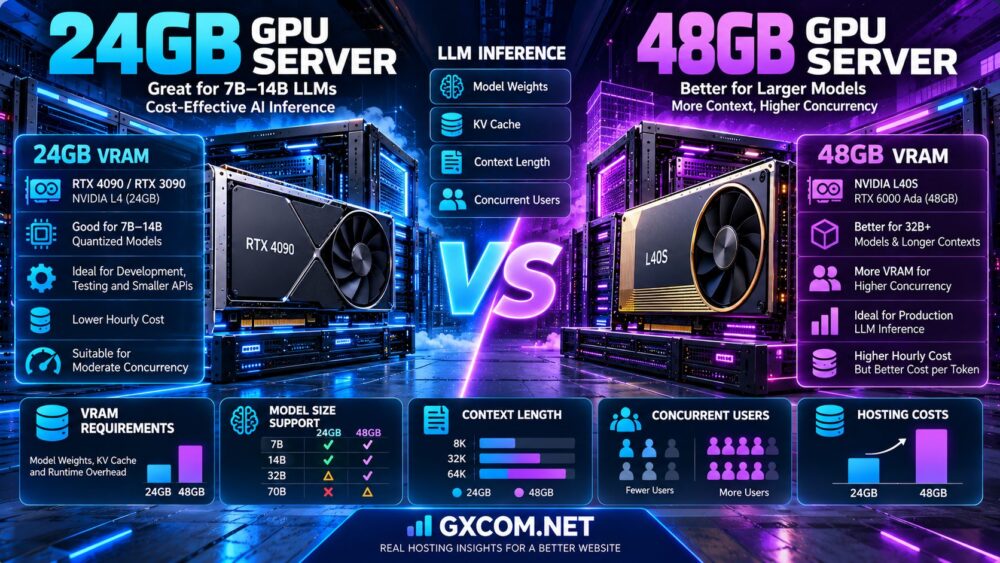
For model-memory planning, see our 24GB vs 48GB GPU Server Comparison, which examines model weights, KV cache, context length, and concurrency.

How to Reduce Serverless GPU Cold Starts
Cold starts can often be reduced, although the best strategy depends on the provider.
1. Keep One or More Workers Warm
Maintaining a minimum worker count can reduce startup delays for requests handled by that warm capacity.
The trade-off is continuous worker billing.
2. Cache Model Weights
Cached model files can avoid repeated large downloads.
3. Optimize Container Images
Remove unnecessary dependencies and avoid installing packages during every startup.
4. Use Compatible GPU Types
Allowing multiple supported GPU types may improve placement flexibility when the preferred hardware is unavailable.
5. Tune Idle Timeout
A longer idle timeout can reduce repeated cold starts during clustered traffic.
It can also increase paid idle time.
6. Configure Autoscaling Thresholds
Earlier scaling decisions may reduce queue delays when traffic rises.
7. Measure Initialization Separately
Track container startup, model loading, queue delay, and actual inference time to identify the largest bottleneck.
Serverless GPU vs Always-On GPU for LLM Inference
LLM inference workloads have several characteristics that affect deployment economics.
Prompt Processing
Long prompts increase prefill computation and can influence TTFT.
Autoregressive Generation
Output tokens are generated sequentially, making memory bandwidth, compute capacity, and batching important.
KV Cache
Active sequences consume GPU memory for attention-related state.
Continuous Batching
Inference engines can schedule multiple active requests together to improve utilization.
Low Request Volume
When requests arrive only occasionally, serverless deployment may avoid paying for unused GPU capacity.
High Request Volume
When requests arrive continuously, an always-on GPU may achieve better utilization and more predictable capacity.
LLM Inference Verdict
The best deployment model depends on the relationship between request frequency, processing duration, latency requirements, and cost.
Serverless GPU vs Always-On GPU for RAG Applications
Retrieval-augmented generation systems combine retrieval, prompt construction, and language model inference.
Internal Document Processing
Periodic document processing and embedding jobs may be good candidates for serverless execution.
Interactive Knowledge Assistants
User-facing assistants may need warm inference capacity to avoid unpredictable first-response delays.
Long Context
Large retrieved contexts increase prompt-processing work and can raise KV cache requirements.
RAG Recommendation
Separate batch ingestion workloads from latency-sensitive user-facing inference when practical.
A hybrid design can use on-demand GPUs for background processing and warm capacity for interactive queries.
GPU Utilization: The Key to Hosting Economics
GPU utilization is a major factor in deciding between serverless and always-on deployment.
However, different utilization metrics measure different things.
Compute Utilization
GPU compute utilization measures hardware activity during an observation period.
Billable Utilization
Billable utilization compares paid GPU time with time spent delivering useful work.
Request Utilization
Request utilization measures how effectively available serving capacity handles application demand.
Why the Distinction Matters
An always-on GPU may be allocated for 24 hours while actively processing requests for only a few hours.
A serverless platform can reduce allocated time, but initialization and idle timeouts may still create billable overhead.
Serverless GPU vs Always-On GPU: Cost Models
To compare costs fairly, define what each provider actually bills for.
Serverless GPU Cost
A simplified serverless cost model is:
Serverless cost = Billable worker seconds × Worker rate + Storage + Other applicable charges.
Billable worker time may include initialization, execution, and idle timeout periods, depending on the platform.
Always-On GPU Cost
A simplified always-on cost model is:
Always-on cost = Allocated GPU hours × Instance rate + Storage + Other applicable charges.
Comparability Warning
The same GPU model can have different prices and service characteristics across products.
Compare GPU memory, compute performance, availability, storage, network policies, and support before applying cost formulas.
Hypothetical Monthly GPU Cost Comparison
Consider two illustrative deployment offers with the following assumptions:
- Serverless worker rate: $1.20 per billable hour.
- Always-on GPU rate: $0.75 per allocated hour.
- Month length: 720 hours.
- Serverless startup and idle overhead: 20% above useful processing time.
- Storage and other charges excluded.
| Useful GPU Work per Month | Serverless Billable Hours | Serverless Cost | Always-On Cost |
|---|---|---|---|
| 50 hours | 60 | $72 | $540 |
| 150 hours | 180 | $216 | $540 |
| 300 hours | 360 | $432 | $540 |
| 400 hours | 480 | $576 | $540 |
All rates and overhead assumptions are hypothetical and do not represent current prices from RunPod, Vast.ai, Cherry Servers, or Vultr. The comparison assumes one always-on GPU can complete the workload within the required service window.
In this example, serverless deployment is cheaper at lower useful processing volumes, while always-on infrastructure becomes less expensive as workload duration increases.
How to Calculate the GPU Cost Break-Even Point
The break-even point occurs when the total serverless compute bill equals the always-on compute bill.
Using a simplified model:
Break-even useful hours = (Always-on hourly rate × Monthly allocated hours) ÷ (Serverless hourly rate × Overhead factor).
With the hypothetical assumptions above:
Break-even = ($0.75 × 720) ÷ ($1.20 × 1.20) = 375 useful GPU hours.
That equals approximately 52.1% of a 720-hour month.
This is not a universal utilization threshold. It is the result of the stated example.
Different GPU rates, worker discounts, scaling overhead, and concurrency requirements can shift the break-even point significantly.
Interactive GPU Cost Calculator: What to Include
A useful cost calculator should include:
- Serverless worker rate
- Always-on instance rate
- Expected useful GPU processing hours
- Cold-start and idle-time overhead
- Minimum warm worker count
- Monthly operating hours
- Persistent storage charges
- Additional infrastructure charges
For production planning, also include the cost of meeting a latency service-level objective.
Serverless GPU vs Always-On GPU for High Concurrency
Concurrency changes the economics because one GPU worker may process multiple requests simultaneously.
Serverless Autoscaling
Serverless platforms may increase worker counts when queues or request rates exceed configured thresholds.
Always-On Batching
Always-on inference servers can use continuous batching to process multiple active sequences efficiently.
Scaling Limits
Maximum worker counts, GPU inventory, model loading time, and request timeouts can restrict scaling.
Concurrency Verdict
Compare completed requests per second, p95 latency, GPU memory use, and total billable time rather than assuming that more workers always improve efficiency.
Serverless GPU vs Always-On GPU for Real-Time Chatbots
Interactive chat applications are sensitive to delays before the first response.
Low-Traffic Chatbots
Serverless deployment may be economical if users tolerate occasional startup delays.
Customer-Facing Support Bots
Warm workers may be appropriate when predictable response time is important.
High-Traffic AI Assistants
Always-on baseline capacity can support sustained traffic, with additional autoscaled workers handling spikes.
Recommendation
Define a TTFT target and benchmark cold-start frequency before choosing a deployment model.
Serverless GPU vs Always-On GPU for Batch Processing
Batch processing is often more tolerant of startup delays than interactive inference.
Document Extraction
Scheduled document processing can run when work is available.
Image Generation
Image-generation jobs may be suitable for queue-based GPU execution.
Embeddings
Large embedding jobs can be processed in batches to improve throughput.
Scheduled AI Tasks
Periodic analytics and offline model processing may benefit from releasing GPU resources between jobs.
Batch Verdict
Serverless can be attractive when processing is intermittent and startup delay is acceptable.
For sustained batch pipelines, compare always-on utilization and throughput before deciding.
RunPod: Serverless Workers vs GPU Pods
RunPod is a useful example because it offers both serverless inference and persistent GPU infrastructure.
RunPod Serverless
RunPod Serverless supports endpoint-based inference with configurable worker scaling.
Its documented worker categories include Flex workers and Active workers.
Flex Workers
Flex workers can scale to zero when idle, reducing compute allocation between jobs.
Active Workers
Active workers remain running and incur charges even when no requests are being processed.
They can provide warm baseline capacity for latency-sensitive applications.
RunPod GPU Pods
GPU Pods provide a persistent GPU environment suited to development, custom applications, and long-running workloads.
Which RunPod Product Fits?
Use Serverless when endpoint scaling and demand-based execution are important.
Use Pods when persistent infrastructure control and sustained workloads are more important.
For more details, read our RunPod Serverless GPU Review.
Vast.ai for GPU Inference Hosting
Vast.ai operates a GPU rental marketplace with varying hardware, host characteristics, and rental conditions.
It may be relevant for teams seeking flexible GPU instances and competitive marketplace options.
Persistent GPU Workloads
Vast.ai instances can be evaluated for long-running inference processes, experimentation, and custom deployments.
Marketplace Considerations
Hardware availability, host reliability, storage, networking, and interruption conditions require careful review.
Serverless Comparison
Do not assume that renting a Vast.ai GPU instance automatically provides the same scale-to-zero endpoint behavior as a managed serverless product.
For provider-specific details, read our Vast.ai GPU Marketplace Review.
Cherry Servers for Dedicated GPU Infrastructure
Cherry Servers provides dedicated infrastructure products and GPU-related configurations.
It may be relevant for organizations running sustained inference workloads that benefit from physical hardware control or longer-term infrastructure planning.
Potential Advantages
- Dedicated infrastructure options
- Customizable server environments
- Potential fit for sustained GPU workloads
- Greater control over selected hardware configurations
Important Considerations
GPU inventory, available memory, location, contract terms, and support scope must be verified for the selected product.
Vultr for Cloud GPU Deployment
Vultr offers cloud GPU products alongside general-purpose cloud infrastructure.
It may be relevant for organizations that want to deploy GPU workloads within an existing cloud networking and automation environment.
Cloud GPU Considerations
Evaluate the exact GPU model, supported region, instance lifecycle, billing behavior, and deployment tools.
Always-On Use Cases
Cloud GPU instances may suit persistent inference services when their performance and total cost meet application requirements.
Product Distinction
Cloud GPU infrastructure should not automatically be described as serverless inference unless the selected product provides the required endpoint and scaling features.
Serverless GPU vs Dedicated GPU Hosting
Serverless execution and dedicated hardware solve different infrastructure problems.
Serverless Advantages
Serverless platforms can reduce infrastructure management and release idle execution capacity.
Dedicated GPU Advantages
Dedicated GPU servers can provide persistent hardware access and support specialized long-running workloads.
Cost Differences
Intermittent demand can favor demand-based execution, while sustained utilization may favor a continuously allocated GPU.
For the broader infrastructure decision, see our Cloud GPU vs Dedicated GPU Server Comparison.
Hybrid GPU Architecture: Warm Baseline Plus Autoscaling
A hybrid deployment combines continuously available baseline capacity with demand-based scaling.
Baseline Workers
One or more warm workers handle ordinary traffic without routine scale-from-zero startup.
Burst Workers
Additional workers start when demand exceeds baseline capacity.
Scale Down
Extra workers can be released after traffic decreases, according to the platform's policies.
Benefits
- Reduced cold-start exposure for baseline traffic
- Additional capacity during spikes
- Potentially lower idle cost than keeping peak capacity running
- Flexible capacity planning
Limitations
Hybrid deployments still require careful queue management, worker limits, scaling thresholds, and billing controls.
How to Benchmark Serverless vs Always-On GPU
A fair comparison should use the same model and representative requests.
- Choose the exact GPU model and memory capacity.
- Use the same model checkpoint and quantization.
- Match inference engine versions where possible.
- Record container image and model loading behavior.
- Measure cold-start frequency.
- Measure initialization and model loading time.
- Measure warm TTFT.
- Measure cold TTFT.
- Measure TPOT and output throughput.
- Measure p95 and p99 end-to-end latency.
- Increase concurrency gradually.
- Record queueing and scaling delays.
- Monitor GPU utilization and KV cache usage.
- Track total billable worker time.
- Calculate cost per completed request.
For meaningful results, test low traffic, burst traffic, and sustained traffic separately.
Common GPU Deployment Mistakes
Mistake 1: Assuming Serverless Means Zero Cold Starts
Scale-to-zero configurations can require worker initialization after idle periods.
Mistake 2: Assuming Always-On Means Zero Latency
Queueing, prefill, network delays, and model execution still affect response time.
Mistake 3: Ignoring Warm Worker Charges
Minimum active workers may bill continuously.

Mistake 4: Comparing Different GPUs
Different hardware can invalidate a simple cost or latency comparison.
Mistake 5: Ignoring Model Loading Time
Large checkpoints and uncached downloads can increase cold-start delays.
Mistake 6: Treating Spot GPU as Serverless GPU
Spot capacity and serverless execution are different concepts.
Mistake 7: Measuring Only Average Latency
Tail latency can reveal problems hidden by average results.
Mistake 8: Assuming Lower Hourly Price Means Lower Cost
Throughput, utilization, storage, and operational overhead affect the final bill.
Serverless GPU vs Always-On GPU: Use-Case Recommendations
| Workload | Starting Recommendation | Reason |
|---|---|---|
| Occasional LLM API requests | Serverless GPU | Can reduce idle compute allocation |
| Scheduled document processing | Serverless GPU | Startup delay may be acceptable |
| Development experiments | Serverless or temporary GPU instance | Avoid continuous unused capacity |
| Real-time customer chatbot | Always-on or warm workers | More predictable first-response latency |
| High-volume inference API | Always-on baseline | Potentially better sustained utilization |
| Unpredictable traffic spikes | Hybrid architecture | Warm baseline plus burst scaling |
| Continuous batch inference | Benchmark always-on | High utilization may improve economics |
| Large custom inference stack | Persistent GPU instance | Greater environment control |
| Production RAG assistant | Warm baseline or hybrid | Balances latency and variable demand |
Frequently Asked Questions
What is the difference between Serverless GPU and Always-On GPU?
Serverless GPU platforms manage demand-based worker execution, while always-on GPU deployments keep compute resources continuously allocated.
Is Serverless GPU cheaper than Always-On GPU?
Serverless can be cheaper for intermittent workloads. Always-on can become more economical when utilization is consistently high.
What causes a GPU cold start?
Cold starts can involve worker scheduling, container initialization, model loading, and inference runtime preparation.
How long does a serverless GPU cold start take?
It varies by platform, hardware availability, container image, model size, and caching configuration. Benchmark the exact deployment.
Can Serverless GPU eliminate cold starts?
Keeping warm workers can eliminate scale-from-zero cold starts for requests served by those workers, although additional scaling may still introduce startup delays.
Does Serverless GPU charge when idle?
Some scale-to-zero configurations reduce compute charges when workers stop, but active workers, idle timeouts, storage, and other resources may remain billable.
Does Always-On GPU charge when unused?
Typically yes, while the GPU instance remains allocated under the provider's billing rules.
What is TTFT?
Time to First Token measures the delay before the first streamed output token is received.
What is TPOT?
Time per Output Token measures generation latency between output tokens according to the benchmark's defined calculation.
Does Serverless GPU have lower throughput?
Not necessarily. Warm workers using equivalent hardware and software can have comparable processing capability, although scaling and queueing affect end-to-end performance.
Is RunPod Serverless suitable for LLM inference?
Yes. RunPod provides serverless GPU endpoints designed for containerized inference workloads.
What is a RunPod Flex worker?
A Flex worker is a demand-based worker that can scale down when idle.
What is a RunPod Active worker?
An Active worker remains running to provide warm capacity and incurs continuous charges.
Is a RunPod Pod the same as Serverless?
No. Pods provide persistent GPU environments, while Serverless provides endpoint-oriented worker execution and scaling.
Can Vast.ai host an always-on inference server?
Vast.ai GPU instances may support persistent inference deployments, subject to host availability and rental terms.
Can a dedicated GPU server be used for LLM inference?
Yes. Dedicated GPU servers can support persistent inference services and specialized configurations.
Is Serverless GPU good for RAG?
It can work well for batch-oriented RAG tasks. Interactive RAG assistants may benefit from warm capacity.
How do I calculate GPU hosting break-even?
Compare the complete serverless worker bill with the allocated cost of always-on capacity, including startup overhead, storage, and operational requirements.
What is the best GPU deployment model for unpredictable traffic?
A hybrid architecture with warm baseline workers and autoscaled burst capacity may provide a useful balance.
Should I choose Spot GPU or Serverless GPU?
These are different decisions. Spot refers to interruptible capacity, while serverless refers to the execution and scaling model. Our Spot vs On-Demand GPU Servers Comparison explains the capacity and interruption trade-offs.
Final Verdict: Serverless GPU vs Always-On GPU
The best Serverless GPU vs Always-On GPU decision depends on traffic patterns, cold-start tolerance, inference latency, and actual billable utilization.
Serverless GPU can be a strong choice for intermittent workloads, batch processing, development, and APIs with unpredictable demand.
Always-on GPU infrastructure can be better suited to sustained inference, strict latency requirements, and workloads that consistently use their allocated capacity.
A hybrid architecture may provide the most practical balance when predictable baseline latency and burst scalability are both important.
Before selecting a provider, benchmark cold and warm requests, calculate useful processing time, and include all billable resources in the cost model.
TRAFFIC PATTERN → COLD-START TOLERANCE → TTFT → GPU UTILIZATION → SCALING POLICY → TOTAL COST → DEPLOYMENT MODEL
Verify current GPU availability, worker billing rules, startup behavior, storage charges, and service limitations directly with each provider before deploying production workloads.