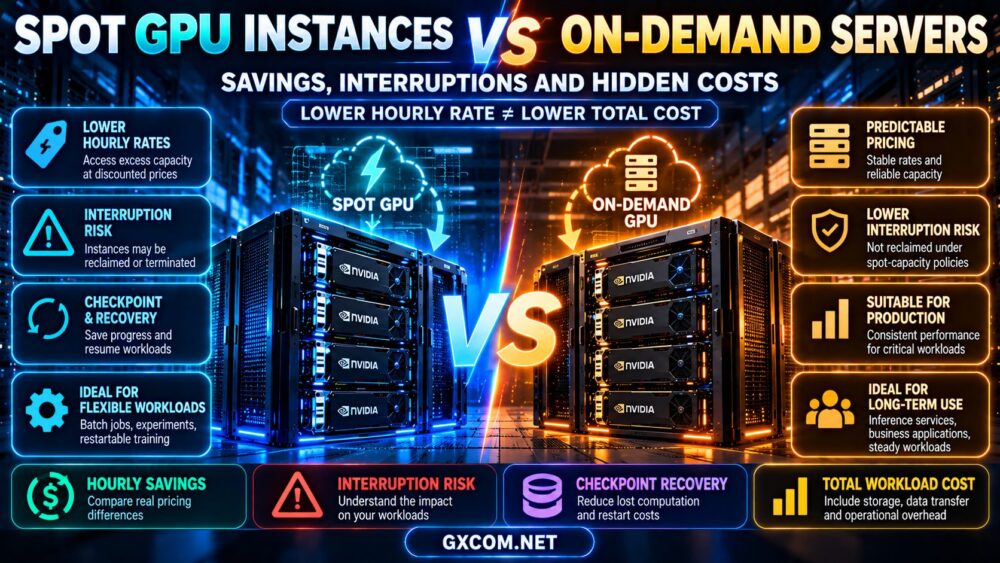
Spot GPU vs On-Demand is an important comparison for AI developers, machine learning teams, and businesses trying to reduce GPU computing costs. Spot GPU instances can offer lower advertised rates by using capacity that may be reclaimed, while on-demand GPU servers generally provide a more predictable allocation model. The difference matters when training large language models, running batch inference, fine-tuning AI systems, or hosting production applications.
Lower hourly pricing is attractive, but interruptions can introduce lost computation, checkpoint storage charges, recovery delays, and operational complexity. A discounted GPU instance may become more expensive than a stable alternative if a workload repeatedly restarts or misses critical deadlines.
This guide compares spot GPU instances with on-demand servers, explains how interruption risk affects AI workloads, and provides practical formulas for evaluating savings, hidden costs, and provider options.
Spot GPU vs On-Demand: Key Differences
Spot and on-demand infrastructure primarily differ in resource allocation, availability guarantees, interruption behavior, and pricing models.
| Feature | Spot GPU Instances | On-Demand GPU Servers |
|---|---|---|
| Pricing | Often discounted relative to comparable regular capacity | Generally uses published usage-based rates |
| Availability | Depends on spare capacity and provider policies | Depends on available regular capacity |
| Interruption risk | May be reclaimed or terminated | Not ordinarily reclaimed under a spot-capacity policy |
| Workload continuity | Requires interruption-aware design | More predictable, but failures remain possible |
| Checkpointing | Strongly recommended for long-running tasks | Still recommended for reliability |
| Production inference | Best suited to interruptible capacity within a resilient design | Often preferable for baseline availability |
| Batch processing | Can be attractive when jobs are restartable | Useful for predictable completion schedules |
| Capacity guarantees | Usually limited | Depends on service and reservation terms |
Spot and on-demand are broad industry terms. Individual platforms may use different product names, pricing structures, termination notices, and allocation rules.
Importantly, on-demand does not necessarily mean dedicated bare-metal hardware, guaranteed future capacity, or immunity from infrastructure failures.
How Spot GPU Instances Work
Spot GPU instances generally use computing capacity that a provider makes available under a lower-priority allocation model.
When capacity is needed elsewhere or the provider's allocation conditions change, a spot instance may be interrupted.
Depending on the platform, interruption can mean termination, shutdown, eviction, or another form of resource reclamation.
Why Spot GPUs Can Cost Less
Providers may discount interruptible capacity because customers accept uncertainty about how long the resources will remain available.
The discount compensates users for the operational risks of losing an instance during execution.
However, there is no universal spot discount. Rates vary by provider, GPU model, region, availability, and pricing policy.
Spot GPU Interruptions Explained
A running AI workload can be affected when its GPU allocation is reclaimed.
Potential consequences include:
- Loss of progress since the last checkpoint.
- Termination of active inference requests.
- Additional time spent waiting for replacement capacity.
- Repeated downloads or loading of model weights.
- Recovery and scheduling overhead.
- Failure to meet completion deadlines.
Some providers offer interruption warnings or graceful shutdown mechanisms. Others may provide limited notice or have different termination behavior.
Never assume that a specific warning period or automatic recovery feature is available without checking the product documentation.
Spot GPU vs On-Demand for AI Training
The Spot GPU vs On-Demand decision becomes particularly important for training jobs that may run for many hours or days.
Training often involves repeated computation over large datasets, with model parameters and optimizer states changing throughout the process.
When Spot GPUs Make Sense for Training
Spot instances can be attractive when training jobs are:
- Restartable from saved checkpoints.
- Flexible about completion time.
- Automated rather than manually supervised.
- Able to run across alternative GPU types.
- Designed to tolerate temporary resource unavailability.
Examples include certain hyperparameter searches, independent experiments, and checkpointed model training tasks.
When On-Demand GPUs Are Better
On-demand infrastructure is often preferable when:
- A training run has a strict completion deadline.
- Interruptions would invalidate expensive work.
- Recovery procedures are untested.
- The application requires a stable multi-GPU topology.
- Operational complexity must be minimized.
On-demand resources still require checkpointing and failure recovery, but they do not normally expose users to the same deliberate spot-capacity reclamation model.
Distributed Training Adds Complexity
Multi-GPU and multi-node training jobs may be especially sensitive to interruptions.
If one required worker disappears, the entire distributed job may need to pause, reconfigure, or restart.
The effect depends on the training framework, fault-tolerance strategy, communication topology, and checkpoint architecture.
Spot GPU Instances for LLM Fine-Tuning
Fine-tuning language models is another workload where spot GPU pricing can be attractive.
Methods such as LoRA and QLoRA can reduce some training resource requirements, but they do not eliminate interruption risk.
Why Checkpointing Matters
A checkpoint may contain model parameters, adapter weights, optimizer states, scheduler information, and training progress metadata.
Exactly what must be saved depends on the training method and the level of reproducibility required.
If an instance disappears, a properly designed training pipeline can resume from a durable checkpoint rather than starting from the beginning.
Choosing a Checkpoint Interval
Saving checkpoints too frequently creates storage and I/O overhead.
Saving them too infrequently increases the amount of computation that may be lost.
The appropriate interval depends on checkpoint duration, interruption frequency, recovery costs, and the value of lost work.
For additional information on fine-tuning methods and memory requirements, read our LLM fine-tuning GPU server guide.
Spot GPU vs On-Demand for AI Inference
Inference workloads have different requirements from training.
A batch inference job can often be retried. A production chatbot or real-time AI API may require continuous availability and predictable latency.
Batch Inference on Spot GPUs
Spot capacity can work well for asynchronous inference when tasks are independent and recoverable.
Examples include:
- Offline document classification.
- Large-scale embedding generation.
- Scheduled image processing.
- Batch transcription and analysis.
- Non-urgent model evaluation.
Use a durable job queue, persistent results, and retry-safe processing so interrupted tasks can resume without corrupting output.
Real-Time Inference on On-Demand GPUs
Applications with user-facing latency requirements usually need a more stable baseline of serving capacity.
On-demand GPU instances can provide that baseline, although redundancy, monitoring, and failover are still necessary.

Hybrid Inference Architecture
Some teams combine regular GPU capacity for baseline traffic with interruptible resources for overflow or asynchronous tasks.
However, this requires workload-aware routing, health checks, and sufficient regular capacity to preserve service quality when spot instances disappear.
For broader deployment considerations, see our AI inference server hosting guide.
How Much Can Spot GPU Instances Actually Save?
Advertised hourly savings provide only the starting point for a meaningful comparison.
The simplest calculation is:
Hourly discount = (on-demand rate – spot rate) / on-demand rate × 100%
Illustrative Spot GPU Pricing Example
Assume two hypothetical offers for comparable GPU resources:
- On-demand GPU rate: $1.00 per hour.
- Spot GPU rate: $0.40 per hour.
The advertised discount would be 60%.
| Billable GPU Hours | On-Demand Compute | Spot Compute |
|---|---|---|
| 50 hours | $50 | $20 |
| 100 hours | $100 | $40 |
| 250 hours | $250 | $100 |
| 500 hours | $500 | $200 |
These prices are hypothetical examples, not verified market rates or quotations from any provider. They exclude storage, networking, interruptions, and operational costs.
Under ideal conditions, the spot option looks significantly cheaper. However, this table assumes that all billable compute time contributes equally to useful output.
The Hidden Costs of Spot GPU Instances
The true cost of interruptible GPU infrastructure includes more than the hourly rate.
1. Lost Computation
If a training job is interrupted before its next durable checkpoint, some completed computation may need to be repeated.
Lost work consumes additional GPU hours and delays completion.
2. Checkpoint Storage
Checkpoints may be large, particularly for training workloads that preserve optimizer states and other runtime information.
Persistent storage can introduce capacity, snapshot, and transfer charges.
3. Recovery and Restart Time
Restarting an AI workload may involve provisioning a replacement instance, downloading model files, loading datasets, restoring checkpoints, and initializing the training environment.
Some of this time may be billable even before productive GPU computation resumes.
4. Network Transfer Costs
Moving datasets, model weights, and checkpoints between storage services or regions may create additional charges.
Billing depends on the provider's storage and network policies.
5. Engineering and Automation
Reliable spot computing often requires queue management, interruption handling, checkpoint automation, monitoring, and retry logic.
These systems consume engineering time even when the GPU rate is inexpensive.
6. Deadline Risk
A lower-cost instance may not be suitable when an interrupted training run could delay a product launch or customer delivery.
The financial impact of missed deadlines can exceed the direct compute savings.
7. Capacity Replacement
Replacement capacity may not be immediately available after an interruption.
Teams should account for the possibility of waiting, changing GPU types, or temporarily moving to higher-priced resources.
Spot GPU Total Cost Calculator: A Practical Formula
A more useful calculation is:
Total spot workload cost = billable GPU compute + storage + data transfer + recovery overhead + attributable engineering costs
For economic comparisons, divide this amount by the number of successfully completed workloads.
Hypothetical Training Job Comparison
Assume a model training job requires 100 productive GPU hours on equivalent hardware.
The on-demand option costs $1.00 per hour. The spot option costs $0.40 per hour.
For the spot scenario, assume interruptions and recovery increase total billable GPU usage to 135 hours. Also assume $8 in incremental storage charges and $12 in additional attributable operational costs.
| Cost Component | On-Demand | Spot |
|---|---|---|
| Billable GPU hours | 100 | 135 |
| Hourly rate | $1.00 | $0.40 |
| Compute cost | $100 | $54 |
| Additional storage | $0 | $8 |
| Additional operations | $0 | $12 |
| Illustrative total | $100 | $74 |
All numbers are hypothetical. The comparison assumes equivalent useful GPU performance and excludes costs shared equally by both options.
In this scenario, the spot option saves $26, or 26%, despite its advertised 60% hourly discount.
The lesson is straightforward: actual savings depend on productive throughput and the cost of recovering from interruptions.
Calculate the Break-Even Point
Let:
- R: Spot hourly rate.
- H: Total billable spot GPU hours.
- C: Additional spot-specific costs.
- D: Total cost of the equivalent on-demand workload.
Spot is cheaper when:
(R × H) + C < D
Therefore:
Maximum economical spot hours = (D – C) / R
Using the example above, with $20 in additional costs:
($100 – $20) / $0.40 = 200 hours
Under these assumptions, the spot option remains cheaper only while its total billable GPU usage stays below 200 hours.
At exactly 200 hours, both options have the same modeled total cost.
How to Reduce Spot GPU Interruption Risk
Organizations can improve the economics of spot computing by designing workloads around interruptions rather than treating them as exceptional events.
Use Durable Checkpoints
Save training progress to storage that survives instance termination.
Validate checkpoint restoration before starting expensive production training jobs.
Make Jobs Restartable
Design workflows so an interrupted task can resume or restart without corrupting datasets or output.
For batch inference, use idempotent task handling where practical.
Separate Compute From Persistent Data
Avoid storing critical checkpoints or unique datasets only on temporary instance storage.
Verify the provider's data persistence rules and storage lifecycle.
Use Multiple Capacity Options
Where supported, allow workloads to run on more than one suitable GPU model or capacity pool.
However, GPU substitutions must preserve software compatibility and sufficient memory.
Monitor Job Progress
Track checkpoint age, restart frequency, useful compute hours, queue delays, and total completed work.
These metrics help determine whether spot capacity is delivering meaningful savings.
Maintain a Fallback Strategy
For deadline-sensitive workloads, consider switching to regular capacity when interruptions become too costly.
Fallback policies should account for both price and remaining completion time.
Spot GPU vs On-Demand: Best Use Cases
Different AI workloads tolerate interruptions differently.
| AI Workload | Starting Recommendation | Reason |
|---|---|---|
| Hyperparameter search | Spot | Independent trials can often be retried |
| Checkpointed model training | Spot or hybrid | Recovery can limit lost computation |
| Non-urgent batch inference | Spot | Tasks can often be queued and restarted |
| Production chatbot API | On-demand baseline | Predictable serving capacity matters |
| Real-time video AI | On-demand or resilient hybrid | Interruptions can disrupt active streams |
| Deadline-critical training | On-demand | Completion certainty matters |
| Continuous high-utilization AI | Compare on-demand and dedicated | Long-term infrastructure economics matter |
| Experimental fine-tuning | Spot if restartable | Potential savings with checkpoints |
These recommendations assume appropriate application design. Even a restartable workload may be unsuitable for spot capacity when deadlines are strict or interruptions are frequent.
Where to Compare Spot and On-Demand GPU Hosting
GPU hosting providers offer different infrastructure models, so buyers should compare actual product terms rather than assuming that every platform uses identical spot and on-demand categories.
RunPod: GPU Cloud Deployment Options
RunPod is relevant for developers evaluating GPU cloud computing and different deployment models.
When reviewing available products, verify whether a particular GPU allocation is interruptible, how billing works, what happens during termination, and whether persistent storage survives the instance lifecycle.
Compare the exact GPU, memory, region, storage, and workload requirements rather than relying only on the displayed hourly rate.
Vast.ai: GPU Marketplace Economics
Vast.ai provides a marketplace where hardware configurations, host conditions, and instance characteristics can vary.
Buyers should distinguish among the platform's available allocation types and confirm whether a listing can be interrupted, what storage remains available afterward, and which charges apply.
Marketplace pricing can be attractive, but the cheapest listing is not necessarily the best option for a long-running AI job.
Cherry Servers: Dedicated GPU Infrastructure
Cherry Servers is relevant when comparing interruptible cloud computing with dedicated GPU infrastructure for predictable workloads.
For sustained AI usage, evaluate available dedicated GPU configurations, billing commitments, hardware access, network specifications, and support terms.
Dedicated GPU servers are not spot instances. They represent a different allocation and purchasing model that may be worth comparing when utilization is consistently high.
ServerMania: Dedicated Server Alternatives
ServerMania can be considered when researching dedicated server infrastructure and customized hardware requirements.
Confirm whether the required GPU configuration is available, along with provisioning time, contractual terms, network capacity, and management responsibilities.
A standard dedicated server offering should not be assumed to include GPU hardware unless the product specifications confirm it.
Provider selection rule: Verify current GPU inventory, interruption behavior, storage persistence, billing terms, and available support before committing to any product.
Spot GPU vs Monthly Dedicated GPU Servers
Spot and on-demand instances are not the only options for GPU-intensive workloads.
Teams with predictable, continuous demand may also consider dedicated GPU server rental.
When Dedicated GPU Servers Make Sense
Dedicated infrastructure may become attractive when:
- GPU utilization remains high throughout the month.
- The application requires stable hardware allocation.
- Custom operating systems or drivers are needed.
- Storage and networking requirements are predictable.
- Longer-term capacity commitments are acceptable.
However, dedicated servers can involve provisioning delays, contractual commitments, and different operational responsibilities.

For a broader pricing comparison, see our cheap GPU server rental guide, which examines hourly and monthly pricing models.
Spot GPU Server Buying Checklist
- Confirm the allocation model: Determine whether the instance is interruptible, regular, reserved, or dedicated.
- Check the exact GPU: Compare model, memory capacity, and allocation details.
- Review interruption rules: Understand termination triggers and warning mechanisms.
- Verify storage persistence: Ensure checkpoints survive instance loss.
- Measure restart costs: Include provisioning, downloads, and initialization.
- Compare effective throughput: Calculate useful work completed per billable hour.
- Review network charges: Account for data transfer and external storage.
- Evaluate capacity availability: Consider replacement delays and alternate GPU types.
- Test checkpoint recovery: Verify that the application resumes correctly.
- Calculate total workload cost: Include compute, storage, recovery, and operations.
- Set a deadline policy: Decide when to switch to more predictable capacity.
- Verify supplier terms: Check current prices, availability, and contractual conditions.
Frequently Asked Questions
What is the difference between spot GPU and on-demand GPU?
Spot GPU instances typically offer discounted access to interruptible capacity. On-demand GPU servers generally provide regular usage-based capacity without the same deliberate spot reclamation mechanism. Exact terms vary by provider.
Are spot GPU instances always cheaper?
No. Spot instances may have lower hourly rates, but interruptions, repeated computation, storage charges, and recovery overhead can reduce or eliminate savings.
Can spot GPU instances be interrupted at any time?
Depending on the provider and product, spot instances may be reclaimed when capacity conditions change. Some services offer warnings, but users should not assume a universal notice period.
Are spot GPUs suitable for LLM training?
They can be suitable for restartable training jobs with durable checkpoints and flexible completion deadlines. Jobs that cannot recover efficiently may be better suited to regular capacity.
Can I use spot GPUs for production inference?
Spot capacity may be useful for asynchronous processing or resilient overflow capacity. Critical real-time services generally need sufficient stable capacity and tested failover mechanisms.
What happens to my data when a spot instance terminates?
Data persistence depends on the provider's storage architecture. Temporary instance storage may be lost, while separately managed persistent storage may survive. Always verify the product's storage lifecycle.
How often should I save training checkpoints?
The appropriate interval depends on checkpoint overhead, expected interruption behavior, recovery time, and the cost of lost computation. Test multiple intervals using the actual workload.
Is a dedicated GPU server better than on-demand cloud GPU?
Dedicated servers may be attractive for sustained workloads and custom environments. On-demand cloud GPU instances may provide more flexibility. Compare performance, utilization, commitments, and total cost.
How do I calculate real spot GPU savings?
Compare the total cost of successfully completing the same workload, including billable GPU hours, checkpoint storage, recovery overhead, and operational expenses.
Final Verdict: Spot GPU vs On-Demand Servers
The Spot GPU vs On-Demand decision should be based on interruption tolerance, workload performance, and total completion cost rather than hourly pricing alone.
Spot GPU instances can provide meaningful savings for flexible, restartable AI workloads such as batch inference, experimentation, and checkpointed training.
On-demand GPU servers are often a better starting point for production services, deadline-sensitive jobs, and workloads that require more predictable capacity.
Dedicated GPU servers deserve consideration when usage is sustained and the organization values stable hardware allocation and customized infrastructure.
RunPod and Vast.ai are relevant platforms to investigate for GPU cloud allocation models, while Cherry Servers and ServerMania provide different dedicated infrastructure options to evaluate.
The best choice is not necessarily the lowest advertised GPU rate. It is the infrastructure model that completes the required AI workload reliably at the lowest sustainable total cost.
GPU RATE → INTERRUPTION RISK → CHECKPOINT COST → RECOVERY TIME → COMPLETED WORKLOAD → REAL SAVINGS