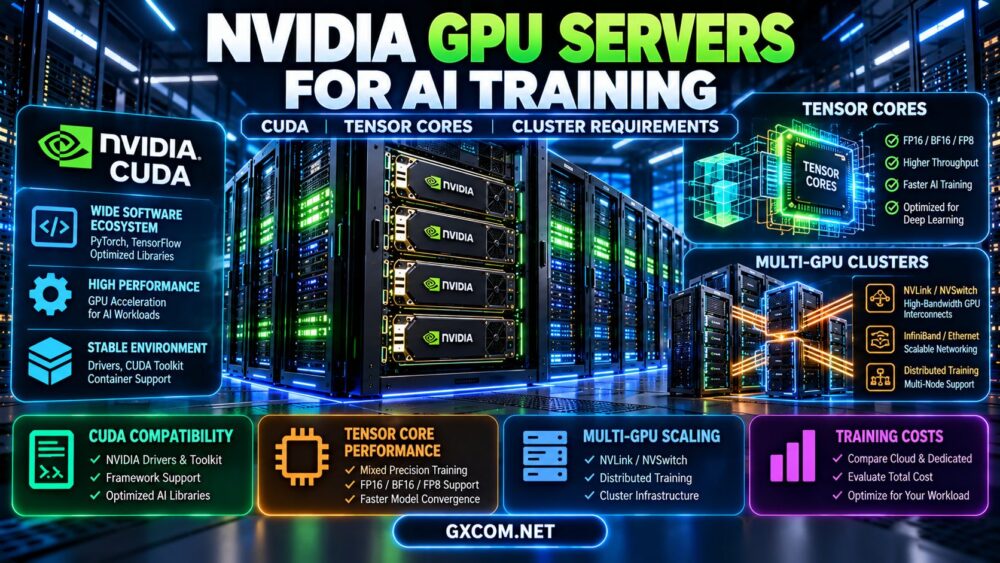
NVIDIA GPU servers for AI training provide the computing infrastructure behind many machine learning experiments, large language model fine-tuning projects, and distributed deep learning workloads. However, selecting a training server requires more than choosing the GPU with the highest advertised performance. CUDA compatibility, Tensor Core capabilities, GPU memory, interconnect bandwidth, storage throughput, and cluster architecture all affect training speed and total cost.
A single GPU may be sufficient for smaller models and parameter-efficient fine-tuning, while larger training jobs can require multiple accelerators connected through high-bandwidth links and coordinated across several servers. Even powerful GPUs can remain underutilized when data loading, CPU performance, or inter-node communication becomes a bottleneck.
This guide explains how NVIDIA GPU training infrastructure works, compares important hardware requirements, and shows how to evaluate cloud GPU rental, dedicated servers, and scalable AI training clusters.
NVIDIA GPU Servers for AI Training: What Really Matters?
The best NVIDIA GPU servers for AI training combine suitable accelerator hardware with a balanced computing system and compatible software environment.
Five major factors determine whether a GPU server is appropriate for a particular training workload:
- GPU compute: The ability to execute the numerical operations required by the model.
- GPU memory: Capacity for parameters, gradients, optimizer states, activations, and temporary buffers.
- Memory bandwidth: The rate at which data moves between GPU memory and compute units.
- GPU interconnects: Communication performance between accelerators during distributed training.
- System balance: CPU, RAM, NVMe storage, networking, software, and operational reliability.
A GPU with impressive theoretical compute specifications may deliver disappointing training performance if its memory capacity is insufficient or its communication links are poorly matched to the workload.
How CUDA Powers NVIDIA AI Training Servers
CUDA is NVIDIA's parallel computing platform and programming ecosystem. It provides tools, runtime functionality, libraries, and programming interfaces used by supported GPU-accelerated applications.
For machine learning teams, CUDA compatibility is a fundamental part of selecting an NVIDIA GPU server.
CUDA Toolkit, Drivers, and Frameworks
A typical NVIDIA training environment includes:
- An NVIDIA GPU supported by the selected software stack.
- A compatible NVIDIA driver.
- A suitable CUDA runtime or toolkit, depending on the application.
- A GPU-enabled framework such as PyTorch.
- Optimized libraries and kernels used by the training workload.
- Container tooling or environment management for reproducibility.
The NVIDIA driver, CUDA runtime, framework build, and custom extensions must form a supported combination.
Installing the newest CUDA Toolkit does not automatically fix an incompatible framework build or an unsupported GPU architecture.
Checking CUDA Availability
On a Linux GPU server, administrators can begin with:
nvidia-smiThis command can report detected GPUs, driver information, memory usage, and other device details.
In PyTorch, a basic validation test is:
import torch

print("PyTorch:", torch.__version__)
print("CUDA build:", torch.version.cuda)
print("CUDA available:", torch.cuda.is_available())

if torch.cuda.is_available():
    print("GPU:", torch.cuda.get_device_name(0))
    x = torch.randn(1024, 1024, device="cuda")
    y = torch.matmul(x, x)
    print("Result:", y.shape)
A successful matrix multiplication confirms that a basic GPU operation can execute. It does not establish that every training library, precision format, or distributed feature is compatible.
CUDA Compute Capability
Different NVIDIA GPU generations support different hardware instructions and software features.
Before deploying optimized kernels or compiled extensions, verify the GPU's compute capability and the minimum requirements of the application.
For official documentation, consult the NVIDIA CUDA documentation.
Tensor Cores and Mixed-Precision AI Training
Tensor Cores are specialized processing units designed to accelerate supported matrix operations used extensively in deep learning.
Modern NVIDIA accelerators provide Tensor Core capabilities that vary by architecture, numerical format, and software implementation.
FP32, TF32, FP16, BF16, and FP8 Explained
| Precision | Typical Role | Important Consideration |
|---|---|---|
| FP32 | General floating-point computation | Higher memory use than reduced-precision formats |
| TF32 | Accelerated supported matrix operations | Hardware and framework behavior vary |
| FP16 | Mixed-precision training | May require loss scaling and numerical care |
| BF16 | Mixed-precision training | Useful exponent range, subject to hardware support |
| FP8 | Supported advanced training workflows | Requires compatible hardware and software recipes |
Reduced precision can improve throughput and reduce memory consumption, but training stability and model quality must be validated.
Support for a precision format does not guarantee that every operation in a training pipeline will use it.
Why Tensor Core Generation Matters
Newer GPU architectures may support additional numerical formats and improved matrix acceleration.
However, the actual benefit depends on model architecture, batch size, kernel efficiency, memory access patterns, and framework optimization.
Do not compare training servers using Tensor Core counts or advertised AI TOPS alone.
Choosing NVIDIA GPUs for AI Training
NVIDIA offers consumer, workstation, and data center GPUs with different memory capacities, compute capabilities, reliability characteristics, and system requirements.
Enterprise data center accelerators may be more appropriate for large-scale training, while selected GeForce GPUs can remain useful for smaller experiments and fine-tuning.
| GPU | Memory | Architecture | Typical Evaluation |
|---|---|---|---|
| RTX 3090 | 24GB GDDR6X | Ampere | Budget experiments and supported fine-tuning |
| RTX 4090 | 24GB GDDR6X | Ada Lovelace | High-performance single-GPU development |
| NVIDIA L40S | 48GB GDDR6 ECC | Ada Lovelace | AI and graphics workloads requiring more VRAM |
| NVIDIA H100 | 80GB HBM in common variants | Hopper | High-performance data center training |
| NVIDIA H200 | 141GB HBM3e in common variants | Hopper | Memory-intensive training and inference |
| NVIDIA B200 | 180GB HBM3e | Blackwell | Advanced AI training platforms |
Memory specifications refer to representative products or configurations. Actual systems, GPU form factors, power limits, interconnects, and availability differ. GPU model names alone do not identify the complete server architecture.
RTX GPUs for Smaller Training Workloads
RTX 3090 and RTX 4090 can support compatible development and fine-tuning workloads that fit within 24GB of GPU memory.
However, consumer GPUs differ from data center accelerators in system design, management features, memory characteristics, and supported deployment configurations.
For a detailed comparison, read our RTX 3090 vs RTX 4090 GPU server guide.
H100, H200, and B200 for Advanced Training
Data center GPUs such as H100, H200, and B200 are relevant for larger models and demanding training pipelines.
H200 offers greater memory capacity and bandwidth than common H100 configurations, while B200 belongs to NVIDIA's newer Blackwell architecture.

Nevertheless, the value of each accelerator depends on the complete server platform, software compatibility, available interconnects, and actual workload performance.
For model-by-model hardware comparisons, see our H100 vs H200 vs B200 server comparison.
GPU Memory Requirements for AI Training
GPU memory is often the first practical limit encountered when training or fine-tuning large models.
Training memory includes more than the model weights.
What Uses GPU Memory During Training?
- Model parameters.
- Gradients.
- Optimizer states.
- Intermediate activations.
- Temporary workspaces.
- Communication buffers for distributed operations.
As a simplified illustration, 7 billion parameters stored at 16-bit precision require approximately 14GB for weights alone, using decimal units.
That estimate excludes gradients, optimizer states, activations, and other memory requirements.
Full-parameter training can therefore require substantially more memory than inference using the same model.
Techniques That Reduce Training Memory
Depending on the framework and model, teams may use:
- Mixed-precision training.
- Gradient accumulation.
- Activation checkpointing.
- Optimizer state sharding.
- Parameter-efficient fine-tuning.
- CPU or storage offloading.
These techniques involve trade-offs in performance, complexity, and numerical behavior.
For practical model sizing, consult our LLM hosting requirements guide.
When Does AI Training Need Multiple GPUs?
Multiple GPUs become relevant when one accelerator cannot provide sufficient memory, throughput, or training completion speed.
However, adding GPUs does not automatically produce linear performance gains.
Data Parallelism
Data parallelism distributes training examples across multiple workers while coordinating model updates.
It can improve aggregate training throughput, but gradient synchronization introduces communication overhead.
Tensor Parallelism
Tensor parallelism partitions supported operations or model tensors across accelerators.
It can help run models that exceed a single GPU's memory capacity, but may require frequent high-bandwidth communication.
Pipeline Parallelism
Pipeline parallelism distributes model layers or stages across devices.
It introduces scheduling considerations and can suffer from pipeline idle time if poorly configured.
Sharded Training
Framework strategies such as Fully Sharded Data Parallel can distribute model-related states across workers.
These approaches can reduce per-GPU memory pressure but introduce additional communication and implementation complexity.
The appropriate strategy depends on model architecture, GPU memory, cluster topology, and software support.
NVLink, NVSwitch, PCIe, and InfiniBand Explained
Interconnect design is a critical part of selecting NVIDIA GPU servers for AI training, especially when training requires frequent communication between accelerators.
| Technology | Primary Role | Planning Consideration |
|---|---|---|
| PCIe | General system and device connectivity | Generation, lanes, and topology |
| NVLink | Supported high-bandwidth GPU communication | GPU generation and system compatibility |
| NVSwitch | GPU interconnect switching in supported systems | Platform-specific topology |
| InfiniBand | High-performance network connectivity | Adapters, switching, latency, and software |
| High-speed Ethernet | Cluster networking and data transfer | Bandwidth, congestion, and RDMA support |
NVLink Is Not Universal
NVLink availability and bandwidth depend on the exact GPU and server platform.
For example, RTX 3090 supports NVLink in compatible configurations, while RTX 4090 does not.
Similarly, not every H100 or H200 deployment provides the same GPU interconnect topology.
NVSwitch and Multi-GPU Systems
NVSwitch can provide high-bandwidth GPU connectivity in supported NVIDIA systems.
It is particularly relevant to tightly coupled multi-GPU training platforms, but must be evaluated as part of the complete server architecture.
Inter-Node Networking
When training spans multiple physical servers, communication depends on network hardware, switching, and distributed software.
High-speed InfiniBand or appropriately configured Ethernet with supported RDMA capabilities may help reduce communication overhead.
However, network bandwidth alone does not guarantee efficient distributed training.
NVIDIA GPU Cluster Requirements for AI Training
A production GPU cluster combines compute nodes, high-performance networking, shared or distributed storage, scheduling, monitoring, and operational controls.
Compute Node Requirements
Each GPU server should be evaluated for:
- GPU model, quantity, and memory capacity.
- Supported GPU interconnect topology.
- CPU capacity and PCIe connectivity.
- System RAM and memory bandwidth.
- Local NVMe storage performance.
- Power, cooling, and thermal constraints.
- Driver and software compatibility.
Storage Requirements
Training clusters may repeatedly read large datasets and write substantial checkpoints.
Storage design should consider sequential throughput, random I/O, metadata operations, durability, and recovery time.
Insufficient storage performance can leave expensive GPUs waiting for data.
Networking Requirements
Distributed training requires sufficient bandwidth and suitable latency between participating nodes.
Network design should reflect the expected communication pattern rather than relying only on the advertised port speed.
Cluster Scheduling
Teams may use workload managers or orchestration systems to allocate GPU resources, manage queues, and recover from failures.
Examples include Kubernetes-based GPU environments and HPC-oriented schedulers such as Slurm.
The correct choice depends on the organization's workload patterns, operational expertise, and cluster design.
Monitoring and Reliability
Production clusters should monitor GPU utilization, memory usage, temperatures, job failures, storage performance, and network health.
Training jobs also need durable checkpoints and tested recovery procedures.
For more information, see our multi-GPU server hosting and scaling guide.
Cloud vs Dedicated NVIDIA GPU Servers for AI Training
Cloud GPU rental and dedicated GPU servers solve different infrastructure problems.
| Factor | Cloud GPU | Dedicated GPU Server |
|---|---|---|
| Deployment | Often flexible and usage-based | Defined physical server configuration |
| Scaling | Depends on available capacity | Depends on hardware and provisioning |
| Driver control | Varies by service model | May allow greater customization |
| Billing | Often hourly or usage-based | Often monthly or contract-based |
| Best initial fit | Experiments and changing workloads | Sustained or specialized workloads |
| Multi-node training | Requires suitable cluster product | Requires appropriate networking and orchestration |
Dedicated GPU hardware is not automatically more economical, and cloud GPU resources are not automatically more scalable.
Actual performance, availability, contractual terms, and operational requirements determine the better option.
Where to Rent NVIDIA GPU Servers for AI Training
Several GPU hosting platforms and infrastructure providers are relevant to AI training procurement.
However, provider catalogs change. The following companies should be evaluated against the exact GPU model, memory requirement, network topology, and software environment needed by the workload.
Cherry Servers: Dedicated GPU Infrastructure
Cherry Servers is relevant for organizations comparing dedicated GPU and bare-metal infrastructure for sustained training workloads.
Confirm available accelerator models, GPU count, administrative access, interconnect capabilities, and network specifications before selecting a configuration.
A dedicated GPU server should not be assumed to include NVLink, NVSwitch, or multi-node training connectivity unless explicitly specified.
RunPod: GPU Cloud for AI Development
RunPod is relevant for developers evaluating GPU cloud environments for experiments, fine-tuning, and model development.
Compare the exact GPU configuration, storage persistence, billing model, software image, and current capacity.
For distributed training, verify whether the selected deployment provides the necessary GPU communication and networking features.
GPU Mart: GPU Server Configuration
GPU Mart can be considered when evaluating GPU-oriented server configurations and dedicated resource requirements.
Request confirmation of the physical accelerator, memory capacity, operating system, driver access, and suitability for the intended training workload.
Vast.ai: Marketplace GPU Compute
Vast.ai offers marketplace-based GPU computing options that may appeal to developers comparing different hardware configurations and rental economics.
Individual listings can differ in GPU model, host conditions, storage, networking, and availability.
For distributed training, inspect the complete hardware topology and communication requirements rather than assuming that multiple listed GPUs form an optimized training cluster.
DediXLAB: Dedicated Server Evaluation
DediXLAB is another provider to investigate when comparing dedicated server configurations.
Before treating any offering as an AI training solution, confirm that the desired GPU hardware is available and that the system meets compute, storage, networking, and software requirements.
Important: Inclusion does not establish current stock of H100, H200, B200, or any particular GPU model. Buyers should verify availability, hardware allocation, cluster features, and commercial terms directly.
NVIDIA GPU Training Costs: What Should You Compare?
The best NVIDIA GPU servers for AI training are not necessarily those with the lowest hourly rate or highest theoretical compute specification.
The relevant financial metric is the total cost required to complete the training workload successfully.
Total Training Cost Formula
Total training cost = billable compute + storage + networking + software + recovery + attributable operations
For comparisons, use the same model, dataset, training objective, precision settings, and acceptable quality target.
Illustrative GPU Training Cost Example
Consider two hypothetical server options that can complete the same training objective:
| Metric | GPU Server A | GPU Server B |
|---|---|---|
| Hourly compute rate | $1.20 | $2.40 |
| Training completion time | 80 hours | 35 hours |
| Compute cost | $96 | $84 |
All values are hypothetical and are not real supplier prices or benchmark results. The example assumes both options complete an equivalent training objective.
Although Server B costs twice as much per hour, its faster completion time produces a lower compute cost in this illustration.
Actual results depend on model characteristics, training precision, GPU memory, communication efficiency, and software optimization.
Account for GPU Utilization
Low GPU utilization may indicate data loading delays, small batch sizes, inefficient kernels, or synchronization overhead.

Before purchasing more GPUs, profile the training pipeline and identify the actual bottleneck.
Compare Spot, On-Demand, and Dedicated Options
Interruptible GPU capacity can reduce hourly costs for restartable workloads, while regular or dedicated infrastructure may be preferable for deadline-sensitive training.
Checkpointing, recovery time, and capacity availability should be included in the financial comparison.
AI Training Server Procurement Checklist
- Define the training objective: Identify pretraining, full fine-tuning, LoRA, QLoRA, or experimentation.
- Estimate GPU memory: Include parameters, gradients, optimizer states, and activations.
- Choose suitable accelerators: Compare actual model compatibility and performance.
- Validate CUDA support: Check drivers, framework builds, and required libraries.
- Review Tensor Core capabilities: Confirm supported numerical formats.
- Check GPU topology: Verify PCIe, NVLink, or NVSwitch where relevant.
- Evaluate inter-node networking: Review bandwidth, latency, and distributed communication requirements.
- Size CPU and RAM: Avoid data preparation bottlenecks.
- Check storage performance: Ensure datasets and checkpoints can be processed efficiently.
- Plan recovery: Use durable checkpoints and test restoration.
- Benchmark the application: Measure useful training throughput and completion time.
- Compare total cost: Include compute, storage, networking, support, and operations.
Frequently Asked Questions
What are NVIDIA GPU servers for AI training?
They are servers equipped with compatible NVIDIA accelerators and supporting hardware used to train or fine-tune machine learning models through frameworks and libraries that support NVIDIA GPU computing.
Why is CUDA important for AI training?
CUDA provides a computing platform and software ecosystem used by many GPU-accelerated AI applications. Driver, runtime, framework, and library compatibility are important for successful deployment.
Do Tensor Cores make AI training faster?
Tensor Cores can accelerate supported matrix operations, especially with compatible precision formats. Real performance depends on the workload and software implementation.
How much GPU memory is needed for LLM training?
Memory requirements depend on model size, precision, training method, batch size, and optimizer. Full training generally requires substantially more memory than storing model weights alone.
Is RTX 4090 suitable for AI training?
RTX 4090 can be useful for compatible experiments and fine-tuning workloads that fit within its 24GB of VRAM. Larger training tasks may require higher-memory accelerators or distributed strategies.
When should I use multiple GPUs?
Multiple GPUs may be appropriate when one accelerator cannot meet memory or throughput requirements. The benefits depend on parallelization strategy and communication efficiency.
Is NVLink required for multi-GPU training?
No. Some multi-GPU workloads can operate over PCIe or other supported communication paths. NVLink can improve communication in compatible systems, but it is not universal or mandatory for every training job.
What is the difference between NVLink and InfiniBand?
NVLink connects supported GPUs within compatible system architectures. InfiniBand is a high-performance networking technology often used for communication between servers and other networked components.
Are dedicated GPU servers better than cloud GPU instances?
Dedicated servers may suit sustained workloads and custom environments, while cloud instances may offer greater flexibility. The better choice depends on performance, availability, software control, and total cost.
What matters most when selecting a GPU training cluster?
GPU memory, compute performance, interconnect topology, networking, storage, software compatibility, reliability, and cost per completed training run should all be evaluated.
Final Verdict: NVIDIA GPU Servers for AI Training
The best NVIDIA GPU servers for AI training combine compatible CUDA software, appropriate Tensor Core capabilities, sufficient GPU memory, and balanced system infrastructure.
For smaller workloads, a single GPU server may provide an economical starting point. For larger models and distributed training, multi-GPU servers or clusters may be necessary.
However, additional accelerators only deliver value when the training framework, memory strategy, storage system, and communication architecture can use them efficiently.
Cherry Servers, RunPod, GPU Mart, Vast.ai, and DediXLAB represent different GPU infrastructure options to investigate. Confirm the exact accelerator, server topology, software compatibility, and commercial terms before purchasing.
Rather than choosing the highest advertised TFLOPS or lowest hourly rate, benchmark the real workload and calculate total cost per completed training run.
AI MODEL → CUDA COMPATIBILITY → GPU MEMORY → TENSOR CORES → INTERCONNECT → CLUSTER PERFORMANCE → TOTAL TRAINING COST