Understanding LLM hosting requirements is essential before deploying a large language model on a GPU server, cloud instance, or private infrastructure. Choosing too little GPU memory can prevent a model from loading, while renting unnecessarily powerful hardware can increase operating costs without delivering meaningful benefits.
For models with 7 billion, 14 billion, 32 billion, or 70 billion parameters, hardware requirements depend on more than parameter count. Model precision, quantization, context length, KV cache, concurrency, inference framework, and GPU architecture all influence the final server configuration.
This guide explains how to estimate GPU VRAM, system RAM, storage, and compute requirements for LLM hosting. It also compares single-GPU, multi-GPU, and CPU offloading approaches and explores infrastructure options from RunPod, Cherry Servers, GPU Mart, Vast.ai, and Kamatera.
What Hardware Do You Need to Host an LLM?
A typical self-hosted LLM deployment includes several hardware and software components:
- GPU: Accelerates model inference when the model and runtime support the selected accelerator.
- GPU VRAM: Stores model weights, KV cache, intermediate tensors, and runtime buffers.
- CPU: Handles request processing, tokenization, scheduling, data preparation, and other supporting operations.
- System RAM: Supports the operating system, model loading, CPU-side tensors, and application services.
- Storage: Holds model files, tokenizer data, application software, logs, and persistent datasets.
- Network: Connects users and applications to the model-serving endpoint.
- Inference software: Loads the model and manages generation, batching, and memory allocation.
The most important starting point is whether the model and its runtime memory requirements fit within the available GPU memory.
For a broader introduction to AI GPU hardware, read our NVIDIA AI GPU servers guide.
How Much GPU VRAM Does an LLM Need?
GPU VRAM requirements begin with model weight storage, but model weights are only one part of the total memory footprint.
A simplified estimate is:
Model weight memory (bytes) ≈ number of parameters × bytes per parameter
For common numerical formats:
- FP32 stores approximately 4 bytes per parameter.
- FP16 and BF16 store approximately 2 bytes per parameter.
- Idealized 8-bit storage uses approximately 1 byte per parameter.
- Idealized 4-bit storage uses approximately 0.5 bytes per parameter.
Real quantized models may require additional memory for scales, metadata, unquantized tensors, and implementation-specific overhead.
LLM VRAM Requirements by Model Size
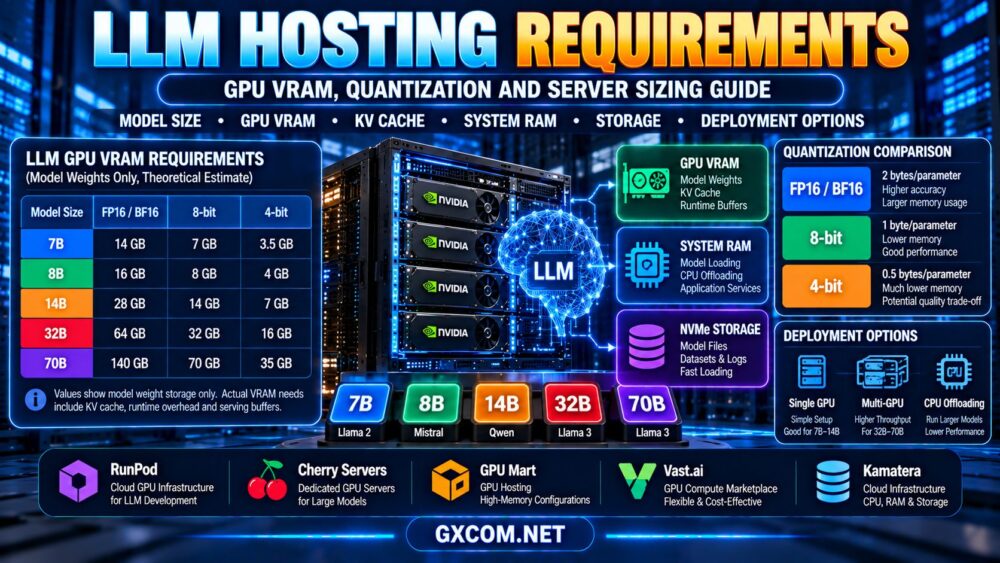
The following table shows approximate model weight storage in decimal gigabytes (GB). These values exclude KV cache, temporary buffers, inference framework overhead, and other runtime memory.
| Model Parameters | FP16 / BF16 | Idealized 8-bit | Idealized 4-bit |
|---|---|---|---|
| 7B | 14 GB | 7 GB | 3.5 GB |
| 8B | 16 GB | 8 GB | 4 GB |
| 14B | 28 GB | 14 GB | 7 GB |
| 32B | 64 GB | 32 GB | 16 GB |
| 70B | 140 GB | 70 GB | 35 GB |
Important: These are theoretical weight-storage estimates, not guaranteed minimum GPU VRAM requirements. Actual deployment requirements depend on model architecture, quantization format, context length, runtime configuration, and concurrent requests.
For example, a 7B model with idealized 4-bit weights occupies about 3.5 GB for weights alone. That does not mean a 4 GB GPU can necessarily run the model successfully.
LLM Quantization Explained: FP16 vs INT8 vs 4-bit
LLM quantization reduces the numerical precision used to represent model weights or other tensors, potentially lowering memory consumption and improving deployment efficiency.
However, quantization does not guarantee faster inference or identical output quality.
FP16 and BF16
FP16 and BF16 are widely used reduced-precision floating-point formats. They generally require two bytes per parameter and are useful when compatible GPU hardware and software support the model.
BF16 and FP16 have different numerical characteristics, so the best choice depends on hardware support and model requirements.
8-bit Quantization
8-bit quantization can reduce weight storage compared with 16-bit formats.
Actual memory use depends on the quantization implementation, and some layers or operations may remain in higher precision.
4-bit Quantization
4-bit quantization can make larger models practical on GPUs with less memory.
Common approaches include formats supported by GGUF-based runtimes and other framework-specific quantization methods.
Different formats have different memory overhead, kernel support, performance characteristics, and quality trade-offs.
Does Quantization Reduce Model Quality?
It can. The effect depends on the model, quantization method, calibration, task, and precision.
Some quantized models retain strong practical performance for common applications, while others experience measurable degradation on particular workloads.
Test accuracy and output quality with representative prompts before adopting a quantized model in production.
KV Cache: The Hidden GPU Memory Requirement
When an autoregressive language model generates tokens, it commonly stores attention key and value tensors in a KV cache.
The KV cache helps avoid recomputing certain attention information during subsequent decoding steps.
KV cache memory depends on:
- Model architecture and number of transformer layers.
- Number of key-value attention heads.
- Head dimension.
- KV cache precision.
- Number of tokens stored.
- Number of concurrent sequences.
- Memory-management techniques used by the inference runtime.
For a conventional full KV cache, a simplified memory estimate is:
KV cache bytes ≈ 2 × layers × KV heads × head dimension × cached tokens × bytes per element
The factor of two represents key and value tensors. Actual implementations may use paging, cache compression, quantization, sliding windows, or other optimizations that change memory consumption.
Why Context Length Matters
Longer context windows can increase KV cache memory requirements.
A model that loads successfully with a short prompt may run out of GPU memory when processing long documents or serving several users simultaneously.
Do not size an LLM server using model weights alone.
How to Estimate Total GPU Memory
A practical planning formula is:
Total GPU memory ≈ model weights + KV cache + temporary tensors + runtime overhead + operational headroom
Because runtime memory use varies considerably, this formula should be used as a planning framework rather than an exact calculator.
For reliable capacity planning:
- Select the exact model and quantization format.
- Confirm the model's actual loaded weight size.
- Choose a realistic maximum context length.
- Estimate expected concurrent requests.
- Configure the intended inference runtime.
- Measure peak GPU memory usage under representative load.
- Allow sufficient headroom for memory fluctuations and operational stability.
GPU manufacturers and cloud providers may report memory capacity using different conventions, so compare usable memory rather than relying only on rounded marketing figures.

LLM Server Sizing Examples: 7B, 14B, 32B and 70B
The following examples describe possible starting points for evaluation. They are not universal minimum hardware specifications.
| Model Class | Illustrative Approach | Primary Concern |
|---|---|---|
| 7B–8B | Single GPU with suitable quantization and memory | Context length and runtime overhead |
| 14B | Higher-memory single GPU or quantized deployment | Weight size and KV cache |
| 32B | High-memory GPU, quantization, or multi-GPU setup | VRAM capacity and throughput |
| 70B | High-memory accelerator configuration or multiple GPUs | Memory distribution and serving performance |
Hosting a 7B or 8B Model
Smaller LLMs are often a practical starting point for self-hosted inference.
Quantization may allow the model weights to fit within a modest GPU memory budget, but longer context windows and concurrency still require additional capacity.
For development, begin with a single GPU and benchmark the exact model.
Hosting a 14B Model
A 14B model requires approximately 28 GB for FP16/BF16 weights alone under the simplified calculation.
Quantization can reduce that requirement, but actual serving memory still includes the KV cache and other runtime allocations.
A higher-memory single GPU may simplify deployment when it can accommodate the entire workload.
Hosting a 32B Model
A 32B model requires approximately 64 GB for FP16/BF16 weights alone.
With suitable quantization, the weight footprint may be substantially smaller, potentially making a single high-memory GPU viable for some configurations.
However, throughput, context length, and concurrency can still justify a larger deployment.
Hosting a 70B Model
A 70B model requires approximately 140 GB for FP16/BF16 weights alone, before runtime overhead.
Quantization can reduce model weight memory significantly, but production serving may still require high-memory accelerators or multiple GPUs.
Large-model deployments should account for inter-GPU communication, tensor parallelism, model-loading time, and the serving framework's memory behavior.
Single GPU vs Multi-GPU LLM Hosting
A single GPU is often simpler to configure, monitor, and troubleshoot.
When the model and serving workload fit within one GPU, a single-device deployment can avoid some of the communication overhead associated with distributed inference.
Multiple GPUs may be appropriate when:
- The model cannot fit on one available accelerator.
- Higher throughput requires additional compute capacity.
- Concurrency exceeds the practical limits of a single GPU.
- The deployment uses supported model or tensor parallelism.
- Operational requirements justify multiple serving replicas.
Multi-GPU configurations introduce additional complexity. Depending on the model and serving approach, communication bandwidth and topology may affect performance.
Also distinguish between splitting one model across GPUs and running independent model replicas on separate GPUs. These approaches solve different capacity problems.
CPU Offloading: Can You Run an LLM with Less VRAM?
CPU offloading moves selected model data or computations to system memory and CPU resources instead of keeping everything on the GPU.
This can make it possible to run models that do not fit entirely within available GPU memory.
However, offloading may reduce performance because data transfers and CPU execution can become bottlenecks.
The performance impact depends on the model, runtime, amount of offloading, memory bandwidth, and hardware configuration.
When CPU Offloading Makes Sense
- Testing a model before investing in a larger GPU.
- Running occasional, latency-insensitive workloads.
- Developing with constrained hardware budgets.
- Evaluating whether a quantized model meets application requirements.
For demanding production APIs, benchmark offloaded inference carefully before relying on it.
How Much System RAM Does LLM Hosting Need?
System RAM requirements depend on the deployment architecture.
A GPU-resident inference server may need RAM for the operating system, application processes, model loading, tokenizer data, and supporting services.
A CPU-only or heavily offloaded deployment may require considerably more system RAM because model tensors are stored or processed outside GPU memory.
Do not assume that system RAM and GPU VRAM are interchangeable. They have different bandwidth characteristics and roles in model execution.
For server selection, measure actual peak RAM usage during model loading and representative inference tests.
LLM Storage Requirements: SSD vs NVMe
LLM deployments require storage for model checkpoints, quantized model files, tokenizer assets, serving software, containers, logs, and application data.
Storage capacity should account for more than one model file.
For example, teams may keep:
- Multiple model versions.
- Different quantization formats.
- Container images and runtime dependencies.
- Embedding models and vector database files.
- Application logs and temporary files.
- Backup copies and deployment artifacts.
NVMe storage can reduce model-loading and file-access delays compared with slower storage configurations, although the impact depends on the complete system.
Once a model is fully loaded into GPU memory, faster storage does not necessarily improve token generation speed.
LLM Hosting Providers and GPU Infrastructure Options
GPU hosting providers differ in resource allocation, hardware availability, billing models, software environments, and management responsibilities.
The following five providers are relevant to different parts of the LLM deployment process. They should not be treated as offering identical GPU products or managed inference services.
| Provider | Infrastructure Role | What to Verify |
|---|---|---|
| RunPod | Cloud GPU infrastructure | GPU VRAM, deployment options, storage and billing |
| Cherry Servers | Dedicated GPU server infrastructure | Available accelerators, hardware configuration and contracts |
| GPU Mart | GPU-focused hosting | GPU allocation, usable VRAM, operating system and drivers |
| Vast.ai | GPU compute marketplace | Individual listings, memory, reliability and availability |
| Kamatera | General-purpose cloud infrastructure | CPU, RAM, storage and availability of suitable GPU products |
RunPod: Cloud GPU Resources for LLM Development
RunPod is worth evaluating for developers who need GPU resources for model experimentation, inference, and deployment workflows.
When choosing a configuration, compare the actual GPU model, usable VRAM, storage persistence, deployment environment, and billing conditions.
Also verify whether the selected product includes managed inference capabilities or requires you to configure the model-serving stack yourself.
For more platform-specific information, read our RunPod GPU cloud review.
Cherry Servers: Dedicated GPU Infrastructure
Cherry Servers is relevant when an organization needs dedicated physical infrastructure for sustained LLM workloads.
Evaluate current GPU-equipped server configurations, accelerator memory, CPU resources, system RAM, NVMe storage, network capacity, and support responsibilities.
Dedicated infrastructure may be attractive for predictable utilization, but the customer may still be responsible for installing and maintaining the inference software.
GPU Mart: GPU Hosting and Memory Configuration
GPU Mart can be considered when comparing GPU-focused hosting products.
Check the exact accelerator allocation, available VRAM, operating system compatibility, and driver support.
For larger models, confirm whether suitable high-memory or multi-GPU configurations are available rather than assuming every GPU hosting plan can run a 70B model.
Vast.ai: Marketplace GPU Capacity
Vast.ai offers a marketplace-style approach to GPU compute.
Compare individual listings by GPU memory, CPU and RAM resources, storage, networking, availability, and host characteristics.
Marketplace infrastructure may suit experimentation and cost-sensitive deployments, but production reliability should be evaluated at the specific listing and application level.
Kamatera: General Cloud Infrastructure and Supporting Services
Kamatera is relevant for evaluating general-purpose cloud infrastructure that may support application backends, orchestration, databases, and certain CPU-based model deployments.
However, a conventional cloud server should not be described as a GPU inference server unless the specific product provides suitable GPU hardware.
Verify available instance types and hardware capabilities before choosing it for GPU-dependent LLM workloads.
Cloud GPU vs Dedicated GPU Server for LLM Hosting
Cloud GPU infrastructure can be useful when demand is variable, models are still being evaluated, or teams need flexible access to different accelerators.
Dedicated GPU rental may be attractive for sustained workloads with predictable capacity requirements.
| Factor | Cloud GPU | Dedicated GPU Server |
|---|---|---|
| Deployment flexibility | Depends on instance availability and platform | Depends on hardware provisioning and contract |
| Billing | Often usage-based | Often fixed-term or monthly |
| Hardware control | Varies by service | Typically greater physical hardware control |
| Idle capacity | May be reduced under supported billing models | Capacity may remain reserved |
| Best fit | Testing, variable demand, flexible deployments | Steady workloads and dedicated infrastructure needs |
For a deeper financial comparison, see our GPU server rental vs buying guide.
How to Calculate LLM Hosting Costs
LLM hosting costs depend on GPU rental, storage, networking, utilization, and operational requirements.
A low hourly price does not necessarily produce a low cost per generated token.
Useful metrics include:
- Cost per billable GPU hour.
- Cost per million output tokens.
- Cost per completed inference request.
- Average GPU utilization.
- Time to first token and sustained generation throughput.
- Storage, data transfer, and idle capacity charges.
For a detailed explanation of inference performance and cost efficiency, read our AI inference server hosting comparison.
LLM Hosting Server Sizing Checklist
Before renting a server, answer these questions:
- Which exact model? Identify its architecture, parameter count, and version.
- Which precision? Choose FP16, BF16, or a compatible quantization format.
- How much VRAM? Calculate weights, KV cache, runtime buffers, and headroom.
- How much context? Define realistic input and output token limits.
- How many users? Estimate simultaneous requests and required throughput.
- Which GPU? Confirm architecture, memory, driver, and runtime support.
- How much RAM? Include model loading and CPU offloading where relevant.
- How much storage? Allow space for model files, dependencies, and application data.
- Which deployment model? Compare cloud GPU, dedicated rental, and CPU-based options.
- What total cost? Benchmark representative workloads before committing.
Common LLM Hosting Mistakes
Confusing Model File Size with Total VRAM
A model file's size does not include every runtime allocation. KV cache and temporary tensors can substantially increase memory use.

Assuming Quantization Has No Trade-Offs
Quantization can reduce memory consumption, but output quality, runtime compatibility, and inference speed may change.
Ignoring Context Length
Longer contexts can increase memory use and processing time, particularly under concurrent load.
Choosing GPUs by VRAM Alone
Memory capacity is critical, but compute capability, memory bandwidth, software compatibility, and serving efficiency also matter.
Buying Multi-GPU Infrastructure Too Early
A suitably sized single GPU may be simpler and more cost-effective for workloads that fit comfortably on one accelerator.
Frequently Asked Questions
How much VRAM do I need to host a 7B LLM?
A 7B model requires approximately 14 GB for FP16/BF16 weights alone. Quantization can reduce weight memory, but actual VRAM requirements also include KV cache, buffers, and runtime overhead.
Can a 24GB GPU run a 32B model?
Some quantized 32B models may fit within a 24GB GPU under suitable runtime and context configurations. However, the exact memory requirement depends on the quantization format, model architecture, KV cache, and other allocations.
How much VRAM does a 70B model require?
FP16/BF16 weights for a 70B model require approximately 140 GB under a simplified calculation. Quantization reduces weight storage, but additional memory is still needed for inference.
Does 4-bit quantization make LLM inference faster?
Not always. Lower memory use may help certain workloads, but speed depends on hardware, inference kernels, model architecture, and implementation.
Can I host an LLM without a GPU?
Yes. Some LLMs can run on CPUs, especially smaller or quantized models. Performance and latency depend on CPU capabilities, system RAM, memory bandwidth, and the inference runtime.
Is NVMe necessary for LLM hosting?
NVMe is useful for model loading and storage-intensive operations, but it is not universally required. Once a model is loaded into GPU memory, storage speed may have limited influence on token generation.
Do I need multiple GPUs for a 70B model?
Not necessarily. A sufficiently large single accelerator may support some configurations, particularly with quantization. Other deployments require multiple GPUs because of memory capacity, throughput, or concurrency needs.
What is the difference between LLM hosting and AI inference hosting?
LLM hosting focuses on deploying language models, including their memory and software requirements. AI inference hosting is broader and includes the operational performance, serving architecture, latency, throughput, and cost of running AI models.
Final Verdict: Size the Server for the Model and Workload
The right LLM hosting requirements depend on the exact model, quantization format, context length, concurrency, and performance targets.
Begin by estimating model weight memory, then account for KV cache, runtime overhead, system RAM, and storage. Benchmark the actual inference software before deciding whether to use a single GPU, multiple GPUs, or CPU offloading.
RunPod and Vast.ai are relevant options for flexible GPU compute evaluation. Cherry Servers and GPU Mart may be worth considering for suitable GPU hosting configurations, while Kamatera can be evaluated for general cloud infrastructure and supporting application services.
Always verify current hardware availability, usable GPU memory, deployment compatibility, and total operating costs before purchasing.
MODEL SIZE → QUANTIZATION → GPU VRAM → KV CACHE → RAM → STORAGE → CONCURRENCY → TOTAL COST
The most economical LLM server is the one that reliably meets your real workload requirements without paying for unnecessary capacity.