Understanding GPU VPS pricing requires looking beyond the advertised monthly rate. Two GPU virtual private servers with similar specifications may have very different performance, resource isolation, software compatibility, and total operating costs.
One plan may provide exclusive access to a physical GPU, while another allocates a virtual GPU profile with limited memory and shared compute resources. Some providers charge by the hour, while others use monthly subscriptions or dedicated server contracts. Storage, Windows licensing, data transfers, and idle resources can add further expenses.
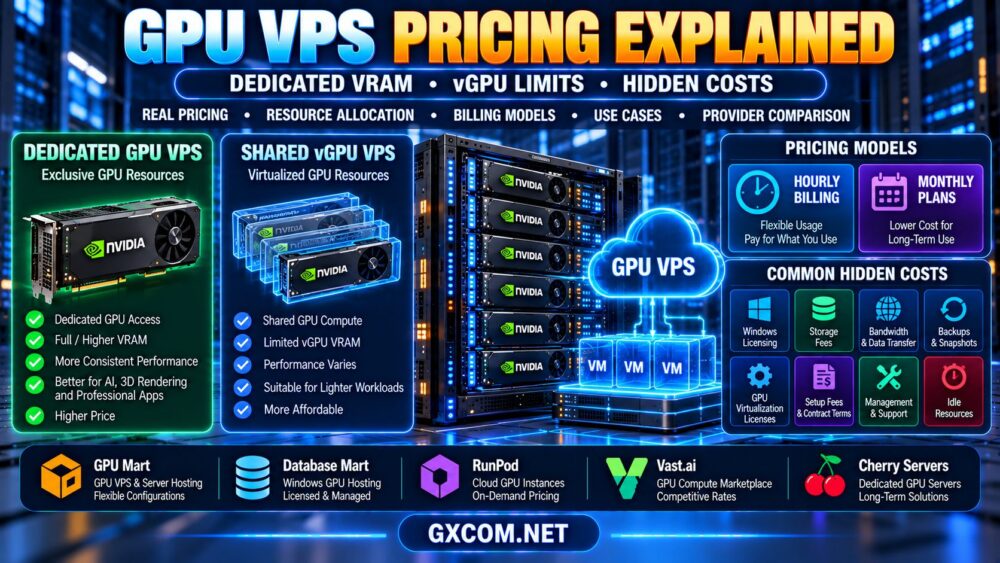
This guide explains how dedicated VRAM, vGPU limits, GPU allocation, and billing models affect GPU VPS costs. It also shows how to compare options from GPU Mart, Database Mart, RunPod, Vast.ai, and Cherry Servers without relying on misleading headline prices.
What Determines GPU VPS Pricing?
GPU VPS hosting prices depend on the hardware, virtualization model, operating environment, and services included in the plan.
The most important pricing factors include:
- GPU model: Architecture, compute performance, memory capacity, and supported features.
- GPU allocation: Exclusive physical GPU access, virtual GPU profiles, or shared compute capacity.
- Usable VRAM: The graphics memory available to the virtual machine or workload.
- CPU and RAM: Host-side resources that support applications and data processing.
- Storage: Local SSD, NVMe, persistent volumes, and backup capacity.
- Operating system: Windows or Linux availability and associated licensing.
- Network: Bandwidth, included traffic, regional connectivity, and transfer charges.
- Billing model: Hourly usage, monthly commitments, reserved capacity, or dedicated contracts.
- Management: Technical support, backups, monitoring, and software administration.
A low-cost GPU VPS can be a good choice when its allocation model matches the workload. However, comparing only advertised GPU names or memory figures can lead to expensive purchasing mistakes.
Dedicated GPU vs Shared vGPU: Why Prices Differ
The distinction between dedicated and shared GPU resources is central to understanding GPU VPS pricing.
Dedicated GPU Allocation
With a dedicated GPU allocation, a customer may receive exclusive access to a physical accelerator through passthrough or another supported deployment method.
This can reduce competition for GPU compute and memory resources, although CPU, storage, and networking may still be shared depending on the product.
Dedicated allocation can be attractive for demanding graphics applications, predictable inference workloads, and software requiring specific hardware capabilities.
Shared vGPU Allocation
A virtual GPU, or vGPU, can allow multiple virtual machines to use resources from a compatible physical accelerator.
Depending on the platform, each virtual machine may receive a defined memory allocation and access to shared GPU processing capacity.
Shared vGPU products may improve infrastructure utilization, but performance consistency, supported features, and resource guarantees vary by implementation.
| Pricing Factor | Dedicated GPU | Shared vGPU |
|---|---|---|
| GPU compute access | Typically exclusive physical device allocation | Shared or partitioned according to profile |
| VRAM | Physical device memory, subject to overhead | Profile-defined or otherwise limited allocation |
| Performance consistency | Less GPU-level contention | Depends on isolation and scheduling |
| Driver and feature support | Depends on hardware and virtualization | Depends on vGPU profile and licensing |
| Cost structure | Reflects reserved accelerator capacity | Reflects allocated virtual resources and platform policy |
| Best fit | Workloads needing exclusive GPU access | Compatible workloads with moderate requirements |
Shared vGPU is not automatically inferior. A well-configured virtual GPU can be suitable for many workloads, while dedicated hardware may be unnecessarily expensive for occasional use.
For the technical differences, see our dedicated GPU vs shared GPU VPS comparison.
Dedicated VRAM vs Shared GPU Memory
VRAM allocation can be one of the most confusing parts of a GPU hosting advertisement.
A provider may describe the physical GPU's total memory, the memory assigned to a vGPU profile, or a broader resource pool. These are not interchangeable specifications.
For example, a physical GPU with 48 GB of memory does not mean that every virtual machine running on that GPU can access 48 GB.
What Does Dedicated VRAM Mean?
In a virtualized GPU environment, dedicated VRAM may refer to memory reserved or assigned to a particular virtual GPU profile.
However, the term alone does not establish exclusive ownership of the physical GPU or guarantee dedicated compute capacity.
Ask the provider to clarify whether the advertised VRAM is:
- The physical GPU's total installed memory.
- The memory assigned to your virtual GPU profile.
- A guaranteed allocation available to your workload.
- Subject to virtualization or driver overhead.
- Accessible under the selected operating system and software environment.
Does More VRAM Always Justify a Higher Price?
No. VRAM capacity matters when applications need to store large models, scenes, textures, or working datasets.
However, if a workload fits comfortably within the available memory, additional VRAM may provide little benefit without stronger compute performance or higher memory bandwidth.
For AI workloads, compare usable memory with actual model requirements rather than buying the largest advertised allocation.
vGPU Limits That Can Affect Real Value
Virtual GPU technology introduces configuration details that may influence application compatibility and effective performance.
Compute Resource Scheduling
Some vGPU implementations share GPU processing resources among virtual machines.
The scheduling method, resource guarantees, and neighboring workloads can affect performance consistency. Other partitioning technologies may offer stronger isolation.
Do not assume that all shared GPU products use the same scheduling architecture.
GPU Feature Availability
A vGPU profile may expose only supported graphics, compute, or media capabilities.
For example, GPU video encoding, CUDA access, professional graphics features, or particular driver modes may require specific hardware, profiles, or licenses.
Maximum Resolution and Display Support
For remote workstations, verify the supported display configuration, resolution, frame rate, and graphics API compatibility.

These capabilities can be as important as raw GPU compute performance.
Virtualization Licensing
Some professional GPU virtualization products require additional software licensing.
Whether the provider includes those licenses can materially affect the total price.
GPU VPS Pricing Models: Hourly vs Monthly Billing
GPU hosting services may offer hourly, monthly, or contract-based billing. The best choice depends on how frequently the GPU is needed.
Hourly GPU Billing
Hourly billing can suit temporary experiments, development sessions, occasional rendering, and variable workloads.
However, billing rules differ. A stopped instance may stop generating compute charges while persistent storage, reserved resources, or other services continue to incur fees.
Monthly GPU VPS Plans
Monthly plans can simplify budgeting for users who need a GPU workstation or application server on a regular basis.
Before choosing a monthly plan, check resource guarantees, traffic allowances, contract terms, cancellation policies, and upgrade options.
Dedicated GPU Server Contracts
Dedicated server rental can make sense for sustained GPU usage, but provisioning terms and minimum commitments may be less flexible than usage-based cloud infrastructure.
Compare the complete operating cost rather than assuming that one billing model is always cheaper.
How to Calculate GPU VPS Break-Even Usage
A simple break-even calculation can help compare hourly and monthly options.
Break-even hours = monthly fixed cost ÷ hourly compute rate
Consider a hypothetical comparison:
- Hourly GPU service: $0.80 per billable hour.
- Monthly GPU service: $240 per month.
The simplified break-even point is:
$240 ÷ $0.80 = 300 hours
At 100 billable hours, the hourly option would cost $80 for compute alone. At 400 hours, it would cost $320.
These figures are illustrative, not actual supplier quotations. The two options must also offer comparable hardware, performance, availability, and included services for the comparison to be meaningful.
Storage, licenses, traffic, and other charges can shift the real break-even point.
GPU VPS Hidden Costs: What the Advertised Price May Exclude
The most expensive GPU VPS is not always the one with the highest advertised rate. Unexpected operating charges can make a seemingly affordable plan costly over time.
1. Windows Licensing
Windows-based GPU workstations may require appropriate operating system licenses.
Windows Server, Windows desktop editions, and remote desktop access have different licensing conditions. Confirm that the provider's deployment model is properly licensed for your intended use.
2. GPU Virtualization Licenses
Some vGPU environments require commercial software entitlements or specialized drivers.
Ask whether these costs are included and whether additional licensing applies to professional graphics applications.
3. Persistent Storage
Cloud GPU services may charge separately for persistent disks, network volumes, snapshots, or backup storage.
Storage charges can continue when compute instances are stopped.
4. Data Transfer and Bandwidth
Outbound traffic, regional transfers, or traffic above included allowances may generate additional charges.
Large model checkpoints, video streams, and rendered outputs can make network costs important.
5. Idle GPU Resources
A running GPU instance can continue generating compute charges even when no useful work is being performed.
For temporary workloads, automatic shutdown and resource monitoring can reduce unnecessary spending.
6. Backups and Snapshots
Backup services may be optional or billed separately.
Check whether backups cover operating system volumes, application data, and persistent GPU workload storage.
7. Technical Support and Administration
Unmanaged GPU hosting may require customers to install drivers, configure applications, secure remote access, and maintain the operating system.
The labor required to administer a server should be considered part of its operating cost.
8. Provisioning and Contract Terms
Dedicated GPU infrastructure may involve setup fees, minimum commitments, or cancellation conditions.
Review the complete service agreement before comparing it with an on-demand instance.
GPU VPS Providers: Compare Pricing Structure and Resource Allocation
Different providers serve different GPU infrastructure needs. The following companies are worth evaluating based on the intended workload, but they should not be treated as offering interchangeable products.
| Provider | Infrastructure Focus | Pricing Questions to Ask |
|---|---|---|
| GPU Mart | GPU-focused hosting | GPU allocation, VRAM, Windows licensing, included resources |
| Database Mart | Windows and GPU-related hosting options | GPU availability, OS fees, remote access and support |
| RunPod | Cloud GPU infrastructure | Compute billing, persistent storage, idle resources |
| Vast.ai | GPU compute marketplace | Listing-specific rates, host conditions, storage and availability |
| Cherry Servers | Dedicated GPU and bare metal infrastructure | Hardware reservation, contract terms, management and traffic |
GPU Mart: GPU Hosting Specifications
GPU Mart is relevant for comparing GPU-oriented hosting products where the exact accelerator allocation and operating environment matter.
Check whether a selected plan provides exclusive GPU access or virtualized GPU resources. Confirm usable VRAM, CPU and RAM allocations, storage, Windows support, and any additional software charges.
Database Mart: Windows and GPU Hosting Costs
Database Mart can be evaluated for Windows-oriented hosting and suitable GPU-related products.
Before ordering, verify that the specific plan includes the required GPU, supported operating system, remote desktop functionality, and applicable licensing.
A standard Windows VPS should not be assumed to include hardware GPU acceleration.
RunPod: Cloud GPU Usage Costs
RunPod is relevant for GPU compute workloads where deployment flexibility and usage-based billing may be important.
When comparing costs, examine the selected GPU configuration, billing state, persistent storage, network services, and deployment environment.
For more platform-specific background, read our RunPod GPU cloud review.
Vast.ai: Marketplace GPU Pricing
Vast.ai provides a marketplace approach to GPU compute, where available listings may differ in hardware, host characteristics, resource allocation, and operating conditions.
Compare listings by usable GPU memory, CPU, system RAM, storage, network performance, reliability requirements, and total billing terms.
The lowest listed compute rate is not necessarily the lowest effective cost for a completed workload.
Cherry Servers: Dedicated GPU Cost Comparison
Cherry Servers is worth evaluating when a workload requires dedicated physical GPU infrastructure.
Compare available accelerator models, server specifications, provisioning arrangements, included bandwidth, support responsibilities, and contract commitments.
For sustained usage, dedicated infrastructure may provide a useful alternative to on-demand GPU compute, depending on the workload and total costs.
GPU VPS vs Cloud GPU vs Dedicated GPU Server
Choosing the right infrastructure category is often more important than finding the lowest advertised rate within one category.
| Infrastructure | Potential Advantage | Important Limitation |
|---|---|---|
| GPU VPS | Virtual server environment with suitable GPU access | GPU allocation and feature support vary |
| Cloud GPU instance | Flexible deployment and usage-based options | Storage, billing and OS support vary |
| Dedicated GPU server | Exclusive physical hardware and greater control | Contract commitments and administration requirements |
For organizations evaluating long-term hardware ownership, our GPU server rental vs buying guide explores the broader financial trade-offs.
Which GPU VPS Is Best for Your Workload?
AI Inference and Model Development
For AI workloads, prioritize GPU architecture, usable VRAM, model compatibility, compute performance, and cost per completed inference task.
Memory requirements can vary significantly with model size, quantization, context length, and concurrency.
See our LLM hosting requirements guide before selecting GPU memory capacity.
Windows Remote Workstations
For CAD, 3D modeling, video editing, and remote desktop applications, confirm operating system support, graphics drivers, hardware encoding, and streaming compatibility.
Not every GPU compute product is suitable for an interactive Windows desktop.
Our GPU VPS for remote desktops guide explains these requirements in detail.
3D Rendering
For rendering workloads, compare actual scene performance, VRAM usage, supported rendering engines, and cost per completed frame.
Short-term cloud GPU capacity may suit occasional projects, while sustained production can justify a different billing model.
Continuous GPU Applications
For services that run continuously, evaluate monthly or dedicated hosting alongside usage-based infrastructure.
Account for utilization, availability requirements, support, backup costs, and expected growth.
How to Compare the Real Cost of GPU VPS Hosting
A useful total-cost formula is:
Total GPU hosting cost = compute + operating system and software licenses + storage + data transfer + backups + management + other applicable charges
For workload-based comparisons, calculate the cost of useful output:

- AI inference: cost per million generated tokens or completed requests.
- 3D rendering: cost per completed frame or rendering project.
- Remote desktops: total monthly cost per productive workstation.
- Batch computing: cost per completed job.
Benchmarking representative workloads can reveal whether a more expensive GPU configuration actually delivers better value.
GPU VPS Buying Checklist
- Identify the GPU: Confirm the exact accelerator model and architecture.
- Verify allocation: Determine whether compute resources are exclusive or shared.
- Check usable VRAM: Confirm the memory available to your application.
- Review vGPU restrictions: Check drivers, encoders, supported APIs, and licensing.
- Confirm CPU and RAM: Avoid system-side performance bottlenecks.
- Compare billing models: Calculate expected monthly usage and break-even hours.
- Inspect storage costs: Include persistent volumes, snapshots, and backups.
- Review network charges: Check traffic allowances and transfer fees.
- Verify operating system support: Especially for Windows GPU workstations.
- Test real workloads: Compare performance and cost per useful result.
For additional budget-oriented buying considerations, explore our affordable NVIDIA GPU VPS comparison.
Frequently Asked Questions
Why is GPU VPS hosting more expensive than regular VPS hosting?
GPU VPS hosting adds accelerator hardware, graphics memory, power and cooling requirements, virtualization complexity, and potentially specialized software licensing. Costs vary by hardware and resource allocation.
Is dedicated VRAM the same as a dedicated GPU?
No. A vGPU profile may have an assigned memory allocation while still sharing physical GPU compute resources with other virtual machines.
Is shared vGPU always slower than dedicated GPU hosting?
No. Performance depends on the hardware, virtualization method, resource guarantees, workload, and competing demand. A suitable vGPU can perform well for supported applications.
Are GPU VPS prices usually hourly or monthly?
Both models exist. Cloud GPU services commonly offer usage-based options, while some GPU VPS and dedicated hosting products use monthly or fixed-term contracts.
Do stopped cloud GPU instances still cost money?
They can. Compute charges may stop under certain billing states, while persistent storage, reserved resources, or related services may continue generating charges. Check the provider's current billing policy.
Does a Windows GPU VPS include a Windows license?
Not always. Confirm the operating system edition, licensing arrangement, remote desktop rights, and whether any fees are included in the quoted plan.
Can a GPU VPS be used for LLM inference?
Yes, if the GPU, available VRAM, drivers, and runtime support the selected model. Actual capacity depends on model size, quantization, KV cache, and concurrency.
What is the best way to compare GPU VPS value?
Compare total operating cost against real workload performance, usable GPU resources, software compatibility, reliability, and management requirements.
Final Verdict: Compare GPU VPS Pricing by Usable Resources and Total Cost
The best GPU VPS pricing decision is based on what the customer can actually use, not just the lowest advertised monthly or hourly rate.
Dedicated GPU allocation, shared vGPU profiles, usable VRAM, driver support, operating system licensing, storage, networking, and billing conditions all affect real value.
GPU Mart and Database Mart are relevant for evaluating suitable GPU-oriented and Windows hosting configurations. RunPod and Vast.ai provide different cloud GPU procurement models, while Cherry Servers offers a dedicated infrastructure comparison point.
Before buying, confirm the exact product specifications, current pricing terms, GPU feature availability, and total cost for your intended workload.
GPU MODEL → ALLOCATION → USABLE VRAM → vGPU LIMITS → BILLING → HIDDEN COSTS → REAL WORKLOAD VALUE
Choose the GPU hosting configuration that delivers the performance and capabilities you need at a sustainable total cost.