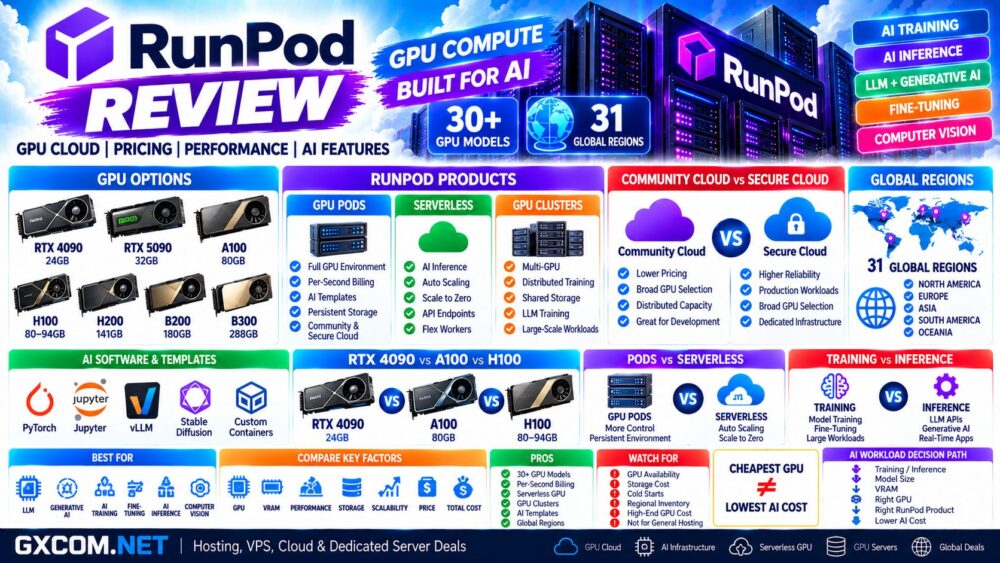
RunPod is a GPU cloud platform built for artificial intelligence, machine learning, large language models, generative AI, inference, fine-tuning, and other GPU-intensive workloads.
Instead of requiring developers to purchase expensive GPU hardware, RunPod provides on-demand access to a large catalog of NVIDIA accelerators ranging from affordable RTX GPUs to A100, H100, H200, B200, and B300 systems.
Its infrastructure is divided into three major products: GPU Pods for flexible GPU instances, Serverless for automatically scaling AI inference, and Clusters for distributed multi-GPU workloads.
This makes RunPod relevant to individual AI developers as well as teams running production inference or large training jobs.
In this RunPod Review, we examine GPU pricing, Community Cloud vs Secure Cloud, H100 and A100 options, Serverless GPU infrastructure, performance considerations, storage, global availability, AI features, and the major pros and cons to consider before renting GPU compute.
RunPod Review: Quick Overview
| Feature | RunPod |
|---|---|
| Primary Focus | GPU Cloud and AI Infrastructure |
| GPU Models | 30+ models |
| Global Regions | 31 |
| GPU Pods | Yes |
| Serverless GPU | Yes |
| GPU Clusters | Yes |
| Community Cloud | Yes |
| Secure Cloud | Yes |
| Per-Second Billing | Yes |
| NVIDIA RTX | Yes |
| NVIDIA A100 | Yes |
| NVIDIA H100 | Yes |
| NVIDIA H200 | Yes |
| NVIDIA B200 / B300 | Yes |
| Templates | Yes |
| Persistent Storage | Network Volumes |
| Best For | AI, LLMs, inference, training, fine-tuning and development |
What Is RunPod?
RunPod is a specialized GPU cloud rather than a conventional web hosting provider.
Its infrastructure is designed around GPU compute and AI development, allowing users to deploy accelerator-equipped environments without purchasing or maintaining physical GPU servers.
The platform currently revolves around three primary compute models:
- GPU Pods
- Serverless GPUs
- GPU Clusters
Each addresses a different workload.
Pods provide persistent GPU instances with greater control. Serverless is designed primarily for inference workloads that need automatic scaling. Clusters provide multi-GPU infrastructure for larger distributed jobs.
RunPod GPU Pods
GPU Pods are RunPod's general-purpose GPU instances.
They are suitable when you want direct access to a GPU environment for workloads such as:
- LLM development
- Model training
- Fine-tuning
- Stable Diffusion
- Computer vision
- AI research
- Jupyter development
- Batch processing
- AI inference
RunPod currently offers more than 30 GPU models across its cloud infrastructure, giving developers considerably more choice than a platform built around only one or two accelerator families.
RunPod GPU Pricing
GPU pricing changes according to GPU model, cloud tier, region, availability, and deployment type.
RunPod bills GPU compute by the second, making it possible to run short jobs without paying for a full hour of unused capacity.
At the time of this review, examples of current Secure Cloud Pod pricing include:
| GPU | VRAM | Secure Cloud Price* |
|---|---|---|
| RTX A5000 | 24GB | $0.27/hr |
| RTX 4090 | 24GB | $0.74/hr |
| RTX 5090 | 32GB | $0.99/hr |
| A40 | 48GB | $0.49/hr |
| RTX A6000 | 48GB | $0.53/hr |
| L40S | 48GB | $1.09/hr |
| A100 PCIe | 80GB | $1.59/hr |
| A100 SXM | 80GB | $1.59/hr |
| H100 PCIe | 80GB | $2.89/hr |
| H100 SXM | 80GB | $3.49/hr |
| H100 NVL | 94GB | $3.19/hr |
| H200 | 141GB | $4.59/hr |
| B200 | 180GB | $6.79/hr |
| B300 | 288GB | $7.89/hr |
*Published prices can change and availability varies. Always check current RunPod pricing before deploying production infrastructure.
Community Cloud vs Secure Cloud
One of RunPod's important distinctions is between Community Cloud and Secure Cloud.
| Factor | Community Cloud | Secure Cloud |
|---|---|---|
| Pricing | Generally lower | Generally higher |
| GPU Selection | Broad | Broad |
| Infrastructure Model | Distributed community capacity | RunPod Secure Cloud infrastructure |
| Best For | Cost-sensitive development and experiments | More demanding production workloads |
Community Cloud can provide particularly attractive prices for developers experimenting with AI models.
For example, current Community Cloud pricing can place GPUs such as the RTX 4090 substantially below Secure Cloud rates.
However, the cheapest available GPU should not automatically determine where a production application is deployed.
Infrastructure requirements, availability, storage, networking, reliability expectations, and workload duration should also be considered.
RunPod RTX 4090
The RTX 4090 remains one of the most interesting RunPod options for developers seeking strong AI performance without immediately moving to expensive data-center accelerators.
It provides 24GB of VRAM and can be useful for:
- LLM inference
- Stable Diffusion
- Image generation
- LoRA training
- AI development
- Computer vision
- Small and medium model workloads
Current RunPod pricing lists the RTX 4090 from approximately $0.34/hour on Community Cloud, while Secure Cloud pricing is approximately $0.74/hour.
The trade-off is memory capacity.
Twenty-four gigabytes of VRAM can become restrictive for larger language models, large batch sizes, or workloads requiring extensive model context.
RunPod A100
The NVIDIA A100 remains useful for workloads that need substantially more GPU memory than consumer RTX hardware.
RunPod currently provides A100 configurations with up to 80GB of GPU memory.
Typical workloads include:
- Large language models
- Model training
- Fine-tuning
- High-concurrency inference
- Machine learning
- Scientific computing
Current Secure Cloud pricing for both A100 PCIe 80GB and A100 SXM 80GB is approximately $1.59/hour.
Community Cloud can be cheaper when suitable inventory is available.
RunPod H100
The NVIDIA H100 targets significantly more demanding AI workloads.
RunPod currently offers multiple H100 variants, including:
- H100 PCIe 80GB
- H100 SXM 80GB
- H100 NVL 94GB
The H100 is particularly relevant for:
- LLM training
- Generative AI
- High-throughput inference
- Transformer workloads
- AI research
- Large-scale machine learning
However, H100 should not automatically be selected simply because it is faster hardware.
A development workload that fits comfortably into 24GB of VRAM may achieve much better cost efficiency on an RTX 4090 or another lower-cost GPU.
For a broader comparison, see our
NVIDIA H100 Server Hosting
guide.
RunPod H200, B200 and B300
RunPod's GPU catalog has expanded beyond H100-class infrastructure.
Current high-memory options include:
- H200 — 141GB VRAM
- B200 — 180GB VRAM
- B300 — 288GB VRAM
These accelerators become relevant when large models, large context windows, training workloads, or high-throughput inference exceed the practical memory capacity of smaller GPUs.
But GPU memory should still be matched to the model rather than maximized without a workload requirement.
More VRAM ≠ Automatically Better Value.
What Is RunPod Serverless?
RunPod Serverless provides a different model from keeping a GPU Pod continuously online.
Instead of maintaining a dedicated GPU instance, developers can deploy containerized inference workloads behind an API endpoint.
Workers scale according to demand.
This makes Serverless particularly attractive for applications where traffic is variable.
Typical use cases include:
- LLM APIs
- Chatbots
- Image generation APIs
- Speech recognition
- Text-to-speech
- Computer vision APIs
- Generative AI applications
RunPod Serverless Pricing
Serverless pricing differs from Pod pricing because the infrastructure includes automatic worker management and scaling.
Current published Serverless rates include:
| GPU Class | Example GPU | Current Rate* |
|---|---|---|
| 16GB | A4000 / similar | From $0.58/hr |
| 24GB | L4 / A5000 / 3090 | $0.69/hr |
| 24GB PRO | RTX 4090 | $1.10/hr |
| 32GB | RTX 5090 | $1.58/hr |
| 48GB | A6000 / A40 | $1.22/hr |
| 48GB PRO | L40 / L40S / 6000 Ada | $1.75/hr |
| 80GB | A100 | $2.72/hr |
| H200 | 141GB | $5.93/hr |
| B200 | 180GB | $8.64/hr |
| B300 | 280GB class | $9.98/hr |
*Prices are published platform rates at the time of review and can change.
Flex Workers vs Active Workers
RunPod Serverless can be configured around different worker behavior.
Flex workers are useful for variable workloads because they can scale down when demand disappears.
Active workers remain available to reduce startup delays for latency-sensitive production applications.
The decision can be simplified as:
Variable Traffic → Flex Workers
Consistent Low-Latency Traffic → Active Workers
Keeping workers ready generally increases idle infrastructure cost, while scaling to zero can introduce startup latency.
Serverless Cold Starts and FlashBoot
Cold-start latency is one of the important issues with serverless GPU infrastructure.
If no worker is running when a request arrives, infrastructure may need to initialize before inference begins.
RunPod has developed FlashBoot to reduce startup delays and currently advertises sub-200ms startup in supported conditions.
Actual end-to-end application latency can still depend on model size, container initialization, model loading, storage, network conditions, and worker availability.
RunPod Pods vs Serverless
| Factor | GPU Pods | Serverless |
|---|---|---|
| Infrastructure | GPU instance | Auto-scaling workers |
| Control | Higher | Application/API focused |
| Idle Cost | Instance-dependent | Can scale to zero |
| Best For | Development and training | Production inference |
| Scaling | Manual / infrastructure based | Automatic |
| Pricing | Generally lower GPU rate | Higher rate but workload-based scaling |
Neither option is automatically cheaper.
A continuously busy inference service may have different economics from an API that receives only occasional requests.
RunPod GPU Clusters
RunPod Clusters are designed for workloads that require multiple GPUs or multiple nodes.
Current cluster infrastructure can scale to dozens of GPUs and supports shared storage for distributed workloads.
Potential use cases include:
- Distributed LLM training
- Large-scale fine-tuning
- Multi-GPU inference
- AI research
- HPC
Current public Cluster pricing includes H200 SXM and A100 SXM options, while other high-end configurations may require contacting sales.
RunPod Templates
One of RunPod's useful developer features is its template ecosystem.
Instead of configuring every environment manually, developers can start with preconfigured software stacks for common AI workloads.
Examples include environments for:
- PyTorch
- Jupyter
- Stable Diffusion
- vLLM
- AI inference
- Machine learning development
Users can also bring their own container when a custom environment is required.
RunPod Storage
GPU cost is only part of AI infrastructure pricing.
Models, datasets, checkpoints, outputs, and container data also require storage.
RunPod provides persistent network volumes that can remain available independently of individual GPU sessions.
This can be particularly useful when switching between GPUs because large model files do not necessarily need to be downloaded again for every new instance.
When comparing GPU providers, calculate:
GPU + Storage + Data Transfer + Runtime = Real AI Cost.
RunPod Performance
GPU model alone does not determine AI application performance.
Real-world results depend on:
- GPU architecture
- VRAM
- Memory bandwidth
- GPU count
- Interconnect
- CPU
- System RAM
- Storage performance
- Framework
- Quantization
- Batch size
- Model architecture
For example, an RTX 4090 can provide excellent value for smaller models, but its 24GB VRAM and lack of NVLink create limitations for workloads that require large-memory or tightly coupled multi-GPU configurations.
A100, H100, and newer data-center accelerators become more relevant as memory requirements and distributed training complexity increase.
Have We Independently Benchmarked RunPod?
This review evaluates RunPod using its currently published GPU specifications, pricing, infrastructure documentation, and platform features.
Unless GXCOM.NET explicitly publishes benchmark methodology and measured results, provider specifications and published performance claims should not be interpreted as independent GXCOM.NET benchmark results.
AI performance varies dramatically by model and configuration.
For production deployments, benchmark your actual model using metrics such as:
- Tokens per second
- Time to first token
- Requests per second
- GPU utilization
- VRAM usage
- Training throughput
- Cost per request
- Cost per million tokens
RunPod for LLM Training
RunPod supports a broad range of GPUs appropriate for LLM training and fine-tuning.
Smaller fine-tuning jobs may run economically on RTX or A-series GPUs, while larger training workloads can require A100, H100, H200, B200, B300, or multi-GPU clusters.
The correct selection path is:
Model Size → Precision → VRAM → GPU Count → Interconnect → Training Time → Total Cost.
See our
Best GPU Servers for LLM Training
guide for a broader infrastructure comparison.
RunPod for AI Inference
Inference has different priorities from model training.
Training often prioritizes raw compute, memory capacity, memory bandwidth, and multi-GPU communication.
Inference often prioritizes:
- Latency
- Throughput
- VRAM
- Concurrency
- Autoscaling
- Cost per request
This is where RunPod Serverless becomes particularly relevant because workers can scale according to application traffic.
RunPod for Generative AI
RunPod can support a broad range of generative AI applications.
Examples include:
- Large language models
- Image generation
- Text-to-image
- Speech recognition
- Text-to-speech
- Video AI
- AI agents
- Computer vision
The wide GPU catalog means developers can match hardware more closely to the workload rather than paying H100-class prices for every AI application.
RunPod vs Dedicated GPU Server
| Factor | RunPod GPU Cloud | Dedicated GPU Server |
|---|---|---|
| Upfront Hardware Cost | None | Monthly commitment or purchase |
| Deployment | Fast | Usually slower |
| GPU Switching | Easy | Hardware dependent |
| Scaling | Flexible | Limited by physical server |
| Short Workloads | Strong fit | Often less economical |
| High Continuous Utilization | Usage based | Can become cost-effective |
| Hardware Control | Lower | Higher |
GPU cloud is particularly attractive when utilization changes frequently.
Dedicated GPU infrastructure can become more interesting when the same hardware runs continuously at high utilization.
See our
NVIDIA GPU Server vs GPU Cloud
comparison.
RunPod Pros and Cons
| Pros | Cons |
|---|---|
| 30+ GPU models | GPU availability can vary |
| RTX through B300 options | Pricing differs between GPU and cloud tiers |
| Community and Secure Cloud | Storage adds to total cost |
| Per-second billing | High-end GPUs remain expensive |
| Serverless GPU platform | Serverless cold starts require consideration |
| Multi-GPU clusters | AI infrastructure still requires technical knowledge |
| Persistent network storage | Community capacity can be less predictable |
| AI templates | Not designed as conventional website hosting |
| 31 global regions | Exact GPU inventory varies by region |
Who Should Consider RunPod?
RunPod is particularly relevant for:
- AI developers
- Machine learning engineers
- LLM developers
- AI startups
- Researchers
- Generative AI applications
- Fine-tuning workloads
- AI inference APIs
- Image generation
- Computer vision
- GPU development
It is especially attractive when you want access to multiple GPU generations without purchasing the hardware.
Who May Prefer an Alternative?
RunPod may be unnecessary for conventional websites, WordPress, small databases, or applications that do not benefit from GPU acceleration.
Organizations that require complete control over physical GPU hardware may prefer a dedicated GPU server.
Likewise, workloads running at very high utilization continuously for months should compare GPU cloud costs against monthly dedicated GPU infrastructure rather than assuming hourly cloud pricing will always be cheaper.
Is RunPod Good for AI Developers?
RunPod's combination of low-cost RTX GPUs, high-memory data-center accelerators, templates, persistent storage, Serverless endpoints, and multi-GPU infrastructure makes it particularly well aligned with AI development.
The broad GPU catalog is useful because AI workloads vary dramatically.
A developer testing a small model may need only an RTX-class GPU, while a production LLM workload may require 80GB, 141GB, 180GB, or more GPU memory.
The ability to change infrastructure without buying new hardware is therefore one of the platform's main advantages.
Is RunPod Cheap?
RunPod can be inexpensive for certain GPU workloads, particularly when Community Cloud capacity or lower-cost RTX hardware meets the project's requirements.
But “cheap GPU” should not be measured by hourly price alone.
A slower GPU that requires twice as long to finish a workload may cost more than a faster accelerator with a higher hourly rate.
Similarly, an oversized H100 can be poor value for a workload that fits easily on an RTX 4090.
The useful metric is:
Work Completed ÷ Total Infrastructure Cost.
For current offers from multiple providers, see our
Cheap GPU Rental Deals
comparison.
RunPod Review: Final Thoughts
RunPod is one of the more specialized GPU cloud platforms for developers building AI and machine learning applications.
Its major strengths are GPU choice and deployment flexibility. Users can move from inexpensive RTX-class hardware to A100 and H100 accelerators, high-memory H200 and Blackwell GPUs, Serverless inference, or multi-GPU clusters as workload requirements increase.
Per-second billing also makes the platform particularly relevant for experimentation and variable workloads because developers do not necessarily need to maintain expensive GPU infrastructure continuously.
The main challenge is choosing the right GPU and deployment model. Community Cloud, Secure Cloud, Pods, Serverless, and Clusters serve different requirements, and the lowest hourly price does not necessarily produce the lowest cost per completed workload.
Before deploying, use this decision path:
AI Workload → Training / Inference → Model Size → VRAM → GPU → Pods / Serverless / Cluster → Storage → Runtime → Total Cost.