Cloud GPU buyers often focus on the most powerful accelerator available, even when their applications need something more economical. Video analytics, image processing, and smaller AI inference services may benefit more from balanced memory capacity, hardware codecs, and predictable operating costs than from maximum training performance.
This NVIDIA L4 GPU Cloud Review examines the L4’s 24GB memory, video engines, inference capabilities, and deployment economics. It also compares cloud hosting approaches and explains when a larger accelerator makes more sense.
NVIDIA L4 GPU Cloud Review: Quick Verdict
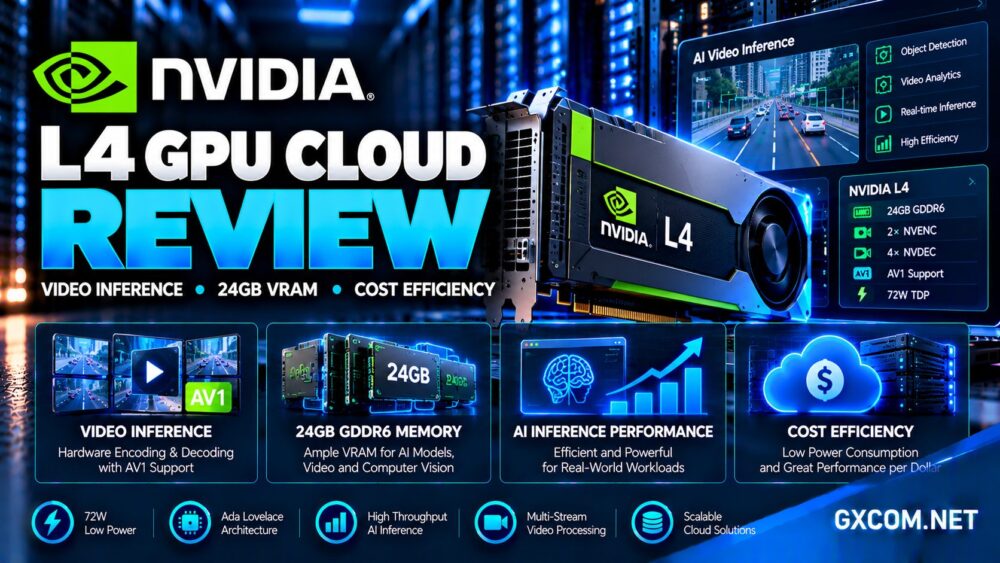
The NVIDIA L4 is an Ada Lovelace data center GPU designed for efficient AI inference, video processing, graphics, and related accelerated workloads.
Its 24GB GDDR6 memory, dedicated video engines, and 72W maximum thermal design power make it attractive for applications that need GPU acceleration without the resource footprint of larger training-oriented hardware.
Our verdict: The L4 is a strong candidate for video AI pipelines, computer vision, transcoding, and smaller inference deployments. It is less compelling when models exceed its memory capacity or workloads require the memory bandwidth and compute scale of high-end accelerators.
Buyers should compare actual throughput per dollar, not simply theoretical GPU specifications.
NVIDIA L4 Specifications Explained
The L4 uses NVIDIA’s Ada Lovelace architecture and fourth-generation Tensor Cores. Its hardware is optimized for a broad mixture of AI, video, and graphics tasks.
| Specification | NVIDIA L4 |
|---|---|
| Architecture | Ada Lovelace |
| GPU memory | 24GB GDDR6 |
| Memory bandwidth | 300GB/s |
| FP32 performance | 30.3 TFLOPS |
| Video engines | 2 NVENC, 4 NVDEC |
| Maximum TDP | 72W |
| Interface | PCIe Gen4 x16 |
These specifications establish the hardware’s capabilities, but they do not guarantee identical performance across cloud providers.
CPU allocation, storage throughput, driver versions, virtualization, and network conditions can influence results.
Video Inference: Where the L4 Stands Out
Video processing is one of the L4’s most important strengths. The accelerator combines dedicated video encoding and decoding hardware with CUDA and Tensor Core capabilities.
This allows applications to decode video, preprocess frames, perform inference, and encode results without relying entirely on general-purpose CPUs.
NVENC, NVDEC and AV1 Support
The L4 includes two NVENC encoding engines and four NVDEC decoding engines. It also supports hardware acceleration for AV1 alongside established video formats.
AV1 can improve compression efficiency for compatible delivery workflows, potentially reducing bandwidth requirements at a comparable visual quality.
However, actual encoding throughput depends on resolution, frame rate, preset, codec, and the surrounding software pipeline.
A cloud instance with an L4 is not automatically capable of serving a specific number of concurrent streams under every configuration.
Computer Vision and Video Analytics
Computer vision applications frequently combine decoding, object detection, segmentation, and postprocessing.
The L4 is suitable for testing such pipelines because it can accelerate multiple stages on the GPU.
For production systems, measure complete pipeline latency rather than inference speed alone. Video decoding, CPU preprocessing, data transfers, and output encoding can become bottlenecks.
Our NVIDIA GPU server providers guide explores infrastructure options for these workloads.
24GB VRAM: What Models Can the L4 Run?
The L4’s 24GB GDDR6 memory provides useful capacity for many computer vision models, embedding systems, image generation applications, and smaller language models.

Nevertheless, usable model capacity depends on precision, context length, batch size, and framework overhead.
Inference Memory Requirements
Model weights are only one component of GPU memory consumption.
Inference applications also need space for activations, runtime buffers, and key-value caches. Longer contexts and concurrent requests can increase memory pressure substantially.
Quantization can reduce model weight requirements, but it may affect quality or performance depending on the implementation.
A model fitting into 24GB during a single test does not guarantee adequate memory for production concurrency.
When 24GB Is Not Enough
Large language models, high-resolution generation, and substantial batch processing can exceed the L4’s available memory.
Multi-GPU configurations may help, but memory does not automatically combine into a single addressable pool.
Distributed execution introduces communication overhead and requires compatible software.
Our GPU vs CPU server comparison explains how accelerator requirements influence infrastructure decisions.
L4 Inference Performance and Its Limitations
The L4 supports modern inference optimizations, including reduced-precision computation through its Tensor Cores.
Frameworks such as TensorRT can help improve throughput when models and execution environments are compatible.
However, advertised peak tensor performance is not the same as sustained application performance.
Real workloads may be constrained by memory bandwidth, CPU preprocessing, request scheduling, or inefficient batching.
For language model serving, measure time to first token, output tokens per second, and latency under realistic concurrency.
For image and video inference, compare frames per second and end-to-end processing time at the required quality settings.
L4 vs T4, L40S and Larger AI GPUs
The L4 occupies a useful position between older inference accelerators and larger GPUs designed for more demanding workloads.
| GPU | Memory | Typical Buying Consideration |
|---|---|---|
| NVIDIA T4 | 16GB | Older inference and video workloads |
| NVIDIA L4 | 24GB | Efficient video and mainstream inference |
| NVIDIA L40S | 48GB | Larger models and heavier graphics workloads |
| NVIDIA H100 | 80GB-class configurations | High-throughput AI training and inference |
The T4 can remain attractive when rental costs are low and applications fit its memory and performance limits.
The L40S provides more memory and greater headroom for larger workloads, while H100-class hardware targets substantially more demanding AI applications.
None is automatically the most economical option. Performance per dollar depends on the application, provider, and utilization rate.
Where to Rent NVIDIA L4 Cloud GPUs
GPU cloud platforms differ in hardware availability, deployment controls, billing, storage, and geographic coverage.
OVHcloud: Explicit L4 Cloud Instances
OVHcloud publishes a dedicated L4 GPU cloud offering with 24GB memory per GPU and configurations supporting multiple L4 accelerators.
It is relevant for buyers who want a clearly specified L4 deployment for inference, video processing, and graphics workloads.
Check regional availability, instance CPU and RAM allocations, networking, and storage before ordering.
RunPod: Flexible GPU Deployment
RunPod offers GPU Pods and other deployment models for AI development and inference.
Its product information includes L4/L40-series GPUs among supported hardware families, although actual availability depends on current inventory.
RunPod can be useful for experimentation and workloads that benefit from flexible deployment periods.
Vast.ai: Marketplace-Based Alternatives
Vast.ai operates a marketplace for GPU compute capacity.
Customers can compare hardware listings and deployment conditions, but should verify whether a suitable L4 instance is currently available rather than assuming permanent inventory.
Host reliability, storage, networking, and interruption policies can materially affect total costs.
Vultr: A Broader GPU Cloud Comparison
Vultr is another provider worth evaluating for cloud GPU infrastructure, especially when geographic deployment and integration with other cloud services matter.
Its available accelerator models may differ from an L4-specific offering, so buyers should verify the actual GPU SKU before making a comparison.
Our Vultr NVIDIA GPU cloud review provides additional context.
NVIDIA L4 Cloud Pricing and Cost Efficiency
The L4’s low hardware power envelope is attractive, but cloud rental pricing reflects much more than electricity consumption.
Providers must account for server hardware, networking, storage, maintenance, infrastructure utilization, and service delivery.
Consequently, a 72W GPU does not automatically produce the cheapest hourly cloud instance.
Measure Cost Per Completed Workload
For video transcoding, compare the cost of processing a fixed number of video hours.
For inference, calculate cost per thousand requests or per million generated tokens under realistic latency requirements.
For computer vision, measure processed frames per dollar while maintaining the required accuracy.
This approach can reveal that a faster, more expensive GPU is cheaper overall when it completes jobs significantly sooner.
Watch for Storage and Idle Costs
Persistent volumes, snapshots, data transfers, and stopped-instance storage can increase spending.
Applications running continuously should be evaluated differently from occasional development jobs.

Our affordable GPU servers comparison helps assess broader hosting economics.
How to Benchmark an L4 Cloud Instance
Begin with a representative workload, including real input sizes, model precision, and expected concurrency.
Record GPU memory consumption, utilization, CPU usage, latency, throughput, and storage behavior.
Repeat tests under sustained load rather than relying on a brief benchmark.
Confirm the installed driver, CUDA version, framework compatibility, and whether the cloud instance provides exclusive accelerator access.
For shared or virtualized environments, examine how resource allocation affects performance consistency.
Our AI GPU VPS providers guide discusses additional deployment considerations.
Frequently Asked Questions
How much VRAM does the NVIDIA L4 have?
The NVIDIA L4 has 24GB of GDDR6 memory with a published bandwidth of 300GB/s.
Is the NVIDIA L4 good for AI inference?
Yes. It is well suited to many smaller inference and computer vision workloads, provided the model and runtime fit its memory and compute limits.
Does the NVIDIA L4 support AV1?
Yes. The L4 supports hardware-accelerated AV1 video encoding and decoding.
Is the L4 better than the H100?
Not for every task. The L4 emphasizes efficient mainstream inference and video processing, while H100-class GPUs target much larger and more demanding AI workloads.
Can I rent an L4 GPU in the cloud?
Yes. OVHcloud publishes L4 cloud instances, and other GPU platforms may offer L4 configurations subject to inventory and region.
Final Verdict: Is NVIDIA L4 Cloud Hosting Worth It?
This NVIDIA L4 GPU Cloud Review finds an accelerator particularly attractive for video pipelines, computer vision, and appropriately sized inference workloads.
Its 24GB memory, AV1-capable video engines, and modest power envelope provide a balanced foundation for efficient GPU applications.
OVHcloud offers a clearly identified L4 cloud product, while RunPod, Vast.ai, and Vultr provide additional GPU hosting approaches worth evaluating against specific workload requirements.
Before purchasing, benchmark actual throughput, confirm available VRAM, check accelerator exclusivity, and calculate complete operating costs. The right GPU is the one that meets your performance target at the lowest sustainable cost.