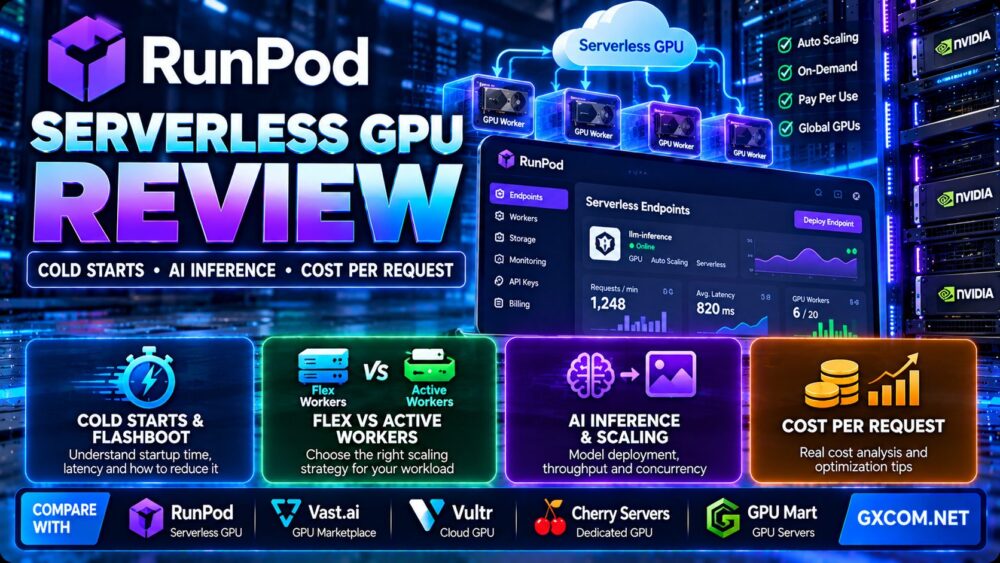
This RunPod Serverless GPU review examines how RunPod handles AI inference, cold starts, autoscaling, GPU worker utilization, and cost per request. For developers building LLM APIs, image generation services, AI agents, or production inference pipelines, the most important question is not simply how much a GPU costs per hour. It is how reliably the platform delivers completed requests at an acceptable latency and total cost.
RunPod Serverless lets developers deploy containerized workloads behind API endpoints without manually maintaining a continuously running GPU server. Workers can scale with demand, while different worker configurations help balance response time and infrastructure spending.
However, serverless GPU hosting is not automatically the cheapest or fastest option for every workload. Cold starts, model initialization, GPU memory requirements, concurrency, queueing, and worker idle time can change the economics considerably.
In this review, we explain how RunPod Serverless works, where its limitations matter, how to calculate effective inference costs, and when alternatives such as Vast.ai, Vultr, Cherry Servers, and GPU Mart may be more suitable.
Editorial methodology: This assessment uses published platform documentation and workload-based technical analysis. GXCOM.NET has not independently benchmarked RunPod cold-start latency, GPU throughput, endpoint uptime, or production request costs. Any numerical examples below are hypothetical unless explicitly identified otherwise.
RunPod Serverless GPU Review: Quick Verdict
RunPod Serverless is worth evaluating for teams that need GPU-backed AI inference endpoints with automatic scaling and less infrastructure administration. Its combination of container deployment, Flex Workers, Active Workers, and usage-based billing provides useful flexibility for both intermittent and predictable workloads.
The strongest use case is an inference service where demand varies and maintaining a dedicated GPU around the clock would create substantial idle capacity.
The biggest trade-off is that scaling from zero can introduce startup delays. Keeping workers warm reduces those delays but increases the amount of time billed.
| Evaluation Area | RunPod Serverless Assessment |
|---|---|
| Primary workload | GPU-accelerated API inference |
| Deployment model | Containerized serverless endpoints |
| Scaling | Configurable worker scaling |
| Worker types | Flex Workers and Active Workers |
| Cold-start mitigation | Warm workers, caching and platform optimizations |
| Billing | Usage-based, with different worker charging behavior |
| GPU selection | Multiple GPU and memory classes |
| Developer control | Custom containers and inference handlers |
| Best fit | Variable-demand AI inference |
| Main limitation | Latency and cost depend heavily on worker configuration |
What Is RunPod Serverless GPU?
RunPod Serverless is a managed execution environment for GPU workloads that respond to API requests. Developers package inference code and dependencies into supported containers, deploy them as endpoints, and configure how workers handle incoming jobs.
Instead of manually creating and maintaining a permanent virtual machine for every inference service, the platform can start and stop workers according to demand.
This is particularly useful for workloads such as:
- Large language model inference.
- AI chatbots and customer support assistants.
- Text-to-image generation.
- Speech transcription and audio processing.
- Computer vision inference.
- Embedding and classification services.
- AI agents calling specialized models.
- Batch-oriented inference jobs.
Serverless GPU hosting is different from renting a traditional GPU instance. With a dedicated instance, customers typically manage the running environment and pay for allocated compute according to the provider's billing rules. With Serverless, worker orchestration and scaling become part of the platform.
For a broader introduction to RunPod's GPU infrastructure, see our RunPod GPU Cloud review.
How RunPod Serverless Works
A typical RunPod Serverless workflow begins with a model, an inference handler, and a compatible container image.
- Prepare the model and its runtime dependencies.
- Build or select a compatible container image.
- Configure the Serverless endpoint and GPU requirements.
- Set worker limits and scaling behavior.
- Send inference requests through the endpoint API.
- Allow available workers to execute jobs.
- Retrieve responses or job results.
- Monitor latency, failures, utilization, and spending.
The simplicity of this workflow depends on how complex the model is. A small classification model may require relatively little initialization, while a large language model may need significant GPU memory and model-loading time.
Container-Based Deployment
RunPod supports custom containerized workloads, giving developers control over model frameworks, libraries, and inference logic within the supported environment.
That flexibility is useful for teams using PyTorch, TensorFlow, ONNX, or custom inference servers.
However, developers remain responsible for packaging compatible dependencies, handling requests correctly, and ensuring that models fit the selected GPU configuration.
Endpoint and Worker Configuration
An endpoint receives requests and distributes work to available workers. Worker settings influence concurrency, startup behavior, throughput, and cost.
Setting too few workers can increase queueing during traffic spikes. Setting too many permanently active workers can create unnecessary spending.
The objective is to match worker capacity to the workload's arrival rate and acceptable response time.
RunPod Cold Starts Explained
Cold starts are among the most important factors in any RunPod Serverless GPU review.
A cold start occurs when a request requires a worker that is not already ready to execute the workload.
The total delay can include multiple stages:
- Finding or allocating suitable GPU capacity.
- Preparing the container execution environment.
- Starting the inference application.
- Loading model weights and dependencies.
- Initializing CUDA or other GPU runtime components.
- Preparing the model for its first inference request.
These stages do not necessarily occur in the same way for every request or every endpoint configuration.
What Is RunPod FlashBoot?
RunPod advertises FlashBoot technology designed to reduce cold-start delays through platform-level optimizations and reusable warm infrastructure.
The company describes sub-200-millisecond cold starts for supported FlashBoot scenarios.
That figure should not be interpreted as a universal guarantee that an arbitrary large model can be loaded and produce its first complete response within 200 milliseconds.
Application initialization, model weights, storage access, and inference time remain important.
Cold Start vs First-Token Latency
Cold-start time and first-token latency are not identical.
Cold-start time concerns worker readiness. Time to first token also includes request handling, prompt processing, and the beginning of model generation.
For a streaming LLM service, users may care more about time to first token and sustained token generation speed than the platform's infrastructure startup metric alone.
Why Model Size Matters
Large models often require more memory and longer initialization than smaller models.
Model format, quantization, weight loading, storage throughput, and inference framework also influence startup behavior.
Even with optimized worker startup, loading a large model can dominate the user's total waiting time.
How to Reduce Cold-Start Delays
- Keep a suitable number of Active Workers available.
- Use optimized and appropriately sized container images.
- Reduce unnecessary runtime initialization steps.
- Store model files where workers can access them efficiently.
- Use supported caching and persistent storage options.
- Choose a GPU with sufficient VRAM.
- Preload models when the application architecture permits.
- Monitor actual first-request latency after idle periods.
The correct solution depends on whether the workload is latency-sensitive, cost-sensitive, or both.
Flex Workers vs Active Workers
RunPod provides two important worker modes for balancing availability and spending.
Flex Workers
Flex Workers are designed to handle demand that changes over time. They can start when requests arrive and scale down when they are no longer needed.
They are useful for development workloads, occasional inference, scheduled processing, and applications with unpredictable bursts.
The trade-off is that a newly started worker may need initialization time before it can process a request.
Active Workers
Active Workers remain available to handle requests without waiting for a worker to start from zero.
They are relevant to production APIs with steady traffic or strict latency expectations.
However, they continue generating compute charges while active, including periods when no useful requests are being processed.
Flex vs Active Worker Comparison
| Factor | Flex Workers | Active Workers |
|---|---|---|
| Primary purpose | Handle variable demand | Maintain ready capacity |
| Scale to zero | Supported | Not while configured to remain active |
| Cold-start exposure | Possible when new workers start | Reduced for ready workers |
| Idle compute charges | Depend on worker lifecycle and timeout | Continue while workers remain active |
| Best traffic pattern | Bursty or intermittent | Steady or latency-sensitive |
| Main risk | Startup and queueing delays | Paying for unused capacity |
For many production applications, the most practical strategy is a combination: maintain enough Active Workers for predictable baseline demand and allow Flex Workers to handle unexpected spikes.

How Worker Idle Timeout Affects Cost
Idle timeout controls how long a Flex Worker may remain available after completing a job.
A longer timeout can reduce repeated cold starts when requests arrive close together.
However, it may increase billable worker time if the next request does not arrive.
A shorter timeout can reduce idle spending but increase the chance that a later request needs a new worker.
Consider a hypothetical endpoint receiving requests in clusters every few minutes.
If workers shut down immediately after each job, many clusters may trigger initialization.
If workers remain available briefly, several requests may reuse the same worker. The best setting depends on the distribution of time between requests, not simply the average daily request count.
RunPod AI Inference Performance: What Should You Measure?
Serverless GPU performance should be evaluated using real application workloads rather than GPU model names alone.
Time to First Token
For streaming language models, time to first token indicates how quickly the user begins receiving a response.
It includes more than raw GPU execution speed. Queueing, network latency, model initialization, and prompt processing can all contribute.
Tokens per Second
Generation throughput measures how quickly a model produces output tokens once generation begins.
It depends on GPU architecture, model size, precision, batching, memory bandwidth, and inference software.
Requests per Second
Requests per second measures service-level throughput, but it should be reported alongside request size and latency.
A platform handling many short classification requests cannot be compared directly with one generating long LLM responses.
Queueing Delay
Queueing occurs when incoming requests exceed available worker capacity.
High GPU utilization can be desirable, but persistent queues may indicate that the endpoint needs more concurrency or additional workers.
Tail Latency
Average latency can conceal poor experiences during traffic spikes.
Measure p50, p95, and p99 response times to understand how frequently users encounter slow requests.
Error and Retry Rates
Failed requests can increase both customer-visible latency and total operational cost.
Track timeouts, worker errors, application exceptions, and retries separately from successful inference requests.
Choosing the Right GPU for Serverless Inference
RunPod offers multiple GPU memory classes and architectures, but availability and supported endpoint configurations can change.
The right GPU depends on model memory requirements, precision, batching, expected throughput, and cost per successful result.
Smaller GPU Memory Classes
Smaller models, embeddings, lightweight computer vision, and some quantized language models may fit within lower-VRAM configurations.
However, model weights are only part of GPU memory usage. Runtime overhead, activations, and the key-value cache can also consume substantial memory.
Midrange GPU Memory Classes
Midrange configurations can be appropriate for larger inference models, image generation, and workloads requiring additional batching capacity.
GPU selection should account for sustained throughput rather than simply whether a model loads successfully.
High-Memory GPUs
High-memory GPUs may be necessary for larger language models, longer context windows, and higher concurrency.
However, a higher hourly rate does not automatically mean a higher cost per completed request.
A faster GPU may process more requests in the same amount of billable time.
For broader GPU infrastructure options, explore our NVIDIA GPU server providers guide.
RunPod Serverless Pricing: What Are You Actually Paying For?
RunPod Serverless uses usage-based GPU worker billing, with prices varying by GPU class and worker configuration.
Customers should verify current rates on the official pricing page because hardware availability and rates can change.
Effective spending depends on several factors:
- Selected GPU and memory class.
- Flex Worker or Active Worker configuration.
- Total billable worker runtime.
- Model initialization and warm-up.
- Idle timeout behavior.
- Concurrency and batching efficiency.
- Additional storage or network-related charges, where applicable.
- Failed requests and retries.
For Active Workers, keeping capacity available can generate charges even without incoming requests.
For Flex Workers, scaling to zero can reduce idle compute costs, but startup and configured idle periods may affect total billable time.
How to Calculate RunPod Cost per Request
The most useful cost metric is often the expense of completing a successful inference request at the required service quality.
A basic calculation is:
Cost per successful request = Total attributable operating cost / Number of successfully completed requests
For an endpoint, attributable operating cost can include worker compute, initialization, idle capacity, storage, and other applicable service charges.
It is important to distinguish total incoming requests from successful requests. Retries and failures can increase spending without increasing useful output.
Hypothetical Example: Flex Workers
Assume an illustrative GPU worker rate of $1.20 per hour. This is a fictional rate used only to demonstrate the calculation.
Suppose the endpoint records 900 billable worker-seconds and completes 300 successful inference requests.
Compute cost = $1.20 × (900 / 3,600) = $0.30.
Compute cost per successful request = $0.30 / 300 = $0.001.
That equals $1.00 per 1,000 successful requests, excluding storage, networking, and other applicable charges.
The example assumes all 900 worker-seconds are attributable to those requests and that there are no additional compute charges.
Hypothetical Example: Active Worker
Now assume a fictional Active Worker rate of $0.80 per hour.
If one worker remains active for 24 hours, the compute charge would be:
$0.80 × 24 = $19.20.
If it completes 12,000 successful requests during that period:
$19.20 / 12,000 = $0.0016 per request.
That equals $1.60 per 1,000 successful requests, before other charges.
Despite the lower hourly rate, the Active Worker can cost more per request if utilization is insufficient.
Why a More Expensive GPU Can Be Cheaper per Request
Consider two hypothetical GPUs:
| Metric | GPU A | GPU B |
|---|---|---|
| Illustrative hourly cost | $1.00 | $2.00 |
| Successful requests per hour | 600 | 1,800 |
| Compute cost per request | $0.00167 | $0.00111 |
| Compute cost per 1,000 requests | $1.67 | $1.11 |
These figures are hypothetical and do not represent tested RunPod GPU benchmarks.
GPU B costs twice as much per hour but delivers three times the throughput in this example, resulting in a lower compute cost per successful request.
This is why selecting a GPU solely by its hourly price can produce misleading conclusions.
Serverless GPU vs Dedicated GPU: Which Is More Cost-Effective?
Serverless GPU infrastructure is attractive when workloads are intermittent, unpredictable, or highly variable.
Dedicated GPU servers can become more attractive when workloads run continuously and achieve consistently high utilization.
| Factor | Serverless GPU | Dedicated GPU |
|---|---|---|
| Scaling | Worker-based automatic scaling | Customer-managed or provider-specific |
| Idle compute | Can scale down with Flex Workers | Typically remains allocated |
| Cold starts | Possible during worker startup | Less relevant when services remain running |
| Low-level control | Platform-defined environment | Often greater infrastructure control |
| Predictable steady demand | Depends on worker utilization | May offer favorable economics |
| Unpredictable demand | Potentially strong fit | Can result in unused capacity |
For a deeper comparison of compute purchasing models, see our spot vs on-demand GPU server guide.
Spot pricing and serverless billing are not identical models, but both demonstrate why interruption risk, utilization, and workload duration matter when evaluating GPU costs.
RunPod vs Vast.ai vs Vultr vs Cherry Servers vs GPU Mart
RunPod competes with several different types of GPU infrastructure providers. However, these services are not always direct substitutes.
| Provider | Primary Infrastructure Model | Evaluation Focus |
|---|---|---|
| RunPod | GPU Pods, Serverless and other GPU infrastructure | Managed inference endpoints and GPU deployment |
| Vast.ai | GPU marketplace | Host selection, availability and instance economics |
| Vultr | Cloud GPU infrastructure | Configurable cloud instances and infrastructure control |
| Cherry Servers | Dedicated and cloud infrastructure | Dedicated GPU capacity and hardware control |
| GPU Mart | GPU servers and hosting | Fixed GPU configurations and server resources |
RunPod vs Vast.ai
Vast.ai uses a marketplace model where GPU availability, hardware configurations, and host characteristics can vary.
RunPod Serverless provides a more managed endpoint-oriented workflow for applications that need automatic worker scaling.
Vast.ai may be worth considering for teams comfortable managing GPU instances and comparing marketplace offerings.
RunPod Serverless may be preferable when endpoint orchestration and reduced infrastructure management are priorities.
RunPod vs Vultr
Vultr offers cloud GPU infrastructure that can support AI training and inference workloads.
Customers who need direct control over cloud instances may prefer a conventional GPU cloud deployment.
RunPod Serverless is more specifically designed around request-driven worker execution.
Read our Vultr Cloud GPU review for more on GPU instance selection, infrastructure control, and cost considerations.
RunPod vs Cherry Servers
Cherry Servers offers infrastructure options relevant to customers requiring dedicated server resources and greater hardware control.
Dedicated GPU capacity may suit sustained AI inference, training, or custom environments.
RunPod Serverless is more relevant when workload demand changes significantly and automated scaling is valuable.
RunPod vs GPU Mart
GPU Mart provides GPU-oriented hosting and server products.
It may be relevant to customers who prefer fixed server configurations and predictable resource allocation.
RunPod Serverless may suit API-oriented workloads where compute capacity needs to expand or contract according to incoming requests.
Before choosing either model, compare GPU memory, software compatibility, operational responsibilities, and total cost per completed workload.
Best Use Cases for RunPod Serverless
AI Chatbots and LLM APIs
Chatbots often experience demand fluctuations throughout the day.
Serverless workers can help align compute capacity with traffic, while Active Workers can maintain ready capacity for latency-sensitive interactions.
Image Generation APIs
Image generation workloads can require substantial GPU resources but may arrive in bursts.
Serverless execution can reduce the need to keep dedicated GPU capacity continuously allocated.
Speech and Audio Processing
Speech transcription and audio analysis can be processed through asynchronous jobs when immediate responses are not essential.
This makes worker scaling and queue management important cost considerations.
Computer Vision Services
Image classification, object detection, and document analysis can benefit from request-driven GPU execution.
Batching and efficient preprocessing may improve throughput.
AI SaaS Products
AI SaaS businesses often need to handle unpredictable customer activity.
Combining baseline Active Workers with burst capacity from Flex Workers can provide a practical starting architecture.
When RunPod Serverless May Not Be the Best Choice
Serverless GPU hosting is not suitable for every AI workload.
Continuous High-Utilization Inference
If a model processes requests continuously at high utilization, dedicated GPU capacity may offer better economics.
The correct comparison is cost per completed request at the required latency, not simply the hourly rate.
Long-Running Training Jobs
Training jobs with persistent execution, checkpoints, and large datasets may be better suited to dedicated GPU instances or clusters.
Serverless endpoints are primarily designed around request-driven execution.
Highly Customized Infrastructure
Applications requiring unusual drivers, operating system modifications, or specialized networking may need infrastructure-level control beyond the serverless environment.
Strict Latency Requirements
Applications with very tight latency targets should test actual endpoint behavior, including queueing and cold-start conditions.

Active Workers can reduce startup delays, but they do not eliminate network latency, application processing, or model execution time.
How to Optimize RunPod Serverless Costs
- Measure baseline traffic. Determine how many requests arrive during normal periods.
- Use Active Workers selectively. Keep only the capacity needed for predictable demand.
- Allow Flex Workers to absorb spikes. Avoid permanently allocating maximum peak capacity.
- Tune idle timeout. Balance repeated startup costs against idle worker charges.
- Optimize model loading. Reduce unnecessary initialization and data transfers.
- Select GPUs by throughput. Compare successful requests per dollar, not only hourly price.
- Use batching where appropriate. Improve utilization without violating latency requirements.
- Monitor queueing. Identify when workers are saturated.
- Track failed requests. Include retries in cost calculations.
- Review storage charges. Include persistent model files and other required services.
- Test under realistic traffic. Use production-like request lengths and concurrency.
- Recalculate costs regularly. Workload patterns and GPU prices can change.
RunPod Serverless Pros and Cons
Advantages
- GPU-backed API inference without manually maintaining every server.
- Flexible worker scaling for variable workloads.
- Active Workers for ready inference capacity.
- Support for custom containerized applications.
- Multiple GPU memory and performance classes.
- Usage-based billing suitable for intermittent workloads.
- Potential to reduce idle GPU spending.
- Platform features designed to reduce cold-start delays.
- Useful architecture for AI APIs and SaaS products.
Limitations
- Cold starts can affect newly launched workers.
- Large models may require substantial initialization time.
- Active Workers incur charges while running.
- Flex Worker idle timeout can affect spending.
- GPU availability and supported configurations can change.
- Queueing and concurrency require careful tuning.
- Custom containers still require maintenance.
- Continuous workloads may be cheaper on dedicated GPU infrastructure.
- Effective cost per request is workload-dependent.
RunPod Serverless Deployment Checklist
- Define the model and required GPU memory.
- Identify acceptable p95 and p99 latency.
- Choose synchronous or asynchronous request handling.
- Package the model in a supported container.
- Optimize model initialization.
- Select a compatible GPU class.
- Configure Flex and Active Worker limits.
- Set an appropriate idle timeout.
- Test cold starts after idle periods.
- Measure first-token latency and throughput.
- Monitor queueing and failed jobs.
- Calculate cost per successful request.
- Compare results with a dedicated GPU deployment.
- Review production monitoring and recovery procedures.
Frequently Asked Questions
What is RunPod Serverless GPU?
RunPod Serverless is a GPU-backed execution platform that runs containerized AI workloads through API endpoints with configurable worker scaling.
Does RunPod Serverless have cold starts?
Cold starts can occur when a new worker must be prepared. RunPod provides technologies and configuration options to reduce startup delays, including FlashBoot and Active Workers.
Is RunPod FlashBoot always under 200 milliseconds?
No universal end-to-end guarantee should be inferred from the advertised figure. Actual model readiness and response time depend on workload initialization, storage, GPU availability, and application processing.
What is the difference between Flex and Active Workers?
Flex Workers handle changing demand and can scale down. Active Workers maintain ready capacity but generate charges while they remain active.
Is RunPod Serverless cheaper than a dedicated GPU?
It can be for intermittent workloads. Dedicated GPU infrastructure may be more economical for sustained high-utilization inference.
How is RunPod cost per request calculated?
Divide total attributable operating cost by the number of successfully completed requests. Include worker compute, idle time, initialization, and applicable additional charges.
Can RunPod Serverless run large language models?
Yes, provided the selected GPU, runtime, and endpoint configuration support the model's memory and compute requirements.
Can RunPod Serverless scale to zero?
Flex Worker configurations can scale to zero when idle. Active Workers remain running while configured as active capacity.
Is RunPod Serverless good for AI SaaS?
It can be a strong option for AI SaaS products with variable traffic, provided worker configuration meets latency and cost requirements.
Should I choose RunPod Serverless or a GPU Pod?
Choose Serverless for request-driven workloads that benefit from automatic scaling. Consider GPU Pods for development, custom infrastructure requirements, and long-running jobs.
Final Verdict: Is RunPod Serverless Worth It?
Our RunPod Serverless GPU review finds that the platform is a practical option for developers deploying GPU-backed AI inference APIs without managing dedicated server capacity for every workload.
Flex Workers help match compute usage to changing demand, while Active Workers provide ready capacity for applications where response time matters.
However, effective performance and cost depend on GPU selection, model initialization, worker scaling, queueing, utilization, and request success rates.
For bursty AI inference, RunPod Serverless deserves serious consideration. For continuous, high-utilization workloads, compare its total cost against dedicated GPU infrastructure from providers such as Vast.ai, Vultr, Cherry Servers, and GPU Mart.
MODEL REQUIREMENTS → GPU MEMORY → COLD STARTS → WORKER CONFIGURATION → LATENCY → THROUGHPUT → COST PER SUCCESSFUL REQUEST → DEPLOYMENT DECISION