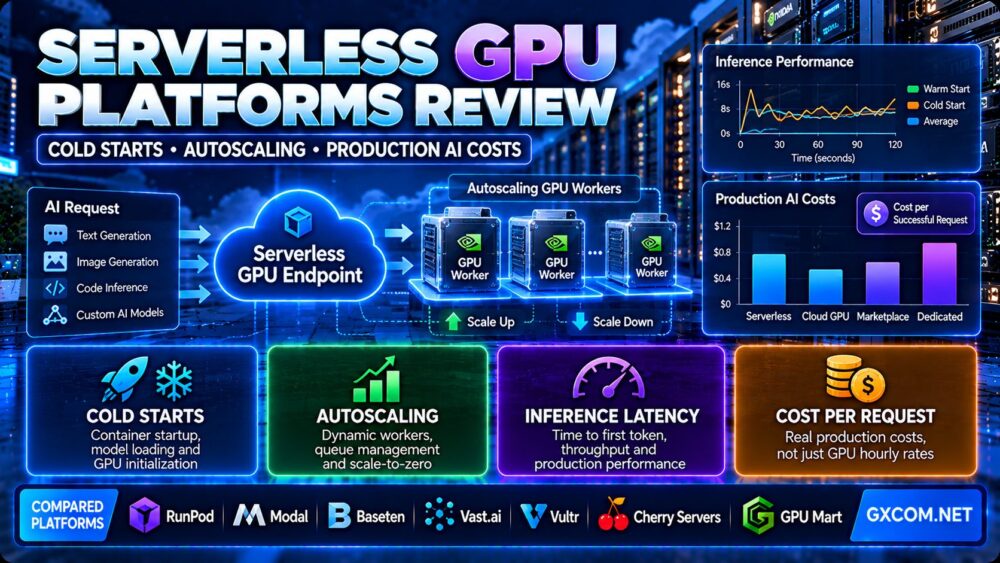
This serverless GPU platforms review compares the technologies, deployment models, and operating costs behind modern AI inference infrastructure. We examine GPU cold starts, autoscaling behavior, concurrency, latency, utilization, and the cost of serving real production workloads.
Serverless GPU computing can help AI developers avoid paying for continuously running accelerators when request traffic is unpredictable. Instead of maintaining a permanently allocated GPU server, a serverless platform can start workers when needed and reduce capacity as demand falls.
However, serverless does not mean zero operational complexity or universally lower costs. GPU initialization, model loading, worker warm-up, request queues, storage, and networking can all affect both performance and billing.
For production applications, the right platform is the one that meets latency and reliability requirements at an acceptable cost per successful request.
In this review, we compare RunPod, Modal, and Baseten as serverless or managed inference platforms, while examining Vast.ai, Vultr, Cherry Servers, and GPU Mart as alternative GPU infrastructure models.
Editorial methodology: This article is based on publicly documented platform features and general AI inference engineering principles. GXCOM.NET has not independently benchmarked the providers or measured their uptime, cold-start latency, or production throughput. Pricing and feature availability should be confirmed before deployment.
Serverless GPU Platforms Review: Quick Verdict
Serverless GPU platforms are especially useful for AI applications with variable demand, bursty traffic, asynchronous jobs, and workloads that can tolerate occasional worker startup delays.
They can reduce idle GPU spending and simplify some infrastructure management tasks.
However, applications requiring consistently low latency or continuous high utilization may benefit from pre-warmed workers, reserved GPU capacity, or dedicated GPU servers.
The best choice depends on traffic patterns, model size, startup time, concurrency, software requirements, and the total cost of successful inference.
| Evaluation Area | What Matters |
|---|---|
| Cold starts | Container startup, model loading and GPU initialization |
| Autoscaling | Worker provisioning, queue depth and scale-down behavior |
| Latency | Time to first token, request duration and tail latency |
| Concurrency | Requests handled per worker and total available workers |
| GPU selection | VRAM, architecture and model compatibility |
| Billing | Compute time, startup overhead and applicable resource charges |
| Storage | Model caching, persistent volumes and checkpoint access |
| Reliability | Retries, timeouts, health checks and regional availability |
| Best economic metric | Cost per successful request at target latency |
What Is a Serverless GPU Platform?
A serverless GPU platform allows developers to run GPU-accelerated workloads without directly managing a permanently running GPU server.
Depending on the provider, developers may deploy container images, Python functions, model-serving endpoints, or managed inference applications.
The platform manages some combination of worker provisioning, scheduling, scaling, and request routing.
The underlying GPUs still exist as physical infrastructure. Serverless describes the service and operating model, not the absence of servers.
How Serverless GPU Inference Works
- A user sends a request to an inference API.
- The platform routes the request to an available worker or queue.
- If no suitable worker is ready, additional compute may be started.
- The worker loads the required container, dependencies, and model.
- The GPU processes the request.
- The application returns its output.
- The platform retains or releases worker capacity according to scaling rules.
The user experience depends on how quickly workers become available and how efficiently they process requests.
GPU Cold Starts Explained
A cold start occurs when an inference request must wait for a worker that is not already ready to process the workload.
Cold-start delays are especially important for interactive applications such as AI chatbots, coding assistants, image generation services, and real-time APIs.
Container Initialization
The platform may need to provision compute and start the application container.
Large container images, initialization scripts, and dependency checks can increase startup time.
Model Loading
Model weights must often be transferred from storage into system memory or GPU memory.
Large models can require substantial loading time, particularly when storage bandwidth is limited.
GPU Initialization
GPU drivers, CUDA contexts, framework libraries, and inference engines may require initialization.
Some platforms optimize these steps through snapshots, caching, or other startup acceleration techniques.
Compilation and Warm-Up
Certain inference frameworks compile kernels, construct execution graphs, or perform warm-up operations.
These steps can add latency before the first useful request completes.
Cold Start vs Warm Start
| Metric | Cold Start | Warm Start |
|---|---|---|
| Worker availability | Worker may need provisioning | Worker already running |
| Container startup | May be required | Usually already completed |
| Model loading | May be required | Model may remain in GPU memory |
| Initial latency | Potentially higher | Generally lower |
| Idle compute spending | Can be reduced through scale-to-zero | May continue while workers remain active |
Published cold-start claims should be interpreted carefully. A platform may report rapid worker startup under certain conditions, but the full application cold start can also include model downloads, loading, and initialization.
How to Reduce Serverless GPU Cold Starts
Keep Critical Workers Warm
Pre-warmed workers can respond without waiting for a new GPU environment to initialize.
However, keeping workers active may create continuous compute charges.
Optimize Container Images
Remove unnecessary packages, minimize initialization scripts, and use compatible base images.
Prebuild dependencies rather than installing them during every startup.
Cache Model Weights
Use supported persistent storage or model caching to avoid repeatedly downloading large weights.
Verify whether cached data survives worker termination and whether it is shared across workers.
Reduce Model Loading Overhead
Evaluate supported quantization formats, efficient inference engines, and model loading strategies.
Any optimization should preserve acceptable model quality.
Separate Interactive and Batch Workloads
Interactive APIs may need warm capacity, while background jobs can tolerate longer queue times.
Separating the two can improve cost control.
Serverless GPU Autoscaling: How It Really Works
Autoscaling adjusts available GPU workers as demand changes.
However, different platforms use different scaling signals and operational limits.
Queue-Based Autoscaling
A queue-based system adds workers when requests accumulate or wait too long.
This can improve utilization, but users may experience queueing delays during sudden traffic spikes.
Request-Based Autoscaling
Request-based scaling can respond to the number of pending or active requests.
It may be more aggressive, potentially improving response time at the cost of additional active capacity.
Concurrency Limits
Each worker can process only as much work as its GPU memory, compute capacity, and serving application allow.
Increasing request concurrency without sufficient memory can cause out-of-memory errors or excessive latency.
Maximum Worker Limits
A maximum worker setting can help control spending and prevent unbounded scaling.
However, a low limit can cause requests to queue or fail during demand spikes.
Scale-Down Policies
Platforms often retain idle workers briefly before releasing them.
This can reduce repeated cold starts when traffic arrives in short bursts.
However, warm retention time may remain billable under the provider's pricing model.
Autoscaling Is Not Instant Capacity
Autoscaling does not guarantee that a specific GPU is immediately available in every region.
Provisioning speed, inventory constraints, and model initialization can limit responsiveness.
RunPod Serverless GPU Review
RunPod provides serverless GPU endpoints for containerized AI inference workloads.

Its architecture includes worker scaling options designed to balance latency and cost.
Flex Workers
RunPod Flex Workers can scale to zero when idle.
This can reduce spending for applications with intermittent requests.
However, a new worker may need to start when traffic resumes.
Active Workers
Active Workers remain running and ready to handle requests.
They reduce cold-start exposure but generate ongoing compute charges.
GPU Selection
RunPod offers different GPU memory classes and hardware options for serverless workloads.
Actual availability and pricing depend on the current product catalog.
Billing Considerations
RunPod's documentation describes per-second worker billing, including startup, execution, and the period before an idle worker stops.
Storage charges can also apply under the selected configuration.
Best Fit
RunPod Serverless is worth evaluating for custom containerized AI inference applications that need adjustable GPU capacity.
For a deeper platform-specific analysis, read our RunPod Serverless GPU Review.
Modal Serverless GPU Review
Modal provides a serverless computing platform for GPU workloads, Python applications, data processing, and AI inference.
Its development model emphasizes defining and deploying compute workloads without managing conventional virtual machines.
Development Workflow
Modal can be attractive for developers working with Python-based AI applications and functions.
Teams should evaluate whether the platform's deployment model fits their application architecture.
Autoscaling
Modal supports automatic scaling based on workload demand.
Its platform can allocate compute resources when needed and reduce unused capacity.
GPU and Resource Billing
Modal publishes separate pricing components for GPU compute, CPU, memory, storage, and network usage.
Its documentation also explains that container startup and warm retention time can contribute to billing.
Best Fit
Modal may suit teams seeking a developer-oriented serverless environment for GPU functions and AI workloads.
Evaluate total resource billing and application startup behavior before selecting it for production.
Baseten AI Inference Platform Review
Baseten focuses on managed AI inference deployment and production model serving.
It provides infrastructure and tooling intended to help organizations deploy models with autoscaling and performance optimization.
Managed Model Deployment
Baseten supports deployment workflows for custom and supported models.
Its services can reduce some of the operational work involved in serving AI models.
Autoscaling and Production Operations
Baseten emphasizes autoscaling and production inference capabilities.
Customers should review available service tiers, deployment options, and contractual commitments.
Pricing Models
Baseten offers different approaches, including managed model APIs and dedicated deployment options.
These pricing models are not directly interchangeable.
Best Fit
Baseten may be relevant to businesses prioritizing managed inference operations and deployment tooling.
Compare the cost of serving the same model under equivalent latency and throughput requirements.
Serverless GPU Platforms Compared
| Platform | Primary Model | Best Evaluation Focus |
|---|---|---|
| RunPod Serverless | GPU API endpoints with configurable workers | Flex vs Active, model loading and worker costs |
| Modal | Serverless GPU functions and applications | Developer workflow and resource-based billing |
| Baseten | Managed AI inference deployment | Production operations, scaling and serving economics |
None of these platforms is universally best for every AI application.
The correct choice depends on the model, deployment workflow, traffic pattern, service requirements, and actual cost per completed request.
Serverless GPU vs GPU Marketplace vs Dedicated GPU Servers
Serverless inference is only one way to access GPU computing.
Other infrastructure models may be more appropriate for continuous workloads or specialized deployment requirements.
Vast.ai GPU Marketplace
Vast.ai offers a marketplace where customers select GPU machines with different hardware and host characteristics.
This approach can provide flexibility, but customers must evaluate reliability, storage, networking, and rental conditions.
Marketplace instances are not automatically managed serverless endpoints.
See our Vast.ai GPU Marketplace Review for a detailed analysis of host reliability and workload costs.
Vultr Cloud GPU
Vultr offers cloud GPU infrastructure suitable for applications requiring conventional cloud instance control.
Customers may manage their own inference services, scaling systems, and application environments.
Cloud GPU instances can be attractive when predictable access to allocated infrastructure is more important than scale-to-zero behavior.
Cherry Servers
Cherry Servers provides dedicated and cloud infrastructure, including selected GPU-capable server options.
Dedicated infrastructure may suit sustained workloads requiring predictable hardware allocation and greater server control.
GPU Mart
GPU Mart offers GPU server hosting and related infrastructure products.
Its conventional server rental approach may suit workloads that need a persistent GPU environment rather than an automatically scaling inference endpoint.
Deployment Model Comparison
| Model | Key Benefit | Main Trade-Off |
|---|---|---|
| Serverless GPU | Elastic capacity and reduced idle compute | Cold starts and scaling overhead |
| GPU Marketplace | Flexible selection of available machines | Host variability and management work |
| Cloud GPU Instance | Conventional cloud infrastructure control | Ongoing capacity management |
| Dedicated GPU Server | Predictable hardware allocation | Capacity commitment and idle resource cost |
Production AI Costs: Why GPU Hourly Rates Are Not Enough
For production AI systems, the most meaningful metric is often the cost of serving a successful request within the required latency target.
Hourly GPU pricing alone ignores important factors such as initialization, idle workers, failed requests, retries, and storage.
Compute Execution
GPU processing time is a primary cost component.
However, actual throughput depends on the model, GPU, precision, batching, and inference engine.
Cold-Start Overhead
When workers must initialize before serving requests, startup time may be billable.
Repeated cold starts can increase effective cost under bursty traffic patterns.
Warm Worker Costs
Pre-warmed workers reduce startup latency but may continue generating charges during idle periods.
Storage Costs
Model weights, persistent volumes, temporary files, and logs can generate storage expenses.
Network Charges
Network egress and data transfer policies vary between providers.
Large output artifacts, images, and video workloads may require particular attention.
Failed Requests
Requests that time out or fail can consume compute without delivering a successful result.
Retries may increase spending further.
Cost Formula
Total production inference cost = GPU compute + CPU and memory charges + Storage + Network transfer + Warm capacity + Retry overhead + Other required services.
Cost per successful request = Total attributable cost / Number of successfully completed requests.
For language models, also measure cost per million input tokens and cost per million output tokens at the required service quality.
Hypothetical Cost Example: Serverless vs Always-On GPU
Consider a fictional inference service with two possible deployment models.
The following numbers are illustrative and do not represent current pricing from any provider.
| Metric | Serverless | Always-On GPU |
|---|---|---|
| Illustrative compute rate | $1.20 per active hour | $0.80 per allocated hour |
| Billable hours per month | 120 | 720 |
| Illustrative compute cost | $144 | $576 |
| Idle capacity exposure | Lower if scale-to-zero is effective | Continuous |
| Cold-start exposure | Possible | Usually reduced while running |
In this example, serverless compute is less expensive because the application has relatively low utilization.
However, if serverless billable usage rises to 600 hours at the same rate, compute spending becomes $720.
At that point, the illustrative always-on GPU costs less in compute charges.
This comparison excludes differences in GPU performance, worker concurrency, storage, network, and operational overhead.
Break-Even Utilization
A simplified break-even calculation is:
Break-even serverless hours = Always-on monthly compute cost / Serverless hourly compute rate.
Using the illustrative numbers:
$576 / $1.20 = 480 serverless billable hours.
If the application requires fewer than 480 equivalent billable serverless hours, serverless has the lower illustrative compute cost.
If it requires more, the always-on option has the lower illustrative compute cost.
Real decisions require performance-normalized comparisons, because the two GPU configurations may complete different amounts of useful work per hour.
How Traffic Patterns Affect Serverless GPU Costs
Low and Sporadic Traffic
Serverless can reduce idle spending when requests arrive infrequently.
However, users may experience cold-start delays after idle periods.
Bursty Traffic
Autoscaling can help handle sudden request spikes, provided sufficient GPU capacity is available.
Queueing and worker initialization can still affect response times.
Steady Traffic
Consistent demand can keep GPU workers busy for long periods.
In these cases, dedicated or reserved capacity may become economically attractive.
Mixed Traffic
Applications with predictable baseline demand and occasional spikes may benefit from hybrid infrastructure.
For example, a team may maintain a small amount of warm capacity while using elastic workers for overflow traffic.
Latency Metrics That Matter in Production
Time to First Token
Time to first token measures the delay before a language model begins generating its response.
It is important for interactive AI applications.
End-to-End Request Latency
Total latency includes queueing, startup, model execution, and network transfer.
Measure the full user experience rather than GPU execution time alone.
P95 and P99 Latency
Average latency can hide occasional very slow requests.
P95 and P99 latency help reveal the experience of users affected by slower responses.
Queue Wait Time
Long queues can indicate insufficient worker capacity or aggressive cost-saving scaling rules.
Throughput
Measure requests per second, images per minute, or tokens per second, depending on the workload.
Success Rate
Track successful requests, errors, timeouts, and retries.
A system with low average compute cost but frequent failures may be economically inefficient.
GPU Selection for Serverless AI Inference
GPU selection should follow model memory requirements and expected workload performance.
GPU VRAM
Model weights, activations, runtime overhead, and KV cache must fit within available GPU memory.
Concurrency and context length can significantly increase memory usage.
GPU Architecture
Architecture influences supported numerical formats, inference kernels, and framework compatibility.
Model Quantization
Quantization can reduce memory requirements and sometimes improve throughput.
However, compatibility and output quality should be tested.
Batching
Batching can improve GPU utilization but may increase latency for individual requests.
GPU Memory Bandwidth
Memory bandwidth can influence inference performance, especially for workloads that move substantial model data.
Multi-GPU Requirements
Large models may require tensor parallelism or other multi-GPU strategies.
Verify GPU topology and interconnect support before deploying distributed inference.
For hardware selection guidance, read our NVIDIA GPU Server Providers guide.
Production Deployment Checklist
- Identify the target model and inference framework.
- Calculate GPU memory requirements.
- Define latency and throughput targets.
- Measure cold-start and warm-start behavior.
- Evaluate container initialization time.
- Test model caching and persistent storage.
- Configure appropriate worker concurrency.
- Set minimum and maximum worker limits.
- Define request timeouts and retry policies.
- Monitor queue length and worker utilization.
- Track P95 and P99 latency.
- Calculate cost per successful request.
- Review network and storage charges.
- Test failure recovery and regional availability.
- Set spending limits and billing alerts.
- Compare serverless with always-on GPU capacity.
- Reassess the deployment model as traffic changes.
When Serverless GPU Is the Right Choice
- AI APIs with unpredictable request volume.
- Image generation services with intermittent traffic.
- Asynchronous inference pipelines.
- Batch processing jobs that can tolerate queueing.
- AI prototypes and early-stage applications.
- Applications requiring elastic burst capacity.
- Teams seeking to reduce idle GPU spending.
When Dedicated GPU Infrastructure May Be Better
- High-utilization inference services running continuously.
- Applications with strict and consistent latency requirements.
- Workloads requiring specialized GPU topology.
- Systems with complex persistent state or storage needs.
- Applications requiring extensive operating system customization.
- Organizations with predictable long-term capacity requirements.
Serverless GPU Pros and Cons
Advantages
- Can reduce idle GPU compute costs.
- Supports elastic scaling for variable demand.
- Reduces some server provisioning work.
- Useful for API-based AI inference.
- Can simplify experimentation and deployment.
- Supports burst-oriented workload patterns.
- Allows teams to focus more on application logic.
Limitations
- Cold starts can increase latency.
- Worker initialization may be billable.
- GPU inventory can limit scaling.
- Storage and network charges may apply.
- Warm capacity can reduce cost advantages.
- Queueing can affect tail latency.
- Not always economical for sustained high utilization.
- Platform-specific deployment behavior can increase migration effort.
Frequently Asked Questions
What is a serverless GPU platform?
A serverless GPU platform provides GPU-accelerated compute through managed execution or inference services that can allocate and scale workers according to demand.

What causes GPU cold starts?
Cold starts can involve provisioning a worker, starting a container, loading model weights, initializing GPU libraries, and warming up the inference engine.
Can serverless GPU scale to zero?
Some platforms and configurations support scale-to-zero behavior. The availability and billing implications depend on the provider and selected service.
Is RunPod Serverless cheaper than a GPU server?
It depends on workload utilization, compute rates, startup overhead, storage, and performance. Serverless can reduce idle costs, while a continuously used GPU server may be more economical for steady traffic.
What is the difference between Flex and Active Workers?
On RunPod, Flex Workers can scale down when idle, while Active Workers remain running to reduce cold-start delays.
Does autoscaling eliminate inference latency?
No. Autoscaling can add capacity, but provisioning, queues, model loading, and GPU execution still affect latency.
How do I calculate serverless GPU cost per request?
Divide total attributable inference spending by the number of successfully completed requests. Include applicable compute, storage, network, startup, and retry costs.
Is serverless GPU suitable for large language models?
Yes, when the selected GPU memory, runtime, and deployment configuration support the model. Large models may require substantial warm-up time or multi-GPU resources.
Is Vast.ai a serverless GPU platform?
Vast.ai is primarily a GPU marketplace. Renting a GPU instance through a marketplace is not the same as purchasing a managed serverless inference endpoint.
When should I use dedicated GPU servers instead?
Dedicated GPU infrastructure may be preferable for sustained high utilization, predictable capacity requirements, specialized hardware configurations, or strict latency targets.
Final Verdict: Which Serverless GPU Platform Should You Choose?
Our serverless GPU platforms review finds that serverless infrastructure can be an effective way to deploy AI inference services with variable traffic.
RunPod is relevant for configurable GPU endpoints and worker management. Modal is worth evaluating for developer-oriented serverless GPU applications. Baseten focuses on managed production inference workflows.
However, no platform is universally best. Teams should compare startup latency, autoscaling behavior, GPU compatibility, throughput, failure recovery, and the total cost of successful requests.
For consistently busy workloads, alternatives such as Vast.ai marketplace instances, Vultr cloud GPUs, Cherry Servers dedicated infrastructure, and GPU Mart server products may deserve consideration.
Choose infrastructure based on actual workload behavior, not simply the lowest advertised GPU rate.
MODEL → VRAM → TRAFFIC PATTERN → COLD START → AUTOSCALING → LATENCY → SUCCESS RATE → COST PER REQUEST → DEPLOYMENT DECISION