GPU cloud pricing can become expensive quickly, especially for developers who only need one or two accelerators for AI inference, image generation, rendering or model experimentation. TensorDock takes a different approach from traditional hyperscale clouds by operating a distributed GPU marketplace where independent infrastructure providers compete on price. In this TensorDock Review 2026, we examine its current GPU pricing, performance model, RTX 4090 and RTX 5090 availability, NVIDIA A100 and H100 options, global locations, billing system and the tradeoffs that come with marketplace-based GPU infrastructure.
TensorDock’s biggest attraction is affordability. Instead of requiring large commitments or enterprise contracts, users can deploy individual GPUs and pay according to actual usage. The platform currently offers everything from older V100 accelerators and consumer RTX cards to A100 and H100 infrastructure.
That flexibility comes with an important difference: TensorDock does not operate like a uniform hyperscale cloud. Hardware, pricing, location and host reliability can vary between listings, so users need to evaluate the complete server rather than selecting a GPU model based only on the lowest advertised hourly price.
Last updated: September 2026. TensorDock operates a dynamic marketplace, so GPU prices, inventory and locations can change continuously. Treat the prices below as snapshots rather than permanent rates.
TensorDock Review 2026: Quick Overview
| Feature | TensorDock |
|---|---|
| Platform Type | Distributed GPU cloud marketplace |
| GPU Selection | 45+ GPU models advertised |
| Popular GPUs | H100, A100, RTX 5090, RTX 4090, RTX A6000, V100 |
| Locations | 100+ locations advertised worldwide |
| Virtualization | KVM virtual machines |
| Root Access | Yes |
| Windows Support | Available on supported hosts |
| Billing | Pay as you go; current dashboard bills per second |
| Spot Instances | Available in beta |
| Best For | Budget AI, inference, rendering and experimentation |
What Is TensorDock?
TensorDock aggregates GPU infrastructure from independent hosts into one cloud marketplace.
Instead of owning every GPU in a small number of standardized data centers, the platform connects users with infrastructure operators in different countries and locations.
This creates a marketplace where hosts compete based on factors including:
- GPU model
- Hourly price
- Location
- CPU
- RAM
- Storage
- Availability
- Host reliability
The result resembles a GPU marketplace more than a conventional cloud provider.
TensorDock says its network spans more than 100 locations and offers access to dozens of GPU models. Users looking at the broader market can compare additional GPU cloud providers before choosing a platform.
TensorDock GPU Pricing in 2026
Pricing is the main reason many users investigate TensorDock.
The company currently advertises popular GPUs at rates substantially below many traditional enterprise cloud platforms.
| GPU | VRAM | Representative Starting Price* | Typical Use |
|---|---|---|---|
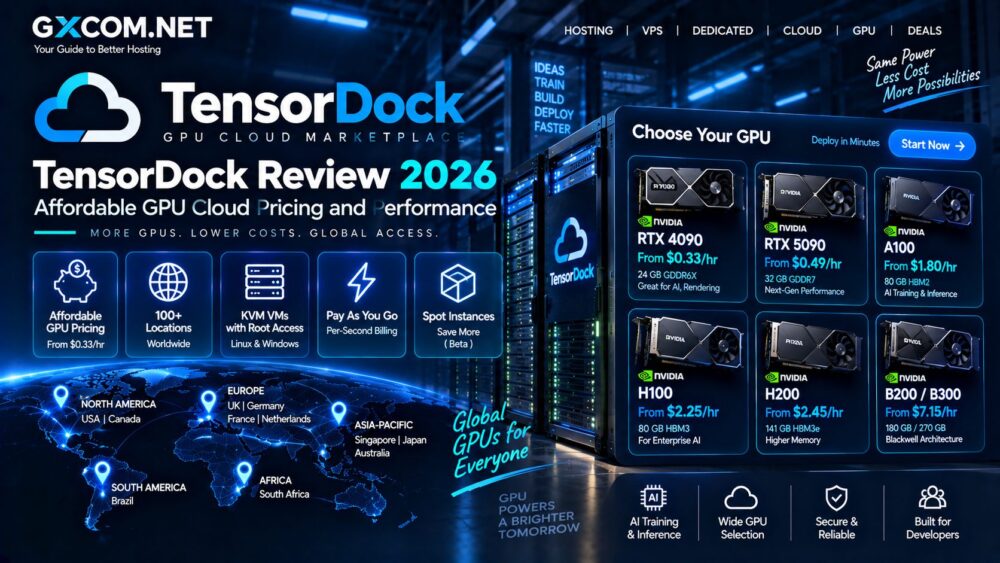
| NVIDIA H100 SXM5 | 80 GB | From about $2.25/hr | LLM training and inference |
| NVIDIA A100 SXM4 | 80 GB | From about $1.80/hr | AI training and inference |
| RTX PRO 6000 | 96 GB | From about $0.99–$1.10/hr in recent dashboard listings | Large-memory AI workloads |
| RTX 5090 | 32 GB | From about $0.49–$0.60/hr | Inference, rendering and image generation |
| RTX 4090 | 24 GB | From about $0.33–$0.50/hr | AI inference and rendering |
| RTX A6000 | 48 GB | From about $0.39–$0.47/hr | AI and professional rendering |
| V100 SXM3 | 32 GB | From about $0.29–$0.30/hr | Legacy CUDA and AI workloads |
*TensorDock uses marketplace pricing. These figures are representative prices observed or advertised in September 2026 and should not be interpreted as guaranteed permanent rates.
Why TensorDock Prices Change
Two TensorDock servers containing the same GPU can have different hourly prices.
This is intentional.
Independent hosts set pricing, while differences in data-center quality, CPU resources, RAM, storage, networking and geographic location also affect the final cost.
A cheap RTX 4090 in one location may therefore have a different CPU, uptime history and storage configuration from a more expensive RTX 4090 elsewhere.
The lowest number in the marketplace is not automatically the best server for every workload.
RTX 4090 on TensorDock
RTX 4090 is one of TensorDock’s most interesting options for users prioritizing price-to-performance.
With 24 GB of VRAM, it can handle many workloads involving:
- Stable Diffusion
- Image generation
- LLM inference
- Fine-tuning smaller models
- Blender rendering
- Video processing
- CUDA development
Recent marketplace listings illustrate the pricing variation clearly. RTX 4090 servers have appeared around the mid-$0.30/hour range in some North American locations, while other configurations can cost approximately $0.50/hour or more.
For workloads that fit inside 24 GB of VRAM, this can provide attractive compute value compared with paying for an enterprise accelerator simply because it carries a higher-end model name.
RTX 5090 on TensorDock
The RTX 5090 increases memory to 32 GB and provides a newer Blackwell-generation consumer GPU option.
Recent TensorDock dashboard listings have shown RTX 5090 instances beginning around $0.50–$0.60 per hour, although actual prices depend on current inventory.

The additional VRAM makes the card more flexible for AI workloads that exceed the 24 GB limit of RTX 4090.
For independent developers and smaller AI teams, RTX 5090 can occupy an interesting middle ground between inexpensive consumer GPU compute and significantly more expensive enterprise accelerators.
TensorDock A100 GPU Cloud
NVIDIA A100 remains relevant for AI workloads requiring enterprise GPU features and more memory.
TensorDock advertises A100 SXM4 configurations with 80 GB of VRAM.
The additional memory can make A100 preferable to RTX 4090 or RTX 5090 when the workload cannot fit inside consumer-GPU VRAM.
Typical use cases include:
- Large-model inference
- Machine-learning training
- Fine-tuning
- Scientific computing
- CUDA workloads
Readers comparing enterprise accelerator generations can also visit our A100 and H100 GPU coverage.
TensorDock H100 GPU Cloud
H100 is TensorDock’s flagship option for users needing significantly more AI performance.
The platform advertises H100 SXM5 80 GB capacity starting around $2.25 per hour on its main website, although marketplace availability can produce different prices.
H100 is more appropriate for workloads such as:
- Large language model training
- High-throughput inference
- Generative AI
- Transformer workloads
- Research computing
However, users should compare total server configuration rather than the GPU price alone. CPU allocation, memory, storage and networking can affect the performance of an expensive accelerator.
KVM Virtualization and Root Access
TensorDock uses KVM virtualization and provides users with root access to their virtual machines.
This is an important distinction from serverless GPU platforms where developers interact mainly with containers or APIs.
A TensorDock VM behaves more like a conventional server.
Users can:
- Install software
- Manage drivers
- Configure CUDA environments
- Run Docker
- Use SSH
- Deploy custom frameworks
TensorDock also advertises Windows support, which expands the platform beyond Linux-only machine-learning workloads.
TensorDock for Windows GPU Workloads
Windows support can be useful for workloads that depend on desktop applications or Remote Desktop.
TensorDock’s documentation includes deployment workflows for Windows 10 GPU instances and Remote Desktop access.
Possible use cases include:
- 3D rendering
- Adobe workflows
- Remote GPU desktops
- Windows CUDA applications
- Image-generation interfaces
This makes TensorDock more flexible than GPU services designed exclusively around Linux containers.
TensorDock Billing
TensorDock operates on a prepaid pay-as-you-go model.
Users add funds to their account, and the balance is deducted while servers are running.
The current deployment interface states that instances are billed per second with no minimum billing period.
One important operational detail is account balance: TensorDock states that servers can be automatically deleted when the account balance reaches zero.
Users running important workloads should therefore monitor their balance rather than treating the platform like a postpaid monthly hosting account.
What Happens When a TensorDock VM Is Stopped?
The newer deployment interface separates running and stopped costs.
Compute charges fall substantially when an instance is inactive, but storage and other retained resources can continue generating charges.
This means stopping a GPU server can reduce costs without necessarily making the retained VM completely free.
Always review the dashboard estimate before leaving an instance stopped for an extended period.
TensorDock Spot Instances
TensorDock also offers Spot Instances, currently documented as a beta feature.
Instead of paying the normal on-demand rate, users place a bid for interruptible GPU capacity.
Hosts establish minimum bid levels, which TensorDock says are typically around 50% of the normal on-demand GPU price.
Spot instances can work well for:
- Batch rendering
- Fault-tolerant inference
- Experiments
- Checkpointed training
- Non-urgent jobs
The downside is interruption risk. Another workload with a higher-value bid can receive priority.
TensorDock Locations
Geographic distribution is another major advantage of the marketplace model.
TensorDock advertises more than 100 locations across over 20 countries through its own marketplace and infrastructure partners.
This can give users considerably more geographic choice than a small GPU provider operating only one or two facilities.
However, location quality is not uniform.
TensorDock assigns location tiers based partly on infrastructure characteristics such as power redundancy. Its documentation notes that a Tier 0 location can even represent a location without redundant power, while higher-tier facilities provide stronger infrastructure.
Users running production workloads should therefore examine the host and location rating instead of selecting purely on geography or price.
TensorDock Reliability
TensorDock says it holds hosts to a 99.99% uptime standard and requires planned maintenance to be scheduled in advance.
The marketplace also identifies certain providers as Top Hosts based on their operating history and communication.
Still, users should distinguish a marketplace standard from the uniform infrastructure architecture of a single-provider hyperscale cloud.
Host quality can vary, which makes the displayed uptime and location information particularly important when selecting a server.
TensorDock Security
Marketplace infrastructure naturally raises questions about whether independent hosts can access customer workloads.
TensorDock says most hardware on the platform is now located in certified data centers.
The company also states that it revokes SSH access from hosts so they cannot access customer data without TensorDock’s knowledge and uses monitoring on host nodes to detect logins and suspicious activity.
For highly sensitive enterprise workloads, customers should still perform their own security and compliance assessment before deploying confidential data to any distributed marketplace.
TensorDock API
TensorDock provides an API for developers who want to automate infrastructure deployment rather than creating every server manually.
Automation can be useful for:
- Launching GPU workers
- Checking availability
- Managing servers
- Building internal deployment systems
- Scaling batch workloads
This makes the platform more useful for development teams than a marketplace that only provides a manual web interface.
TensorDock for AI Inference
Inference may be one of the strongest TensorDock use cases.
Many inference workloads do not require an H100.
If a model fits comfortably within 24 GB or 32 GB of VRAM, an RTX 4090 or RTX 5090 can offer significantly lower hourly costs.
The marketplace model allows developers to compare several GPU generations and choose based on actual workload requirements rather than automatically paying for enterprise hardware.
TensorDock for AI Training
TensorDock can also support training, but workload scale matters.
Individual RTX, A100 or H100 instances can work well for smaller training jobs, fine-tuning and experimentation.
Organizations building massive multi-node training clusters may place greater value on tightly integrated networking, standardized hardware and enterprise orchestration.
That is where specialized platforms such as CoreWeave and Nebius occupy a different segment of the market.
TensorDock vs Vast.ai
Vast.ai is probably TensorDock’s most natural comparison because both use marketplace economics to provide access to GPUs from distributed infrastructure providers.
Both platforms can deliver very low prices compared with conventional hyperscale clouds.
TensorDock emphasizes KVM virtual machines, straightforward cloud deployment and a mixture of data-center and distributed hosts. Vast.ai has an especially large marketplace and exposes extensive information for users who want to optimize aggressively around price and hardware.
The better fit depends on available inventory and the level of marketplace complexity the user is comfortable managing.
Read our Vast.ai Review 2026 for a closer look at that platform.
TensorDock vs RunPod
RunPod combines GPU Pods with a strong Serverless GPU offering.
TensorDock is more VM-oriented. Users receive KVM environments with root access and can configure the operating system more like a traditional cloud server.
RunPod may appeal more strongly to developers building containerized or serverless AI applications, while TensorDock can be attractive when full VM control and marketplace pricing matter.

See our RunPod Review 2026 for current RunPod GPU options.
TensorDock vs CoreWeave
CoreWeave serves a substantially different segment of the GPU cloud market.
TensorDock emphasizes affordable distributed compute and individual GPU VMs. CoreWeave focuses heavily on production AI infrastructure, high-performance GPU clusters, Kubernetes and large-scale training and inference.
An independent developer deploying one RTX 4090 has very different requirements from an AI company orchestrating hundreds of Blackwell accelerators.
Our CoreWeave Review 2026 examines that enterprise AI infrastructure model.
TensorDock Pros & Cons
| Pros | Cons |
|---|---|
| Very competitive GPU pricing | Marketplace pricing changes frequently |
| Wide range of GPU models | Host quality can vary |
| Affordable RTX 4090 and RTX 5090 | Cheapest location may have weaker redundancy |
| A100 and H100 availability | Inventory can change quickly |
| KVM with root access | Less standardized than a hyperscale cloud |
| Windows support | Users must monitor prepaid balance |
| 100+ advertised locations | Spot instances are still beta |
| Per-second billing | Storage and other resources add to GPU cost |
Who Should Consider TensorDock?
TensorDock is particularly attractive to cost-sensitive users who still want full GPU virtual machines.
Strong use cases include:
- Independent AI developers
- AI startups
- Stable Diffusion users
- LLM inference
- Fine-tuning
- 3D rendering
- University researchers
- CUDA development
- Remote Windows GPU workloads
Who May Prefer an Alternative?
Organizations requiring extremely consistent infrastructure across hundreds or thousands of interconnected GPUs may prefer a purpose-built cluster provider.
Enterprises with strict compliance requirements should also investigate the exact host and data-center environment before deploying sensitive workloads.
Users who prefer serverless AI rather than managing a complete VM may find another platform more convenient.
For the broader infrastructure decision, see our GPU Server vs Cloud GPU comparison.
TensorDock Review 2026: Final Verdict
Our TensorDock Review 2026 shows why marketplace-based GPU clouds have become attractive to developers who find conventional AI infrastructure too expensive.
The biggest advantage is choice. TensorDock provides access to consumer GPUs such as RTX 4090 and RTX 5090 alongside professional and enterprise accelerators including RTX A6000, A100 and H100. Users can then compare hosts, locations and prices instead of accepting one standardized cloud rate.
This model can produce excellent price-to-performance, particularly for AI inference, image generation, rendering, development and smaller training workloads.
The tradeoff is consistency. Pricing, availability, host hardware and infrastructure quality vary across the marketplace, so users should evaluate uptime history, location tier, CPU, RAM and storage alongside the GPU itself.
TensorDock therefore makes the most sense when affordable GPU access and VM-level flexibility are more important than operating inside a completely standardized enterprise cloud environment.
For developers willing to compare listings rather than simply selecting the first available instance, TensorDock remains one of the more interesting affordable GPU cloud marketplaces to evaluate in 2026.