Choosing a managed VPS vs control panel VPS can be confusing because both products may offer dashboards, website management tools, and technical support. However, installing cPanel, SPanel, DirectAdmin, or Plesk does not automatically mean someone is maintaining your server.
A control panel simplifies administration. Managed VPS hosting adds provider responsibilities defined by a support agreement. Understanding that distinction helps businesses avoid unexpected licensing fees, security gaps, and expensive troubleshooting.
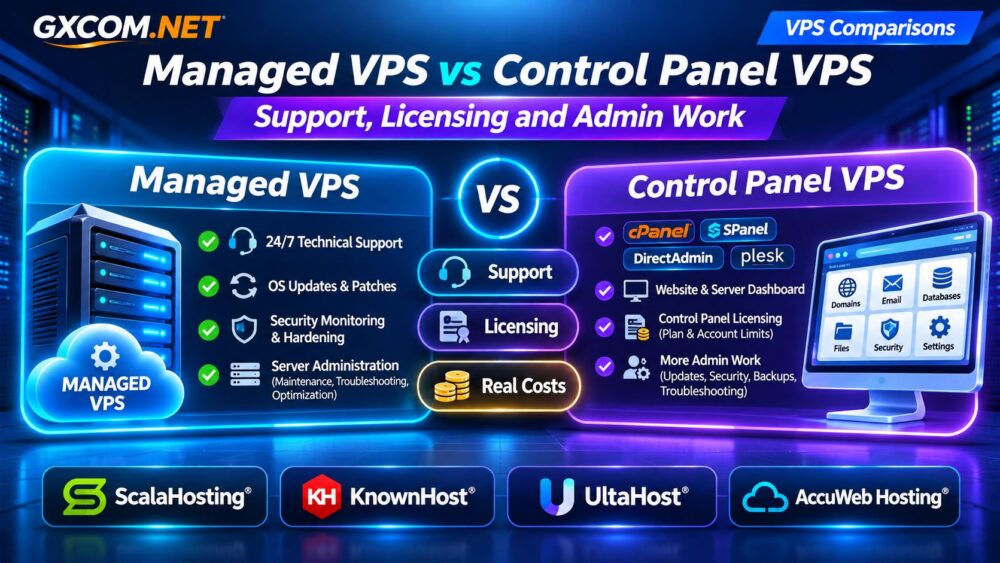
Managed VPS vs Control Panel VPS: Quick Comparison
| Feature | Managed VPS | Control Panel VPS |
|---|---|---|
| Primary benefit | Professional server administration | Graphical management tools |
| Operating system updates | Often provider-managed | Customer-owned unless specified |
| Control panel | May be included or optional | Usually installed or available |
| Security monitoring | Depends on management agreement | Requires separate configuration |
| Application troubleshooting | Limited by support policy | Generally customer-owned |
| Additional costs | Management and software fees | Licenses and administration time |
The categories overlap. A managed VPS may include a control panel, while a control panel VPS may offer optional management. Always compare the actual service contract.
What Does Managed VPS Hosting Include?
Managed VPS hosting generally combines virtual server resources with professional assistance for supported administration tasks. Depending on the provider, this may include operating system patches, web server configuration, security hardening, monitoring, and service troubleshooting.
However, managed support does not necessarily include WordPress development, custom applications, plugin conflicts, or database optimization. Those responsibilities often remain with the website owner or developer.
Our Managed vs Unmanaged VPS Guide explains the broader management models.
What Is a Control Panel VPS?
A control panel VPS is a virtual server equipped with software that simplifies hosting administration. Instead of performing every task through SSH, users can manage domains, databases, email accounts, SSL certificates, and website files through a graphical interface.
Popular options include cPanel/WHM, SPanel, DirectAdmin, and Plesk. Their interfaces and licensing arrangements differ, but none should be treated as a universal replacement for system administration.
For example, a dashboard may let you restart a database service without diagnosing why the service repeatedly crashes. Installing updates may still require compatibility checks, backups, and recovery planning.
Server Management vs Control Panel: Who Does the Work?
Before purchasing, identify who is responsible for each operational task.

| Task | Managed VPS | Panel-Only VPS |
|---|---|---|
| OS security patches | Often provider | Usually customer |
| Panel updates | Check agreement | Customer or automated tools |
| Firewall configuration | May be included | Customer |
| Website plugin updates | Usually customer | Customer |
| Backup restoration | Depends on plan | Customer unless purchased |
| Emergency troubleshooting | Within support scope | Often limited |
A control panel can reduce repetitive work, but it cannot guarantee that someone will investigate malware, repair a failed operating system upgrade, or respond to an overnight outage.
cPanel, SPanel, DirectAdmin, and Plesk Licensing
Licensing affects the total cost of a VPS, especially when hosting multiple customer accounts.
cPanel/WHM uses commercial licensing with account-related tiers. SPanel is included with eligible ScalaHosting VPS packages without a separate account-based cPanel fee. DirectAdmin and Plesk have their own licensing arrangements, which may be bundled or charged separately.
Check whether your quote includes the panel, required account capacity, updates, and technical assistance. A low introductory server price can become less attractive after adding software licenses and renewal charges.
For businesses comparing infrastructure expenses, see our Shared vs Cloud Hosting Cost Comparison.
Real Monthly Costs: Managed VPS vs Panel-Only VPS
Consider a hypothetical business hosting several WordPress websites. These figures illustrate ownership costs and are not current provider prices.
| Monthly Expense | Managed VPS | Panel-Only VPS |
|---|---|---|
| VPS and management | $65 | $25 |
| Control panel license | $0 included | $20 |
| Internal administration | 1 hour | 4 hours |
| Labor at $30/hour | $30 | $120 |
| Total monthly cost | $95 | $165 |
In this example, the panel-only VPS appears cheaper initially but costs $70 more after administration time. Different workloads can reverse the result, particularly when an experienced team already manages several servers efficiently.
Calculate twelve-month and renewal costs, including backups, security software, migrations, and emergency support.
Four Approved VPS Providers to Compare
ScalaHosting: Managed VPS With SPanel
ScalaHosting is relevant for businesses seeking managed cloud VPS hosting with SPanel. Its integrated panel can simplify website administration while managed services address supported server-level tasks. Compare SPanel and cPanel configurations before choosing.
KnownHost: Managed VPS With Familiar Panels
KnownHost offers managed VPS options with established control panel choices, including DirectAdmin and optional cPanel/WHM. It suits buyers who prioritize documented support responsibilities and familiar hosting workflows.
UltaHost: Compare Management and Panel Options
UltaHost is worth evaluating for managed VPS requirements. Verify the selected plan’s administration coverage, available control panels, backup features, and licensing charges rather than assuming every VPS package includes identical services.
AccuWeb Hosting: VPS Configuration Flexibility
AccuWeb Hosting is another candidate for businesses evaluating Linux or Windows VPS environments. Confirm operating system compatibility, management eligibility, control panel availability, and software licensing for the intended workload.
These providers serve different requirements. Compare equivalent server resources and written support policies before purchasing.
Security and Backups: The Hidden Responsibility Gap
Control panels provide convenient security and backup interfaces, but responsibility for configuration and recovery remains important. Ask who applies operating system patches, monitors suspicious activity, tests backups, and restores damaged services.

A successful backup job does not guarantee a usable recovery. Review our VPS Snapshot and Backup Recovery Guide before relying on automated snapshots alone.
Which VPS Option Should You Choose?
Choose managed VPS hosting when your team lacks server administration experience, business uptime is important, or recurring maintenance would distract developers from their primary work.
A panel-only VPS can make sense when you already understand Linux or Windows administration, maintain independent backups, and can respond to security incidents without relying on hosting support.
If you are comparing broader purchasing options, consult our Best VPS Providers Comparison.
Frequently Asked Questions
Does cPanel Make a VPS Fully Managed?
No. cPanel provides administration tools, while managed hosting depends on the provider’s support agreement.
Is SPanel the Same as Managed Hosting?
No. SPanel is software. Managed assistance is a separate service responsibility, even when both are included in one package.
Can I Add Management to an Existing VPS?
Some providers offer management upgrades, but compatibility and eligibility vary. Confirm supported operating systems and panels first.
Final Verdict
The difference between managed VPS and control panel VPS is primarily responsibility, not dashboard design. A panel makes tasks easier; professional management determines who handles supported maintenance and incidents.
Compare ScalaHosting, KnownHost, UltaHost, and AccuWeb Hosting according to your technical skills, preferred panel, support requirements, and complete operating costs. Choose the arrangement that reduces real workload rather than simply advertising the lowest server price.