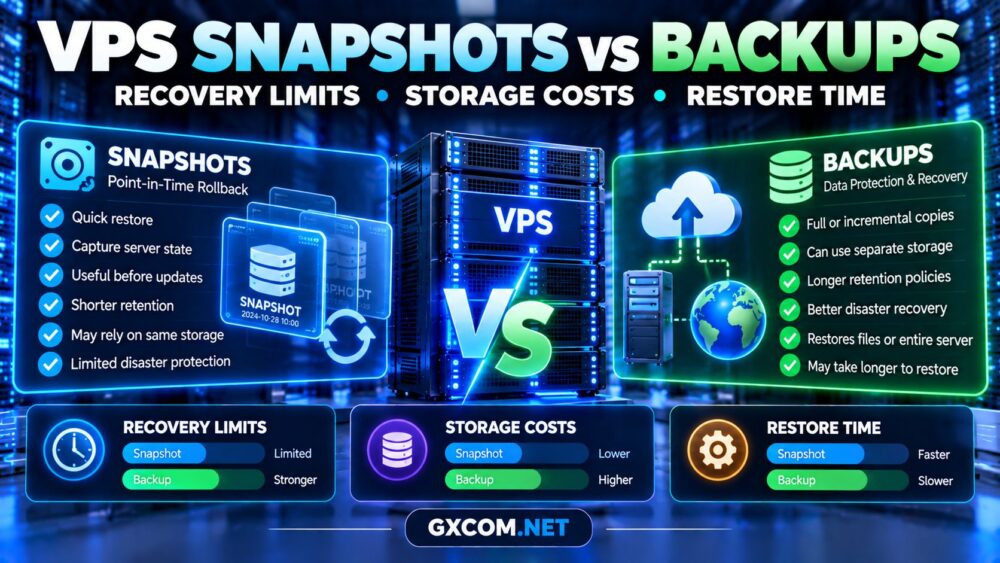
VPS snapshots vs backups is an important comparison for anyone hosting websites, databases, or business applications on a virtual private server. Both technologies help recover data, but they differ in storage independence, recovery flexibility, retention, and cost.
A snapshot may restore a server quickly after a failed update, yet it might not survive the loss of its underlying storage system. A properly designed independent backup offers broader protection, although restoration may take longer.
This guide explains the differences, recovery limitations, and purchasing considerations that matter before choosing a VPS provider.
What Is a VPS Snapshot?
A VPS snapshot captures the state of a virtual machine or its storage at a particular point in time. Depending on the platform, it may include disk contents and selected virtual machine configuration information.
Snapshots are especially useful before operating system upgrades, software installations, or configuration changes.
However, snapshot architecture varies. Some systems use copy-on-write mechanisms, while others create separately stored point-in-time images. Storage independence and retention policies therefore depend on the provider.
A snapshot is not automatically an offsite backup.
What Is a VPS Backup?
A VPS backup is a recoverable copy of data, applications, or an entire server environment. Backups may be full, incremental, or differential, depending on the service.
They can protect against accidental deletion, corruption, failed upgrades, and infrastructure loss when stored and managed appropriately.
Effective backup systems also require retention policies, access controls, integrity checks, and regular restoration testing.
For organizations evaluating managed recovery assistance, our managed VPS support scope guide explains why backup creation and assisted restoration may have different service terms.
VPS Snapshots vs Backups: Key Differences
| Feature | Snapshot | Backup |
|---|---|---|
| Main purpose | Point-in-time rollback | Data recovery and protection |
| Storage independence | Platform-dependent | Can use separate storage |
| Retention | Often shorter | Configurable retention policies |
| Recovery speed | Potentially fast | Depends on data and method |
| Disaster protection | Depends on architecture | Stronger with offsite copies |
| Application consistency | Requires verification | Requires verification |
Neither approach guarantees successful recovery without appropriate configuration and testing.
Recovery Limits: What Can Go Wrong?
Physical Storage Failure
If snapshots depend on the same storage infrastructure as the production VPS, a major storage failure could make both unavailable.
Independent backups stored in another failure domain reduce this risk.
Accidental Deletion
Snapshots can help reverse recent mistakes, provided the relevant recovery point still exists. Backups with longer retention may recover files deleted weeks earlier.

Ransomware and Compromised Accounts
An attacker with sufficient account permissions might delete snapshots or accessible backups. Immutable or separately controlled backup copies provide additional protection.
Database Corruption
A crash-consistent snapshot does not necessarily capture a transactionally consistent database. Application-aware backups, database dumps, or coordinated snapshots may be necessary.
Always test whether restored databases start correctly and preserve expected transactions.
RPO and RTO: Measuring Recovery Requirements
Recovery point objective (RPO) describes the maximum acceptable data loss measured in time. Recovery time objective (RTO) describes the target duration for restoring service.
For example, an application with a one-hour RPO needs recovery points frequent enough to meet that requirement. A two-hour RTO requires a recovery process capable of restoring service within the target window.
Snapshots may help achieve short recovery times, while independent backups support protection against broader failure scenarios.
The correct strategy depends on application importance, database activity, and available recovery resources.
How Much Do VPS Snapshots and Backups Cost?
Storage charges depend on retained data, billing rules, backup frequency, and whether copies are stored in separate locations.
Some providers charge for allocated snapshot storage. Others charge for stored backup capacity, retention, or additional recovery services.
Consider this hypothetical monthly budget:
| Protection Component | Illustrative Monthly Cost |
|---|---|
| VPS subscription | $18 |
| Snapshot storage | $4 |
| Independent backups | $7 |
| Additional retention | $3 |
| Total | $32 |
The protection services add $14 monthly, or $168 annually. These are illustrative amounts, not provider quotations.
Compare the full subscription cost rather than treating advertised VPS storage capacity as evidence that backup storage is included.
Four VPS Providers to Compare for Data Protection
When evaluating hosting providers, verify the exact snapshot and backup features available for the selected plan.
Kamatera: Cloud Recovery Planning
Kamatera is worth evaluating for configurable cloud server deployments where backup design and infrastructure flexibility influence purchasing decisions.
Confirm available recovery options, storage charges, retention settings, and restoration procedures before ordering.
Vultr: Instance and Storage Considerations
Vultr is another candidate for developers comparing cloud compute environments. Examine the backup and snapshot capabilities associated with the intended instance type.
Do not assume that every storage product or instance family follows identical recovery policies.
Hostwinds: VPS Backup Responsibilities
Hostwinds is relevant for customers comparing managed and unmanaged VPS arrangements.
Check whether backups are included, optional, or customer-managed, and whether technical support assists with restoration.
Evoxt: Budget VPS Protection Planning
Evoxt is worth researching for cost-conscious VPS deployments. Verify the selected product’s snapshot availability, backup options, storage policies, and recovery responsibilities.
Regardless of provider, maintain an independent backup strategy appropriate for your workload.
For broader purchasing research, explore our best VPS providers comparison.
How Long Does VPS Restoration Take?
Restore time depends on data volume, storage throughput, network speed, application complexity, and recovery procedures.
A snapshot rollback may be relatively quick when the platform supports direct restoration. A full backup restoration may require downloading data, rebuilding services, and validating databases.
Neither method guarantees a fixed recovery time.
Database-heavy workloads should also consider storage latency. Our NVMe VPS performance benchmarking guide explains how to evaluate storage responsiveness.
Best Practices for VPS Backup and Snapshot Management
A practical protection strategy combines fast rollback options with independently recoverable data.
- Create snapshots before significant system changes.
- Schedule independent backups according to business requirements.
- Store at least one backup outside the production failure domain.
- Restrict backup deletion permissions and protect credentials.
- Use application-consistent methods for active databases.
- Test restoration regularly and document the results.
- Review retention and storage costs as data grows.
Businesses should also consider the operational cost of failed recovery. Our managed VPS total cost guide examines how administration and recovery responsibilities affect long-term spending.

Should You Pay Extra for VPS Backups?
Additional backup spending can be justified when losing business data would cost more than maintaining reliable recovery copies.
However, purchasing an optional backup service is not enough. Verify storage independence, restoration access, retention, and responsibility for recovery.
Before choosing a plan, compare relevant VPS hosting deals while checking whether backup protection is included in the advertised configuration.
Frequently Asked Questions
Can a VPS snapshot replace a backup?
Not reliably in every situation. Snapshots may depend on shared infrastructure and might not protect against major storage failures or account compromise.
Are VPS snapshots faster to restore?
They can be, but restoration speed depends on the provider’s architecture, snapshot type, and workload.
Should backups be stored offsite?
Independent storage is strongly recommended for important workloads because it reduces exposure to failures affecting the production environment.
Do VPS providers include automatic backups?
Some do, while others offer optional services or require customers to configure their own backups. Verify the specific plan.
Final Verdict
VPS snapshots vs backups is not an either-or decision. Snapshots can provide convenient rollback, while independent backups offer broader recovery protection when correctly designed.
Compare recovery limits, retention, storage independence, restoration time, and total cost before purchasing VPS hosting.
For important websites and applications, use both technologies where appropriate and test recovery before an emergency occurs.