VPS hosting can cost less than a premium shared hosting plan—or hundreds of dollars per month for a powerful managed server.
That enormous price range makes a simple question surprisingly difficult to answer:
How much does VPS hosting actually cost?
The answer depends on much more than CPU cores and RAM.
A low-cost VPS may include only basic virtual server resources, while another plan may bundle NVMe storage, backups, a control panel, Windows licensing, monitoring and server management.
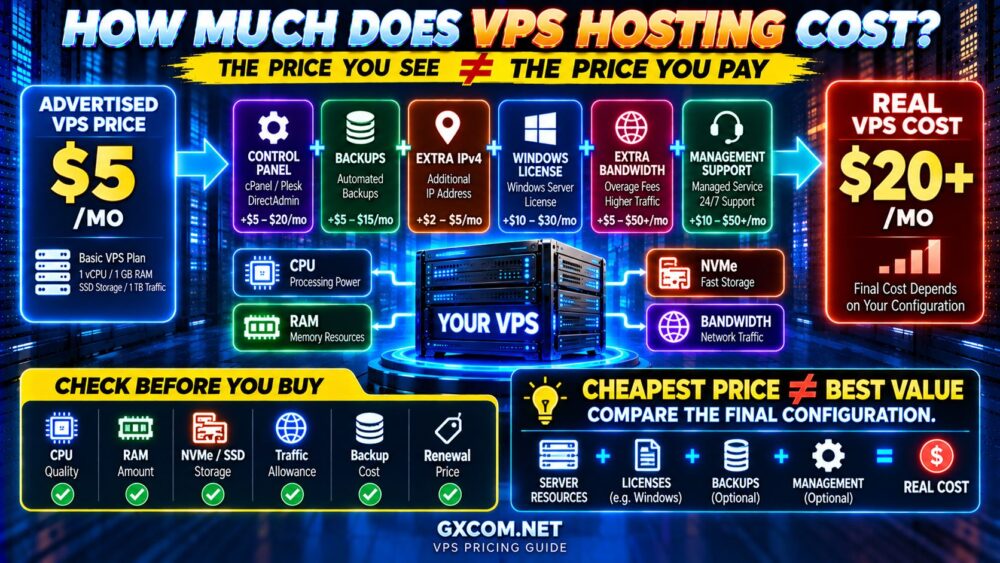
This means the advertised monthly price is not always the real cost of running the VPS.
This guide explains VPS hosting cost, typical pricing tiers, how CPU, RAM and storage affect pricing, the hidden fees to check before buying, and how to compare VPS plans based on real value rather than the lowest advertised price.
How Much Does VPS Hosting Cost?
As a broad market framework, VPS hosting can range from only a few dollars per month for a small self-managed Linux VPS to well over $100 per month for high-resource or fully managed configurations.
| VPS Tier | Typical Monthly Range | Common Use Case |
|---|---|---|
| Budget VPS | $5–$15 | Development, small sites, lightweight applications |
| Standard VPS | $15–$40 | Growing websites, WordPress, small applications |
| Business VPS | $40–$80 | Busy websites, ecommerce, multiple sites |
| High-Performance VPS | $80–$150+ | Large applications and demanding workloads |
| Managed / Enterprise VPS | $100+ | Business-critical workloads and management services |
These are planning ranges rather than fixed industry prices.
Actual pricing varies according to the provider, virtualization platform, hardware, datacenter, management level and billing term.
The better question is therefore not:
“WHAT IS THE CHEAPEST VPS?”
It is:
“WHAT RESOURCES AND SERVICES AM I GETTING FOR THE TOTAL COST?”
What Determines VPS Hosting Cost?
A VPS price is built from several components.
A useful way to think about it is:
CPU
+
RAM
+
STORAGE
+
NETWORK
+
MANAGEMENT
+
LICENSES
+
BACKUPS
=
REAL VPS COST
Two VPS plans with similar headline specifications can therefore have very different total costs and real-world performance.
1. CPU: More vCPU Usually Costs More
CPU allocation is one of the main factors affecting VPS pricing.
Common configurations include:
- 1–2 vCPU
- 4 vCPU
- 8 vCPU
- 16+ vCPU
But simply counting cores is not enough.
CPU performance can also depend on:
- Processor generation
- Clock speed
- Shared vs dedicated CPU allocation
- Host-node utilization
- Virtualization platform
- Provider resource policies
This is why:
4 vCPU ≠ 4 vCPU PERFORMANCE.
A cheaper VPS advertising more cores can sometimes perform worse than a more expensive plan using newer processors and better resource allocation.
2. RAM: How Much Memory Are You Paying For?
RAM is another major pricing factor.
VPS plans commonly provide:
- 1–2 GB RAM
- 4 GB RAM
- 8 GB RAM
- 16 GB RAM
- 32 GB RAM or more
Memory is used by the operating system, web server, PHP workers, databases, caching services, control panels and applications.
More RAM can support larger databases and more concurrent processes, but buying excessive memory does not automatically make a website faster.
MORE RAM ≠ MORE PERFORMANCE IF RAM IS NOT THE BOTTLENECK.
Choose memory based on workload rather than simply purchasing the largest number your budget allows.
3. SSD vs NVMe Storage
Storage technology can affect both VPS price and performance.
Modern VPS providers increasingly advertise NVMe storage because it offers much greater performance potential than traditional SATA SSDs.
NVMe can be particularly valuable for:
- Databases
- WooCommerce
- Dynamic websites
- High-I/O applications
- Large numbers of concurrent storage operations
However, the word “NVMe” does not guarantee unlimited storage performance.
Actual results can depend on IOPS limits, I/O caps, virtualization and host contention.
See our NVMe VPS vs SSD VPS comparison for a deeper explanation.
If you are deciding whether the upgrade actually matters for your workload, also read Is NVMe VPS Worth It?.
4. Storage Capacity
Storage capacity can also increase VPS cost.
A server requiring 40 GB for a lightweight application has very different storage requirements from one hosting:
- Large media libraries
- Multiple websites
- Large databases
- Backups
- Application logs
Do not buy storage based only on current usage.
Leave reasonable room for:
- Database growth
- Operating system updates
- Logs
- Temporary files
- Website growth
But avoid paying for hundreds of gigabytes you are unlikely to use.
5. Bandwidth and Monthly Traffic
VPS providers may include a monthly transfer allowance such as:
- 1 TB
- 3 TB
- 5 TB
- 10 TB
- 20 TB+
Others advertise unmetered or effectively very high transfer allowances subject to network policies.
Do not confuse monthly transfer with network port speed.
MONTHLY TRANSFER tells you how much data can be transferred during a billing period.
PORT SPEED refers to the network connection rate available under the provider's conditions.
Both can affect value, especially for high-traffic websites, downloads and media-heavy applications.
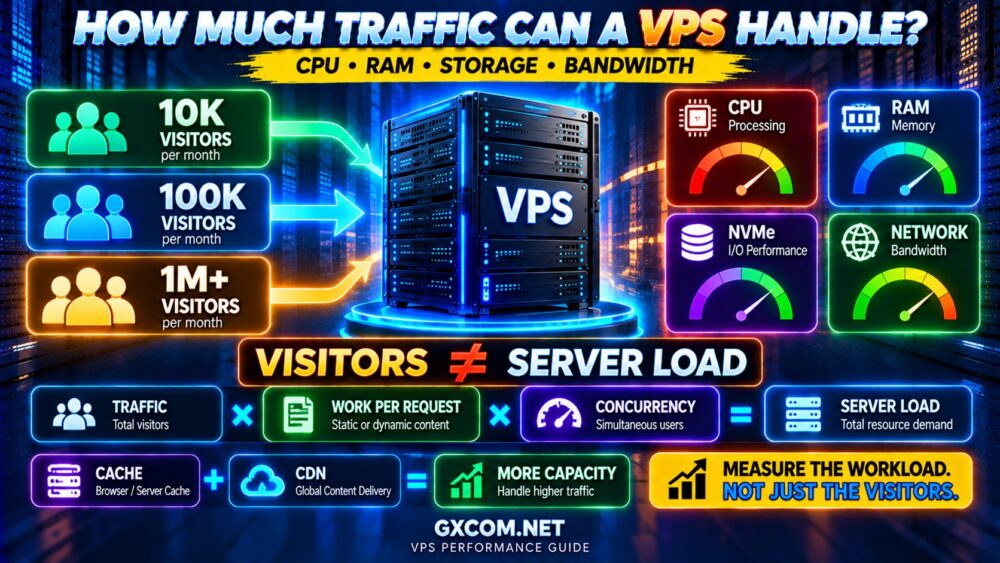
Our How Much Traffic Can a VPS Handle? guide explains how CPU, RAM, caching and bandwidth combine to determine real capacity.
6. VPS Location Can Affect Price
The same provider may charge different prices depending on the datacenter location.
Infrastructure costs vary between regions, and certain locations may have more expensive:

- Power
- Bandwidth
- Datacenter space
- Hardware
- IPv4 resources
Do not automatically choose the cheapest region.
If your main audience is in the United States, Europe or Asia, choosing a datacenter closer to users can reduce latency.
Unmanaged VPS vs Managed VPS Pricing
Management level can create one of the largest differences in VPS cost.
An unmanaged VPS primarily gives you the infrastructure.
You may be responsible for:
- Linux administration
- SSH configuration
- Security updates
- Firewall configuration
- Web server setup
- Database management
- Monitoring
- Backups
- Troubleshooting
Managed VPS hosting adds technical services on top of the infrastructure.
That explains why a managed VPS can cost significantly more than an unmanaged server with similar CPU and RAM.
For the full comparison, see our Managed vs Unmanaged VPS guide.
How Much Does an Unmanaged VPS Cost?
Entry-level unmanaged VPS hosting can start at only a few dollars per month.
This makes self-managed VPS infrastructure attractive to:
- Developers
- Linux administrators
- Technical website owners
- Students
- DevOps users
- Users running custom applications
But the low monthly price comes with responsibility.
The real cost is:
SERVER PRICE + YOUR ADMINISTRATION TIME + TECHNICAL RISK.
If you are unfamiliar with this hosting model, read our What Is Unmanaged VPS Hosting? guide before choosing purely on price.
How Much Does Managed VPS Cost?
Managed VPS hosting generally costs more because the provider handles some or most server administration tasks.
Depending on the plan, that can include:
- System updates
- Monitoring
- Security configuration
- Control panel support
- Backups
- Performance assistance
- Server troubleshooting
Managed VPS plans may begin around the price of premium hosting and extend well beyond $100 per month for larger or more heavily managed servers.
See our Managed VPS Hosting Cost guide for a detailed breakdown.
Linux VPS vs Windows VPS Cost
The operating system can have a significant effect on price.
Most Linux distributions used for VPS hosting do not require a commercial operating system license.
Windows Server generally requires licensing.
This means two servers with similar hardware specifications may have different monthly prices:
LINUX VPS
Server Resources
WINDOWS VPS
Server Resources + Windows Licensing
The exact licensing model varies by provider and configuration.
Therefore, when comparing Windows VPS plans, always verify whether the advertised price already includes the Windows Server license.
VPS Hidden Fee #1: Control Panel Licenses
A cheap VPS can become considerably more expensive when you add a commercial control panel.
Common options can include:
- cPanel/WHM
- Plesk
- DirectAdmin
- Provider-specific panels
Some VPS plans include a control panel.
Others charge separately.
If you are comfortable administering Linux through SSH, you may not need a commercial panel at all.
But if you depend on cPanel or Plesk, include the license before comparing total prices.
VPS Hidden Fee #2: Backups
Do not assume backups are included.
A provider may offer:
- Automatic backups
- Snapshots
- Paid backup storage
- Optional backup plans
- No managed backup service
Check:
- Backup frequency
- Retention period
- Storage location
- Restore process
- Restore fees
A cheap VPS without a reliable backup strategy can become extremely expensive after data loss.
VPS Hidden Fee #3: IPv4 Addresses
IPv4 addresses are increasingly valuable resources.
Many VPS plans include one IPv4 address, but additional addresses may cost extra.
If your application requires multiple IPv4 addresses, check pricing before purchasing.
Do not assume additional IP addresses are free or even available.
VPS Hidden Fee #4: Bandwidth Overages
A VPS with limited monthly transfer can become expensive if you exceed the included allowance.
Before buying, check:
- Included traffic
- Overage pricing
- Port speed
- Traffic throttling policies
- Inbound vs outbound billing rules
For high-bandwidth workloads, network pricing can matter more than a small difference in CPU cost.
VPS Hidden Fee #5: Windows Licensing
Windows VPS buyers should pay particular attention to licensing.
A low advertised VPS price may represent the underlying server only.
After selecting Windows Server, the final checkout price can increase.
Always compare:
VPS PRICE + WINDOWS LICENSE = REAL WINDOWS VPS COST.
VPS Hidden Fee #6: Management and Support
A budget VPS may include technical support for infrastructure problems but not operating system or application administration.
If you later need paid management, the total cost can rise considerably.
Before buying, determine whether support covers:
- Hardware / host issues
- Operating system problems
- Control panel issues
- Web server configuration
- Database troubleshooting
- Security incidents
- Application problems
24/7 SUPPORT ≠ 24/7 SERVER MANAGEMENT.
VPS Hidden Fee #7: Promotional vs Renewal Pricing
Introductory discounts can make a VPS appear cheaper than its long-term cost.
Always compare:
- Initial monthly price
- Required billing term
- Renewal price
- Setup fees
- Refund policy
A better calculation is:
12–24 MONTH TOTAL COST
rather than:
FIRST MONTH PRICE.
Monthly vs Annual VPS Billing
Long-term VPS contracts can reduce the effective monthly price, but they also reduce flexibility.
Monthly billing can be preferable when:
- You are testing a provider
- You are unsure about performance
- Your project is temporary
- Your resource requirements may change
Annual or multi-year billing becomes more attractive after you know the provider works well for your workload.
DISCOUNT ≠ VALUE IF YOU ARE LOCKED INTO THE WRONG SERVER.
How Much Should You Spend on a VPS?
The correct budget depends on the workload.
Small Website or Development VPS
A budget VPS may be enough for a lightweight website, testing environment or small application.
Growing WordPress Website
A mid-range VPS with several vCPUs, adequate RAM and quality SSD or NVMe storage may provide a better balance of performance and cost.
WooCommerce or Dynamic Website
Prioritize CPU performance, sufficient RAM, database performance and storage I/O rather than choosing solely on monthly price.
Business-Critical Website
Support, backups, monitoring and infrastructure reliability may justify spending more than the cheapest available option.
Does a More Expensive VPS Always Perform Better?
No.
Price and performance are related, but not perfectly.
A more expensive VPS may include:
- Better CPU hardware
- Dedicated CPU resources
- Faster NVMe storage
- Better networking
- Backups
- Management
- Premium support
But a higher price can also reflect licensing, location or service packaging rather than raw performance.
This is why benchmark results and real workload testing matter.
Cheap VPS vs Good-Value VPS
There is an important difference between cheap and good value.
A $5 VPS can be excellent value if it reliably handles your workload.
A $5 VPS is poor value if:
- CPU performance is inconsistent
- Storage is heavily limited
- Network quality is poor
- You constantly exceed resource limits
- You need expensive add-ons
Likewise, a $40 VPS can be good value if it replaces several smaller servers or supports a revenue-generating application reliably.
CHEAPEST PRICE ≠ LOWEST REAL COST.
VPS Providers Worth Comparing
Different VPS providers target different workloads and buyer profiles.
DigitalOcean and Vultr are relevant for developers comparing flexible cloud-style VPS infrastructure.
Database Mart is worth evaluating for users comparing different VPS and server configurations.
Budget-focused buyers may also compare providers such as RackNerd and VPSDime.
Users who prefer provider-assisted server administration can compare managed options such as ScalaHosting.
The goal is not to find the provider advertising the largest resource numbers.
Compare:
CPU QUALITY
↓
RAM
↓
STORAGE
↓
NETWORK
↓
MANAGEMENT
↓
HIDDEN FEES
↓
TOTAL COST
How to Compare VPS Prices Correctly
| Factor | What to Check |
|---|---|
| CPU | vCPU count, generation, shared vs dedicated |
| RAM | Amount and upgrade options |
| Storage | Capacity, SSD/NVMe, IOPS/I/O limits |
| Bandwidth | Transfer allowance and overages |
| Network | Port speed and location |
| OS | Linux vs Windows licensing |
| Control Panel | Included or additional license |
| Backups | Included, optional or self-managed |
| Management | Managed vs unmanaged |
| Support | Exact support scope |
| Renewal | Long-term price after promotion |
VPS Pricing Checklist Before You Buy
- ✓ CPU generation
- ✓ Shared or dedicated CPU
- ✓ RAM allocation
- ✓ SSD or NVMe storage
- ✓ Storage capacity
- ✓ IOPS / I/O limits
- ✓ Monthly transfer
- ✓ Port speed
- ✓ Datacenter location
- ✓ IPv4 cost
- ✓ Control panel license
- ✓ Windows license if required
- ✓ Backup cost
- ✓ Management level
- ✓ Support scope
- ✓ Upgrade pricing
- ✓ Renewal price
COMPARE THE FINAL CONFIGURATION—NOT THE ADVERTISED STARTING PRICE.
VPS Hosting Cost FAQ
How much does VPS hosting cost per month?
Basic self-managed VPS hosting can start at only a few dollars per month, while business, high-performance and managed VPS plans can range from tens to well over $100 per month. The final price depends on CPU, RAM, storage, bandwidth, management and additional services.
Why is VPS hosting more expensive than shared hosting?
A VPS provides a more isolated server environment with defined resources and greater control. Shared hosting distributes server resources and administration across many customers, which reduces the cost per account.
Is a $5 VPS good enough?
It can be for lightweight websites, development environments or small applications. Check CPU performance, RAM, storage, bandwidth and support rather than judging the server by price alone.
How much does a 4 GB RAM VPS cost?
Pricing varies widely between providers because RAM is only one component. CPU quality, storage, bandwidth, operating system, management and billing term can all change the price.
Is NVMe VPS more expensive?
Sometimes, although NVMe is increasingly standard across VPS platforms. The more important question is whether the provider delivers useful real-world storage performance and whether your workload benefits from it.
Does Windows VPS cost more than Linux VPS?
It often does because Windows Server generally requires commercial licensing. Always check whether the Windows license is included in the displayed VPS price.
Are VPS backups included?
Not always. Some providers include backups or snapshots, while others charge separately or expect customers to configure their own backup solution.
What is the cheapest type of VPS?
Small unmanaged Linux VPS plans are generally among the lowest-cost options because they require fewer resources and do not include extensive server management or commercial operating system licensing.
Final Verdict: How Much Should VPS Hosting Really Cost?
There is no single correct VPS price.
A low-cost server can be an excellent choice for a lightweight application, while a business-critical website may justify spending substantially more for better resources, backups and support.
The real VPS pricing equation is:
SERVER RESOURCES
+
STORAGE PERFORMANCE
+
NETWORK
+
LICENSES
+
BACKUPS
+
MANAGEMENT
=
REAL VPS COST
Do not ask only:
“HOW CHEAP IS THIS VPS?”
Ask:
“WHAT WILL THIS VPS ACTUALLY COST AFTER I CONFIGURE EVERYTHING I NEED?”
Then compare that total cost with the performance, support and reliability your workload requires.
DON'T BUY THE CHEAPEST SPEC SHEET.
BUY THE BEST VALUE FOR YOUR WORKLOAD.