VPS CPU throttling vs steal time is an important distinction when a virtual server becomes slow despite apparently reasonable CPU utilization. Both can delay application execution, but they originate from different resource-control mechanisms.
CPU throttling commonly occurs when a workload reaches an enforced CPU quota. Steal time indicates that a virtual machine wanted CPU execution time but the hypervisor scheduled other work instead. Identifying the correct cause helps avoid unnecessary VPS upgrades.
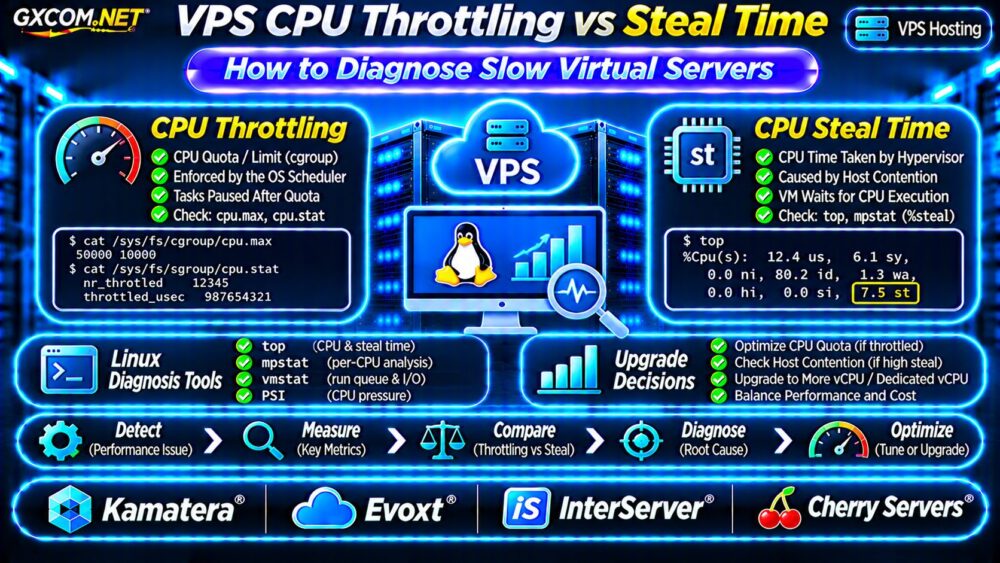
CPU Throttling vs Steal Time: Key Differences
Linux CPU throttling often involves Completely Fair Scheduler bandwidth controls applied through cgroups. A process group that exhausts its permitted CPU time must wait until additional quota becomes available.
CPU steal time, reported as st by Linux monitoring tools, represents time when a virtual CPU could not execute because the hypervisor was servicing other workloads.
| Metric | CPU Throttling | CPU Steal Time |
|---|---|---|
| Primary mechanism | CPU quota enforcement | Hypervisor scheduling |
| Typical environment | Containers or limited cgroups | Virtual machines |
| Useful evidence | cpu.stat counters | top or mpstat %steal |
| Potential remedy | Adjust quota or workload | Investigate host contention |
These conditions can occur together, and not every VPS exposes enough metrics to identify both.
Step 1: Check CPU Steal Time
Start with the Linux top command:
topExamine the CPU summary, particularly the st field. A sustained increase during slow application periods may indicate virtual CPU scheduling contention.
For interval-based measurements, install the sysstat package and run:
mpstat -P ALL 1 10This displays per-CPU statistics across ten one-second intervals. Compare %steal with application response times and CPU utilization.
A single elevated sample does not prove persistent host oversubscription. Investigate repeated patterns under comparable workloads.
For a dedicated explanation, read our VPS CPU Steal Time Troubleshooting Guide.
Step 2: Identify Linux CPU Throttling
On systems using cgroup v2, CPU bandwidth controls are commonly exposed through cpu.max and cpu.stat.

Inspect the current cgroup’s effective CPU quota:
cat /sys/fs/cgroup/cpu.max
cat /sys/fs/cgroup/cpu.stat
The first command may return values such as 50000 100000, indicating a quota equivalent to half a CPU over the specified period. A value of max means no bandwidth quota is configured at that cgroup level.
The statistics file can include nr_throttled and throttled_usec, depending on the kernel configuration.
These paths inspect the root cgroup. For an application inside a container or systemd service, inspect its actual cgroup and relevant parent limits instead.
Interpret Throttling Counters Carefully
Increasing throttling counters indicate quota enforcement, but do not automatically establish that throttling causes user-visible latency.
Measure counter changes over time and correlate them with request latency, workload concurrency, and CPU demand.
On cgroup v1 systems, equivalent information uses different paths and CPU controller files.
Step 3: Check CPU Pressure and Run Queues
CPU pressure metrics help identify tasks waiting for processor availability.
cat /proc/pressure/cpu
vmstat 1 10
Linux Pressure Stall Information reports CPU pressure over defined intervals. The vmstat command provides runnable-task counts and additional system activity.
High CPU pressure can occur because of application demand, quota restrictions, or scheduling contention. It does not independently identify the responsible mechanism.
Also examine load average, per-process CPU usage, and application-level latency before drawing conclusions.
Step 4: Separate CPU Problems from Storage Delays
Slow VPS performance is not always caused by CPU scheduling. Database queries, swap activity, and saturated storage can produce similar symptoms.
Check memory availability, swap usage, disk latency, and application logs. Elevated I/O wait is not the same metric as CPU steal time.
For storage-related symptoms, consult our NVMe VPS vs SSD Performance Comparison.
When Should You Upgrade Your VPS?
Upgrading is reasonable when repeated measurements show that available CPU resources cannot meet sustained workload demand.
If throttling results from a container quota, adjusting that limit may help, provided the VPS has sufficient underlying CPU capacity.
If steal time remains elevated during important workloads, ask the provider about resource allocation, host contention, and migration options.
A larger shared-CPU plan may improve performance without eliminating contention. Dedicated vCPU products may offer stronger allocation guarantees, but contractual definitions vary.
Four VPS Providers to Compare
The following GXCOM.NET-approved affiliate providers offer infrastructure options worth investigating. Verify CPU allocation policies and product specifications before purchasing.
Kamatera: Adjustable Compute Resources
Kamatera is suitable for comparing configurable cloud server resources. Evaluate vCPU allocation, upgrade procedures, monitoring, and available support.
Evoxt: Budget-Oriented VPS Options
Evoxt is worth considering for smaller Linux workloads. Compare CPU fair-use conditions, sustained performance, RAM allocation, and monthly costs.
InterServer: VPS Resource Comparison
InterServer provides another option for evaluating VPS resources and operating expenses. Confirm CPU scheduling policies, resource limits, and upgrade flexibility.
Cherry Servers: Performance-Focused Infrastructure
Cherry Servers may be relevant when stronger compute isolation is required. Compare its applicable VPS and dedicated infrastructure offerings, CPU specifications, and contractual guarantees.
Do not assume any provider guarantees zero steal time or unrestricted CPU consumption without explicit documentation.
Shared CPU vs Dedicated CPU VPS Costs
Consider a hypothetical shared-CPU VPS costing $15 monthly and a more isolated compute option costing $35 monthly.

The annual difference is $240. Whether that premium is justified depends on measured application performance, downtime exposure, and operational requirements.
Compare sustained latency, CPU scheduling consistency, and documented usage policies rather than relying solely on vCPU counts.
Our Best VPS Providers Guide offers broader purchasing considerations.
Practical VPS CPU Diagnosis Checklist
- Record application response times during slow periods.
- Measure steal time using top or mpstat.
- Inspect actual workload cgroup quotas and counters.
- Check CPU pressure, run queues, and memory usage.
- Exclude storage and database bottlenecks.
- Compare provider policies before changing plans.
Frequently Asked Questions
Can CPU Throttling and Steal Time Occur Together?
Yes. A virtual machine may experience hypervisor scheduling delays while an application inside it also encounters cgroup CPU limits.
Does High Steal Time Prove Overselling?
No. It indicates delayed virtual CPU execution, but isolated samples do not establish a provider’s capacity-management practices.
Will More vCPUs Fix a Slow VPS?
Not necessarily. Storage bottlenecks, CPU quotas, inefficient applications, and shared-host contention may remain.
Final Verdict
Diagnosing VPS CPU throttling vs steal time requires examining the correct metrics rather than treating every slowdown as insufficient CPU capacity.
Use Linux monitoring tools, correlate measurements with application performance, and compare Kamatera, Evoxt, InterServer, and Cherry Servers using verified resource policies. Upgrade only when evidence supports the decision.