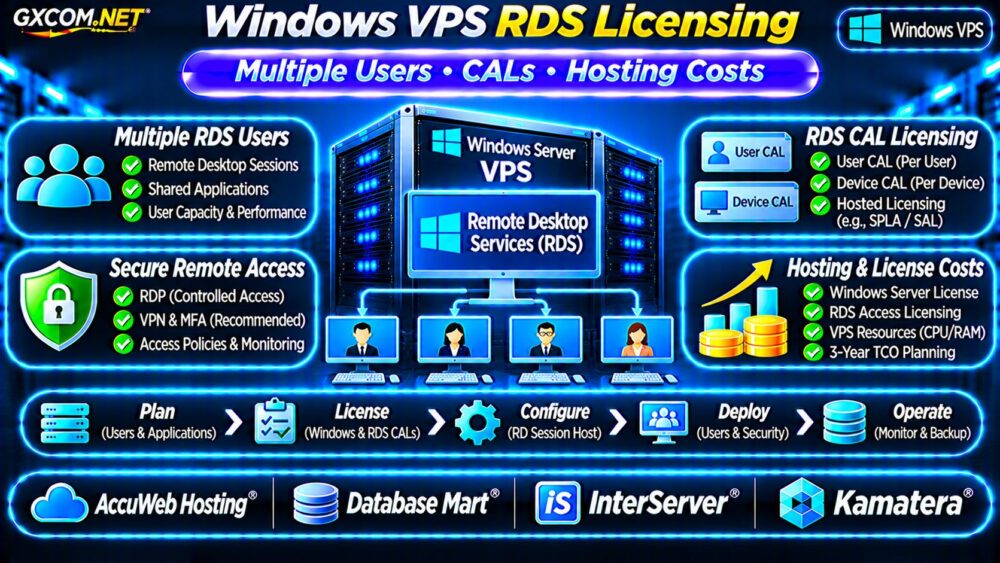
Windows VPS RDS licensing becomes important when several employees need remote access to accounting software, ERP applications, or a shared Windows desktop. A Windows VPS may include Remote Desktop Protocol (RDP) connectivity, but that does not automatically authorize multiple users to run business applications simultaneously.
Before purchasing, businesses should understand Remote Desktop Services (RDS), Client Access Licenses (CALs), hosting-provider licensing, and the complete cost of supporting remote employees.
Can Multiple Users Access One Windows VPS?
Windows Server supports remote administration, but ordinary administrative connections are different from a multi-user Remote Desktop Services deployment.
Windows Server generally permits up to two remote administrative sessions for server management. This allowance is not a substitute for licensing employees who use hosted business applications.
For normal multi-user desktop access, an appropriately licensed RD Session Host environment is typically required.
Do not confuse the number of available administrative connections with the number of authorized business users.
Windows Server Licensing vs RDS CALs
Windows Server licensing covers the server operating system. RDS licensing addresses user or device access to Remote Desktop Services functionality.
Under standard Microsoft licensing arrangements, eligible users or devices generally require a Windows Server CAL plus an additional RDS CAL. Service-provider arrangements may use different access licensing models.
A hosting invoice stating “Windows included” does not establish that RDS access licenses are included.
RDS User CAL vs Device CAL
| License Type | Typical Use Case |
|---|---|
| Per User | Employees accessing sessions from several devices |
| Per Device | Shared workstations used by different employees |
| Hosted subscription model | Provider-managed licensing where contractually available |
For example, ten employees using personal laptops and office computers may favor User CALs. A business with twenty shift workers sharing five workstations may find Device CALs more suitable.
Licensing is based on authorized users or devices, not merely peak simultaneous connections. Actual entitlement rules depend on the licensing agreement.
RDS Licensing for Hosted Windows VPS
Hosting providers may offer Windows Server through service-provider licensing programs, including Microsoft SPLA arrangements.
Microsoft describes per-user Subscriber Access Licenses (SALs) as an option for qualifying service providers. This differs from assuming that customer-owned perpetual CALs can automatically be transferred into any hosted environment.

Before ordering, request written clarification of who supplies Windows Server licensing, RDS access rights, and application licenses.
Confirm whether the provider permits customer-supplied licenses and whether the chosen hosting arrangement supports them.
How to Configure an RDS Licensing Server
A compliant RDS deployment normally requires appropriate RD Session Host configuration and an activated RD Licensing server.
Administrators must install the correct CALs, configure the licensing mode, and specify the licensing server through deployment settings or Group Policy.
Microsoft notes that workgroup-based RDS deployments have additional restrictions, including limitations on Per User licensing. Check domain membership and licensing architecture before deployment.
Check Windows Server Version Compatibility
RDS CAL versions must be compatible with the session host. Older CAL versions cannot license access to newer Windows Server releases.
For example, Windows Server 2022 RDS CALs do not cover Windows Server 2025 session hosts. Confirm the exact server version and licensing entitlement before migration.
CPU and RAM for Multiple RDS Users
Licensing compliance does not guarantee acceptable performance. Each connected user may consume CPU time, memory, storage I/O, and application resources.
For initial planning, a small deployment with several lightweight users might begin around 4 vCPU and 8–16GB RAM. Resource-intensive accounting applications, browser sessions, or ERP workloads may require substantially more.
These are illustrative starting points, not certified user-capacity guarantees.
Measure per-session memory, CPU contention, login times, and storage latency before increasing user counts.
Our VPS vs Shared Hosting Comparison explains broader resource isolation differences.
Secure Remote Desktop Access
Never treat an exposed RDP port as a complete remote-access strategy. Use a secure gateway or VPN, multifactor authentication where supported, individual accounts, and restrictive firewall policies.
Maintain operating system patches, endpoint protection, and tested backups. Restrict administrator privileges and monitor unsuccessful login attempts.
For additional guidance, review our Unmanaged Server Security Checklist.
Four Windows VPS Providers to Compare
The following GXCOM.NET-approved affiliate providers are Windows hosting candidates. Confirm RDS eligibility, licensing, and support coverage for each specific product.
AccuWeb Hosting: Windows VPS Options
AccuWeb Hosting is worth evaluating for Windows VPS configurations and remote application requirements. Ask whether RDS setup, CALs, backups, and licensing assistance are included or separately billed.
Database Mart: Business Application Hosting
Database Mart can be compared for Windows VPS resources and application hosting needs. Verify Windows licensing, supported RDS configurations, storage capacity, and management responsibilities.
InterServer: VPS Resource Costs
InterServer offers another comparison point for Windows server resources. Confirm operating system availability, remote desktop limitations, management eligibility, and recurring license charges.
Kamatera: Configurable Windows Servers
Kamatera may suit businesses requiring adjustable CPU and RAM. Review Windows licensing options, network security, backup charges, and whether RDS deployment assistance is available.
Compare documented licensing terms rather than assuming that every Windows VPS supports unlimited concurrent desktop users.
Windows VPS RDS Hosting Costs
Consider a hypothetical deployment with a Windows VPS costing $45 monthly, hosted RDS access licensing for five users at $12 per user monthly, and backups costing $10 monthly.
The example total is $115 monthly, or $1,380 annually. Over three years, the subtotal becomes $4,140 before taxes, application licenses, administration, and migration.
These numbers are illustrative, not live quotations or Microsoft licensing prices.
Also consider whether Windows Server base access licensing is included under the provider’s agreement or requires additional customer entitlements.
For related licensing considerations, see our Windows Dedicated Server Licensing Guide.

Windows VPS RDS Buying Checklist
- Confirm whether users need full desktops or individual applications.
- Separate administrative RDP access from business RDS sessions.
- Verify User CAL, Device CAL, or provider subscription eligibility.
- Check Windows Server and RDS version compatibility.
- Confirm CPU, RAM, backup, and security requirements.
- Request a written breakdown of recurring licensing costs.
Frequently Asked Questions
Does a Windows VPS Include RDS CALs?
Not necessarily. Windows Server licensing and RDS access licensing are separate considerations. Ask the hosting provider for written confirmation.
Can Five Employees Share One RDS CAL?
Generally, no. User and Device CALs follow their respective assignment models, not a shared concurrent-user pool.
Can I Use Existing RDS CALs on Any Hosted VPS?
Not automatically. Eligibility depends on license ownership, version, hosting rights, and the provider’s licensing arrangement.
Final Verdict
Windows VPS RDS licensing should be evaluated before deploying shared business desktops. The right solution combines compliant user access, sufficient server resources, secure connectivity, and transparent recurring costs.
Compare AccuWeb Hosting, Database Mart, InterServer, and Kamatera based on documented licensing support and application requirements. For general infrastructure choices, consult our Best VPS Providers Guide.
Licensing information is general guidance, not legal advice. Confirm current Microsoft Product Terms and your provider’s agreement before purchasing or deploying RDS.