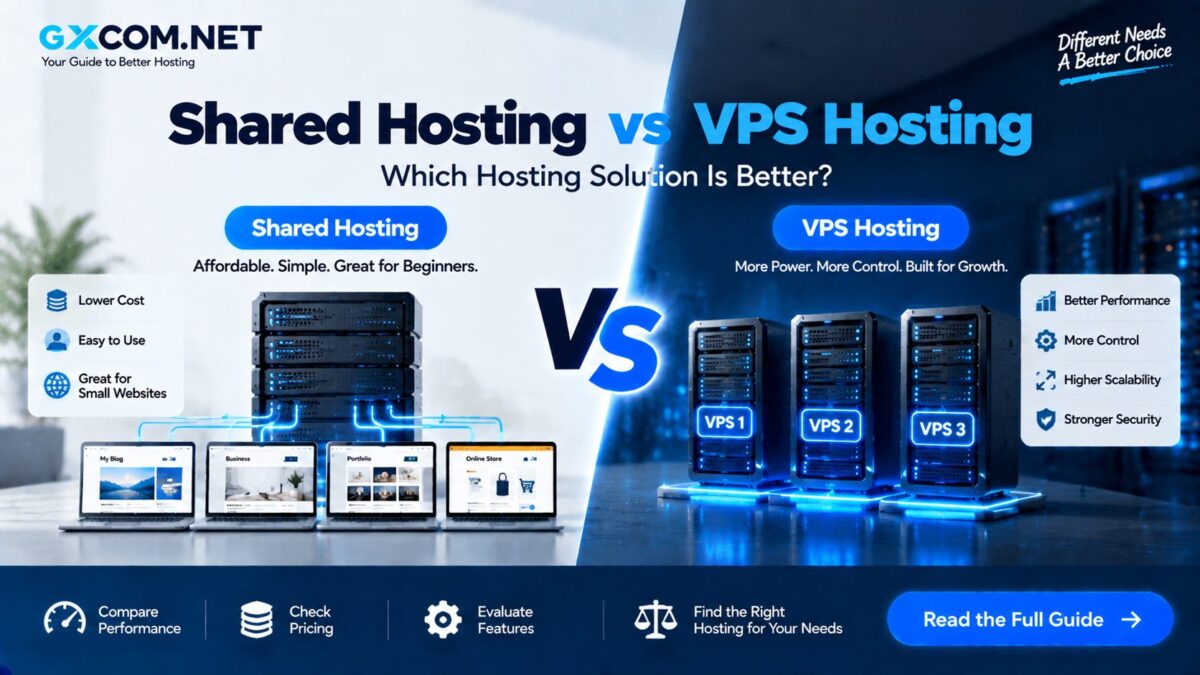
Shared hosting is one of the easiest and most affordable ways to launch a website. But as traffic grows, plugins become heavier or applications demand more resources, many website owners eventually ask the same question:
Should I stay on shared hosting or upgrade to a VPS?
The answer is not simply “VPS is faster.” Shared hosting and VPS hosting are designed for different workloads, budgets and levels of technical responsibility.
A well-optimized website can run successfully on shared hosting for years, while a poorly configured VPS can perform worse than a quality shared hosting platform.
In this shared hosting vs VPS comparison, we examine performance, CPU and RAM, resource limits, control, security, scalability and real-world cost—and explain the signs that indicate it may be time to upgrade.
START SMALL → SHARED HOSTING
NEED MORE RESOURCES & CONTROL → VPS
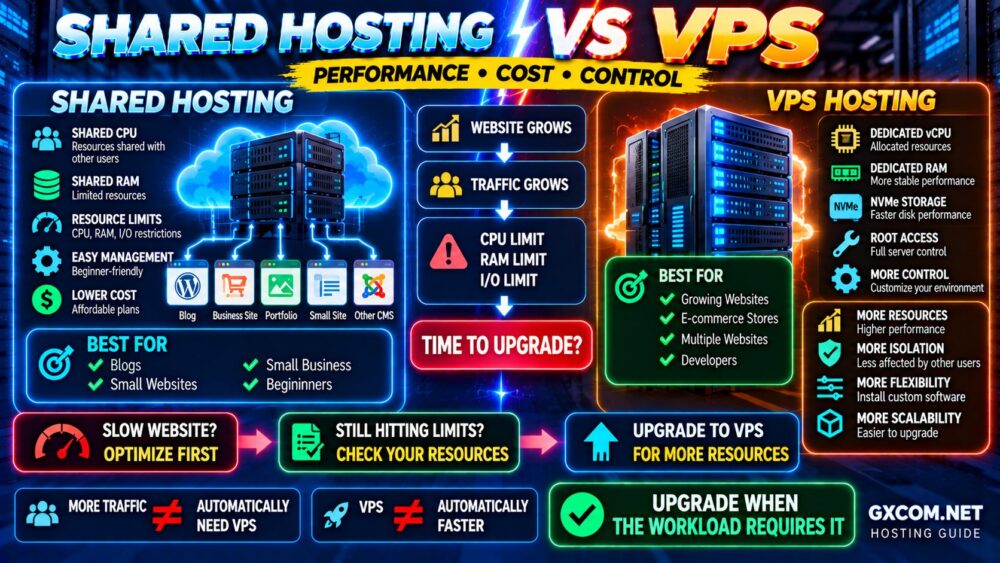
Shared Hosting vs VPS: Quick Comparison
| Feature | Shared Hosting | VPS Hosting |
|---|---|---|
| Starting Cost | Lower | Usually higher |
| Ease of Use | Very easy | Depends on management |
| Resource Isolation | Limited | Greater |
| CPU & RAM | Shared and limited | Defined allocation |
| Root Access | No | Usually available |
| Server Customization | Limited | High |
| Scalability | Plan-dependent | Generally stronger |
| Server Management | Provider | User or provider |
| Best For | Small websites | Growing or demanding workloads |
The simplest way to understand the difference is:
SHARED HOSTING = SHARE THE ENVIRONMENT
VPS = GET YOUR OWN VIRTUAL SERVER ENVIRONMENT
What Is Shared Hosting?
Shared hosting places many customer accounts on the same underlying server infrastructure.
The provider manages the operating system, web server, security configuration and much of the technical environment, while customers typically manage their websites through a hosting control panel.
A shared hosting plan may include:
- Website storage
- Databases
- Email accounts
- SSL support
- Backups
- Control panel
- One-click WordPress installation
The major advantage is efficiency.
Because infrastructure and administration costs are distributed across many customers, shared hosting can be inexpensive and easy to operate.
This makes it ideal for many:
- Personal websites
- Blogs
- Portfolios
- Landing pages
- Small business websites
- Low-to-moderate traffic WordPress sites
What Is VPS Hosting?
A Virtual Private Server uses virtualization to create separate virtual server environments on physical infrastructure.
A typical VPS plan may advertise resources such as:
- 2 or 4 vCPU
- 4 GB or 8 GB RAM
- NVMe or SSD storage
- Bandwidth allocation
- Dedicated IP address
- Root or administrator access
This gives you considerably more control over the server environment.
Depending on the VPS, you may install your own:
- Operating system
- Web server
- Database software
- PHP versions
- Control panel
- Firewall
- Redis
- Docker
- Custom applications
However, greater control can also mean greater responsibility.
1. Shared Hosting vs VPS Performance
A VPS can provide more predictable access to resources than conventional shared hosting, but VPS does not automatically mean faster.
Website speed depends on the complete stack:
CPU → RAM → STORAGE → NETWORK → WEB SERVER → DATABASE → CACHE → APPLICATION
A quality shared hosting platform may use optimized server software, caching and carefully managed infrastructure.
An unmanaged VPS may provide more resources but perform poorly if the server stack is incorrectly configured.
Therefore:
VPS ≠ AUTOMATICALLY FASTER.
BETTER RESOURCES + GOOD CONFIGURATION = BETTER PERFORMANCE.
2. CPU and RAM
This is one of the biggest differences between shared hosting and VPS hosting.
On shared hosting, CPU and RAM are part of a shared environment. Providers normally enforce account-level limits to prevent one customer from consuming excessive resources.
You may encounter restrictions involving:
- CPU usage
- Memory
- PHP workers
- Entry processes
- Concurrent connections
- I/O
- IOPS
A VPS is more commonly sold with an explicit allocation:
2 vCPU + 4 GB RAM
or:
4 vCPU + 8 GB RAM
This makes resource planning easier, but specifications still need context.
CPU model, virtualization, oversubscription and storage performance can differ substantially between providers.
4 vCPU ≠ 4 vCPU PERFORMANCE.
3. Resource Isolation
Shared hosting is intentionally multi-tenant.
Hosting companies use isolation technologies and resource limits to control how customer accounts interact with the underlying infrastructure.
A VPS provides a stronger logical boundary between individual virtual servers.
This can make performance more predictable for workloads that consistently require CPU, RAM or application resources.
However, VPS infrastructure can still share underlying physical hardware, especially CPU and network resources.
Do not confuse a VPS with a dedicated server.
4. Storage and Disk Performance
Storage matters because websites frequently read and write files, databases, logs and cached data.
Modern hosting platforms commonly advertise SSD or NVMe storage, but the storage label alone does not guarantee performance.
Actual results can depend on:
- Storage architecture
- I/O limits
- IOPS limits
- Disk contention
- Database workload
- Provider infrastructure
A shared hosting account may hit an I/O restriction even when it has plenty of storage space remaining.
A VPS can provide greater flexibility, but you should still examine storage limits rather than assuming “NVMe” automatically means unlimited disk performance.
5. Shared Hosting vs VPS Control
Shared hosting prioritizes convenience.
You typically control:
- Domains
- Websites
- Databases
- PHP settings
- SSL
- Backups
But you usually cannot fundamentally change the server environment.
With an appropriate VPS, you may control:
- Operating system
- Web server
- Firewall
- System packages
- Database configuration
- SSH settings
- Custom ports
- Runtime environments
If you need custom server software, containers or root access, VPS hosting is normally the stronger choice.
6. Ease of Use
Shared hosting clearly wins for beginners.
The typical process is:
BUY HOSTING
↓
CONNECT DOMAIN
↓
INSTALL WORDPRESS
↓
BUILD WEBSITE
An unmanaged VPS can require:
DEPLOY SERVER
↓
SECURE SSH
↓
CONFIGURE FIREWALL
↓
INSTALL WEB STACK
↓
CONFIGURE DATABASE
↓
DEPLOY WEBSITE
↓
MONITOR & MAINTAIN
If you are new to server administration, our VPS Server Setup Guide explains the basic deployment process.
7. Security
Shared hosting and VPS hosting can both be secure.
The major difference is who manages the security responsibilities.
With shared hosting, the provider normally handles much of the server-level security.
With an unmanaged VPS, you may need to handle:
- Operating-system patches
- SSH configuration
- Firewall rules
- User permissions
- Software updates
- Backups
- Monitoring
A VPS provides greater security control, but control is useful only when it is configured correctly.
If you upgrade to a self-managed VPS, follow our VPS Security Best Practices.
8. Shared Hosting vs VPS Cost
Shared hosting is generally less expensive because infrastructure and management are shared across many customers.
But introductory pricing can be misleading.
Always compare:
- Initial price
- Renewal price
- Backup fees
- Domain costs
- Email limits
- Resource limits
- Migration costs
VPS pricing requires even more careful comparison.
The advertised VPS price may not include everything you need.
SERVER PRICE
+ Backup
+ Control Panel
+ Management
+ Software Licenses
+ Extra Storage
=
REAL VPS COST
A $5 VPS is not necessarily a $5 hosting solution.
9. Scalability
Shared hosting can scale farther than many beginners expect.
A provider may offer:
ENTRY SHARED PLAN
↓
BUSINESS SHARED PLAN
↓
PREMIUM HOSTING
Eventually, however, a growing workload may require greater isolation or control.
VPS hosting can provide a clearer infrastructure path:
2 vCPU / 4 GB
↓
4 vCPU / 8 GB
↓
8 vCPU / 16 GB
↓
LARGER VPS / CLOUD / DEDICATED
Exact scaling behavior depends on the provider, so investigate upgrade procedures before purchasing.
10. Shared Hosting vs VPS for WordPress
WordPress does not automatically require a VPS.
Many blogs, company websites and content sites can run successfully on quality shared or specialized WordPress hosting.
A VPS becomes more attractive when WordPress requires:
- More CPU
- More RAM
- More PHP workers
- Custom server configuration
- Persistent object caching
- Multiple demanding websites
- Greater traffic capacity
If you are deciding between general and specialized WordPress hosting first, read our WordPress Hosting vs Web Hosting comparison.
How Much Traffic Can Shared Hosting Handle?
There is no universal visitor number.
Claims such as “shared hosting handles 10,000 visitors” or “you need VPS after 100,000 visitors” oversimplify the problem.
Ten thousand monthly visitors arriving gradually at cached pages can require far fewer resources than a few hundred simultaneous users generating dynamic requests.
Capacity depends on:
- Concurrent users
- Page caching
- PHP execution
- Database queries
- Page weight
- Traffic spikes
- Plugins
- Application behavior
MONTHLY VISITORS ≠ SERVER LOAD.
7 Signs It May Be Time to Upgrade From Shared Hosting to VPS
1. You Regularly Hit CPU Limits
If your account repeatedly reaches CPU restrictions during normal traffic, investigate what is consuming the resources.
2. You Frequently Exhaust Memory
Complex applications, plugins and concurrent processes can increase memory requirements.
3. I/O Limits Are Affecting Performance
Database-heavy or file-intensive websites may encounter storage throughput restrictions.
4. You Need More PHP Workers or Concurrent Processes
Dynamic websites and e-commerce stores may require greater concurrency than an entry-level shared plan provides.
5. You Need Server-Level Software
If your application requires Docker, custom packages or specialized server services, shared hosting may simply be too restrictive.
6. Traffic Spikes Are Becoming Normal
A temporary viral spike is different from sustained growth. If higher traffic has become normal, infrastructure may need to scale with it.
7. Your Hosting Environment Is Limiting Growth
If you have already optimized the website but consistently encounter hosting limits, upgrading infrastructure becomes a logical next step.
Before Upgrading: Make Sure the Server Is Actually the Problem
Do not upgrade simply because a website feels slow.
A VPS cannot automatically fix:
- Oversized images
- Too much JavaScript
- Bad plugins
- Slow external scripts
- Poor database queries
- Missing caching
- Unoptimized application code
First identify the bottleneck.
Our Website Performance Guide explains the broader optimization process.
OPTIMIZE FIRST → MEASURE → UPGRADE WHEN NECESSARY.
Managed VPS vs Unmanaged VPS
Once you decide to move away from shared hosting, the next question is whether you want to manage the server yourself.
UNMANAGED VPS
- Usually lower infrastructure cost
- Greater administrative responsibility
- More control
- Better suited to experienced users
MANAGED VPS
- Higher cost
- Less server administration
- Provider assistance
- Better fit for businesses without server expertise
For a detailed comparison, see our Managed vs Unmanaged VPS guide.
Hosting Options to Consider When Upgrading
Once shared hosting is genuinely limiting your workload, compare VPS providers based on more than the advertised amount of RAM.
DigitalOcean is worth comparing for developers and users who want straightforward cloud VPS infrastructure with flexible deployment options.
Vultr is another option to evaluate when location choice, cloud compute flexibility and multiple instance configurations matter.
If you prefer a more managed transition from conventional hosting, ScalaHosting is worth comparing when you want VPS resources without taking on the same level of server administration as a fully unmanaged deployment.
For highly price-sensitive VPS workloads, compare current offers carefully rather than choosing purely by headline specifications. CPU allocation, storage performance, bandwidth, backups and support can matter as much as RAM.
If price is your primary consideration, our latest VPS hosting deals page can help you compare current VPS offers and discounts.
Shared Hosting vs VPS for E-Commerce
A small online store can run successfully on quality shared hosting.
But e-commerce introduces more dynamic activity:
- Shopping carts
- Customer accounts
- Checkout sessions
- Product searches
- Payment processing
- Database activity
- Background jobs
These workloads cannot always be cached as aggressively as ordinary content pages.
As transactions and concurrent users grow, VPS or managed infrastructure may provide more room to scale.
Shared Hosting vs VPS Decision Table
| Your Situation | Better Starting Point |
|---|---|
| First website | Shared Hosting |
| Personal blog | Shared Hosting |
| Small business website | Shared Hosting |
| Small WordPress site | Shared / WordPress Hosting |
| Need root access | VPS |
| Need Docker or custom software | VPS |
| Persistent resource limits | VPS |
| Growing dynamic website | VPS / Managed VPS |
| No server administration skills | Shared Hosting / Managed VPS |
| Multiple demanding websites | VPS |
Common Shared Hosting vs VPS Mistakes
Upgrading Only Because VPS Sounds More Professional
A VPS adds complexity. If shared hosting handles your workload comfortably, there may be no reason to move.
Looking Only at RAM
RAM is important, but CPU performance, storage, network quality and configuration matter too.
Ignoring VPS Management
Someone needs to secure, update, monitor and maintain an unmanaged server.
Assuming “Unlimited” Shared Hosting Has Unlimited Resources
Hosting accounts still operate under CPU, memory, I/O, process or acceptable-use limits.
Choosing the Cheapest VPS Available
Extremely low prices can involve tradeoffs in CPU allocation, storage, support, network performance or other areas.
Migrating Before Optimizing
Do not spend more on infrastructure to compensate for a problem that should be fixed at the application level.
Shared Hosting vs VPS FAQ
Is VPS better than shared hosting?
VPS hosting generally provides greater control, resource isolation and scalability, but shared hosting is often easier and cheaper. The better choice depends on your workload.
Is VPS faster than shared hosting?
It can be, particularly when shared hosting resource limits are a bottleneck. However, a poorly configured VPS can be slower than an optimized shared hosting environment.
When should I upgrade from shared hosting to VPS?
Consider upgrading when persistent CPU, RAM, I/O or concurrency limitations remain after you have optimized the website, or when you need server-level control that shared hosting cannot provide.
Do I need a VPS for WordPress?
No. Many WordPress websites perform well on shared or specialized WordPress hosting. VPS becomes useful when resource, control or customization requirements increase.
Can beginners use VPS hosting?
Yes, but unmanaged VPS hosting requires server administration knowledge. Beginners who need VPS resources may prefer managed VPS hosting.
How much RAM does a VPS need?
It depends on the application, operating system, database, traffic and software stack. Choose resources based on measured workload rather than a universal RAM recommendation.
Can a VPS host multiple websites?
Yes. A VPS can host multiple websites as long as its CPU, RAM, storage and network resources are sufficient for the combined workload.
Is shared hosting secure?
Quality shared hosting can be secure when the provider maintains strong account isolation and server security. Website owners must still keep their applications, passwords and plugins secure.
Final Verdict: Shared Hosting or VPS?
For beginners, blogs and smaller business websites, shared hosting remains one of the most practical ways to get online.
Choose shared hosting when you want:
LOWER COST → EASY MANAGEMENT → SIMPLE DEPLOYMENT
Choose VPS hosting when you need:
MORE RESOURCES → MORE CONTROL → MORE FLEXIBILITY → GREATER SCALABILITY
But do not upgrade simply because your website has reached an arbitrary number of monthly visitors.
Measure CPU, RAM, I/O, concurrency and application performance first.
If shared hosting is genuinely the bottleneck, VPS is a logical next step.
If the website itself is the bottleneck, fix the website first.
DON'T UPGRADE BECAUSE YOUR WEBSITE IS BIGGER.
UPGRADE WHEN YOUR WORKLOAD REQUIRES IT.