If you are building a WordPress website, you may encounter two seemingly similar products: web hosting and WordPress hosting.
Both can run WordPress. Both can provide storage, databases, SSL and website management tools. So why do hosting companies sell them as different services—and is WordPress hosting actually worth paying more for?
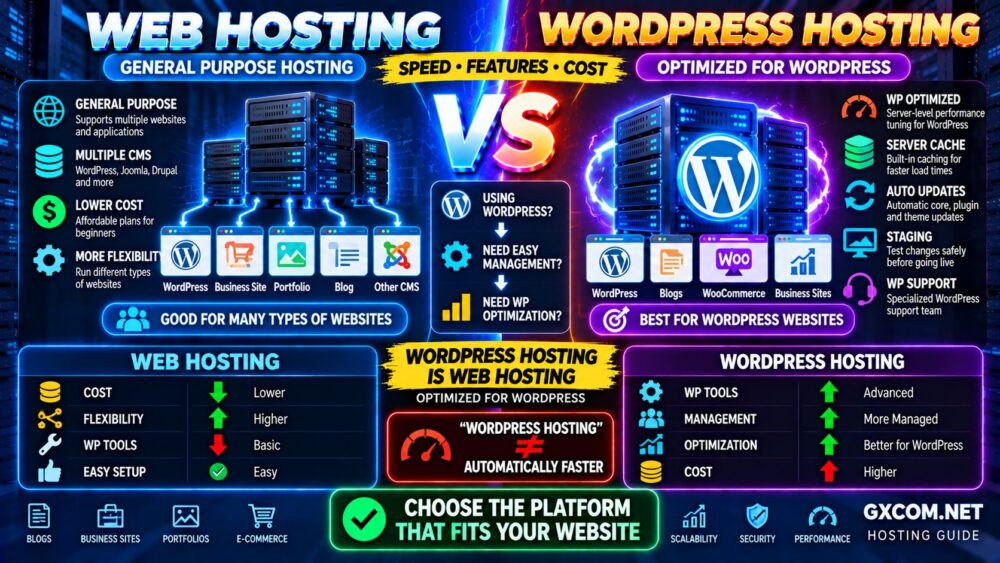
The main difference is specialization. General web hosting is designed to support websites and applications more broadly, while WordPress hosting is typically configured, managed or optimized specifically around WordPress.
But that does not automatically make WordPress hosting better.
In this WordPress hosting vs web hosting comparison, we examine performance, management, security, caching, pricing, scalability and support to help you choose the right hosting environment.
GENERAL WEBSITE → WEB HOSTING
WORDPRESS-FIRST WORKLOAD → WORDPRESS HOSTING
WordPress Hosting vs Web Hosting: Quick Comparison
| Feature | Web Hosting | WordPress Hosting |
|---|---|---|
| Can Run WordPress | Usually yes | Yes |
| WordPress Optimization | Varies | Usually stronger |
| Automatic WordPress Updates | Plan-dependent | Common on managed plans |
| WordPress-Specific Caching | Varies | Often included |
| Staging Tools | Plan-dependent | More common |
| WordPress Support | General hosting support | Often more specialized |
| Server Control | Depends on plan | Often more restricted on managed plans |
| Ease of Use | Easy | Often easier for WordPress |
| Price | Usually lower at entry level | Can cost more |
| Best For | General websites and smaller projects | WordPress-focused websites |
The most important point is:
WORDPRESS HOSTING IS STILL WEB HOSTING.
It is simply a category of hosting designed specifically around WordPress requirements and workflows.
What Is Web Hosting?
Web hosting is the general infrastructure and service that makes a website accessible on the internet.
A typical web hosting account may provide:
- Website storage
- Bandwidth
- Databases
- PHP support
- SSL certificates
- Control panel
- Backups
- Application installers
Depending on the provider, the same hosting account may support WordPress as well as other content management systems and web applications.
For many small WordPress websites, this is perfectly adequate.
You do not need a product labeled “WordPress Hosting” simply to install WordPress.
What Is WordPress Hosting?
WordPress hosting is web hosting designed specifically for WordPress websites.
Depending on the provider and plan, that specialization may include:
- Preinstalled WordPress
- Automatic WordPress updates
- WordPress-specific caching
- Staging environments
- Backup and restore tools
- Malware protection
- WordPress-focused support
- Performance optimization
- WP-CLI or developer tools
However, the term “WordPress hosting” is broad.
One provider may simply offer ordinary shared hosting with WordPress preinstalled, while another may operate a heavily optimized managed WordPress platform.
Therefore:
WORDPRESS HOSTING LABEL ≠ SAME PRODUCT EVERYWHERE.
Compare the actual infrastructure, resource limits and management features rather than the product name alone.
Shared WordPress Hosting vs Managed WordPress Hosting
This is an important distinction.
Shared WordPress hosting is generally an affordable hosting environment configured to make WordPress installation and management easier.
Managed WordPress hosting normally adds a greater level of platform management, optimization and WordPress-specific tooling.
A simplified progression looks like:
SHARED WEB HOSTING
↓
WORDPRESS HOSTING
↓
MANAGED WORDPRESS HOSTING
↓
VPS / CLOUD INFRASTRUCTURE
This is not a strict hierarchy. A well-optimized managed WordPress platform can run on sophisticated cloud infrastructure, while a basic WordPress plan may simply be conventional shared hosting.
1. WordPress Hosting vs Web Hosting: Performance
WordPress hosting can provide a performance advantage when the hosting stack has actually been optimized for WordPress.
Potential optimizations include:
- Server-side page caching
- Object caching
- PHP optimization
- Database tuning
- CDN integration
- Optimized web-server configuration
But the label itself guarantees nothing.
A quality general web hosting platform with effective caching and modern infrastructure may outperform a poorly provisioned WordPress hosting plan.
Website performance depends on the complete stack:
CPU → RAM → STORAGE → PHP → DATABASE → CACHE → CDN → APPLICATION
If you want to understand how the major cache layers work together, read our Website Caching Explained guide.
2. Ease of Use
This is one area where WordPress hosting often has a clear advantage for WordPress users.
Traditional web hosting may follow this workflow:
BUY HOSTING
↓
CREATE DATABASE / INSTALL WORDPRESS
↓
CONFIGURE WEBSITE
WordPress hosting may simplify that to:
BUY PLAN
↓
WORDPRESS READY
↓
BUILD WEBSITE
Some providers also bundle staging, cloning, backups and update management into a single dashboard.
For beginners or businesses that do not want to manage technical hosting details, this convenience can be valuable.
3. WordPress Updates and Maintenance
WordPress websites require ongoing maintenance.
This can include:
- WordPress core updates
- Plugin updates
- Theme updates
- PHP compatibility
- Backups
- Security monitoring
General web hosting normally manages the server infrastructure, but responsibility for the WordPress application may remain largely with you.
Managed WordPress plans may automate or assist with more of these tasks.
Exactly what is managed varies considerably, so check the provider's scope of support before purchasing.
4. Caching
Caching can make a major difference to WordPress performance because uncached requests may involve PHP execution and database queries.
A WordPress request can potentially move through several layers:
VISITOR
↓
CDN CACHE
↓
PAGE CACHE
↓
WORDPRESS / PHP
↓
OBJECT CACHE
↓
DATABASE
Specialized WordPress hosting often provides server-level caching that works without relying entirely on a WordPress caching plugin.
This can be useful, but more caching systems do not automatically mean better performance.
Avoid stacking multiple overlapping caching tools without understanding which layer each one controls.
5. Security
Both general web hosting and WordPress hosting can provide secure environments.
WordPress-specific hosting may add controls targeted at common WordPress risks, such as:
- Malware scanning
- Login protection
- Managed updates
- Plugin monitoring
- Automated backups
- Application-level firewall rules
However, no hosting platform removes the need for good website security practices.
Weak passwords, abandoned plugins and outdated themes can still create risk.
MANAGED SECURITY ≠ ZERO RESPONSIBILITY.
6. Support
General web hosting support typically focuses on hosting infrastructure.
For example, support may help with:
- Server availability
- DNS
- SSL
- Hosting control panel
- Database availability
WordPress-focused support may be more familiar with:
- WordPress errors
- Plugin conflicts
- WordPress migrations
- Performance configuration
- Staging environments
But support boundaries vary by provider.
Do not assume that “managed WordPress” means the provider will troubleshoot every third-party plugin, custom theme or application issue.
7. WordPress Hosting vs Web Hosting: Cost
General shared web hosting is usually the cheaper entry point.
This makes it attractive for:
- New websites
- Personal blogs
- Small business websites
- Portfolio sites
- Low-traffic projects
WordPress hosting may cost more when the plan includes additional management, caching, backups, staging, security or specialized support.
Compare the complete cost:
HOSTING PRICE
+ Backups
+ CDN
+ Security
+ Migration
+ Staging
+ Management
=
REAL HOSTING COST
A cheaper plan is not necessarily cheaper if you need to purchase several important services separately.
8. Resource Limits
This is one of the most important factors that marketing pages often make difficult to compare.
Look beyond storage and bandwidth.
WordPress performance can also depend on:
- CPU limits
- Memory limits
- PHP workers
- Concurrent processes
- I/O
- Database resources
- Cache capacity
A plan advertising “unlimited websites” or “unlimited bandwidth” does not mean unlimited computing resources.
UNLIMITED HOSTING ≠ UNLIMITED PERFORMANCE.
For a deeper explanation of capacity requirements, see our WordPress Hosting Requirements guide.
9. Scalability
A small WordPress website may run comfortably on inexpensive hosting for years.
But resource requirements can grow with:
- Traffic
- WooCommerce
- Membership features
- Plugins
- Dynamic content
- Background tasks
- Multiple websites
A useful growth path might look like:
SHARED HOSTING
↓
WORDPRESS HOSTING
↓
MANAGED WORDPRESS
↓
MANAGED VPS / CLOUD
You do not need to follow this exact path. Upgrade when your workload requires it—not because a website reaches an arbitrary age or visitor count.
10. Server Control
General web hosting and managed WordPress hosting usually prioritize simplicity over server-level control.
You may not be able to freely change:
- Web-server software
- Operating system
- System packages
- Firewall configuration
- Database server configuration
If your project requires root access, custom server software or a specialized application stack, VPS hosting may be a better fit.
Our Web Hosting vs VPS Hosting comparison explains when moving to a VPS makes sense.
WordPress Hosting vs Web Hosting for Beginners
For beginners, both can work.
Choose general web hosting when:
- Your budget is the priority
- Your website is simple
- The provider offers easy WordPress installation
- You are comfortable managing WordPress yourself
Choose WordPress hosting when:
- You want the simplest WordPress setup
- You value automated management
- You want WordPress-focused tools
- You prefer specialized support
The important question is not whether the plan says “WordPress.”
Ask what additional value the WordPress plan actually provides.
WordPress Hosting vs Web Hosting for Small Businesses
For a small business, reliability and management time may matter more than saving a few dollars per month.
If the website is primarily informational and receives modest traffic, quality general hosting may be sufficient.
If WordPress is business-critical and the owner does not want to manage updates, caching, backups and technical troubleshooting, a managed WordPress plan may justify its higher price.
Think about the cost of your time as well as the hosting invoice.
WordPress Hosting vs Web Hosting for WooCommerce
WooCommerce changes the equation because an online store typically performs more dynamic work than a simple blog.
Stores may involve:
- Shopping carts
- Customer accounts
- Checkout sessions
- Product searches
- Database queries
- Payment integrations
- Background processes
Many of these operations cannot simply be served from a full-page cache.
For a small store, good web hosting may still be sufficient. As traffic, products and transactions grow, stronger WordPress hosting, managed VPS or cloud infrastructure may become more appropriate.
When Web Hosting Is the Better Choice
Choose general web hosting when:
- You want the lowest reasonable starting cost
- Your WordPress website is small
- You have modest traffic
- You do not need specialized WordPress tools
- You may run applications other than WordPress
- You are comfortable managing plugins and updates
For these workloads, paying extra purely for a WordPress label may provide little value.
When WordPress Hosting Is the Better Choice
Choose WordPress hosting when:
- WordPress is your primary platform
- You value WordPress-specific support
- You want integrated caching
- You want staging and migration tools
- You want automated maintenance
- You operate an important business website
- You prefer convenience over maximum server control
Hosting Options Worth Comparing
Once you know which hosting model fits your workload, compare actual providers rather than choosing solely from the label on the plan.
For budget-conscious WordPress and general website hosting, providers such as Hostinger are worth comparing when simplicity and a low entry price matter.
hosting.com (formerly A2 Hosting) is another option to evaluate for traditional website and WordPress workloads, particularly when performance features are part of your buying decision.
If you prefer a more managed environment or expect to outgrow basic shared hosting, ScalaHosting is worth comparing with conventional WordPress plans, especially when your longer-term path may involve managed VPS resources.
Do not choose any provider based on brand name alone. Compare current plan limits, renewal pricing, backups, support, caching, data-center availability and migration policies before purchasing.
How to Choose Between Web Hosting and WordPress Hosting
Use this simple decision process:
1. ARE YOU USING WORDPRESS?
No → General web hosting is usually the logical choice.
Yes → Continue.
2. IS THE WEBSITE SMALL AND SIMPLE?
Yes → Quality web hosting may be enough.
No → Continue.
3. DO YOU VALUE WORDPRESS-SPECIFIC MANAGEMENT?
Yes → Consider WordPress or managed WordPress hosting.
No → General hosting may still work.
4. DO YOU NEED ROOT ACCESS OR CUSTOM SERVER SOFTWARE?
Yes → Consider VPS or cloud infrastructure instead.
WordPress Hosting vs Web Hosting Decision Table
| Situation | Recommended Starting Point |
|---|---|
| Personal WordPress blog | Web Hosting / WordPress Hosting |
| Small business WordPress site | WordPress Hosting |
| Non-WordPress website | Web Hosting |
| Beginner wanting easy WordPress setup | WordPress Hosting |
| Business-critical WordPress site | Managed WordPress Hosting |
| Growing WooCommerce store | Managed WordPress / VPS |
| Need custom server software | VPS |
| Need root access | VPS |
| Lowest possible starting cost | Web Hosting |
Common WordPress Hosting Mistakes
Assuming WordPress Hosting Is Always Faster
Performance depends on infrastructure, resources, caching and configuration—not the product name.
Buying Managed WordPress Hosting for a Tiny Website
A small website may not need premium management features.
Choosing Only by Introductory Price
Check renewal pricing and the cost of backups, domains, email and other extras.
Ignoring Resource Limits
Storage and bandwidth alone do not tell you how much WordPress workload a plan can handle.
Installing Too Many Performance Plugins
Overlapping caching and optimization tools can cause conflicts rather than improve performance.
Upgrading Hosting Before Fixing the Website
If the real problem is oversized images, inefficient plugins or excessive JavaScript, more expensive hosting may not solve it.
Start with our How to Speed Up WordPress guide before assuming the server is the problem.
WordPress Hosting vs Web Hosting FAQ
Is WordPress hosting better than web hosting?
WordPress hosting can be better for WordPress users who value specialized optimization, management and support. General web hosting can be equally appropriate for smaller WordPress websites that do not need those additional features.
Can I use WordPress with normal web hosting?
Yes. Most hosting environments that meet WordPress software requirements can run WordPress. A plan does not need to be branded specifically as WordPress hosting.
Is WordPress hosting faster?
It can be faster when the platform includes effective WordPress-specific caching, optimized PHP and database configuration, but the label alone does not guarantee better performance.
Is WordPress hosting more expensive?
Basic WordPress hosting can be similarly priced to shared web hosting, while managed WordPress platforms often cost more because they include additional management, performance and support features.
Do beginners need WordPress hosting?
No, but WordPress hosting can simplify setup and maintenance. Beginners should compare actual features rather than assuming a specialized plan is mandatory.
Does WordPress hosting include a CDN?
Some plans include CDN integration while others do not. Check the specific provider and plan. If you are unsure whether you need one, read our CDN vs No CDN comparison.
When should I upgrade from web hosting?
Consider upgrading when persistent resource limits, traffic growth, WooCommerce activity, management requirements or performance needs exceed what your current hosting plan can provide.
Should I choose WordPress hosting or VPS?
Choose WordPress hosting when you prioritize convenience and WordPress-specific management. Choose a VPS when you need greater resources, server control, custom software or a more flexible infrastructure environment.
Final Verdict: WordPress Hosting or Web Hosting?
For a small WordPress website, quality general web hosting can be completely sufficient.
Choose web hosting when you want:
LOWER COST → FLEXIBILITY → SIMPLE WEBSITE HOSTING
Choose WordPress hosting when you want:
WORDPRESS OPTIMIZATION → EASIER MANAGEMENT → SPECIALIZED TOOLS
Choose managed WordPress hosting when the website is important enough that reducing maintenance work and gaining more specialized support justifies the additional cost.
And when your workload requires significantly more server resources or control, consider moving beyond both categories to VPS or cloud infrastructure.
The best hosting is not the plan with the most features.
THE BEST HOSTING IS THE ONE THAT MATCHES YOUR WORKLOAD, TECHNICAL SKILLS AND GROWTH PATH.