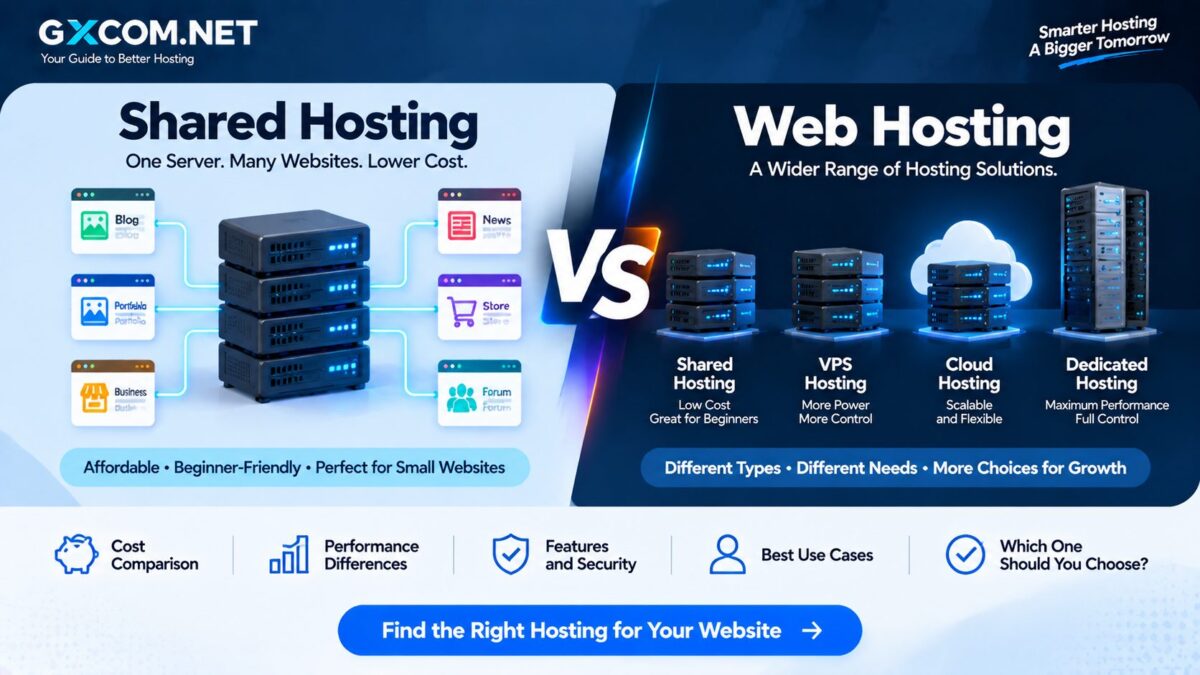
Choosing between web hosting and VPS hosting can be confusing because both can host websites, applications, databases and email—but they provide very different levels of resources, control and scalability.
For a small website, traditional web hosting may be simpler and more affordable. As traffic, applications or resource requirements grow, however, a VPS can provide greater isolation, customization and predictable access to server resources.
So which should you choose?
In this web hosting vs VPS hosting comparison, we break down performance, CPU and RAM, control, security, scalability, management and cost so you can choose the right hosting environment for your website.
SMALL & SIMPLE → WEB HOSTING
GROWING & RESOURCE-INTENSIVE → VPS
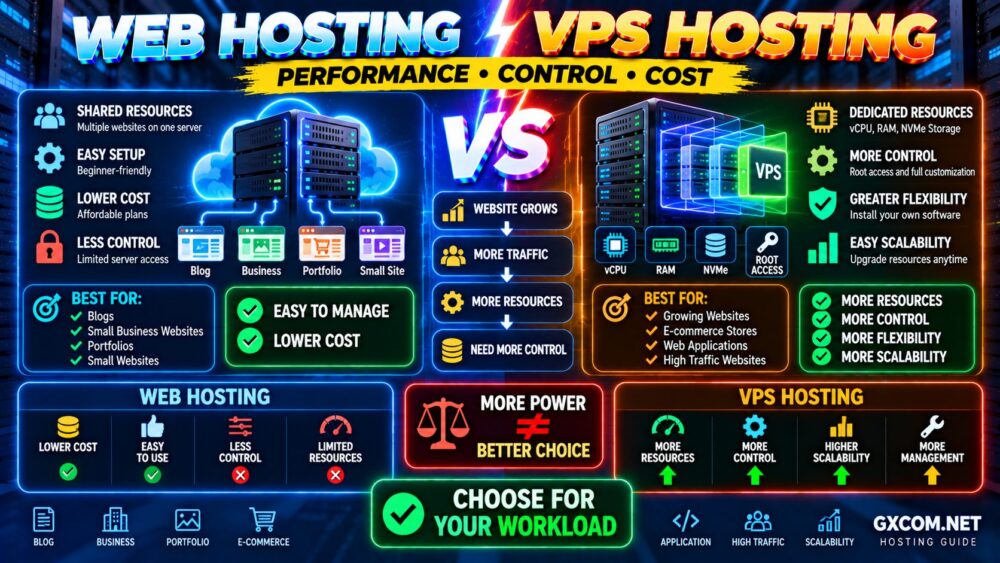
Web Hosting vs VPS Hosting: Quick Comparison
| Feature | Web Hosting | VPS Hosting |
|---|---|---|
| Cost | Usually lower | Usually higher |
| Ease of Use | Generally easier | Depends on management level |
| Server Control | Limited | Much greater |
| Root Access | Usually no | Often available |
| Resource Isolation | More shared | Greater isolation |
| Custom Software | Limited | Much more flexible |
| Scalability | Plan-dependent | Generally stronger |
| Server Administration | Provider handles most tasks | User or managed provider |
| Best For | Small to medium websites | Growing and demanding workloads |
The key difference is not simply that one is “cheap” and the other is “powerful.”
The better choice depends on what your website actually needs.
What Is Web Hosting?
Web hosting is a broad term for services that provide the infrastructure required to make a website available online.
In everyday hosting comparisons, “web hosting” often refers to conventional shared or managed website hosting plans where the provider handles much of the underlying server environment.
A typical plan may include:
- Control panel
- Website storage
- Databases
- Email accounts
- SSL support
- Backups
- One-click application installation
- Basic security features
The main advantage is simplicity.
You can often launch a website without needing to configure Linux, SSH, firewall rules, web-server software or operating-system updates yourself.
This makes traditional web hosting attractive for blogs, portfolios, company websites and other relatively straightforward projects.
What Is VPS Hosting?
A Virtual Private Server, or VPS, uses virtualization to divide physical server resources into isolated virtual environments.
A VPS normally provides its own allocation of resources such as:
- vCPU
- RAM
- Storage
- Operating system
- Network allocation
Depending on the provider and plan, you may also receive root or administrator access.
This means you can often install and configure your own:
- Web server
- Database software
- PHP versions
- Runtime environments
- Firewall
- Control panel
- Monitoring tools
- Custom applications
The tradeoff is responsibility.
An unmanaged VPS gives you considerably more control, but you may also be responsible for security updates, backups, software configuration and troubleshooting.
If you want VPS flexibility without handling everything yourself, a managed VPS may provide a better balance.
1. Web Hosting vs VPS: Performance
VPS hosting can provide stronger and more predictable performance, but a VPS is not automatically faster than every web hosting plan.
This distinction matters.
A high-quality optimized web hosting platform can outperform a poorly configured VPS for some workloads.
Website performance depends on factors including:
- CPU performance
- Resource allocation
- Storage latency
- Caching
- Database performance
- Web-server configuration
- Network quality
- Application efficiency
Traditional shared web hosting places multiple customers on common infrastructure, and providers impose resource limits to keep one account from consuming excessive capacity.
A VPS usually provides greater isolation and a more clearly defined resource allocation.
VPS ≠ AUTOMATICALLY FASTER.
BETTER RESOURCES + BETTER CONFIGURATION = BETTER PERFORMANCE.
2. CPU and RAM
CPU and memory are among the biggest differences users notice when moving from conventional web hosting to a VPS.
On shared hosting, you may not see specifications presented simply as:
4 vCPU + 8 GB RAM
Instead, providers may control usage through CPU percentages, memory limits, concurrent processes, PHP workers, I/O limits or other account-level restrictions.
With VPS hosting, plans are more commonly sold using explicit resource allocations such as:
- 2 vCPU / 4 GB RAM
- 4 vCPU / 8 GB RAM
- 8 vCPU / 16 GB RAM
That makes capacity planning easier, but specifications alone do not tell the whole story.
Two VPS plans with “4 vCPU” can perform differently because CPU models, virtualization, oversubscription and provider infrastructure vary.
4 vCPU ≠ 4 vCPU PERFORMANCE.
3. Resource Isolation
Shared hosting environments are designed for efficiency: many customers share the underlying infrastructure.
Providers use limits and isolation mechanisms to prevent accounts from interfering excessively with one another, but the environment remains fundamentally multi-tenant.
A VPS provides a stronger logical boundary between virtual servers.
You receive your own operating environment and allocated resources according to the provider's virtualization model.
This can make a VPS more suitable for websites with sustained resource requirements or applications where greater environmental control matters.
4. Control and Customization
This is one of the clearest VPS advantages.
Traditional web hosting typically gives you access to the features selected by the hosting provider.
You may be able to configure:
- Domains
- Databases
- PHP options
- SSL
- Backups
But you normally cannot fundamentally redesign the server stack.
With a VPS and appropriate administrative access, you may be able to choose:
- Linux distribution
- Apache, Nginx or another supported server stack
- Database configuration
- Firewall rules
- Custom ports
- Runtime versions
- Caching services
- Docker and containers
If your project requires unusual software or server-level customization, VPS hosting is generally the stronger option.
5. Ease of Use
For beginners, conventional web hosting usually wins.
A typical workflow can be:
BUY HOSTING
↓
CONNECT DOMAIN
↓
INSTALL WORDPRESS
↓
BUILD WEBSITE
An unmanaged VPS can look more like:
DEPLOY VPS
↓
SECURE SERVER
↓
CONFIGURE WEB STACK
↓
CONFIGURE DATABASE
↓
DEPLOY WEBSITE
↓
MAINTAIN SERVER
This does not mean VPS hosting is only for experts.
Managed VPS services and control panels can remove much of the administrative burden, but they generally cost more than an unmanaged server.
6. Security
Both web hosting and VPS hosting can be secure when properly managed.
The difference is largely about responsibility and control.
With conventional web hosting, the provider typically manages much of the server-level security.
With an unmanaged VPS, you may be responsible for:
- Operating-system updates
- SSH security
- Firewall configuration
- Application updates
- Access control
- Backups
- Monitoring
Greater control creates more opportunities to harden the environment—but also more opportunities to misconfigure it.
If you operate your own VPS, follow our VPS Security Best Practices before deploying important workloads.
7. Scalability
Small websites often have plenty of room to grow within conventional hosting.
Providers may offer several levels such as:
ENTRY PLAN → BUSINESS PLAN → PREMIUM PLAN
Eventually, however, you may need more resources or flexibility than the hosting platform allows.
VPS hosting usually provides a clearer scaling path:
2 vCPU / 4 GB
↓
4 vCPU / 8 GB
↓
8 vCPU / 16 GB
↓
LARGER VPS / CLOUD / DEDICATED
Exact upgrade behavior varies by provider, and some resources may be easier to scale than others.
For a growing project, evaluate the migration and upgrade path before choosing a hosting platform.
8. Web Hosting vs VPS Cost
Web hosting is usually cheaper at the entry level.
Shared plans can be inexpensive because infrastructure and administration costs are spread across many customers.
VPS pricing generally increases with:
- vCPU
- RAM
- Storage
- Bandwidth
- Operating system licensing
- Control panel licensing
- Backups
- Management
This means the advertised server price is not always the total cost.
For example:
VPS PRICE
+ Backup
+ Control Panel
+ Management
+ Software Licenses
+ Extra Storage
=
REAL MONTHLY COST
Compare total cost rather than headline price alone.
9. Web Hosting vs VPS for WordPress
WordPress can run successfully on both.
For a small blog, company website or portfolio, good web hosting may provide everything you need with less administration.
A VPS becomes more attractive when WordPress requires:
- More CPU or memory
- Greater traffic capacity
- Custom server configuration
- Advanced caching
- Multiple high-traffic websites
- Custom applications alongside WordPress
Do not move to a VPS simply because someone says WordPress “needs” one.
Match infrastructure to the workload.
For capacity planning, see our WordPress Hosting Requirements Guide.
10. Web Hosting vs VPS for Website Speed
If your website is slow, moving to a VPS may help—but only when hosting resources are actually the bottleneck.
A VPS cannot automatically fix:
- 5 MB images
- Excessive JavaScript
- Poorly optimized database queries
- Too many third-party scripts
- Bad application code
- Incorrect caching
Before migrating, identify what is actually slowing the website down.
Our Website Performance Optimization Guide explains how to diagnose the major performance layers.
SLOW WEBSITE ≠ AUTOMATICALLY NEEDS VPS.
When Should You Choose Web Hosting?
Web hosting is usually the better choice when:
- You are launching your first website
- You want minimal server administration
- Your traffic and resource requirements are moderate
- You primarily use WordPress or another supported CMS
- You do not require custom server software
- You prefer a lower starting cost
- You want provider-managed server infrastructure
Typical use cases include:
- Blogs
- Portfolio websites
- Small business websites
- Landing pages
- Small content websites
When Should You Choose VPS Hosting?
VPS hosting becomes more attractive when:
- You need more predictable resources
- You need root or administrative access
- Your website is outgrowing shared hosting
- You need custom server software
- You operate multiple demanding websites
- You run applications or APIs
- You need greater server-level control
- You have the skills—or managed support—to administer the environment
Typical workloads include:
- Growing WordPress websites
- E-commerce stores
- Web applications
- Development environments
- APIs
- Multiple websites
- Custom software stacks
Signs You May Be Outgrowing Web Hosting
You should investigate an upgrade when you repeatedly encounter:
- CPU limits
- Memory limits
- I/O restrictions
- Process limits
- Persistent performance problems
- Insufficient configuration flexibility
- Traffic-related resource pressure
One temporary traffic spike does not necessarily mean you need a VPS.
Look for persistent constraints and identify the bottleneck first.
Managed VPS vs Traditional Web Hosting
For many growing website owners, this is actually the more useful comparison.
A managed VPS can combine:
VPS RESOURCES + GREATER CONTROL + PROVIDER MANAGEMENT
This can reduce the operational gap between easy-to-use web hosting and a fully self-managed VPS.
The tradeoff is price.
Management, backups, control panels and support may significantly increase the monthly cost compared with a basic unmanaged VPS.
Web Hosting vs VPS: Which Is Better for E-Commerce?
Small stores can operate successfully on quality web hosting, especially when the platform is optimized for the e-commerce software being used.
As a store grows, VPS hosting may become attractive because e-commerce can involve:
- Dynamic pages
- Shopping carts
- Customer accounts
- Database queries
- Background jobs
- Payment integrations
- Traffic spikes
These workloads cannot always be cached as aggressively as a simple content website.
For business-critical stores, reliability and support should matter at least as much as headline specifications.
Web Hosting vs VPS Decision Table
| Your Situation | Better Starting Point |
|---|---|
| First website | Web Hosting |
| Small WordPress blog | Web Hosting |
| Small business website | Web Hosting |
| No server administration experience | Web Hosting or Managed VPS |
| Need root access | VPS |
| Need custom server software | VPS |
| Growing resource requirements | VPS |
| Custom web application | VPS |
| Multiple demanding websites | VPS |
| Want VPS resources without server management | Managed VPS |
Common Web Hosting vs VPS Mistakes
Choosing VPS Only Because It Sounds More Powerful
If a simple web hosting plan already handles your workload efficiently, moving to an unmanaged VPS may add complexity without delivering a meaningful benefit.
Choosing Hosting Only by Price
Compare renewal pricing, resources, backups, support, performance and upgrade options—not just the introductory monthly price.
Assuming VPS Resources Are Fully Dedicated
A VPS is virtualized infrastructure. CPU architecture and allocation policies vary between providers, so understand whether resources are shared, reserved or dedicated.
Ignoring Management Costs
A cheap unmanaged VPS may become more expensive after adding a control panel, backups, licenses and professional administration.
Upgrading Before Diagnosing Performance
If the bottleneck is an oversized image or inefficient code, more server resources may not solve it.
Web Hosting vs VPS Hosting FAQ
Is VPS better than web hosting?
VPS hosting generally provides greater control, resource isolation and customization, but it is not automatically better for every website. Traditional web hosting may be cheaper, easier to manage and completely adequate for smaller sites.
Is VPS faster than shared web hosting?
A VPS can provide stronger and more predictable resources, but actual speed depends on hardware, server configuration, caching, software, network quality and the website itself.
Do I need a VPS for WordPress?
No. Many WordPress websites run successfully on shared, managed or specialized WordPress hosting. A VPS becomes more useful when you need additional resources, control or custom configuration.
Is VPS hosting difficult to manage?
An unmanaged VPS requires more technical knowledge than conventional web hosting. Managed VPS services can handle many server-administration tasks for you.
When should I move from shared hosting to VPS?
Consider moving when persistent resource limitations, traffic growth, custom software requirements or server-level control make your existing hosting environment restrictive.
Can I host multiple websites on a VPS?
Yes. A properly configured VPS can host multiple websites, subject to available CPU, RAM, storage, bandwidth and software configuration.
Is VPS more secure than shared hosting?
VPS hosting offers greater isolation and security control, but security also depends on configuration and maintenance. A poorly maintained VPS can be less secure than professionally managed web hosting.
Is managed VPS worth it?
It can be worthwhile for businesses that need VPS resources but do not want to handle operating-system updates, security configuration, monitoring and other server-administration tasks themselves.
Final Verdict: Web Hosting or VPS?
For most beginners and smaller websites, traditional web hosting is the simpler starting point.
Choose web hosting when you want:
LOWER COST → SIMPLE MANAGEMENT → FAST DEPLOYMENT
Choose VPS hosting when you need:
MORE RESOURCES → MORE CONTROL → MORE FLEXIBILITY → MORE SCALABILITY
And consider a managed VPS when you need VPS-level resources without wanting to manage the entire server yourself.
The most important principle is:
DO NOT BUY THE BIGGEST SERVER.
BUY THE RIGHT INFRASTRUCTURE FOR THE WORKLOAD.