How many visitors can WordPress hosting handle?
You may see claims that a hosting plan can support 10,000, 100,000 or even millions of visitors per month. But visitor numbers alone tell you surprisingly little about how much hosting power a WordPress website actually needs.
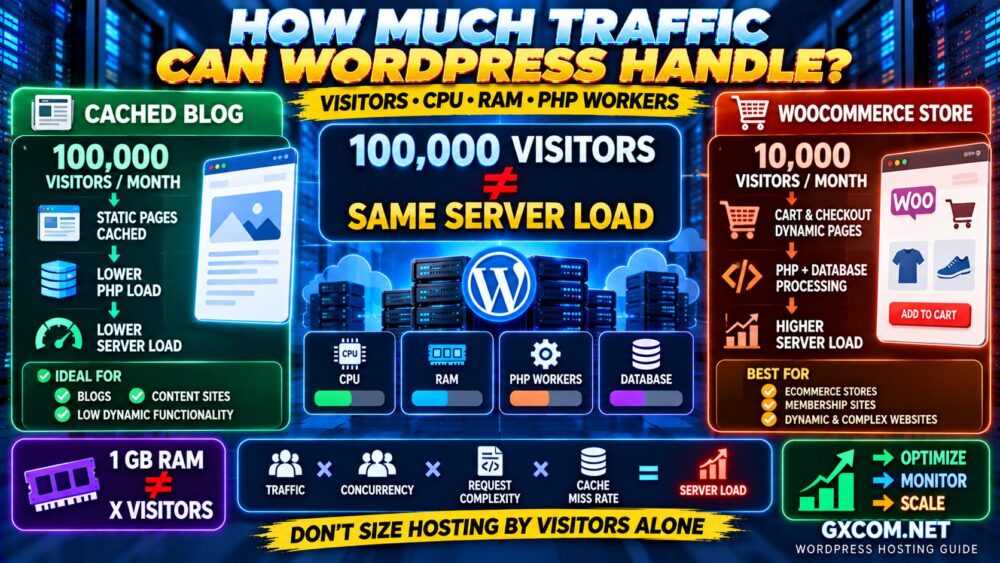
A cached blog receiving 100,000 monthly visits can sometimes use fewer server resources than a WooCommerce store receiving a fraction of that traffic.
The reason is simple: visitors are not the same as server load.
WordPress hosting capacity depends on CPU, RAM, PHP workers, database activity, caching, concurrent requests, plugins, traffic patterns and the type of website you operate.
This guide explains how much traffic WordPress hosting can handle, what CPU and RAM actually do, and how to recognize when your website needs more hosting resources.
VISITORS ≠ SERVER LOAD
How Much Traffic Can WordPress Hosting Handle?
There is no universal visitor limit for WordPress hosting.
Two WordPress websites receiving exactly the same number of visitors can create dramatically different server loads.
Consider these examples:
| Website | Traffic Pattern | Typical Server Demand |
|---|---|---|
| Cached Blog | Mostly anonymous readers | Relatively low |
| News Website | Large traffic spikes | Medium to high |
| Membership Site | Logged-in users | Higher |
| WooCommerce Store | Cart, checkout and account activity | Higher |
| Learning Platform | Logged-in dynamic sessions | High |
The real equation is closer to:
TRAFFIC
×
REQUEST COMPLEXITY
×
CONCURRENCY
×
CACHE MISS RATE
=
SERVER LOAD
Monthly Visitors Can Be Misleading
Hosting companies often advertise plans using monthly visitor estimates because they are easier for customers to understand than CPU time, PHP workers or database query capacity.
But monthly traffic averages can hide what really happens.
Imagine two websites each receiving 100,000 visits per month.
Website A receives traffic evenly throughout the month.
Website B receives 30,000 visitors during a viral traffic spike.
The monthly total may be identical, but Website B needs significantly more capacity during the peak.
That is why:
100,000 VISITS / MONTH
DOES NOT TELL YOU
HOW MANY USERS ARRIVE AT THE SAME TIME.
Concurrent Visitors Matter More Than Total Visitors
Concurrency describes how many visitors or requests your website must process at approximately the same time.
A website receiving thousands of visits throughout a day may be easy to host.
The same number of visits arriving within several minutes can create a major CPU, PHP and database spike.
This is especially important for:
- Viral content
- Product launches
- Flash sales
- Ticket sales
- Live events
- News websites
- Email campaigns
When choosing WordPress hosting, think about peak demand, not just monthly averages.
What Does CPU Do in WordPress Hosting?
CPU handles the computation required to process requests.
For WordPress, CPU resources may be used for:
- PHP execution
- WordPress core
- Plugin code
- Theme functions
- Database-related processing
- Image processing
- Cron jobs
- WooCommerce operations
- Background tasks
When a visitor requests a fully cached page, relatively little application processing may be required.
When a logged-in WooCommerce customer adds a product to the cart, searches the store and checks out, substantially more dynamic processing may occur.
This is why two websites with identical visitor counts can require very different CPU capacity.
How Much CPU Does WordPress Need?
There is no fixed CPU requirement because WordPress workloads vary enormously.
A lightweight website with effective caching may operate comfortably with modest CPU resources.
A busy WooCommerce or membership site may require significantly more processing capacity.
CPU demand is influenced by:
- Number of simultaneous requests
- Plugin efficiency
- Theme complexity
- Database queries
- Cache hit rate
- Background processes
- Bot traffic
- WooCommerce activity
The important metric is not simply how many CPU cores appear on a plan.
MORE CPU CORES ≠ AUTOMATICALLY FASTER WORDPRESS.
CPU generation, clock performance, resource sharing and provider limits also matter.
What Does RAM Do for WordPress?
RAM provides fast working memory for running processes and frequently accessed data.
WordPress hosting may use memory for:
- PHP processes
- Database services
- Object caching
- Web server processes
- Operating system services
- Background jobs
Insufficient memory can cause processes to slow down, terminate or fail.
But simply adding RAM does not solve every performance problem.
If your bottleneck is CPU saturation, slow database queries or external API requests, additional RAM may provide little improvement.
MORE RAM ≠ FASTER WORDPRESS
unless memory is actually the bottleneck.
How Much RAM Does WordPress Hosting Need?
For ordinary shared or managed WordPress hosting, customers may not receive a clearly advertised dedicated RAM allocation.
VPS and cloud plans usually make memory allocation much clearer.
As a broad planning framework for VPS-style environments:
| Workload | RAM Starting Point | Notes |
|---|---|---|
| Small WordPress Site | 1–2 GB | Lightweight stack and caching |
| Growing WordPress Site | 2–4 GB | More plugins and traffic |
| WooCommerce / Dynamic Site | 4–8 GB+ | Depends heavily on concurrency |
| Large Dynamic Workload | 8 GB+ | Measure before sizing |
These numbers are not visitor guarantees. They are only broad infrastructure starting points.
For a deeper resource-sizing explanation, read our WordPress Hosting Requirements guide.
PHP Workers: The WordPress Hosting Limit Many Users Miss
CPU and RAM receive most of the attention, but PHP workers can be extremely important for dynamic WordPress websites.
A PHP worker processes PHP requests that cannot simply be served from cache.
This commonly includes requests involving:
- WordPress admin
- WooCommerce carts
- Checkout
- Logged-in sessions
- Search
- Forms
- Membership areas
- Dynamic API requests
If all available workers are busy, additional dynamic requests may need to wait.
This can make a site feel slow even when monthly visitor numbers do not appear particularly high.
DYNAMIC TRAFFIC → PHP WORKERS → DATABASE → RESPONSE
When comparing managed WordPress hosting plans, do not look only at the advertised visitor allowance. Check whether PHP worker information is available as well.
Caching Can Dramatically Increase Traffic Capacity
Caching changes the WordPress capacity equation.
Without page caching, a request may involve:
VISITOR
↓
PHP
↓
WORDPRESS
↓
DATABASE
↓
HTML RESPONSE
With effective full-page caching:
VISITOR
↓
CACHED PAGE
↓
RESPONSE
This can reduce repeated PHP and database processing dramatically.
That is why a content website with a high cache hit rate may handle surprisingly large traffic volumes on modest infrastructure.
Our Website Caching Explained guide covers browser, server, CDN and object caching in more detail.
Why WooCommerce Needs More Hosting Resources
WooCommerce is more dynamic than a conventional blog.
Pages such as:
- Cart
- Checkout
- My Account
- Personalized content
cannot always be served using the same full-page caching strategy as public content.
A WooCommerce store may also generate:
- Database queries
- Inventory operations
- Payment requests
- Session activity
- Background jobs
- Order processing
Therefore:
10,000 E-COMMERCE VISITORS
can potentially require more server resources than:
100,000 CACHED BLOG VISITORS.
This is exactly why visitor count should never be used as the only hosting capacity metric.
WordPress Plugins Can Change Hosting Requirements
The number of plugins installed is less important than what those plugins actually do.
A website with 30 lightweight plugins can potentially perform better than one with five resource-intensive plugins.
Resource-heavy functionality may include:
- Real-time statistics
- Complex search
- Backup generation
- Security scans
- Related-post processing
- Page builders
- Large WooCommerce extensions
- External API integrations
Before upgrading hosting, identify whether a plugin or application process is creating the bottleneck.
If your site is already slow, see our How to Fix a Slow WordPress Website guide before simply buying a larger plan.
Database Performance Matters
WordPress stores posts, settings, user information and other application data in its database.
Dynamic websites may execute many database queries for each request.
Database performance can deteriorate because of:
- Slow queries
- Large tables
- Excessive autoloaded data
- Plugin activity
- WooCommerce data
- Insufficient memory
- High concurrency
Adding CPU or RAM can sometimes help, but inefficient queries can remain inefficient on a larger server.
MORE HARDWARE CAN HIDE BAD SOFTWARE—IT DOES NOT FIX IT.
Does a CDN Increase WordPress Traffic Capacity?
A CDN can reduce the amount of traffic that reaches the origin server by serving cacheable assets from distributed edge locations.
This is particularly useful for:
- Images
- CSS
- JavaScript
- Downloads
- Cacheable HTML where supported
A CDN can reduce bandwidth usage and origin requests, but it cannot eliminate the processing required for every dynamic WordPress operation.
For example, checkout and logged-in requests may still need to reach the origin application.
See our CDN vs No CDN comparison to decide whether a CDN fits your workload.
Shared Hosting Traffic Limits
Shared hosting can handle substantial WordPress traffic when the website is lightweight and well cached.
The challenge is that shared plans may impose limits involving:
- CPU usage
- Memory
- I/O
- Entry processes
- PHP processes
- Database resources
This means a hosting plan advertised as supporting a large number of monthly visits may still struggle with a sudden burst of expensive dynamic requests.
Shared hosting is usually suitable while:
- Performance remains stable
- You are not repeatedly hitting resource limits
- Traffic spikes remain manageable
- The application does not require server-level customization
Managed WordPress Hosting Traffic Limits
Managed WordPress providers often describe plans using estimated monthly visits.
This makes buying easier, but treat the number as a planning guideline rather than a universal performance guarantee.
A good managed WordPress platform can improve capacity through:
- Integrated caching
- Optimized PHP
- Database tuning
- CDN integration
- WordPress-specific infrastructure
- Monitoring
But resource policies still apply.
If you are considering paying more for these features, see our Managed WordPress Hosting vs Shared Hosting comparison.
When Does WordPress Need a VPS?
A VPS becomes worth considering when you need more control or predictable resources than your current hosting environment provides.
Common reasons include:
- Repeated CPU throttling
- Memory limitations
- High dynamic traffic
- Custom server software
- Growing WooCommerce workloads
- Need for greater configuration control
But VPS hosting creates another decision: managed or unmanaged.
A self-managed VPS gives you more control but also requires server administration skills.
Do not migrate simply because your monthly visitor number crosses an arbitrary threshold.
UPGRADE WHEN YOUR WORKLOAD OUTGROWS YOUR RESOURCES—not when a traffic counter reaches a round number.
WordPress Hosting Providers for Different Workloads
The right provider depends on the workload rather than visitor count alone.
For smaller and growing WordPress websites, Hostinger is worth comparing when ease of use and accessible WordPress hosting are priorities.
hosting.com (formerly A2 Hosting) is another option to evaluate for WordPress workloads where performance-oriented hosting features are important.
When a WordPress website begins requiring greater resources and management, ScalaHosting is worth comparing for a managed VPS-style upgrade path.
Developers comfortable managing their own WordPress server can also compare cloud infrastructure from DigitalOcean or Vultr, where CPU, RAM and storage allocations are more explicit.
Do not ask only:
“HOW MANY VISITORS CAN THIS PROVIDER HANDLE?”
Ask:
“WHAT RESOURCES AND LIMITS DO I GET FOR MY WORKLOAD?”
How to Know When Your WordPress Hosting Is Overloaded
Watch for patterns rather than a single slow page.
Possible warning signs include:
- Increasing Time to First Byte
- Slow WordPress admin
- 502, 503 or 504 errors
- CPU consistently reaching limits
- Memory exhaustion
- PHP worker saturation
- Database slowdown
- Performance collapsing during traffic spikes
- Hosting account resource warnings
A slow frontend alone does not prove that the hosting plan is too small. JavaScript, images and third-party services can also make pages slow.
How to Increase WordPress Traffic Capacity
1. Enable Full-Page Caching
Reduce unnecessary PHP and database execution for anonymous visitors.
2. Use Object Caching When Appropriate
Redis or another object cache can reduce repeated database work for suitable workloads.
3. Optimize Images
Reduce file size and use modern image formats where appropriate.
4. Remove Inefficient Plugins
Identify plugins that create excessive queries or background processing.
5. Optimize the Database
Investigate slow queries rather than relying only on additional hardware.
6. Use a CDN
Offload suitable static and cacheable content from the origin.
7. Control Bot Traffic
Bad bots can consume CPU and PHP capacity without contributing useful human traffic.
8. Upgrade PHP
Use a currently supported PHP version compatible with your WordPress stack.
9. Monitor CPU, RAM and PHP Workers
Upgrade based on measured bottlenecks.
10. Scale Hosting When Optimization Is No Longer Enough
If the website remains resource-constrained after optimization, additional infrastructure may be justified.
For a complete optimization workflow, read our WordPress Performance Guide.
WordPress Traffic Capacity: Practical Scenarios
| Scenario | Main Bottleneck to Watch | Likely Strategy |
|---|---|---|
| Small Blog | Usually minimal | Shared + caching |
| Growing Content Site | Traffic spikes | Caching + CDN |
| Busy News Site | Concurrency | Strong cache + scalable hosting |
| Membership Site | PHP + database | More workers/resources |
| WooCommerce Store | Dynamic requests | CPU + workers + database |
| Large WooCommerce Store | Concurrency + database | Managed VPS/cloud scaling |
WordPress Hosting Traffic FAQ
How many visitors can 1 GB RAM WordPress hosting handle?
There is no reliable visitor number. A highly cached site may handle substantial traffic with modest memory, while a dynamic WooCommerce or membership site can require much more memory and CPU with fewer visitors.
Is 2 GB RAM enough for WordPress?
It can be enough for many small WordPress VPS deployments with an efficient stack, but actual requirements depend on the operating system, database, caching, plugins and traffic concurrency.
How many visitors can shared hosting handle?
There is no universal limit. Quality shared hosting can handle significant traffic for a cached website, while resource-intensive dynamic workloads may encounter limits at much lower visitor counts.
Does WordPress use more CPU or RAM?
WordPress uses both. Dynamic PHP execution and plugin activity can consume CPU, while PHP processes, databases and caching use memory. The limiting resource depends on the workload.
Does more RAM make WordPress faster?
Only when memory is a bottleneck. Adding RAM will not automatically fix slow PHP execution, inefficient database queries, frontend JavaScript or network latency.
How many concurrent users can WordPress handle?
There is no fixed number. It depends on caching, CPU, PHP workers, database performance and whether users are requesting cached or dynamic pages.
Can WordPress handle millions of visitors?
Yes, WordPress can support very large traffic volumes when the application and infrastructure are appropriately designed. High-scale deployments typically rely on caching, CDN services, optimized databases and scalable infrastructure.
When should I upgrade WordPress hosting?
Upgrade when monitoring shows persistent resource constraints, PHP worker saturation or infrastructure-related performance problems that remain after appropriate optimization.
Final Verdict: Don't Size WordPress Hosting by Visitors Alone
There is no accurate formula that says:
1 GB RAM = X VISITORS
or:
2 CPU CORES = Y PAGEVIEWS.
WordPress hosting capacity depends on how much work each visitor causes the server to perform.
A better way to think about capacity is:
VISITORS
↓
CONCURRENCY
↓
CACHED OR DYNAMIC?
↓
PHP + DATABASE WORK
↓
CPU + RAM + WORKERS
If your website is mostly cached content, modest hosting can potentially support surprisingly large traffic volumes.
If your website runs WooCommerce, memberships or other dynamic functionality, significantly fewer visitors can create a much heavier workload.
Optimize first. Monitor second. Upgrade based on the bottleneck.
DON'T BUY HOSTING FOR A VISITOR NUMBER.
BUY RESOURCES FOR YOUR WORKLOAD.