Shared hosting can run WordPress for only a few dollars per month, while managed WordPress hosting can cost several times more.
So what are you actually paying for?
The difference is not simply “cheap hosting versus expensive hosting.” Shared hosting and managed WordPress hosting are designed around different priorities.
Shared hosting focuses on affordability and simplicity. Managed WordPress hosting typically adds WordPress-specific performance optimization, backups, security, staging, updates and specialized support.
But not every WordPress website needs those extras.
In this Managed WordPress Hosting vs Shared Hosting comparison, we examine performance, cost, security, backups, support, traffic capacity and management to determine when paying more is actually worthwhile.
SMALL WORDPRESS SITE → SHARED HOSTING MAY BE ENOUGH
BUSINESS-CRITICAL WORDPRESS SITE → MANAGED WORDPRESS MAY BE WORTH IT
Managed WordPress Hosting vs Shared Hosting: Quick Comparison
| Feature | Shared Hosting | Managed WordPress Hosting |
|---|---|---|
| Cost | Lower | Higher |
| WordPress Optimization | Basic to good | Usually stronger |
| Server Management | Provider managed | Provider managed for WordPress |
| Caching | Varies | Usually integrated |
| Backups | Varies by plan | Often included |
| Staging | May not be included | Commonly available |
| WordPress Updates | Varies | Often automated or managed |
| WordPress Support | General hosting support | Usually more specialized |
| Traffic / Resource Capacity | Plan-dependent | Often designed for more demanding WordPress workloads |
| Best For | Blogs and smaller sites | Businesses, stores and important WordPress sites |
The basic tradeoff is:
SHARED HOSTING = LOWER COST + BASIC HOSTING ENVIRONMENT
MANAGED WORDPRESS = HIGHER COST + MORE WORDPRESS-SPECIFIC MANAGEMENT
What Is Shared Hosting?
Shared hosting places multiple customer accounts on common server infrastructure.
The provider manages the underlying server while customers use a control panel to manage websites, domains, databases and email.
Most modern shared hosting platforms can run WordPress without difficulty.
A typical plan may include:
- WordPress installation
- PHP and MySQL/MariaDB
- SSL certificates
- Website storage
- Basic backups
- Control panel
The primary advantage is cost.
Because infrastructure is shared across many customers, providers can offer hosting at relatively low prices.
This makes shared hosting a practical starting point for:
- Personal blogs
- Portfolio websites
- Small company websites
- New WordPress websites
- Low-traffic content sites
What Is Managed WordPress Hosting?
Managed WordPress hosting is a hosting environment designed specifically around WordPress.
The exact feature set varies by provider, but managed WordPress plans commonly add services such as:
- WordPress-optimized caching
- Automatic updates
- Daily backups
- Staging environments
- Security monitoring
- Malware protection
- WordPress-specific support
- Performance optimization
- Migration tools or assistance
The important word is not simply hosting.
It is managed.
You are paying the provider to take responsibility for more of the WordPress operating environment.
1. Performance: Is Managed WordPress Hosting Faster?
Managed WordPress hosting can provide a performance advantage because the infrastructure is optimized around a single application.
A provider may optimize:
- Page caching
- Object caching
- PHP configuration
- Database performance
- CDN integration
- Server software
- WordPress-specific rules
Shared hosting must usually support a broader range of applications and customer workloads.
However:
MANAGED WORDPRESS ≠ AUTOMATICALLY FASTER.
A high-quality shared hosting platform running a lightweight, well-cached WordPress site can perform extremely well.
Likewise, an expensive managed platform cannot completely compensate for poorly optimized themes, oversized images, excessive JavaScript or inefficient plugins.
The complete performance equation is closer to:
HOSTING + CACHE + DATABASE + THEME + PLUGINS + CONTENT + CDN = WORDPRESS PERFORMANCE
If speed is your main concern, our How to Speed Up WordPress guide covers the optimization process in detail.
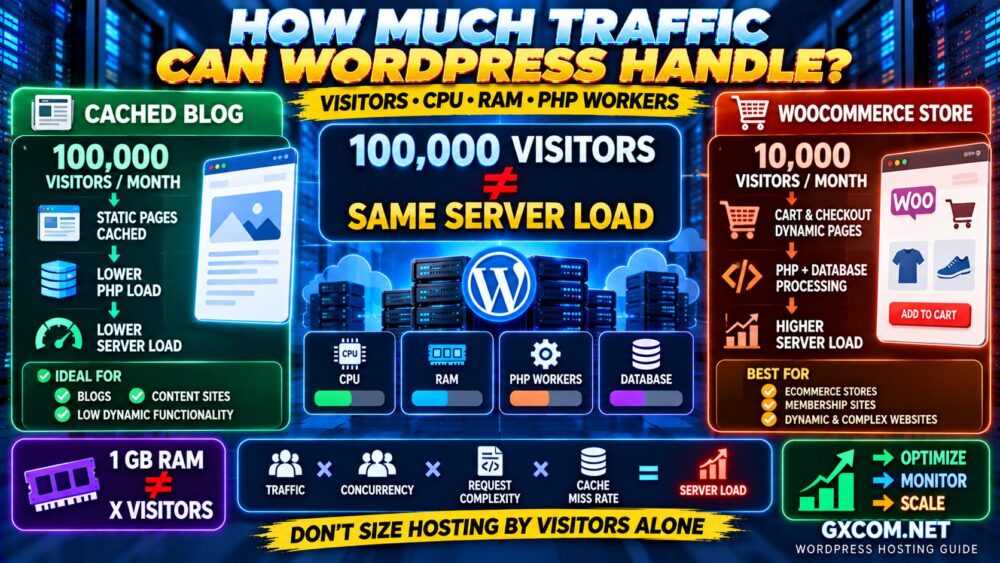
2. CPU, RAM and Resource Limits
One of the biggest misconceptions is that managed WordPress hosting automatically means dedicated CPU and RAM.
That is not necessarily true.
Both shared and managed WordPress platforms may use multi-tenant infrastructure.
The difference is how resources are allocated, optimized and controlled.
Shared hosting may enforce limits involving:
- CPU
- Memory
- I/O
- Entry processes
- PHP workers
- Database usage
Managed WordPress plans may instead emphasize:
- Monthly visits
- PHP workers
- Number of WordPress installations
- Storage
- Bandwidth
Always investigate the actual limits.
“MANAGED” DOES NOT MEAN “UNLIMITED RESOURCES.”
3. Caching
Caching is one of the biggest reasons a well-designed WordPress platform can feel fast.
WordPress normally generates dynamic pages using PHP and database queries.
Caching reduces the amount of repeated processing required.
A managed WordPress platform may provide server-level caching without requiring you to design the caching stack yourself.
Shared hosting can also provide excellent caching, especially when the provider integrates a caching system or compatible WordPress plugin.
Before paying more, check exactly what the managed platform provides.
Our Website Caching Explained guide compares browser, server, CDN and object caching.
4. Backups
Backups are another major difference between entry-level shared hosting and premium managed WordPress services.
A managed WordPress platform may include:
- Automatic daily backups
- Multiple restore points
- One-click restoration
- On-demand backups
- Off-site storage
Shared hosting backup policies vary significantly.
Some inexpensive plans provide excellent automatic backups, while others offer limited retention or charge extra.
Do not simply ask:
DOES THE PLAN INCLUDE BACKUPS?
Ask:
HOW OFTEN?
HOW LONG ARE THEY RETAINED?
WHERE ARE THEY STORED?
CAN I RESTORE THEM MYSELF?
5. WordPress Updates
WordPress websites require ongoing maintenance.
This includes:
- WordPress core
- Plugins
- Themes
- PHP compatibility
Managed WordPress platforms often automate more of this process.
Some may test or delay updates to reduce compatibility risks.
Shared hosting providers increasingly offer automatic WordPress updates as well, so this feature alone does not necessarily justify a large price difference.
Compare the actual update policy rather than assuming “managed” means every WordPress component is automatically maintained.
6. Security
Managed WordPress providers can implement security controls specifically designed around common WordPress threats.
Depending on the service, this may include:
- Malware scanning
- WordPress firewall rules
- Login protection
- Vulnerability monitoring
- Automatic security updates
- DDoS mitigation
- Malware cleanup
Shared hosting can also provide strong security.
In both cases, the website owner remains responsible for important areas such as:
- Strong passwords
- Administrator accounts
- Plugin selection
- Theme security
- Application configuration
MANAGED WORDPRESS SECURITY ≠ ZERO RESPONSIBILITY.
7. Staging Environments
A staging site is a separate copy of your website where you can test changes before deploying them to production.
This is particularly useful when:
- Updating plugins
- Changing themes
- Editing templates
- Testing PHP versions
- Making WooCommerce changes
Staging is commonly included with managed WordPress platforms.
Some shared hosting providers also include it, but availability varies by plan.
For a business-critical site, staging can significantly reduce the risk of making changes directly on the live website.
8. Support
This can be one of the most valuable differences.
General shared hosting support may help with:
- Hosting accounts
- DNS
- SSL
- Server availability
Managed WordPress support may have deeper experience with:
- WordPress
- Plugins
- Caching
- Database issues
- WordPress migrations
- Performance problems
But support scope still varies.
Do not assume a managed provider will debug custom PHP code or fix every third-party plugin problem.
9. Ease of Management
Shared hosting is already relatively easy to use.
But managed WordPress hosting can remove additional technical decisions.
A simplified workflow might look like:
CREATE WORDPRESS SITE
↓
CONNECT DOMAIN
↓
BUILD WEBSITE
↓
PROVIDER HANDLES MORE OF THE INFRASTRUCTURE
This convenience has value when your time is better spent creating content, serving customers or running a business.
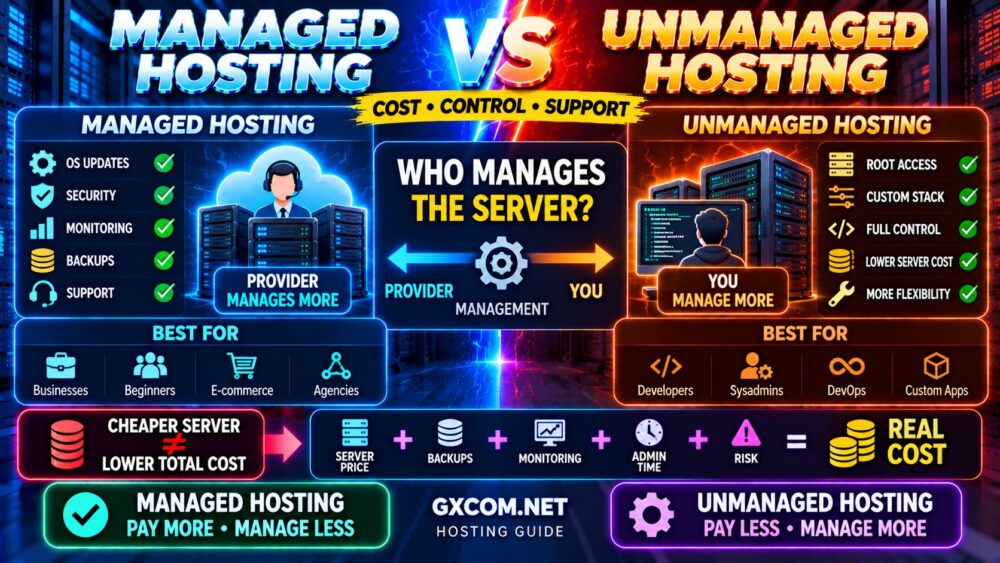
10. Managed WordPress Hosting vs Shared Hosting Cost
This is the biggest objection for many users.
Shared hosting may cost only a few dollars per month during an introductory term.
Managed WordPress hosting can cost considerably more.
But comparing the headline hosting price alone can be misleading.
Consider:
HOSTING PRICE
+ Backups
+ CDN
+ Security
+ Staging
+ Migration
+ Management Time
+ Troubleshooting Time
=
REAL WORDPRESS HOSTING COST
If shared hosting already includes the features you need, managed WordPress may not provide enough additional value.
If you would otherwise pay separately for multiple services—or spend hours maintaining the site—the price difference can become easier to justify.
For a broader breakdown of hosting prices and add-ons, see our Web Hosting Cost Guide.
Is Managed WordPress Hosting Worth It?
The answer depends on what the website is worth to you.
For a personal blog generating little or no revenue, paying several times more for hosting may not make sense.
For an e-commerce store where downtime can mean lost orders, better backups, staging, support and performance management can be much more valuable.
A useful way to think about it is:
EXTRA HOSTING COST
vs
TIME SAVED + RISK REDUCED + SUPPORT + PERFORMANCE
If the second side is more valuable than the first, managed WordPress hosting may be worth the premium.
When Shared Hosting Is Enough
Stay with shared hosting when:
- Your website is small
- Traffic is moderate
- Performance is good
- You are not hitting resource limits
- You are comfortable managing WordPress
- Your backup system is sufficient
- You do not need staging
- Your current support meets your needs
Do not upgrade simply because managed WordPress hosting sounds more professional.
IF IT IS FAST, STABLE AND MEETS YOUR NEEDS, YOU MAY NOT NEED TO MOVE.
When to Upgrade to Managed WordPress Hosting
Managed WordPress becomes more attractive when:
- Your website generates meaningful revenue
- You run WooCommerce
- Traffic has grown significantly
- You need better staging and deployment tools
- Backups are business-critical
- You want specialized WordPress support
- You spend too much time troubleshooting hosting
- Performance problems are related to the hosting environment
- You manage important client websites
The decision should be driven by business and technical requirements—not by an arbitrary visitor number.
Managed WordPress Hosting vs VPS
Some growing WordPress users consider skipping managed WordPress hosting and moving directly to a VPS.
A VPS can provide more control and clearly defined resources, but it may also require more server administration.
Managed WordPress hosting emphasizes:
WORDPRESS + CONVENIENCE + SUPPORT
A self-managed VPS emphasizes:
CONTROL + FLEXIBILITY + SERVER ACCESS
If your problem is simply that shared hosting resource limits are becoming restrictive, our Shared Hosting vs VPS comparison explains when VPS becomes the logical upgrade.
Managed WordPress Hosting Providers Worth Comparing
Once you decide that managed or WordPress-optimized hosting fits your needs, compare providers based on what they actually manage rather than the label alone.
Hostinger is worth comparing for WordPress users who want an accessible hosting environment and competitive pricing without immediately moving to premium enterprise-level WordPress hosting.
hosting.com (formerly A2 Hosting) is another option to evaluate when WordPress hosting and performance-oriented features are priorities.
ScalaHosting becomes particularly relevant when your WordPress site needs more resources and you are considering a managed VPS-style upgrade path rather than remaining on conventional shared hosting.
When comparing any WordPress hosting provider, check:
- CPU and resource limits
- PHP workers
- Caching
- Backups
- Staging
- Security
- Support scope
- Renewal price
Do not choose solely because a plan has “Managed WordPress” in its product name.
Shared Hosting vs Managed WordPress: Real-World Scenarios
| Website | Better Starting Point |
|---|---|
| New personal blog | Shared Hosting |
| Portfolio website | Shared Hosting |
| Small local business website | Shared / WordPress Hosting |
| Growing content website | WordPress / Managed WordPress |
| Revenue-generating business site | Managed WordPress |
| WooCommerce store | Managed WordPress |
| Agency client websites | Managed WordPress |
| Developer needing root access | VPS / Cloud |
Before Paying More, Check Your Current Hosting First
A slow WordPress website does not automatically need managed hosting.
Before migrating, check:
- Page caching
- Object caching
- Image optimization
- Plugin performance
- Database queries
- PHP version
- Theme performance
- Third-party scripts
- CPU usage
- Memory usage
If the application is inefficient, moving it to more expensive hosting may only hide the problem temporarily.
Our How to Fix a Slow WordPress Website guide can help identify the actual bottleneck before you spend more on infrastructure.
OPTIMIZE → MEASURE → IDENTIFY BOTTLENECK → UPGRADE IF NECESSARY.
What to Check Before Buying Managed WordPress Hosting
- ✓ How many WordPress sites are included?
- ✓ Are visits limited?
- ✓ How many PHP workers are available?
- ✓ Is server-level caching included?
- ✓ Is a CDN included?
- ✓ Are daily backups included?
- ✓ How long are backups retained?
- ✓ Is staging included?
- ✓ Are migrations free?
- ✓ What security services are included?
- ✓ What does WordPress support actually cover?
- ✓ What is the renewal price?
This checklist is more useful than simply comparing storage and monthly price.
Common Managed WordPress Hosting Mistakes
Assuming Managed WordPress Is Always Faster
Hosting helps, but themes, plugins, caching, databases and frontend code still affect performance.
Paying for Features You Do Not Need
A small personal blog may not need premium staging, advanced workflows or specialized support.
Ignoring Resource Limits
Managed plans still have limits. Check visits, workers, storage and other restrictions.
Choosing Only by Introductory Price
Compare renewal pricing and the total cost of required features.
Assuming Managed Means Everything Is Managed
Providers differ significantly in what they support and maintain.
Upgrading Before Fixing WordPress
A badly optimized website can remain slow even after moving to more expensive hosting.
Managed WordPress Hosting vs Shared Hosting FAQ
Is managed WordPress hosting better than shared hosting?
Managed WordPress hosting generally provides more WordPress-specific management, performance features and support, while shared hosting is usually cheaper. The better choice depends on the website's importance, traffic and management requirements.
Is managed WordPress hosting worth the extra cost?
It can be worth the additional cost for revenue-generating websites, WooCommerce stores, agencies and businesses that value better management, backups, staging and specialized support.
Can WordPress run well on shared hosting?
Yes. Many small and medium WordPress websites can perform very well on quality shared hosting, particularly when caching and the website itself are properly optimized.
Is managed WordPress hosting faster?
It can be because the infrastructure is often optimized specifically for WordPress. However, performance still depends on the provider, resources, theme, plugins, database and frontend optimization.
When should I upgrade from shared hosting to managed WordPress?
Consider upgrading when your website becomes business-critical, requires better WordPress-specific support and management, or consistently reaches the limitations of your existing hosting after optimization.
Is managed WordPress hosting the same as VPS?
No. Managed WordPress describes a WordPress-focused hosting and management service, while VPS describes a virtual server architecture. A managed WordPress platform may use different underlying infrastructure.
Do I need managed WordPress hosting for WooCommerce?
Not necessarily for a very small store, but WooCommerce creates more dynamic database and PHP activity than a simple blog. As orders, products and concurrent users grow, higher-quality managed WordPress infrastructure can become valuable.
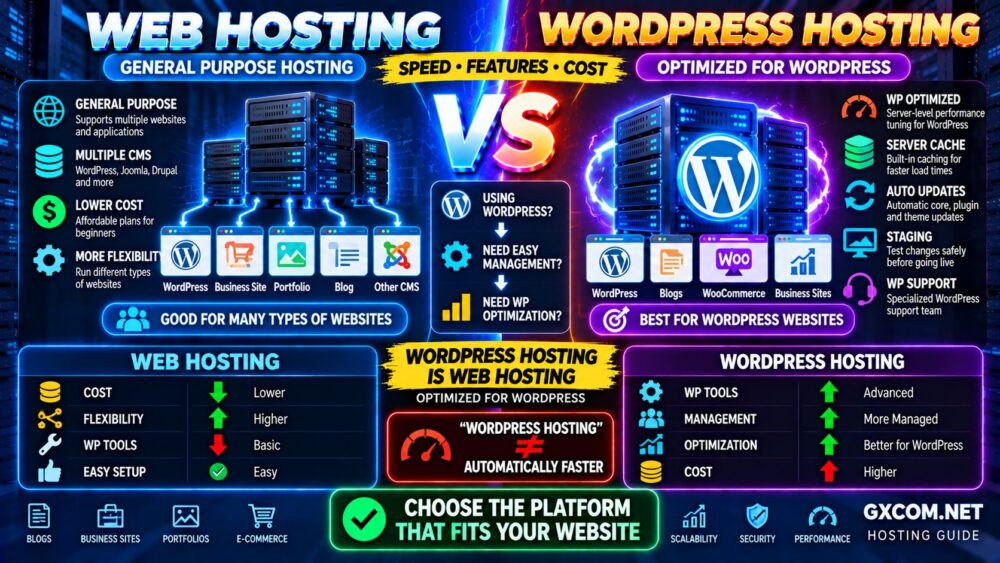
What is the difference between WordPress hosting and web hosting?
Web hosting is the broader category, while WordPress hosting is designed or marketed specifically for WordPress. Our WordPress Hosting vs Web Hosting comparison explains the differences.
Final Verdict: Is Managed WordPress Hosting Worth It?
For a new blog, portfolio or small website, quality shared hosting may provide everything you need at a much lower price.
Choose shared hosting when you prioritize:
LOW COST → SIMPLICITY → BASIC WORDPRESS HOSTING
Choose managed WordPress hosting when you value:
WORDPRESS OPTIMIZATION → BACKUPS → STAGING → SUPPORT → LESS MANAGEMENT
The extra cost becomes easier to justify as the website becomes more valuable to your business.
Do not ask only:
“HOW MUCH MORE DOES MANAGED WORDPRESS COST?”
Also ask:
“HOW MUCH ARE MY TIME, WEBSITE PERFORMANCE AND DOWNTIME WORTH?”
For a small site, shared hosting may be the smarter purchase.
For a revenue-generating or business-critical WordPress website, paying more for the right managed environment can be money well spent.
PAY MORE ONLY WHEN THE EXTRA MANAGEMENT DELIVERS REAL VALUE.