How much traffic can shared hosting actually handle?
You may see estimates ranging from a few thousand to hundreds of thousands of visitors per month. The problem is that there is no universal visitor limit for shared hosting.
A lightweight, well-cached website can sometimes handle surprisingly high traffic on shared infrastructure. A resource-heavy WordPress or WooCommerce website may begin hitting hosting limits with far fewer visitors.
The reason is simple:
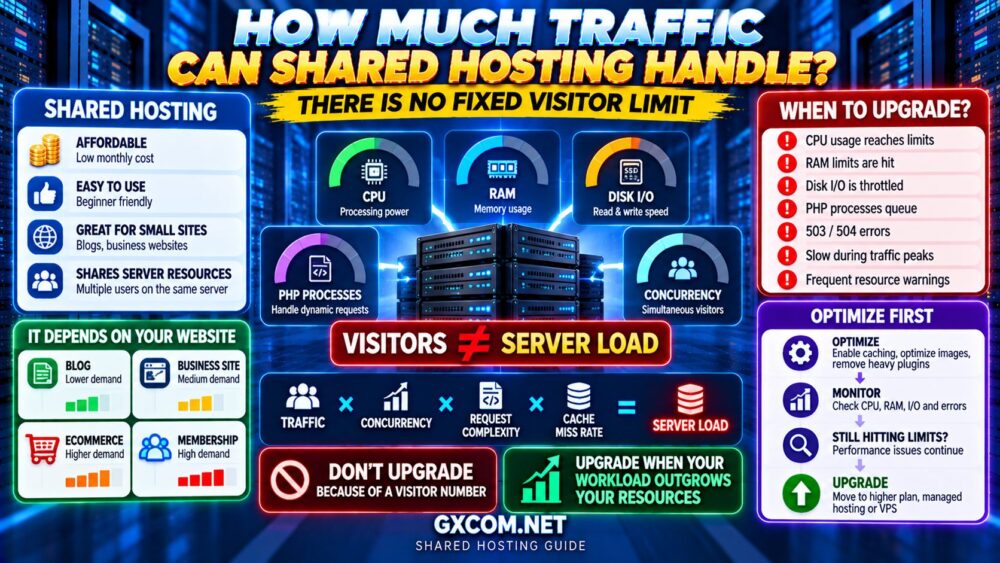
VISITORS ≠ SERVER LOAD.
Shared hosting capacity depends on CPU usage, memory, disk I/O, PHP processes, database activity, caching, concurrent visitors and the resource policies of your hosting provider.
This guide explains how much traffic shared hosting can handle, which limits actually matter and how to know when it is time to upgrade.
How Much Traffic Can Shared Hosting Handle?
There is no accurate universal number.
As a very broad planning framework, a small optimized website receiving tens of thousands of monthly visits may run comfortably on quality shared hosting. Some highly cached content websites can handle considerably more.
But these numbers should never be treated as guarantees.
A better way to estimate hosting capacity is:
TRAFFIC
×
CONCURRENCY
×
REQUEST COMPLEXITY
×
CACHE MISS RATE
=
SERVER LOAD
The question is therefore not simply:
“HOW MANY VISITORS DO I HAVE?”
It is:
“HOW MUCH SERVER WORK DOES MY TRAFFIC CREATE?”
Why Monthly Visitor Numbers Can Be Misleading
Monthly visits are easy to understand, which is why hosting plans and online recommendations often use them.
But averages can hide the most important part of the workload: peak demand.
Consider two websites that each receive 60,000 visits per month.
Website A receives approximately 2,000 visits every day with relatively stable traffic.
Website B receives most of its traffic after newsletters, social media posts or viral content.
The monthly number may be identical, but Website B can place far more pressure on shared hosting during traffic spikes.
60,000 MONTHLY VISITS
DOES NOT TELL YOU
HOW MANY USERS ARRIVE AT ONCE.
Concurrent Visitors Matter More Than Many People Think
Concurrency refers to users or requests reaching your website at approximately the same time.
A shared hosting account may handle thousands of visitors spread throughout the day without difficulty.
If the same traffic arrives within several minutes, CPU, PHP and database demand can rise sharply.
Concurrency becomes especially important for:
- Viral articles
- Email campaigns
- Product launches
- Flash sales
- News websites
- Ticket releases
- Social media traffic spikes
When evaluating shared hosting, think about your peak workload, not only the monthly traffic total.
What Does “Shared” Actually Mean?
Shared hosting places multiple customer accounts on the same underlying server infrastructure.
The provider manages the server and divides resources among accounts using resource controls and hosting software.
This makes shared hosting inexpensive and easy to use.
But it also means your account does not have unlimited access to the server's CPU, RAM, storage performance or processes.
Providers impose limits to prevent one customer from consuming resources needed by everyone else.
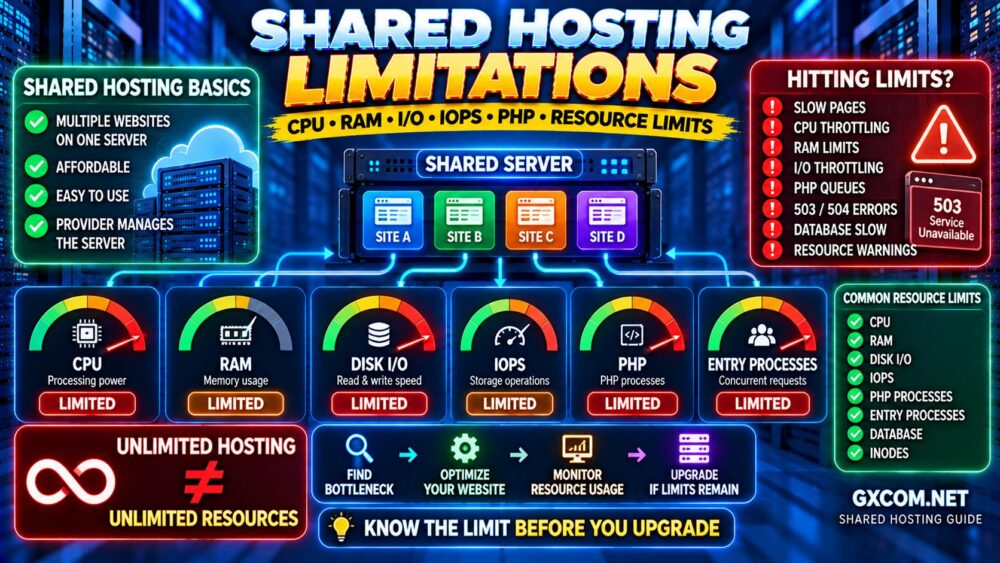
Common limits can include:
- CPU usage
- Physical memory
- Disk I/O
- IOPS
- Entry processes
- PHP processes
- Database connections
- File counts or inodes
These limits often matter more than the advertised storage capacity.
1. CPU Limits
CPU processes the application logic behind dynamic website requests.
WordPress websites may consume CPU through:
- PHP execution
- Plugins
- Theme functions
- Database queries
- WordPress cron
- Image processing
- Security scans
- WooCommerce activity
A cached page may require relatively little CPU processing.
A dynamic request can require WordPress, PHP and the database to perform substantially more work.
This is why:
100,000 CACHED PAGEVIEWS
can potentially create less server load than:
10,000 RESOURCE-INTENSIVE DYNAMIC REQUESTS.
2. RAM Limits
Memory is used by PHP processes, database operations and other services involved in handling requests.
Shared hosting platforms normally limit how much memory an individual account can consume.
If your account repeatedly reaches its memory allocation, processes may slow down or fail.
However, adding memory is not a universal performance solution.
If CPU, PHP processes or database queries are the actual bottleneck, additional RAM alone may not solve the problem.
MORE RAM ≠ AUTOMATICALLY MORE TRAFFIC CAPACITY.
3. Disk I/O and IOPS
Disk performance is frequently overlooked when evaluating shared hosting.
I/O measures how quickly data can be read from or written to storage, while IOPS relates to the number of input/output operations the storage system can process.
Storage activity may increase during:
- Backups
- Large file operations
- Plugin scans
- Database activity
- Cache generation
- Website imports
A hosting plan can have plenty of free disk space while still experiencing an I/O bottleneck.
MORE STORAGE SPACE ≠ FASTER STORAGE.
4. Entry Processes
Some shared hosting platforms expose a metric called entry processes.
This generally represents the number of simultaneous processes or requests entering the account's web application environment.
If the account reaches the allowed limit during a traffic spike, additional requests may wait or fail.
This can produce errors even when the website's monthly visitor count appears modest.
Entry process limits are therefore particularly relevant for websites with bursty or dynamic traffic.
5. PHP Workers and Processes
PHP capacity is especially important for WordPress and other PHP applications.
Dynamic requests may require PHP processing for:
- WordPress admin
- Website search
- Forms
- WooCommerce carts
- Checkout
- Customer accounts
- Membership areas
If all available PHP capacity is occupied, new dynamic requests may need to wait.
This is one reason a website can become slow even when CPU and bandwidth numbers initially appear acceptable.
6. Database Limits
Dynamic websites depend heavily on databases.
WordPress, WooCommerce and many content management systems repeatedly query the database to generate pages and process user actions.
Database load can increase because of:
- Inefficient plugins
- Complex queries
- Large tables
- Search functionality
- WooCommerce activity
- Logged-in users
- High concurrency
A slow database can become the bottleneck even when the web server still has available capacity.
7. Bandwidth Is Not the Same as Traffic Capacity
A shared hosting plan may advertise generous or even “unmetered” bandwidth.
That does not mean unlimited server performance.
Bandwidth describes data transfer. It does not tell you how much CPU, memory, I/O or PHP processing is available.
A website can therefore have plenty of bandwidth remaining while simultaneously hitting CPU or process limits.
UNMETERED BANDWIDTH ≠ UNLIMITED PERFORMANCE.
Caching Can Dramatically Increase Shared Hosting Capacity
Caching is one of the most effective ways to reduce the amount of server work required for repeat requests.
Without full-page caching:
VISITOR
↓
PHP
↓
APPLICATION
↓
DATABASE
↓
PAGE RESPONSE
With effective page caching:
VISITOR
↓
CACHED PAGE
↓
RESPONSE
This can dramatically reduce CPU, PHP and database demand.
Our Website Caching Explained guide compares browser, server, CDN and object caching.
Can a CDN Help Shared Hosting Handle More Traffic?
Yes, a CDN can reduce the workload reaching the origin server by serving suitable content from distributed edge locations.
A CDN can offload assets such as:
- Images
- CSS
- JavaScript
- Downloads
- Cacheable HTML where supported
This can reduce bandwidth usage and origin requests.
However, a CDN cannot eliminate every dynamic request.
WooCommerce checkout, logged-in sessions and other personalized activity may still need origin processing.
Read our CDN vs No CDN comparison for a deeper explanation.
How Much Traffic Can Shared WordPress Hosting Handle?
WordPress traffic capacity depends heavily on what the website does.
| Website Type | Relative Server Demand | Shared Hosting Suitability |
|---|---|---|
| Small Cached Blog | Low | Excellent |
| Business Website | Low to Medium | Usually Good |
| Growing Content Site | Medium | Depends on Resources |
| Membership Site | Medium to High | May Become Limited |
| WooCommerce Store | Higher | Workload Dependent |
| High-Concurrency Dynamic Site | High | VPS / Managed Hosting May Be Better |
If WordPress is your primary workload, our WordPress Hosting Traffic Guide explains CPU, RAM, PHP workers and visitor capacity in more detail.
Why WooCommerce Can Outgrow Shared Hosting Faster
WooCommerce creates more dynamic activity than a conventional content website.
Important pages such as:
- Cart
- Checkout
- My Account
cannot always use aggressive full-page caching because the content can be specific to each customer.
Stores also generate additional:
- Database activity
- PHP processing
- Sessions
- Payment requests
- Order processing
- Background tasks
A growing WooCommerce store may therefore outgrow shared hosting at a much lower visitor count than a cached blog.
How to Know When Shared Hosting Is Reaching Its Limits
Do not upgrade because of one slow page or an arbitrary visitor number.
Look for repeated patterns.
Common warning signs include:
- CPU usage frequently reaches the account limit
- Memory limits are repeatedly reached
- I/O is consistently throttled
- Entry process limits are reached
- PHP requests queue during busy periods
- WordPress admin becomes consistently slow
- Traffic spikes produce 503 or 504 errors
- Database operations slow down
- Your host repeatedly sends resource warnings
- Performance collapses during peak traffic
If these symptoms continue after optimization, your workload may have outgrown the plan.
Before Upgrading: Optimize Your Website First
A larger hosting plan should not be the first solution to every performance problem.
Before upgrading:
- Enable page caching
- Optimize images
- Remove unnecessary plugins
- Investigate slow database queries
- Reduce unnecessary third-party scripts
- Use a CDN where appropriate
- Update PHP and application software
- Control abusive bot traffic
- Review scheduled background tasks
If the website is slow because of poor optimization, moving it to more expensive hosting may only hide the problem.
Our How to Speed Up a Website guide covers the broader optimization process.
OPTIMIZE → MONITOR → FIND THE BOTTLENECK → UPGRADE.
When Should You Upgrade From Shared Hosting?
Upgrade when your website consistently requires resources or control that the shared environment cannot provide.
Good reasons to upgrade include:
- Persistent resource throttling
- Increasing dynamic traffic
- Growing WooCommerce activity
- Frequent traffic spikes
- Need for root access
- Need for custom server software
- Business-critical performance requirements
- Need for more predictable resources
The decision should be based on measured limitations rather than a generic visitor threshold.
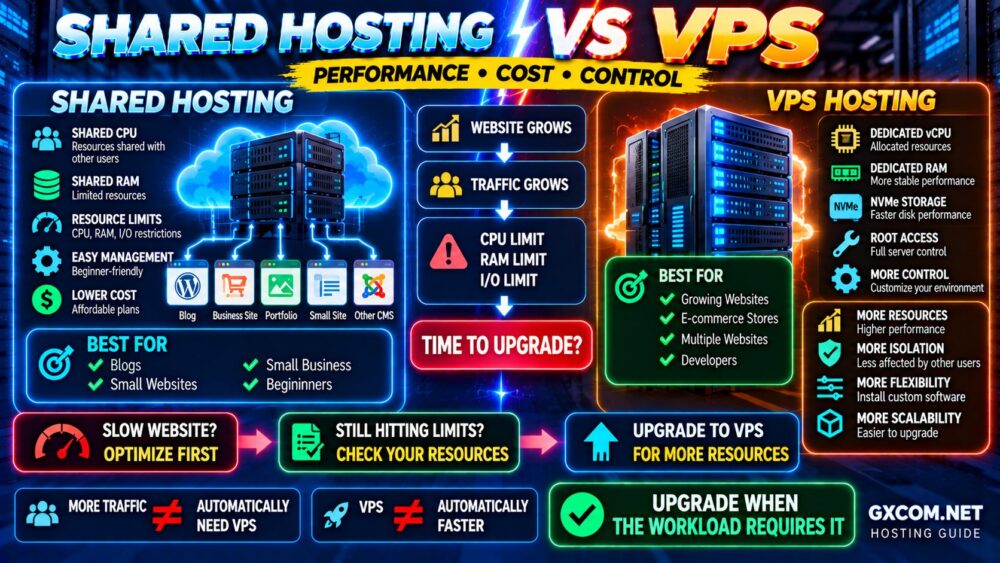
Shared Hosting vs VPS: When Does VPS Make Sense?
VPS hosting gives you a more isolated server environment with clearer CPU, RAM and storage allocations.
A VPS becomes attractive when shared hosting is consistently limiting your workload or when you need more server-level control.
However, VPS also introduces additional technical responsibility.
A self-managed VPS may require you to handle:
- Operating system maintenance
- Security
- Firewall configuration
- Web server configuration
- Backups
- Monitoring
Our Shared Hosting vs VPS comparison explains performance, cost and when the upgrade makes sense.
Managed Hosting Can Be Another Upgrade Path
VPS is not the only option when shared hosting becomes restrictive.
Users who need more performance or better management but do not want to administer a server themselves can consider managed hosting or managed VPS.
The upgrade path can look like:
SHARED HOSTING
↓
HIGHER-TIER SHARED / MANAGED HOSTING
↓
MANAGED VPS
↓
SELF-MANAGED VPS / CLOUD
Which path is best depends on whether your priority is simplicity, management or infrastructure control.
See our Managed Hosting vs VPS guide for the next step in that decision.
Shared Hosting Providers and Upgrade Paths
When choosing shared hosting, do not compare providers only by storage and introductory price.
Look at the quality of the hosting environment and whether there is a practical upgrade path when your website grows.
Hostinger is worth comparing for users who want accessible shared and WordPress hosting with options to move into higher-resource hosting as requirements increase.
hosting.com (formerly A2 Hosting) is another provider worth evaluating where shared hosting performance and future upgrade options are priorities.
AccuWeb Hosting is also worth comparing across shared and more advanced hosting categories when you want multiple infrastructure options under one provider.
If your website eventually needs VPS-level resources with provider management, ScalaHosting becomes relevant as a managed VPS upgrade option.
For technically experienced users who prefer to manage their own cloud server, DigitalOcean and Vultr represent another possible step beyond shared hosting.
The best provider is not simply the one offering the largest visitor number.
Look for:
- Resource policies
- Performance
- Backups
- Support
- Security
- Renewal pricing
- Upgrade options
Shared Hosting Upgrade Decision Checklist
Before upgrading, ask:
- ✓ Am I repeatedly hitting CPU limits?
- ✓ Am I reaching memory limits?
- ✓ Is disk I/O being throttled?
- ✓ Are concurrent requests causing errors?
- ✓ Have I enabled effective caching?
- ✓ Have I optimized the application?
- ✓ Are bots consuming excessive resources?
- ✓ Is my traffic increasingly dynamic?
- ✓ Do I need root access or custom software?
- ✓ Is downtime now costing my business money?
If the first problems disappear after optimization, you may not need to upgrade yet.
If resource limits continue to restrict a properly optimized website, upgrading becomes much easier to justify.
Common Shared Hosting Traffic Mistakes
Believing a Fixed Visitor Limit
No visitor number applies universally to every website and every shared hosting provider.
Looking Only at Monthly Traffic
Concurrency and peak traffic can matter more than monthly averages.
Assuming Unlimited Bandwidth Means Unlimited Traffic
CPU, memory, I/O and processes can become bottlenecks long before bandwidth.
Upgrading Before Optimizing
Caching and application optimization can significantly reduce server load.
Waiting Until the Website Repeatedly Fails
Monitor resource usage so you can identify a trend before performance becomes unacceptable.
Moving to an Unmanaged VPS Without the Skills to Manage It
More resources are useful, but server administration becomes your responsibility.
Shared Hosting Traffic FAQ
How many visitors can shared hosting handle?
There is no universal number. A well-cached content website may handle tens of thousands or substantially more monthly visits on quality shared hosting, while a dynamic website can reach resource limits with much less traffic.
Can shared hosting handle 100,000 visitors per month?
Potentially, yes, particularly for an optimized and highly cached content website. However, 100,000 monthly visitors is not a guarantee because concurrency, CPU usage, database activity and provider resource limits matter.
Can shared hosting handle 1,000 visitors per day?
Many quality shared hosting plans can handle this level of traffic for a reasonably optimized website. The actual workload created by those visitors remains more important than the visitor count itself.
What happens if I exceed shared hosting limits?
The provider may throttle resources, slow requests, temporarily restrict processes or recommend upgrading. In severe cases, visitors may experience server errors or timeouts.
Does unlimited bandwidth mean unlimited visitors?
No. Bandwidth is only one resource. CPU, RAM, disk I/O, PHP processes and database limits can restrict traffic capacity even when bandwidth is not exhausted.
Is shared hosting good for high traffic?
It can work well for highly cacheable websites, but consistently high or dynamic traffic may benefit from managed hosting, VPS or cloud infrastructure with more predictable resources.
When should I upgrade from shared hosting to VPS?
Consider upgrading when a properly optimized website repeatedly reaches shared hosting resource limits or requires server-level control unavailable on the shared platform.
Should I upgrade hosting because my website is slow?
Not automatically. First identify whether the bottleneck is hosting, caching, database queries, plugins, images, JavaScript or another part of the website.
Final Verdict: How Much Traffic Can Shared Hosting Really Handle?
Shared hosting does not have one universal visitor limit.
A lightweight cached website can handle far more traffic than a dynamic application creating expensive PHP and database requests.
Instead of thinking:
SHARED HOSTING = X VISITORS
think:
TRAFFIC
↓
CONCURRENCY
↓
CACHED OR DYNAMIC?
↓
CPU + RAM + I/O + PHP + DATABASE
↓
REAL HOSTING CAPACITY
Stay on shared hosting while your website remains fast, stable and comfortably within its resource limits.
Optimize before upgrading.
Monitor the actual bottleneck.
Then move to higher-tier managed hosting, managed VPS or self-managed VPS when the workload genuinely requires it.
DON'T UPGRADE BECAUSE OF A VISITOR NUMBER.
UPGRADE WHEN YOUR WORKLOAD OUTGROWS YOUR RESOURCES.