Managed hosting and VPS hosting are often compared by website owners who have outgrown basic shared hosting and need more performance, reliability or control.
But there is an important detail:
Managed hosting and VPS are not technically opposite hosting types.
A VPS describes the underlying server environment, while “managed” describes who takes responsibility for maintaining that environment. In fact, a VPS can itself be fully managed.
When most users compare Managed Hosting vs VPS, what they really want to know is whether they should pay a provider to handle more of the infrastructure or move to a VPS where they have greater control and responsibility.
This guide compares performance, CPU and RAM, server control, security, support and total cost so you can decide which approach fits your website.
MANAGED HOSTING = LESS SERVER WORK
VPS = MORE SERVER CONTROL
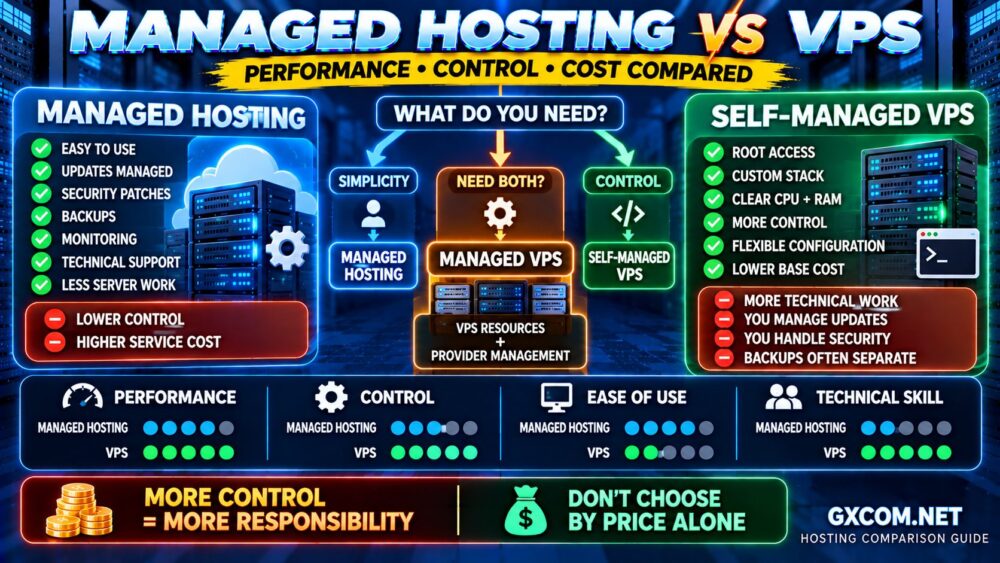
Managed Hosting vs VPS: Quick Comparison
| Feature | Managed Hosting | Self-Managed VPS |
|---|---|---|
| Ease of Use | Higher | Lower |
| Server Control | More limited | High / Root Access |
| Technical Skill Required | Lower | Higher |
| CPU / RAM Visibility | Depends on service | Usually clearly allocated |
| Server Updates | Provider assistance | Your responsibility |
| Security Management | More provider assistance | Your responsibility |
| Backups | Often included | Usually configure or purchase separately |
| Monitoring | Often included | Usually self-managed |
| Base Infrastructure Cost | Usually higher | Usually lower |
| Best For | Businesses / non-admins | Developers / sysadmins |
The decision usually comes down to:
CONVENIENCE + SUPPORT
VS
CONTROL + FLEXIBILITY
What Is Managed Hosting?
Managed hosting is a service where the hosting provider takes responsibility for more of the technical work required to operate your hosting environment.
Depending on the provider and plan, management may include:
- Initial server configuration
- Operating system updates
- Security patches
- Server monitoring
- Backups
- Firewall configuration
- Web server maintenance
- Control panel maintenance
- Performance assistance
- Technical troubleshooting
Managed hosting can be built on different types of infrastructure.
You can have:
- Managed WordPress hosting
- Managed cloud hosting
- Managed VPS hosting
- Managed dedicated hosting
Therefore, the word managed describes the service model rather than a specific server architecture.
What Is VPS Hosting?
A Virtual Private Server uses virtualization to divide physical server infrastructure into isolated virtual environments.
A VPS typically gives you clearly defined resources such as:
- vCPU
- RAM
- SSD or NVMe storage
- Bandwidth
- Operating system
Depending on the provider, you may also receive root or administrator access.
This gives you significantly more control than conventional shared hosting.
You can configure:
- Linux distribution
- Web server
- PHP
- Database
- Firewall
- Caching
- Custom applications
But greater control creates greater responsibility.
ROOT ACCESS = FREEDOM + RESPONSIBILITY.
Managed VPS: Where the Two Categories Meet
This is where many hosting comparisons become confusing.
You do not necessarily have to choose between managed hosting and VPS.
You can buy a managed VPS.
A managed VPS combines:
VPS RESOURCES
+
SERVER-LEVEL CONTROL
+
PROVIDER MANAGEMENT
This can be a strong middle ground for businesses that have outgrown shared hosting but do not want to maintain an entire server themselves.
Therefore, the real spectrum looks more like:
SHARED HOSTING
↓
MANAGED WEB HOSTING
↓
MANAGED VPS
↓
SELF-MANAGED VPS
↓
DEDICATED / CLOUD INFRASTRUCTURE
1. Performance: Managed Hosting vs VPS
A VPS can offer a significant performance advantage when moving from resource-constrained shared hosting because you typically receive a clearer allocation of CPU, RAM and storage.
But VPS does not automatically mean faster.
A poorly configured VPS can perform worse than a professionally optimized managed hosting platform.
Website performance depends on:
- CPU performance
- RAM
- Storage I/O
- Network quality
- Web server configuration
- Database performance
- Caching
- Application optimization
The correct comparison is therefore:
HARDWARE + CONFIGURATION + APPLICATION = PERFORMANCE.
Managed hosting may compensate for less control with professional optimization, while VPS gives experienced users more freedom to optimize the environment themselves.
2. CPU and RAM
VPS hosting usually makes server resources easier to understand.
A VPS plan might specify:
- 2 vCPU
- 4 GB RAM
- 80 GB NVMe storage
- Several terabytes of transfer
Traditional managed web hosting may instead advertise:
- Number of websites
- Monthly visits
- Storage
- PHP workers
- Application limits
Neither model is automatically better.
The important question is whether the available resources match the workload.
And remember:
4 vCPU ≠ 4 vCPU PERFORMANCE.
CPU generation, shared versus dedicated CPU time, virtualization, frequency and provider resource policies all affect actual performance.
3. Server Control
This is one of the clearest advantages of VPS hosting.
With root access, you can often choose and configure:
- Operating system
- Nginx or Apache
- LiteSpeed where licensed and supported
- PHP versions
- Database software
- Redis
- Firewall rules
- Custom applications
- Background services
Managed hosting may restrict some of these choices because the provider needs to maintain a stable and supportable platform.
That limitation can actually be beneficial for users who do not want to manage infrastructure.
MORE CONTROL IS ONLY AN ADVANTAGE IF YOU NEED IT.
4. Ease of Use
Managed hosting wins for simplicity.
The provider handles more of the infrastructure, allowing you to focus on the website or application.
A self-managed VPS may require you to:
- Create users
- Secure SSH
- Configure the firewall
- Install a web server
- Install PHP
- Configure the database
- Set up SSL
- Configure backups
- Deploy monitoring
- Maintain security updates
If you enjoy server administration, this may be an advantage.
If you simply want to run a business website, it can become unnecessary work.
5. Security
With managed hosting, the provider generally takes responsibility for more infrastructure security tasks.
These may include:
- Operating system patching
- Firewall management
- Security monitoring
- Service configuration
- Malware protection
With a self-managed VPS, much of this responsibility moves to you.
A VPS is not inherently insecure.
But an incorrectly configured VPS can create unnecessary risk.
If you choose the self-managed route, our How to Secure a VPS guide covers the essential hardening steps.
6. Backups
Managed hosting often includes an integrated backup system.
Depending on the service, you may receive:
- Automatic daily backups
- Multiple restore points
- One-click restoration
- Off-site backups
With VPS hosting, backups may be an optional paid service or something you configure yourself.
A snapshot is also not necessarily a complete backup strategy.
For important websites, consider keeping backups independent from the production server.
SERVER + BACKUP ON THE SAME FAILURE DOMAIN = INCOMPLETE PROTECTION.
7. Scalability
VPS hosting generally provides a clear upgrade path.
You may be able to increase:
- vCPU
- RAM
- Storage
- Bandwidth
Cloud-based VPS platforms may make scaling particularly straightforward.
Managed hosting can also scale, but the upgrade path depends on the provider's product structure.
Some platforms move customers between managed tiers based on traffic, storage or application resources.
Others eventually migrate customers to managed VPS or dedicated infrastructure.
8. Support
Support is where managed hosting can justify its higher price.
Self-managed VPS support often focuses on:
- Physical infrastructure
- Network
- Virtualization
- Platform availability
If your Nginx configuration breaks, your provider may not fix it for you.
Managed hosting support can potentially assist with more of the software stack.
But management scope varies significantly.
Always ask:
WHAT EXACTLY WILL SUPPORT TROUBLESHOOT?
9. Cost: Which Is Cheaper?
A self-managed VPS usually has a lower base infrastructure price than a comparable fully managed service.
But the monthly server bill is not the complete cost.
For VPS hosting, you may also need:
- Control panel license
- Backup service
- Monitoring
- Security tools
- Server administration
- Emergency troubleshooting
The correct calculation is:
VPS PRICE
+ Backups
+ Control Panel
+ Monitoring
+ Security
+ Administrator Time
=
REAL VPS COST
Compare that with:
MANAGED HOSTING PRICE
+ Required Extras
=
REAL MANAGED HOSTING COST
Our Web Hosting Cost Guide explains why the cheapest advertised monthly price is not always the cheapest long-term option.
Managed Hosting vs VPS for WordPress
WordPress can run extremely well on either platform.
Managed WordPress or managed web hosting is attractive when you want:
- Simple setup
- Integrated caching
- Automatic backups
- WordPress support
- Less server maintenance
A VPS becomes more attractive when you want:
- More predictable resources
- Root access
- Custom server configuration
- Multiple applications
- Greater infrastructure control
Do not move to VPS simply because your WordPress website has reached a particular number of visitors.
As explained in our WordPress Hosting Traffic Guide, server load depends on CPU, RAM, caching, PHP workers, concurrency and the type of traffic—not just monthly visitor count.
Managed Hosting vs VPS for WooCommerce
WooCommerce creates more dynamic workload than a typical cached blog.
Cart, checkout, customer accounts and personalized sessions can increase PHP and database demand.
For a small store, quality managed hosting may be enough.
As the store grows, a managed VPS can become attractive because it combines stronger resources with provider assistance.
Experienced administrators may instead prefer a self-managed VPS because they can optimize the server specifically for the store.
Managed Hosting vs VPS for Business Websites
For many small and medium businesses, the decision is less about technical specifications and more about operational responsibility.
Ask:
- Who installs security updates?
- Who monitors the server?
- Who restores the website after a failure?
- Who troubleshoots the database?
- Who responds when the server goes down at 2 AM?
If the answer to all of these questions is “me,” then the cheaper VPS comes with a hidden cost: your time.
Our Is Managed Hosting Worth It? guide explains how to calculate that management value.
Managed Hosting vs VPS Providers to Compare
Once you know which management model you need, compare providers within the correct category rather than treating every hosting product as equivalent.
For users who want the benefits of VPS resources with more provider management, ScalaHosting is worth comparing as a managed VPS option.
For websites that prioritize ease of use over root-level server control, Hostinger and hosting.com (formerly A2 Hosting) are worth evaluating across their relevant web, WordPress and managed hosting offerings.
For developers comfortable administering their own infrastructure, DigitalOcean and Vultr are useful examples of cloud/VPS platforms where customers can build and manage their own server environments.
The key is not to ask:
WHICH PROVIDER IS BEST?
Ask:
WHICH PROVIDER MATCHES THE MANAGEMENT MODEL I NEED?
When Managed Hosting Is Better
Choose managed hosting when:
- You do not have server administration experience
- Your website is business-critical
- You value technical support
- You want integrated backups
- You prefer the provider to handle updates
- You want less infrastructure maintenance
- Your time is better spent elsewhere
For these users:
LESS CONTROL CAN ACTUALLY MEAN MORE PRODUCTIVITY.
When VPS Hosting Is Better
Choose a self-managed VPS when:
- You need root access
- You understand Linux or Windows server administration
- You need custom software
- You want to configure your own stack
- You already have monitoring and backups
- You want lower base infrastructure costs
- You are comfortable troubleshooting problems yourself
For these users:
MORE CONTROL CAN PRODUCE BETTER VALUE.
When Managed VPS Is the Best Choice
Sometimes neither extreme is ideal.
You may want:
- VPS-level CPU and RAM
- Better resource isolation
- Scalability
- Server-level flexibility
but you may not want:
- Security patching
- Server monitoring
- Backup administration
- Emergency troubleshooting
In that case:
MANAGED VPS = VPS RESOURCES + MANAGEMENT.
This is often one of the most logical upgrade paths for growing business websites.
Managed Hosting vs VPS: Decision Checklist
| If You Need… | Consider |
|---|---|
| Simple hosting | Managed Hosting |
| Minimal server maintenance | Managed Hosting |
| Root access | VPS |
| Custom server software | VPS |
| Lower base server cost | Self-Managed VPS |
| VPS resources without full administration | Managed VPS |
| Business-critical support | Managed / Managed VPS |
| Maximum infrastructure control | Self-Managed VPS |
Common Managed Hosting vs VPS Mistakes
Assuming VPS Is Always Faster
A VPS gives you more control and clearer resources, but configuration quality still matters.
Assuming Managed Hosting Has No Resource Limits
Managed platforms still impose CPU, memory, PHP worker, traffic or application limits.
Comparing Only Monthly Prices
Include backups, licenses, monitoring and administration time.
Buying Root Access You Never Use
If you never need server-level control, the additional complexity may provide no benefit.
Buying Management You Do Not Need
Experienced administrators may be paying for work they can efficiently perform themselves.
Confusing Managed Hosting With Managed VPS
A VPS can itself be managed. Always identify both the infrastructure type and the management level.
Managed Hosting vs VPS FAQ
Is VPS better than managed hosting?
Not universally. VPS is better when you need greater server control and clearly allocated resources. Managed hosting is often better when ease of use, support and reduced server administration are more important.
Is managed hosting faster than VPS?
Not automatically. Performance depends on CPU, RAM, storage, configuration, caching and application efficiency. A well-optimized managed platform can outperform a poorly configured VPS.
Is VPS cheaper than managed hosting?
Self-managed VPS usually has a lower base infrastructure price, but backups, control panels, monitoring, security tools and administration can increase the real cost.
Can a VPS be managed?
Yes. Managed VPS hosting combines VPS infrastructure with provider assistance for server maintenance, updates, monitoring and other administrative tasks depending on the service.
Do I need technical knowledge for VPS hosting?
For a self-managed VPS, server administration knowledge is strongly recommended. Managed VPS reduces the amount of technical work required, although the exact support scope varies by provider.
Should I use managed hosting or VPS for WordPress?
Managed hosting is often easier for users who want to focus on WordPress rather than server administration. VPS is attractive when you need greater resources, custom configuration or server-level control.
When should I move from managed hosting to VPS?
Consider VPS when you need greater control, custom software, clearer resource allocation or an infrastructure configuration your current managed platform cannot provide.
What is the difference between managed VPS and unmanaged VPS?
With managed VPS, the provider handles more server administration. With unmanaged VPS, the customer is primarily responsible for configuring, securing, updating and monitoring the server.
Final Verdict: Managed Hosting or VPS?
Managed hosting and VPS solve different problems.
Managed hosting reduces the amount of infrastructure you need to operate.
VPS hosting gives you greater control over how the infrastructure operates.
Choose managed hosting when you prioritize:
SIMPLICITY → SUPPORT → LESS SERVER WORK
Choose a self-managed VPS when you prioritize:
CONTROL → FLEXIBILITY → LOWER BASE COST
Choose a managed VPS when you need:
VPS RESOURCES + PROFESSIONAL MANAGEMENT
The most important question is not:
“IS MANAGED HOSTING BETTER THAN VPS?”
It is:
“HOW MUCH CONTROL DO I NEED—AND WHO DO I WANT TO MANAGE THE SERVER?”
MORE CONTROL ≠ BETTER HOSTING.
MORE MANAGEMENT ≠ BETTER HOSTING.
The best choice is the one that gives your workload the right resources while placing server responsibility in the right hands.