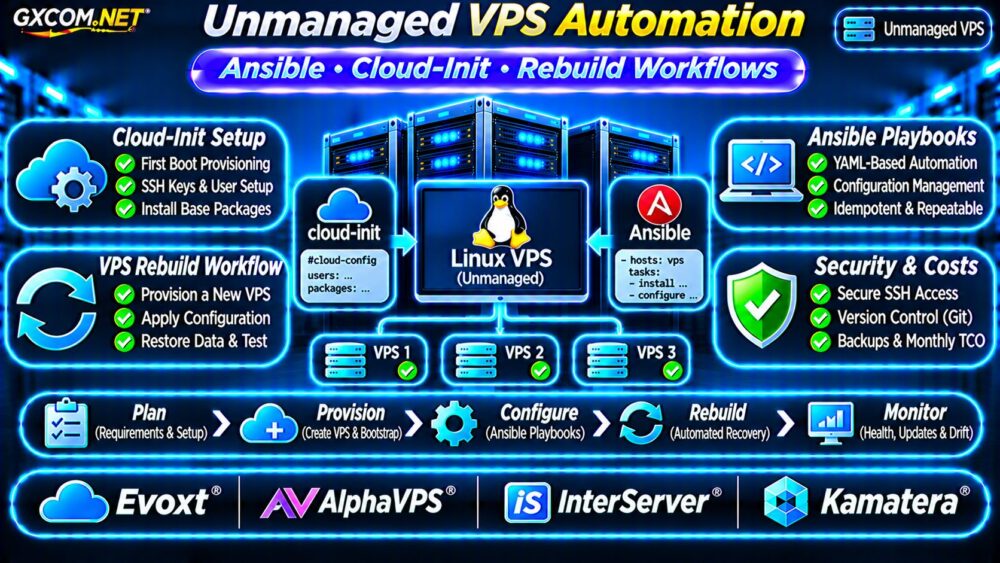
Unmanaged VPS automation helps developers and system administrators deploy, configure, and rebuild Linux servers without repeating every task manually. Instead of installing packages and editing configuration files through SSH, teams can define repeatable infrastructure workflows.
Two useful tools are cloud-init for initial provisioning and Ansible for ongoing configuration management. Together, they can reduce deployment mistakes, configuration drift, and recovery time.
Why Automate an Unmanaged VPS?
Unmanaged VPS hosting gives customers substantial control over operating systems, software, and security settings. However, customers also assume responsibility for configuration, monitoring, updates, and recovery.
Manual administration becomes difficult when multiple servers require identical settings. Automation helps standardize SSH access, packages, firewall policies, and application dependencies.
For an overview of service responsibilities, read our Managed vs Unmanaged VPS Comparison.
Cloud-Init vs Ansible: Different Responsibilities
Cloud-init usually runs during instance initialization when supported by the operating system image and hosting platform. It can configure users, SSH keys, packages, and initial system settings.
Ansible connects to existing machines, typically through SSH, and applies configuration instructions described in YAML playbooks.
| Capability | Cloud-Init | Ansible |
|---|---|---|
| Initial user setup | Excellent | Possible |
| SSH key injection | Common use | Supported |
| Recurring configuration | Limited role | Strong fit |
| Multiple servers | Per-instance | Inventory-based |
| Configuration drift | Not its primary purpose | Repeatable enforcement |
A practical approach uses cloud-init for bootstrapping and Ansible for maintaining the desired configuration.
Step 1: Bootstrap Linux with Cloud-Init
The following Ubuntu-oriented example creates an administrative user, installs basic packages, and enables SSH public-key authentication.
#cloud-config
users:
  - default
  - name: deploy
    groups: sudo
    shell: /bin/bash
    sudo: ALL=(ALL) NOPASSWD:ALL
    ssh_authorized_keys:
      - ssh-ed25519 REPLACE_WITH_PUBLIC_KEY
package_update: true
packages:
  - python3
  - curl
  - ufw
ssh_pwauth: false
Replace the placeholder with your actual public key. Never insert a private SSH key into user data.
This example grants passwordless sudo to the deployment account. Restrict access to its private key and review whether such privileges are appropriate for production.

Cloud-init support varies by provider, image, and provisioning interface. Some VPS products require manual initialization or a custom image instead.
Step 2: Configure Servers with Ansible
Ansible uses an inventory to identify managed hosts. A simple inventory might contain:
[webservers]
web01 ansible_host=192.0.2.10
web02 ansible_host=192.0.2.11

[webservers:vars]
ansible_user=deploy
These documentation IP addresses must be replaced with actual server addresses.
A basic playbook can install and enable Nginx on Ubuntu:
---
- name: Configure web servers
  hosts: webservers
  become: true
  tasks:
    - name: Install Nginx
      ansible.builtin.apt:
        name: nginx
        state: present
        update_cache: true

    - name: Enable Nginx
      ansible.builtin.service:
        name: nginx
        enabled: true
        state: started
Run the playbook from a trusted control machine:
ansible-playbook -i inventory.ini site.ymlUnlike an improvised sequence of shell commands, Ansible modules are designed to describe desired states. Repeated execution can avoid unnecessary changes when tasks are written correctly.
Step 3: Prevent Configuration Drift
Configuration drift occurs when servers gradually develop different packages, permissions, or settings.
Store reviewed playbooks in Git, separate environment variables, and use encrypted secret management such as Ansible Vault.
Run syntax checks and controlled deployments before production changes. Avoid storing passwords, API tokens, or private keys directly in repositories.
Automation does not automatically make a configuration secure. Follow our Unmanaged Server Security Checklist.
Step 4: Build a Repeatable VPS Rebuild Workflow
A rebuild workflow should restore a usable server from documented infrastructure configuration rather than relying on remembered manual steps.
- Create a replacement VPS using a supported image or provisioning interface.
- Inject approved SSH keys and bootstrap settings.
- Wait for cloud-init completion and confirm network access.
- Apply Ansible playbooks and application configuration.
- Restore required data from verified backups.
- Run health checks before switching production traffic.
Test these steps on disposable infrastructure. Record rebuild duration and distinguish operating system recovery from application data recovery.
For backup planning, see our VPS Snapshot Backup and Recovery Guide.
Four Unmanaged VPS Providers to Compare
These GXCOM.NET-approved affiliate providers are candidates for Linux automation workloads. Verify provisioning features for each specific plan.
Evoxt: Budget-Conscious Linux Deployments
Evoxt is worth evaluating for development environments and smaller automated workloads. Confirm Linux image availability, SSH access, reinstall options, and storage resources.
AlphaVPS: Self-Managed Infrastructure
AlphaVPS can be compared for administrator-controlled Linux environments. Check supported operating systems, recovery-console access, networking, and rebuild procedures.
InterServer: VPS Resource Planning
InterServer offers another option for evaluating VPS resources and recurring costs. Verify administrative access, reinstall functionality, backup options, and automation compatibility.
Kamatera: Configurable Cloud Servers
Kamatera is relevant when adjustable infrastructure and deployment integration matter. Review current API documentation, supported images, user-data capabilities, and resource billing.
SSH compatibility alone does not establish native cloud-init support or automated provisioning APIs.
Unmanaged VPS Automation Costs
Automation tools may be available without per-server software licensing fees, but infrastructure and administration still cost money.
Consider three hypothetical VPS instances at $15 monthly each, backups costing $12, and monitoring costing $8.

The infrastructure subtotal is $65 monthly, or $780 annually, excluding engineering time, taxes, and additional services.
Compare this expense with managed hosting alternatives. A lower VPS price may not offset extensive maintenance work.
Explore our Cheap VPS Providers Comparison for broader budget considerations.
Common Automation Mistakes
- Disabling password login before verifying SSH key access.
- Assuming every VPS image supports cloud-init.
- Embedding production secrets in plain-text user data.
- Running destructive playbooks without staging tests.
- Confusing reproducible configuration with recoverable application data.
Frequently Asked Questions
Can Ansible Manage Any Linux VPS?
Most Linux VPS environments with suitable SSH access and required target-side dependencies can be managed using Ansible. Some restricted environments need additional configuration.
Does Cloud-Init Run After Every Reboot?
Not normally for first-boot modules. Execution frequency depends on the module and cloud-init configuration.
Can Automation Replace VPS Backups?
No. Playbooks recreate configuration, while backups protect application data and recovery points. Both are necessary for dependable rebuilding.
Final Verdict
Unmanaged VPS automation works best when cloud-init handles initial provisioning, Ansible maintains configuration, and tested backups support recovery.
Compare Evoxt, AlphaVPS, InterServer, and Kamatera using verified deployment capabilities, resource requirements, and operating costs. Choose infrastructure that supports repeatable workflows rather than relying on manual server administration.