An unmanaged VPS backup strategy is essential when you operate a Linux server without a hosting provider managing your data protection. A failed disk, compromised account, accidental deletion, or broken application update can interrupt service and destroy important information.
Creating backup files is only the beginning. Reliable protection requires independent storage, appropriate recovery points, automated monitoring, and tested restoration procedures.
This guide explains how to build a practical backup plan while controlling storage costs and administrative effort.
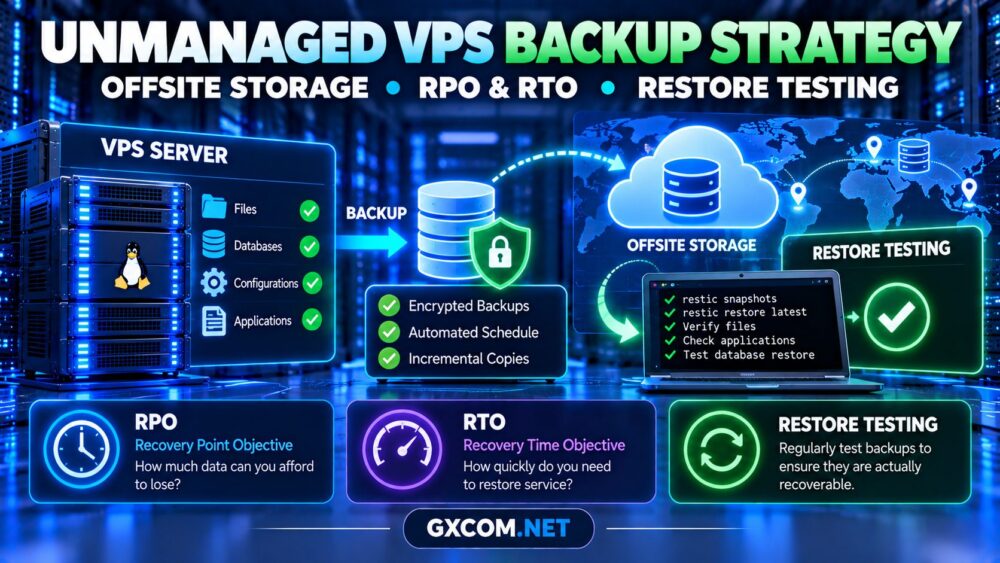
1. Define Your Recovery Objectives
Before choosing backup software, determine how much data your business can afford to lose and how quickly services must return.
Recovery Point Objective (RPO) measures acceptable data loss in time. A four-hour RPO means your recovery process should limit potential data loss to four hours.
Recovery Time Objective (RTO) measures the target time for restoring service. A two-hour RTO requires sufficient infrastructure, bandwidth, and operational readiness.
| Workload | Example RPO | Example RTO |
|---|---|---|
| Development server | 24 hours | 24 hours |
| Business website | 4 hours | 8 hours |
| Transactional application | 15 minutes | 1 hour |
These are illustrative planning targets, not guarantees. Actual requirements depend on business impact, budget, and recovery capabilities.
2. Follow the 3-2-1 Backup Principle
A useful starting point is the 3-2-1 principle: maintain three copies of important data, use two storage types or independent systems, and keep at least one copy offsite.
For a VPS, this could mean production data, an encrypted backup repository on separate storage, and another independently controlled recovery copy.
A second directory on the same virtual disk is not meaningful protection against storage failure.
Prefer storage outside the production server’s failure domain. Consider separate accounts, geographic regions, restricted deletion permissions, and immutable or offline copies where practical.
For the underlying differences between recovery methods, see our VPS snapshots vs backups guide.
3. Identify What Must Be Backed Up
Backing up an entire filesystem may be convenient, but not every directory has equal recovery value.
Prioritize application files, databases, uploaded content, configuration files, certificates, deployment manifests, and securely managed secrets.
Document software versions and installation steps so a replacement VPS can be rebuilt without depending entirely on a full-system image.
For databases, use application-consistent exports or supported backup mechanisms. Copying live database files without coordination can produce unusable recovery data.
4. Automate Encrypted Offsite Backups
Restic is an open-source backup tool supporting encryption, snapshots, and multiple storage backends. It can help automate backups to independently managed storage.

On Ubuntu, install the package:
sudo apt update
sudo apt install restic
For an SFTP repository, configure a restricted backup account and SSH authentication first. Then initialize a repository using a destination you control:
export RESTIC_REPOSITORY="sftp:backupuser@backup-host:/backups/vps01"
export RESTIC_PASSWORD_FILE="/root/.config/restic/password"
restic init
The password file must exist, contain a strong repository password, and have restrictive permissions. Protect it separately: losing the password can make encrypted backups unrecoverable.
After verifying access, back up selected directories:
restic backup /etc /var/www /homeDo not assume these directories cover every application. Review database exports, mounted volumes, permissions, and application-specific requirements.
Schedule backups through systemd timers or another reliable scheduler, and alert on failures. Store credentials outside publicly accessible application directories.
5. Choose Backup Frequency and Retention
Backup frequency should follow your RPO, not an arbitrary daily schedule.
A low-traffic brochure website may tolerate daily backups. An active database may need frequent transaction-log backups or continuous recovery mechanisms.
Retention determines how far back recovery can reach. Consider keeping daily, weekly, and monthly recovery points based on business requirements.
With Restic, retention policies can be applied using commands such as:
restic forget --keep-daily 7 --keep-weekly 4 --keep-monthly 3Retention changes alone do not necessarily reclaim storage immediately. Understand repository pruning, maintenance requirements, and the consequences of deleting older recovery points.
6. Test Restoration Before an Emergency
A successful backup command does not prove that applications can be restored.
Start by listing available recovery points:
restic snapshotsRestore a selected snapshot into an isolated test directory:
restic restore latest --target /tmp/vps-restore-testInspect restored files, permissions, configuration, and database exports. For meaningful disaster recovery testing, rebuild the application on a separate test server.
Measure actual recovery time, verify application functionality, and document missing dependencies. Never restore directly over production data during an unplanned test.
Our unmanaged VPS setup checklist covers the security and monitoring foundations needed for replacement servers.
7. Understand Backup Storage Costs
Offsite backup costs depend on stored capacity, retention, data changes, geographic replication, network transfer, and recovery charges.
Incremental backups can reduce repeated data transfer, but large databases or frequently changing files may still consume substantial storage.
Estimate total cost using:
Monthly protection cost = storage + transfer + recovery services + administration.
Compare the cost of backup storage with the financial impact of data loss. Also test download speeds because inexpensive storage may not meet demanding recovery objectives.
8. Compare VPS Providers and Recovery Responsibilities
Hosting providers differ in available backup tools, management responsibilities, and recovery assistance. Evaluate the specific plan rather than assuming every VPS includes automatic protection.
Evoxt
Evoxt is a candidate for budget-conscious VPS deployments. Check the selected plan’s backup availability, retention, restoration access, and whether independent storage is required.
RAKsmart
RAKsmart is relevant when comparing VPS and cloud infrastructure. Review the product’s storage architecture, backup options, recovery access, and customer responsibilities.
AlphaVPS
AlphaVPS is worth considering for self-managed Linux environments. Confirm snapshot policies, external backup compatibility, and rescue-console availability.
Hostwinds
Hostwinds can be evaluated where VPS management and support scope influence recovery planning. Determine which backup and restoration tasks are included or optional.
Explore our best VPS providers comparison to assess broader infrastructure choices.
9. Plan for Complete VPS Failure
Assume the original VPS could become permanently unavailable. Document the process for provisioning a replacement server, installing software, retrieving encrypted backups, restoring databases, and updating DNS.

Keep recovery credentials and instructions outside the failed environment. Restrict access while ensuring authorized administrators can retrieve them during an incident.
Recovery planning also matters when changing providers. Our VPS migration costs guide explains transfer, IP address, and downtime considerations.
10. Review the Total Cost Before Buying
An unmanaged VPS may offer attractive subscription pricing, but reliable backups introduce additional storage, monitoring, and administration requirements.
When reviewing VPS hosting deals, check backup exclusions, renewal terms, data transfer charges, and recovery limitations.
Choose a plan that supports your recovery objectives rather than simply minimizing the monthly server price.
Frequently Asked Questions
How often should an unmanaged VPS be backed up?
Frequency depends on the acceptable data-loss window. Important transactional systems may require more than periodic filesystem backups.
Is a VPS snapshot enough for disaster recovery?
Not necessarily. Snapshots may share infrastructure or administrative access with the production server.
Should backup storage use a different provider?
Independent providers or accounts can reduce correlated failure risks, although separate infrastructure is not always mandatory.
How can I verify a VPS backup?
Perform integrity checks and restore representative data into an isolated environment. Confirm that the application operates correctly.
Final Verdict
A dependable unmanaged VPS backup strategy combines clear recovery objectives, encrypted offsite copies, automated scheduling, and regular restoration testing.
Protect the backup repository from the same failures and credentials that threaten production, and measure recovery performance before a real emergency.