Unmanaged VPS hosting gives you virtual server resources and administrative control without paying the hosting provider to manage the server for you.
That usually means you are responsible for installing software, securing the server, applying updates, configuring the web stack, monitoring performance, managing backups and troubleshooting problems.
In return, unmanaged VPS hosting can provide something many developers and experienced server users value:
MORE CONTROL + LOWER COST + GREATER FLEXIBILITY.
But that freedom comes with responsibility.
An unmanaged VPS is not simply “cheaper managed hosting.” It is a different operating model in which much of the server administration moves from the hosting company to you.
This guide explains what unmanaged VPS hosting is, how it works, what you are responsible for, its advantages and disadvantages, and who should—or should not—use it.

What Is Unmanaged VPS Hosting?
An unmanaged VPS is a virtual private server where the hosting provider primarily manages the physical infrastructure and virtualization platform, while you manage the operating system and software running inside your VPS.
The provider typically supplies resources such as:
- vCPU
- RAM
- SSD or NVMe storage
- Network connectivity
- IP addresses
- Virtualization infrastructure
You normally receive administrative access to the server and take responsibility for configuring it for your workload.
A simple way to think about it is:
PROVIDER MANAGES THE INFRASTRUCTURE
↓
YOU MANAGE THE SERVER
This division of responsibility is what separates unmanaged VPS hosting from fully or partially managed VPS services.
How Does an Unmanaged VPS Work?
A VPS provider operates physical servers in a datacenter and uses virtualization technology to divide those machines into isolated virtual server environments.
Your VPS receives an allocation of resources according to the plan you purchase.
For example, a VPS might include:
- 4 vCPU
- 8 GB RAM
- 160 GB NVMe storage
- Several terabytes of monthly transfer
- One public IPv4 address
After deployment, you typically connect to a Linux VPS through SSH using an administrative account.
From that point, you configure the server for its intended purpose.
The workflow often looks like this:
CHOOSE VPS
↓
DEPLOY OPERATING SYSTEM
↓
SECURE SSH + FIREWALL
↓
INSTALL SERVER SOFTWARE
↓
CONFIGURE APPLICATION
↓
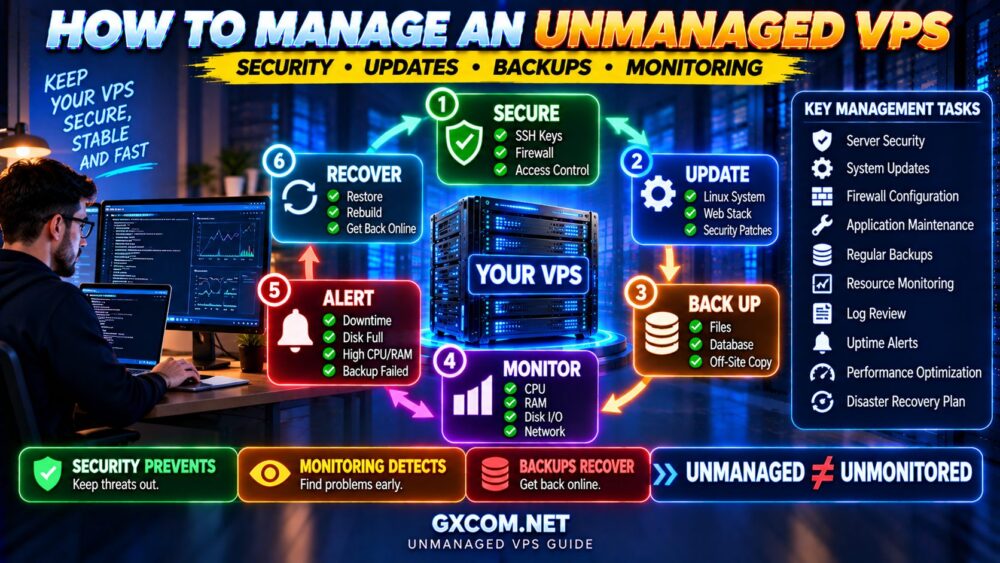
MONITOR + UPDATE + BACK UP
The exact deployment process varies between providers, but the underlying principle remains the same: you have much more control over the software environment than with conventional shared hosting.
What Does the VPS Provider Manage?
“Unmanaged” does not mean the hosting company does absolutely nothing.
The provider is normally responsible for the infrastructure required to keep the virtual server available.
This may include:
- Physical server hardware
- Datacenter power
- Cooling
- Physical networking
- Virtualization platform
- Hardware replacement
- Basic network availability
If a physical disk fails or the host server develops a hardware problem, that is generally the provider's responsibility.
But if your web server configuration is broken, your firewall blocks SSH or your database stops because of an incorrect configuration, the provider may not be responsible for fixing it.
What Are You Responsible for on an Unmanaged VPS?
This is the most important part of understanding unmanaged VPS hosting.
You may be responsible for:
- Operating system configuration
- SSH security
- User accounts
- Firewall rules
- System updates
- Security patches
- Web server installation
- PHP configuration
- Database installation and tuning
- DNS configuration
- SSL certificates
- Server monitoring
- Malware prevention
- Backups
- Application deployment
- Performance optimization
- Troubleshooting
The exact boundary depends on the provider, so always read its support and management policy before purchasing.
UNMANAGED VPS = YOUR SERVER, YOUR RESPONSIBILITY.
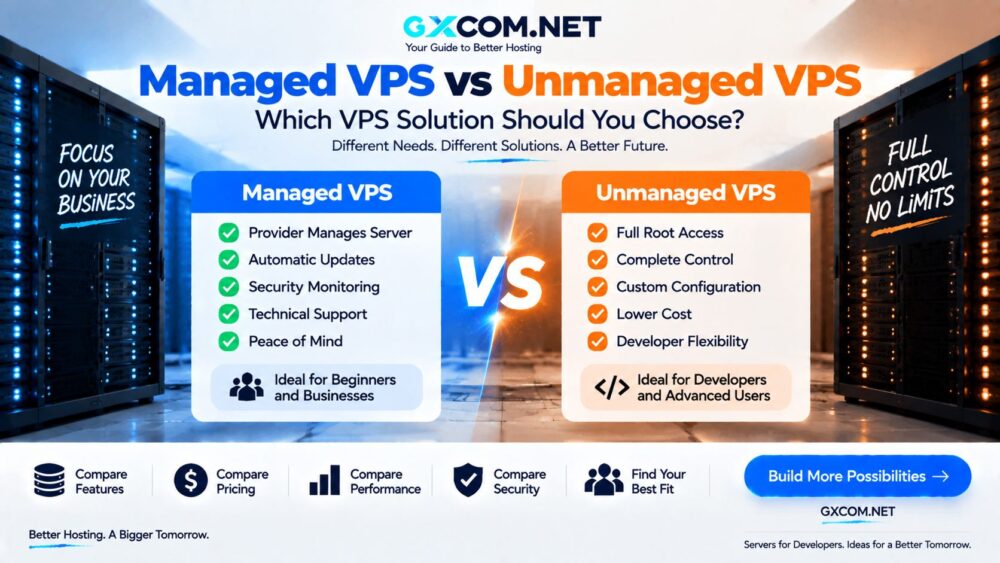
Unmanaged VPS vs Managed VPS
The main difference is not virtualization technology. It is who performs server administration.
| Feature | Unmanaged VPS | Managed VPS |
|---|---|---|
| Server Resources | Included | Included |
| Administrative Control | Usually high | Depends on provider |
| OS Updates | You | Often provider-assisted |
| Security Configuration | You | Often provider-assisted |
| Monitoring | You configure it | May be included |
| Troubleshooting | Primarily you | Provider assistance |
| Technical Skill Required | Higher | Lower |
| Price | Usually lower | Usually higher |
If you are deciding between the two, read our Managed vs Unmanaged VPS comparison for a deeper look at cost, control and management responsibilities.
Why Is Unmanaged VPS Hosting Cheaper?
Unmanaged VPS hosting is often inexpensive because you are primarily paying for infrastructure rather than ongoing server administration.
The provider does not necessarily need to spend support time configuring your applications, tuning your database or fixing problems inside your operating system.
This creates a simple pricing model:
UNMANAGED VPS
=
COMPUTE + RAM + STORAGE + NETWORK
Compared with:
MANAGED VPS
=
INFRASTRUCTURE + MANAGEMENT + SUPPORT + MONITORING
For technically experienced users, this can make unmanaged VPS hosting extremely cost-effective.
For beginners, however, the lower server bill can hide another cost: your time.
The Hidden Cost of Unmanaged VPS Hosting
Suppose an unmanaged VPS costs considerably less than a managed alternative.
The cheaper plan looks like the obvious winner until you account for administration.
Your real cost can become:
SERVER PRICE
+
SETUP TIME
+
MAINTENANCE TIME
+
TROUBLESHOOTING
+
TECHNICAL RISK
=
REAL UNMANAGED VPS COST
If you already have Linux administration skills, those responsibilities may be easy to handle.
If you have to learn everything while maintaining a revenue-generating website, the savings can disappear quickly.
Advantages of Unmanaged VPS Hosting
1. Lower Cost
You are not paying a large management premium, so more of your budget can go toward CPU, RAM and storage.

2. Full Server Control
Unmanaged VPS hosting normally gives experienced users extensive administrative control.
You can choose your preferred:
- Linux distribution
- Web server
- Database
- PHP configuration
- Firewall
- Caching software
- Monitoring stack
- Deployment tools
3. Custom Software
You are not restricted to the applications offered by a conventional shared hosting control panel.
This makes VPS hosting useful for developers, APIs, custom applications, development environments and specialized server workloads.
4. Better Price-to-Resource Value
Users who do not need management can often obtain substantially more computing resources for the same budget.
5. Learn Server Administration
An unmanaged VPS can also be a practical environment for learning Linux, networking, web servers, databases and deployment.
For learners, however, it is safer to experiment on a non-critical server rather than a production website.
Disadvantages of Unmanaged VPS Hosting
1. You Need Technical Knowledge
You should be comfortable working with Linux, SSH and command-line administration—or be prepared to learn.
2. Security Is Your Responsibility
An exposed server with weak passwords, outdated software or poor firewall rules can create serious security risks.
3. Troubleshooting Takes Time
When something fails at 2 AM, the provider may confirm that the VPS is online while leaving the application problem to you.
4. Backups May Not Be Included
You may need to design, configure and test your own backup strategy.
5. Configuration Errors Can Cause Downtime
Administrative access gives you power, but it also allows you to break the server.
A bad firewall rule, failed update or configuration error can take a production website offline.
How Secure Is an Unmanaged VPS?
An unmanaged VPS can be highly secure when properly configured and maintained.
But security is not automatic.
A new internet-facing server should be treated as a system that requires immediate hardening.
Important security tasks include:
- Installing system updates
- Using SSH keys
- Restricting privileged login
- Configuring a firewall
- Removing unnecessary services
- Applying security patches
- Monitoring authentication attempts
- Maintaining reliable backups
Our How to Secure a VPS guide covers 15 essential VPS security practices.
If SSH is your primary administration method, also follow our SSH Security Best Practices guide.
What Software Can You Run on an Unmanaged VPS?
One of the biggest advantages of VPS hosting is flexibility.
Depending on the provider's acceptable-use policy and available resources, a VPS can run:
- WordPress
- WooCommerce
- Nginx
- Apache
- MySQL or MariaDB
- PostgreSQL
- Redis
- Node.js applications
- Python applications
- Docker containers
- APIs
- Development environments
- Monitoring tools
This flexibility is one reason developers often prefer VPS infrastructure over conventional shared hosting.
Is Unmanaged VPS Good for WordPress?
Yes—if you know how to manage the server.
An unmanaged VPS can provide WordPress with:
- Custom PHP configuration
- Nginx or Apache tuning
- Redis object caching
- Database optimization
- Server-level page caching
- More predictable resources
But WordPress itself does not manage the underlying Linux server.
You remain responsible for operating system updates, security, monitoring and backups.
For a small website owner who simply wants to publish content, managed WordPress or shared hosting may be easier.
Is Unmanaged VPS Good for WooCommerce?
Technically, yes.
An unmanaged VPS gives an experienced administrator the ability to optimize the web stack specifically for a WooCommerce workload.
But ecommerce increases the consequences of configuration mistakes and downtime.
Before choosing unmanaged hosting for a production store, ask:
- Who monitors the server?
- Who responds if MySQL fails?
- Who handles security updates?
- Who verifies backups?
- Who restores service during an incident?
If the answer to every question is “me,” make sure you are comfortable with that responsibility.
How Much Traffic Can an Unmanaged VPS Handle?
Management level does not directly determine traffic capacity.
An unmanaged VPS can handle substantial traffic if it has suitable resources and is properly configured.
Capacity depends on:
- CPU performance
- RAM
- Storage performance
- Database efficiency
- Bandwidth
- Caching
- Concurrent requests
- Application efficiency
A well-optimized 4 vCPU / 8 GB VPS can outperform a poorly configured server with more resources.
Our How Much Traffic Can a VPS Handle? guide explains why monthly visitor count alone is a poor capacity metric.
SSD vs NVMe for an Unmanaged VPS
Many modern VPS providers now offer NVMe storage.
NVMe can provide lower latency and higher I/O performance than traditional SATA SSD storage, which can help database-heavy and storage-intensive workloads.
But the storage label does not tell you everything.
Real performance can also depend on:
- IOPS limits
- Disk I/O limits
- Host load
- Storage architecture
- Virtualization
See our NVMe VPS vs SSD VPS comparison before choosing a VPS based only on storage technology.
Do You Need a Control Panel?
No.
An unmanaged VPS can be administered entirely through SSH and configuration files.
This approach minimizes additional software and licensing costs.
However, some users prefer a control panel because it simplifies tasks such as:
- Creating websites
- Managing databases
- Creating email accounts
- Installing SSL certificates
- Managing DNS
Commercial control panels can add to the real cost of an inexpensive VPS, so include licensing when comparing plans.
Unmanaged VPS vs Shared Hosting
Shared hosting and unmanaged VPS hosting target very different users.
| Feature | Shared Hosting | Unmanaged VPS |
|---|---|---|
| Ease of Use | High | Lower |
| Server Administration | Provider | You |
| Server Control | Limited | High |
| Custom Software | Limited | Flexible |
| Technical Skill | Low | Higher |
| Best For | Regular website owners | Developers / experienced users |
Moving from shared hosting directly to unmanaged VPS can be a significant jump in responsibility.
Do not upgrade simply because VPS specifications look better.
Unmanaged VPS vs Cloud Hosting
An unmanaged VPS is usually a single virtual server with a defined resource allocation.
Cloud infrastructure can provide broader capabilities such as APIs, snapshots, private networking, load balancers, object storage and rapid instance deployment.
However, many cloud virtual machines are also effectively self-managed.
Choosing cloud infrastructure does not automatically remove server administration responsibilities.
The important questions are:
WHAT INFRASTRUCTURE DO YOU NEED?
and:
WHO WILL MANAGE IT?
Who Should Use Unmanaged VPS Hosting?
Unmanaged VPS hosting is particularly suitable for:
- Developers
- Linux administrators
- DevOps users
- Technical website owners
- Agencies with server expertise
- Students learning Linux administration
- Users running custom applications
- Users who want maximum control
- Users who want strong price-to-resource value
The ideal unmanaged VPS user is comfortable accepting responsibility for the server in exchange for lower cost and greater control.
Who Should NOT Use an Unmanaged VPS?
An unmanaged VPS may be a poor choice if:
- You have never used SSH
- You are uncomfortable with Linux administration
- You expect the provider to fix application problems
- You do not want to manage security updates
- You do not know how to configure backups
- Your website is business-critical and nobody can administer the server
- You simply want WordPress to work with minimal maintenance
In those situations, a managed VPS may justify its higher monthly price.
Unmanaged VPS Providers Worth Comparing
Once you understand the management responsibility, you can compare providers based on infrastructure rather than simply looking for the cheapest monthly price.
DigitalOcean and Vultr are relevant for developers who prefer flexible cloud-style virtual server environments.
Database Mart is another option worth comparing when evaluating VPS resources and server configurations.
Users shopping for low-cost VPS infrastructure may also encounter providers such as RackNerd and VPSDime.
Instead of comparing providers only by price, evaluate:
CPU QUALITY
↓
RAM
↓
STORAGE PERFORMANCE
↓
NETWORK
↓
BACKUPS
↓
SUPPORT BOUNDARY
↓
TOTAL COST
A $5 VPS is not good value if it cannot reliably run your workload.
How to Choose an Unmanaged VPS
Before purchasing, check these factors.
CPU
Look beyond vCPU count. CPU generation, clock performance and shared-resource policies can affect real performance.
RAM
Choose enough memory for the operating system, web server, database, applications and caching without paying for capacity you do not need.
Storage
Compare capacity, SSD vs NVMe technology and any published I/O or IOPS limits.
Bandwidth
Check monthly transfer, port speed and overage policies.
Datacenter Location
A location closer to your main audience can reduce network latency.
Backups
Determine whether backups or snapshots are included, optional or entirely your responsibility.
Support Scope
Read the provider's unmanaged support policy carefully.
Do not assume technical support will administer your operating system.
Unmanaged VPS Setup Checklist
After deploying a new server, a basic checklist may include:
- ✓ Update the operating system
- ✓ Create an administrative user
- ✓ Configure SSH keys
- ✓ Review root login policy
- ✓ Configure firewall rules
- ✓ Remove unnecessary services
- ✓ Install the required web stack
- ✓ Configure automatic security updates where appropriate
- ✓ Configure monitoring
- ✓ Create a backup strategy
- ✓ Test backup restoration
- ✓ Monitor CPU, RAM and disk usage
- ✓ Document important configurations
DEPLOYING THE VPS IS THE BEGINNING—NOT THE END.
Unmanaged VPS Hosting FAQ
What does unmanaged VPS mean?
It means the provider supplies the virtual server infrastructure while you are primarily responsible for administering the operating system, software, security, updates and applications inside the VPS.
Is unmanaged VPS cheaper than managed VPS?
Usually yes, because ongoing server administration is not included to the same extent. However, your own administration time should also be considered part of the real cost.
Do I get root access with an unmanaged VPS?
Linux unmanaged VPS services commonly provide administrative access, although exact access policies depend on the provider and platform.
Is unmanaged VPS safe?
It can be very secure when properly configured, patched and monitored. Security becomes your responsibility, so poor configuration or neglected updates can increase risk.
Can beginners use an unmanaged VPS?
Yes for learning and experimentation, but beginners should be cautious about using an unmanaged server for a business-critical production website until they understand server security, backups and recovery.
Can I install WordPress on an unmanaged VPS?
Yes. You can install WordPress and configure your own web server, PHP, database, caching and security stack.
Does unmanaged VPS include backups?
Not necessarily. Some providers sell snapshots or backup services separately, while others expect you to configure your own backup solution.
What happens if my unmanaged VPS breaks?
The provider generally handles infrastructure failures, but problems caused by your operating system, applications or configuration may be your responsibility. The exact support boundary varies by provider.
Final Verdict: Is Unmanaged VPS Hosting Right for You?
Unmanaged VPS hosting offers an excellent combination of control, flexibility and price-to-resource value for users who know how to administer a server.
But the low monthly price comes with responsibility.
You are not simply buying CPU and RAM.
You are accepting responsibility for the software environment running on those resources.
Choose unmanaged VPS when you want:
LOWER COST → MORE CONTROL → CUSTOM CONFIGURATION
Choose managed VPS when you want:
SERVER RESOURCES → MANAGEMENT → TECHNICAL SUPPORT
The decision ultimately comes down to one question:
WHO DO YOU WANT MANAGING THE SERVER?
If the answer is “I can manage it myself,” unmanaged VPS hosting can offer excellent value.
If the answer is “I want someone else responsible for the server,” paying for managed VPS hosting may be money well spent.