Unmanaged VPS security patching is essential for protecting Linux servers against known vulnerabilities, but careless updates can interrupt websites, databases, and business applications. Unlike managed hosting, an unmanaged VPS generally leaves operating system maintenance, patch testing, reboot scheduling, and recovery planning to the customer.
A reliable patching process combines vulnerability prioritization, verified backups, controlled deployment, and tested rollback procedures. Here is how to maintain security without introducing unnecessary downtime.
Who Is Responsible for Unmanaged VPS Updates?
VPS providers typically maintain the underlying virtualization infrastructure, while customers administer the guest operating system and installed software. Exact responsibilities depend on the service agreement.
Customers usually manage Linux packages, SSH access, web servers, databases, application dependencies, and security monitoring.
Review our Unmanaged Server Security Checklist for related hardening measures.
Prioritize Security Patches by Risk
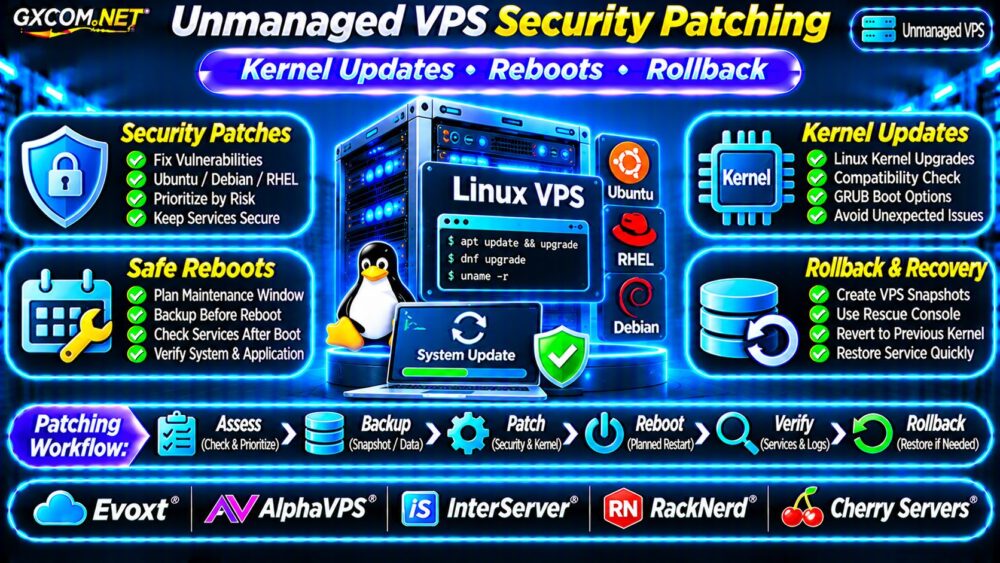
Not every update has identical urgency. Prioritize vulnerabilities based on exploitation evidence, internet exposure, affected services, and business impact.
Act promptly when an actively exploited vulnerability affects a publicly accessible service. Lower-risk updates can follow a scheduled maintenance cycle.
Consult vendor advisories, distribution security notices, and the CISA Known Exploited Vulnerabilities catalog. CVSS severity alone does not establish real-world exposure.
Update Ubuntu and Debian VPS Packages
For Ubuntu or Debian, refresh package information and inspect pending upgrades:
sudo apt update
apt list --upgradable
Apply approved package upgrades during a suitable maintenance window:
sudo apt upgradeReview package changes before confirming. Some upgrades may restart services, and certain dependency changes require additional administrator decisions.
Check distribution-specific security notices rather than assuming every available package update addresses a vulnerability.
Configure Unattended Security Updates
On supported Debian-based systems, unattended-upgrades can automate selected package updates.
sudo apt install unattended-upgrades
sudo dpkg-reconfigure unattended-upgrades
Inspect the configured package origins, automatic reboot settings, notification options, and update logs. Configuration paths and defaults vary by distribution.
For critical production systems, consider staged testing before automatically deploying changes that could affect application compatibility.
Patch RHEL-Compatible Linux VPS Systems
On supported RHEL-compatible distributions using DNF, inspect and apply updates:
sudo dnf check-update
sudo dnf upgrade
Automation may be available through dnf-automatic, depending on distribution version and repository configuration.

Verify enabled repositories, package signing, service restart behavior, and automatic update policies before deployment.
Avoid mixing incompatible third-party repositories or performing major distribution upgrades without a separate migration plan.
Linux Kernel Updates and Reboot Requirements
Installing a new kernel package does not normally mean the running kernel changes immediately. The new kernel typically becomes active after a reboot.
Check the currently running kernel:
uname -rOn Ubuntu systems with the relevant utility installed, inspect whether a reboot is requested:
test -f /var/run/reboot-required \
  && echo "Reboot requested"
This marker is distribution-specific and does not replace checking the running kernel against installed security updates.
Some environments support live kernel patching, but coverage, licensing, and operational limitations vary.
Plan VPS Reboots Without Surprises
Before rebooting, confirm recent backups, available disk space, application health, and console access.
Notify affected users and schedule maintenance during lower-traffic periods. For stateful applications, verify that databases have completed necessary checkpoints and shutdown procedures.
After rebooting, check the kernel version, failed services, application endpoints, and system logs.
uname -r
systemctl --failed
journalctl -b -p err
Do not assume that a successful SSH login means every business application has recovered.
Prepare a Kernel Rollback Strategy
Kernel upgrades can occasionally introduce driver incompatibilities, boot failures, or application regressions.
Where supported, retain a previously working kernel and understand how to select it through GRUB or the provider’s recovery console.
Rollback is not guaranteed: bootloader configurations, cloud images, encrypted disks, and virtualized storage can complicate recovery.
Snapshots vs Application Backups
A pre-update snapshot can provide a recovery point, but snapshot consistency and restoration behavior depend on the provider.
Maintain independent application and database backups. Verify that restoring an earlier server image will not unintentionally overwrite newer business data.
Our VPS Snapshot Backup and Recovery Guide explains these recovery considerations.
Automate Testing Before Production Deployment
Use a staging VPS or reproducible test environment to validate important updates. Test application startup, database connectivity, authentication, scheduled jobs, and monitoring.
Configuration-management tools can help standardize deployment and reduce manual mistakes.
However, automation should include approval controls, failure detection, and a documented recovery path rather than simply applying every available update.
Five Unmanaged VPS Providers to Compare
The following GXCOM.NET-approved affiliate providers are infrastructure candidates. Confirm recovery features and management responsibilities for the exact product selected.
Evoxt: Linux VPS Maintenance
Evoxt is worth evaluating for Linux deployments where predictable resources and straightforward maintenance matter. Verify snapshot options, available operating systems, and console recovery access.
AlphaVPS: Self-Managed Linux Hosting
AlphaVPS can be considered for administrators comfortable maintaining their own Linux environment. Compare storage, backup availability, reinstall procedures, and network policies.
InterServer: VPS Resource Planning
InterServer provides another comparison point for unmanaged VPS costs and resources. Check operating system support, recovery controls, and technical assistance boundaries.
RackNerd: Budget VPS Operations
RackNerd may appeal to cost-conscious administrators. Evaluate promotional contract terms alongside snapshots, backup arrangements, and recovery access.
Cherry Servers: Infrastructure Flexibility
Cherry Servers is relevant for teams comparing infrastructure configurations and operational control. Confirm the selected product’s virtualization, backup, and recovery capabilities.
For broader comparisons, consult our Best VPS Providers Guide.
Calculate the Real Cost of Patching
Consider a hypothetical unmanaged VPS costing $15 monthly, backup storage costing $5, and two hours of administration monthly valued at $30 per hour.

The resulting monthly operating estimate is $80, or $960 annually. This excludes emergency recovery, application licensing, and unexpected downtime.
Compare those expenses with managed hosting, while checking exactly which patching and recovery tasks are covered.
Our Managed vs Unmanaged VPS Comparison provides additional context.
Unmanaged VPS Patching Checklist
- Monitor security advisories and prioritize exposed vulnerabilities.
- Verify backups before applying significant updates.
- Test critical changes in staging when practical.
- Schedule kernel reboots and notify affected users.
- Confirm console access and rollback procedures.
- Validate application health after maintenance.
Frequently Asked Questions
Do All Linux Security Updates Require a Reboot?
No. Many userspace packages can be updated without rebooting, although affected services may need restarting. Kernel changes commonly require a reboot unless an appropriate live-patching mechanism applies.
Can a VPS Snapshot Replace Kernel Rollback?
Not always. Snapshot restoration may involve downtime, data consistency concerns, and provider-specific limitations.
Should Unmanaged VPS Updates Be Fully Automatic?
Automation can reduce exposure, but production systems still need compatibility testing, monitoring, and recovery procedures.
Final Verdict
Effective unmanaged VPS security patching requires more than installing updates. Prioritize vulnerabilities, validate backups, control reboot timing, and prepare for failed kernel upgrades.
Compare Evoxt, AlphaVPS, InterServer, RackNerd, and Cherry Servers using verified recovery features and realistic administration costs. Reliable patching depends on both sound operational practices and suitable VPS infrastructure.