When a business website goes offline, the real cost is rarely limited to server downtime. Failed transactions, interrupted customer inquiries, lost productivity, and damaged trust can quickly become more expensive than the hosting plan itself.
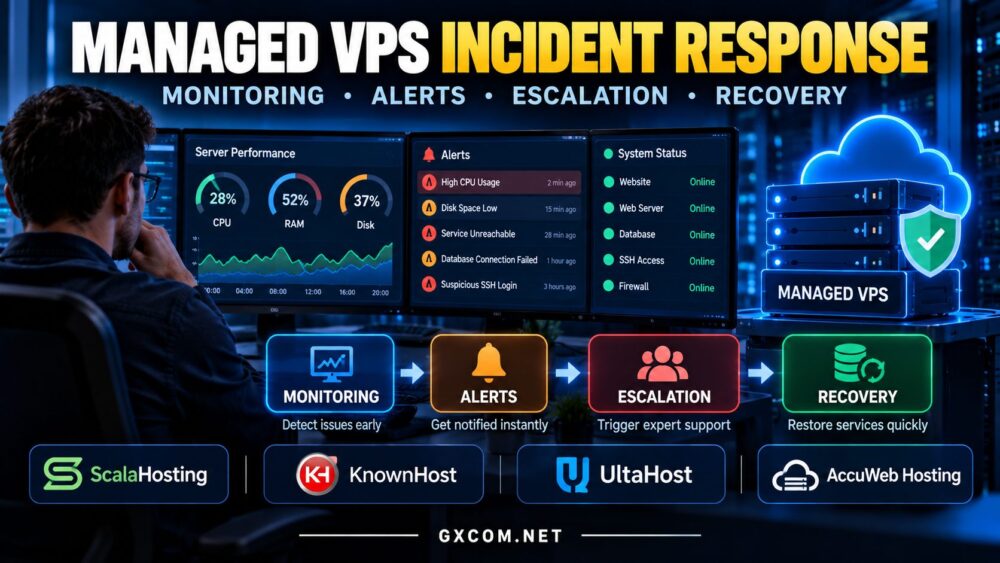
Effective managed VPS incident response is therefore about more than contacting technical support. It requires reliable monitoring, actionable alerts, clear escalation procedures, and a tested recovery process.
This guide explains how managed VPS incident response works, what hosting providers should handle, and how to evaluate support before choosing a service.
What Is Managed VPS Incident Response?
Incident response is the structured process used to detect, investigate, contain, resolve, and review server problems.
Common incidents include:
- Website or application downtime
- Unexpected CPU or memory exhaustion
- Storage failures and disk-space shortages
- Database connection errors
- Network interruptions
- Security alerts and suspicious activity
- Failed software updates
A managed VPS provider may assist with these issues, but the exact responsibilities depend on its management agreement.
For a broader comparison of responsibilities, read our managed vs unmanaged VPS guide.
1. Monitoring: Detect Problems Before Customers Report Them
Good incident response begins with visibility. Monitoring should identify abnormal behavior before a minor issue becomes a major outage.
Useful monitoring signals include CPU utilization, available RAM, disk usage, storage latency, network connectivity, application response time, and service availability.
However, infrastructure monitoring alone is insufficient. A running VPS can still host an unavailable website.
Application-level checks should therefore complement server metrics.
Infrastructure vs Application Monitoring
| Monitoring Layer | What It Detects |
|---|---|
| Infrastructure | CPU, RAM, storage, network problems |
| Operating System | Processes, services, system errors |
| Application | HTTP failures, slow pages, database errors |
| External Availability | Website reachability from outside the server |
Ask whether your managed VPS plan includes proactive monitoring or only assistance after you submit a ticket.
2. Monitoring Alerts: Reduce Noise and Improve Response
Not every monitoring event deserves an emergency response.
Repeated alerts about temporary CPU spikes can overwhelm administrators and distract them from serious incidents.
Effective alerting should distinguish between short-lived fluctuations and sustained failures.
For example, high CPU utilization during a scheduled backup may be expected. Persistent CPU saturation accompanied by failed requests deserves investigation.
Useful alert policies define thresholds, duration, severity, notification channels, and responsible contacts.
More alerts do not automatically produce better incident response.
3. Incident Severity and Escalation Procedures
Escalation determines who becomes responsible when an issue cannot be resolved immediately.
Businesses should define incident severity according to customer impact rather than technical symptoms alone.
| Severity | Example | Response Priority |
|---|---|---|
| Critical | Production website unavailable | Immediate escalation |
| High | Major functionality degraded | Urgent investigation |
| Medium | Noncritical service failure | Scheduled remediation |
| Low | Minor warning or maintenance issue | Routine handling |
These are illustrative priorities, not guaranteed provider response times.

Before purchasing, ask how critical tickets are classified, when senior engineers become involved, and whether customers receive progress updates.
4. Recovery: Restore Services Without Creating New Problems
Recovery should follow a documented sequence rather than a series of improvised changes.
Typical actions include identifying the affected service, checking recent deployments, examining system logs, isolating the failure, and restoring normal operation.
Restarting a service may temporarily restore availability, but it does not necessarily eliminate the underlying cause.
For recurring incidents, root-cause analysis matters as much as immediate recovery.
RTO vs RPO
Two recovery concepts are particularly important:
- Recovery Time Objective (RTO): The targeted maximum time to restore a service after disruption.
- Recovery Point Objective (RPO): The targeted maximum acceptable amount of data loss, expressed as time.
Backups should be tested regularly. A backup that cannot be restored is not a dependable recovery strategy.
5. Security Incidents Require a Different Response
Not every VPS incident is a performance problem. Suspicious logins, unexpected processes, modified files, or abnormal network activity may indicate compromise.
Security response can require isolating affected services, preserving relevant evidence, rotating credentials, and rebuilding systems from trusted sources.
A simple reboot may destroy useful diagnostic information without removing the underlying threat.
Clarify whether the hosting provider offers security investigation, malware remediation, or only infrastructure-level assistance.
6. Shared CPU and Storage Contention
Some performance incidents originate from resource contention rather than application defects.
Shared CPU scheduling, storage I/O limits, and neighboring workloads can contribute to inconsistent response times.
Monitoring should distinguish application demand from infrastructure constraints whenever possible.
Our VPS overselling and noisy-neighbor guide explains these performance risks in greater detail.
7. Managed VPS Providers Worth Comparing
Different hosting providers emphasize different combinations of managed support, infrastructure flexibility, and server administration.
ScalaHosting — Managed VPS for Business Websites
ScalaHosting is worth evaluating for businesses seeking managed VPS hosting and assistance with routine server operations.
Check which monitoring, backup, security, and incident-resolution services are included in the selected plan.
KnownHost — Managed Hosting Support
KnownHost is another candidate for customers who value managed hosting and technical assistance.
Confirm whether application troubleshooting, restoration tasks, and escalation procedures fall within the management scope.
UltaHost — Managed VPS Options
UltaHost offers hosting options that businesses can compare when looking for managed VPS services.
Evaluate operating-system support, backup provisions, server management, and the conditions governing technical assistance.
For broader provider context, see our UltaHost managed VPS review.
AccuWeb Hosting — Flexible VPS Requirements
AccuWeb Hosting is worth considering when comparing VPS operating systems and management options.
Check the exact service level, monitoring coverage, and restoration responsibilities for the plan you intend to purchase.
8. Questions to Ask Before Buying Managed VPS Hosting
Before purchasing, request clear answers to these questions:
- Is monitoring continuous and proactive?
- Are website and application checks included?
- How are critical incidents escalated?
- Is support available outside business hours?
- Who handles operating-system and security updates?
- Are backups included, and who performs restoration?
- Does support cover application-level problems?
- Are incident reports or root-cause findings available?
Do not assume that the word “managed” guarantees identical services across providers.
9. Managed VPS vs Self-Managed Incident Response
With unmanaged VPS hosting, customers usually configure monitoring, investigate alerts, maintain backups, and coordinate recovery themselves.
Managed hosting may reduce that workload, but it does not eliminate customer responsibilities.
Application code, business data, third-party integrations, and deployment procedures may remain outside the provider’s support scope.
For organizations without dedicated infrastructure staff, the value of management often lies in reduced operational burden rather than hardware specifications alone.

10. Incident Response and Total Hosting Cost
Comparing managed VPS plans only by monthly price overlooks the financial impact of outages and recovery work.
Consider support scope, backup costs, restoration assistance, monitoring coverage, and the time employees spend troubleshooting.
A less expensive plan can become costly if critical tasks require separate services or outside specialists.
For additional purchasing options, explore our affordable cloud VPS deals comparison.
Compare VPS Hosting Before Your Next Incident
Evaluate provider support, resource allocations, management responsibilities, and backup options before selecting your next VPS.
Managed VPS Incident Response FAQ
Does managed VPS hosting include 24/7 monitoring?
Not necessarily. Monitoring availability and scope depend on the provider and plan. Verify the service agreement before purchasing.
Will a managed VPS provider restore my website?
Some providers offer restoration assistance, but coverage may depend on backup availability, management terms, and the cause of the incident.
What is the difference between response time and recovery time?
Response time measures how quickly an incident receives attention. Recovery time measures how long it takes to restore the affected service.
Can managed VPS hosting prevent every outage?
No. Monitoring and professional support can improve detection and response, but they cannot eliminate infrastructure failures, software defects, or security risks.
Final Verdict: Incident Readiness Is Part of VPS Value
Effective managed VPS incident response combines monitoring, meaningful alerts, clear escalation, reliable backups, and tested recovery procedures.
When comparing ScalaHosting, KnownHost, UltaHost, and AccuWeb Hosting, focus on documented management responsibilities rather than marketing labels alone.
The right managed VPS service should match your operational requirements and help your team respond to problems with less uncertainty.