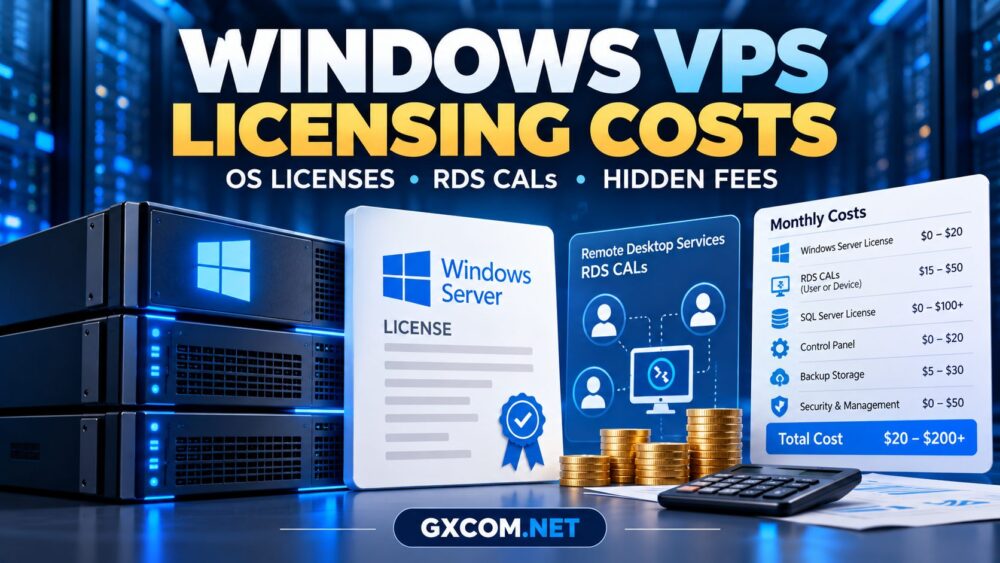
Windows VPS licensing costs can make an inexpensive server considerably more expensive than its advertised monthly rate. A hosting plan may include Windows Server, but that does not automatically cover Remote Desktop Services, SQL Server, or commercial applications.
Before purchasing, buyers should distinguish the operating system license from user access rights and optional software. This guide explains the major charges, common misunderstandings, and questions worth asking a provider.
Is a Windows Server License Included in VPS Hosting?
Many Windows VPS plans bundle operating system licensing into the recurring hosting charge. Others list a separate Windows surcharge or require customers to select an eligible licensing option.
Check three details before comparing offers:
- Which Windows Server edition and version are provided?
- Is the operating system license included throughout the subscription?
- Does the provider permit your intended workload and remote access model?
Microsoft offers different licensing arrangements for physical servers, virtual machines, and service providers. Consequently, a license used on one infrastructure platform is not necessarily transferable to another.
For broader hardware and hosting comparisons, see our guide to affordable Windows dedicated servers.
Windows Server Licensing vs RDS CALs
The most important distinction is between licensing the server operating system and licensing access to Remote Desktop Services.
| License or Service | What It Covers | Possible Additional Cost |
|---|---|---|
| Windows Server license | Operating system usage | Included or separately billed |
| Windows Server CAL | Qualifying user or device access | Depends on licensing arrangement |
| RDS CAL | Remote Desktop Services access | Often additional |
| RDS SAL | Eligible hosted-service subscriber access | Provider-dependent |
| SQL Server license | Commercial database software | Potentially substantial |
Microsoft documents separate licensing requirements for Windows Server and Remote Desktop Services. The precise obligations depend on how users access the system and how the hosting environment is licensed.
Review the official Windows Server licensing guidance when evaluating complex deployments.
Do You Need RDS CALs for Remote Desktop?
Not every Remote Desktop connection has the same licensing purpose.
Administrative Remote Access
Windows Server permits limited remote administrative access under specific licensing conditions. This is intended for managing the server, not providing ordinary hosted desktops to employees or customers.
The availability of administrative connections should never be interpreted as permission to operate an unlimited multiuser desktop service.

Multiple Users Running Applications
When employees or customers use Remote Desktop Services to access hosted desktops or applications, additional access licensing generally applies.
RDS CALs can be licensed per user or per device in applicable customer deployments. Hosted services may instead use subscriber-based licensing under the provider’s Microsoft agreement.
Microsoft explains these requirements in its Remote Desktop Services CAL documentation.
Ask the host whether the advertised Windows VPS supports your intended number of users and whether the necessary licenses are included.
What Is SPLA and Why Does It Matter?
The Microsoft Services Provider License Agreement, or SPLA, enables eligible providers to license Microsoft software for hosted customer services under defined terms.
For buyers, the important question is not whether a provider displays an SPLA badge. It is whether the offered service includes legitimate licensing rights for the intended workload.
Request written clarification about Windows Server licensing, hosted desktop users, and any monthly subscriber charges. Avoid assuming that bringing an existing retail license automatically satisfies hosted-service requirements.
Hidden Windows VPS Costs to Check
Operating system licensing is only one component of the total bill.
- RDS access: Additional user or device licensing for qualifying remote desktop workloads.
- Control panels: Commercial management software and recurring subscriptions.
- SQL Server: Database licensing where free editions are unsuitable.
- Backups: Snapshot retention, offsite storage, and restoration services.
- Security: Endpoint protection, monitoring, and managed firewall options.
- Administration: Migration, maintenance, troubleshooting, and technical support.
- Renewals: Promotional discounts that may not continue after the initial term.
Storage upgrades, additional IP addresses, and data transfer overages may also affect the final invoice.
Windows VPS Licensing Cost Example
Consider a hypothetical small business comparing two configurations. These figures illustrate budgeting only; they are not provider quotations.
| Monthly Cost Component | Basic Server | Business Desktop Deployment |
|---|---|---|
| VPS and Windows OS | $25 | $25 |
| Additional remote access licensing | $0 | $40 |
| Backup service | $5 | $10 |
| Management and monitoring | $0 | $20 |
| Illustrative monthly total | $30 | $95 |
The second deployment costs more because its requirements differ, not because the underlying virtual machine is necessarily faster.
Actual licensing charges depend on contractual terms, user counts, software versions, and deployment rights. Obtain an itemized quotation before committing.
Windows VPS Providers Worth Comparing
Several infrastructure companies merit consideration, although licensing availability and product configurations must be verified individually.
AccuWeb Hosting
AccuWeb Hosting is a relevant option for buyers comparing Windows-oriented virtual hosting and administrative requirements. Confirm the Windows edition, remote access terms, and backup inclusions.
InterServer
InterServer is worth evaluating when comparing infrastructure costs and configuration flexibility. Request confirmation of the operating system license and any software-related surcharges.
VPSHostingService
VPSHostingService may appeal to budget-conscious Windows VPS buyers. Check renewal pricing, licensed operating system availability, and the permitted remote desktop usage.
Database Mart
Database Mart is another candidate for Windows-oriented workloads. Evaluate storage resources, billing commitments, licensing conditions, and the total cost of required applications.
For broader price comparisons, review our cheap VPS provider comparison, while remembering that Linux and Windows plans may have different licensing costs.
Windows VPS vs Dedicated Server Licensing
A dedicated physical server may offer greater hardware control, but its Windows licensing arrangements can differ from those of a hosted virtual machine.
Dedicated deployments can involve processor or core licensing considerations, virtualization rights, and separate access requirements. VPS buyers should not assume that the same license terms apply when moving to bare metal.
Our Windows dedicated server cost and licensing guide explores that distinction.

Pre-Purchase Licensing Checklist
Before ordering, ask the provider:
- Is Windows Server licensing included in the advertised rate?
- Which operating system version and edition are supplied?
- Are administrative RDP sessions permitted?
- What licensing applies to multiple desktop users?
- Are RDS CALs or hosted-service SALs required?
- Can commercial database applications be licensed separately?
- What changes at renewal or when adding users?
- Can the provider document the licensing arrangement?
For budget-oriented purchasing research, also compare our VPS promotional offers and buying considerations.
Frequently Asked Questions
Does Windows VPS hosting include a Windows license?
Some plans include the operating system license; others charge separately. Confirm the exact edition and billing terms.
Are RDS CALs included with Windows Server?
Not automatically. Remote Desktop Services access can require additional licensing beyond the operating system.
Can I use one Windows VPS for multiple remote workers?
Potentially, but the deployment must support the workload technically and meet the applicable remote access licensing requirements.
Is Windows VPS more expensive than Linux VPS?
It can be, particularly when Windows licensing or commercial applications introduce additional charges. Compare complete configurations rather than base prices.
Final Verdict
Windows VPS licensing costs depend on more than the virtual machine’s advertised price. Operating system rights, remote desktop access, application licensing, backups, and management can all affect the total.
Compare itemized quotes from suitable providers and verify Microsoft licensing requirements before deploying business users. The best-value plan is the one that meets your technical and licensing needs without unexpected recurring charges.