VPS CPU steal time is an important performance metric when a virtual private server feels slow despite having available CPU resources. Applications may respond inconsistently, database queries may take longer, and website latency may increase without an obvious spike in ordinary CPU usage.
One possible explanation is virtualization contention. When a physical server hosts multiple virtual machines, its hypervisor must schedule their virtual CPUs onto available physical processors. If your VPS needs CPU time but cannot receive it promptly, Linux may report that delay as steal time.
This guide explains how to measure CPU steal time, investigate noisy neighbors, and decide whether optimization, provider intervention, or a hosting upgrade makes sense.
What Is VPS CPU Steal Time?
CPU steal time represents time when a virtual CPU needed to execute work but the hypervisor did not schedule it onto a physical CPU.
Linux commonly displays this metric as %st in top or st in vmstat. Higher values can indicate that the virtual machine is competing for physical CPU resources.
For example, a VPS might have four virtual CPUs, but those vCPUs still depend on the physical host’s scheduling decisions. Four advertised vCPUs do not necessarily mean four exclusively reserved physical cores.
Importantly, steal time is not the same as ordinary application CPU utilization. Your software can be ready to run while the virtual CPU waits for the hypervisor.
What Causes High CPU Steal Time?
Noisy Neighbors on Shared Hardware
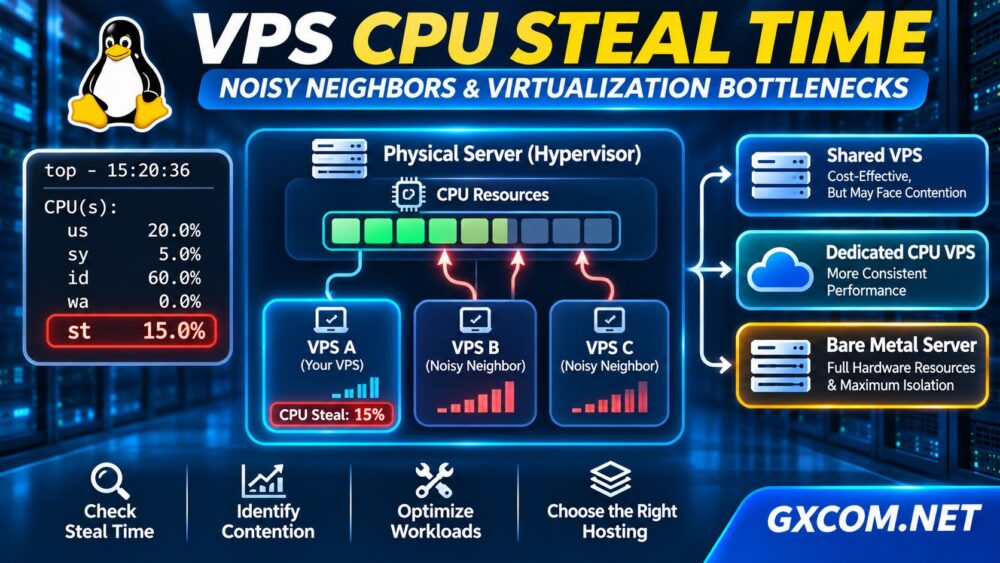
A noisy neighbor is another virtual machine whose workload contributes to resource contention on a shared physical host. Heavy processing activity from neighboring guests may reduce scheduling opportunities for your VPS.
However, high steal time does not identify a specific neighboring customer. The provider must inspect host-level scheduling and resource allocation to confirm the cause.
Oversubscribed Physical CPUs
Virtualization platforms may allocate more virtual CPUs than available physical processing capacity. This can be efficient when workloads are intermittent, but simultaneous demand may create contention.
CPU Quotas and Scheduling Policies
Hypervisor scheduling policies, CPU quotas, and resource priorities can also affect access to physical CPU time. A larger VPS plan does not automatically eliminate these constraints.
How to Check CPU Steal Time on Linux
Start with standard Linux monitoring tools. Measurements are most useful when collected during periods of actual application slowdown.
Method 1: Check Steal Time with top
topLook for the CPU summary and its st value. A simplified example might show:
%Cpu(s): 20.0 us, 5.0 sy, 60.0 id, 0.0 wa, 15.0 stHere, 15% steal time suggests meaningful hypervisor scheduling delay during the measurement interval. This is an illustrative example, not a universal failure threshold.

Method 2: Monitor with vmstat
vmstat 1 10This command samples system activity every second. Inspect the st column alongside CPU utilization, runnable processes, swapping, and I/O wait.
The first data row may reflect averages since boot, so focus on subsequent interval samples when investigating current behavior.
Method 3: Examine Historical CPU Data
sar -u 1 10If the sysstat package is installed, sar can display CPU activity, including steal time where supported. Historical collection must already be configured to investigate earlier incidents.
How Much CPU Steal Time Is Too Much?
There is no universally reliable percentage that applies to every VPS workload. Brief nonzero readings may have little practical impact, while sustained steal time can be serious for latency-sensitive applications.
Use the following diagnostic framework rather than treating it as an industry benchmark:
| Observation | Recommended Response |
|---|---|
| Occasional low readings | Monitor alongside application latency |
| Repeated spikes during slowdowns | Collect timestamps and supporting metrics |
| Sustained elevated steal time | Request provider investigation |
| Persistent contention after remediation | Evaluate migration or resource isolation |
Compare steal time with response times, CPU load, database performance, and user-facing errors. Correlation provides stronger evidence than an isolated percentage.
CPU Steal Time vs CPU Usage vs I/O Wait
These metrics describe different limitations:
- CPU usage: Processing performed by applications and the operating system.
- CPU steal: Scheduling time unavailable to a virtual CPU that needed to run.
- I/O wait: CPU idle time associated with outstanding I/O operations, subject to Linux accounting limitations.
If application CPU utilization is consistently high but steal time is low, your workload may simply need more processing capacity or optimization.
If steal time rises during slowdowns, investigate host-level contention. If I/O latency dominates, examine storage instead.
Our NVMe VPS vs SSD Performance guide explains why storage performance can be a separate bottleneck.
How to Fix High CPU Steal Time
1. Confirm the Problem
Capture repeated measurements during busy and quiet periods. Record application latency, steal time, CPU utilization, memory pressure, and relevant logs.
2. Contact Your VPS Provider
Share timestamps and monitoring results. Ask whether the physical host is experiencing CPU contention and whether migration, scheduling adjustments, or another host-level remedy is available.
3. Optimize Your Application
Reduce unnecessary background jobs, expensive queries, and inefficient processes. Optimization lowers CPU demand but cannot directly change how the provider schedules physical CPUs.
4. Consider Migration
If contention persists, moving to another host or provider may improve consistency. Test performance after migration rather than assuming the problem has disappeared.
For broader purchasing criteria, read our Best VPS Providers comparison.
Shared vCPU vs Dedicated CPU vs Bare Metal
Different infrastructure models offer different levels of control and resource isolation.
Shared-vCPU VPS: Often suitable for general websites and development workloads, but physical CPU scheduling remains shared.
Dedicated-CPU or reserved-capacity plans: May provide stronger CPU allocation guarantees, depending on the provider’s actual policies. Verify what “dedicated” means contractually.
Bare metal: Provides direct access to a physical server without sharing its host CPUs with unrelated virtual machines. Applications can still encounter their own scheduling or resource bottlenecks.
Our Dedicated Server vs VPS guide examines these infrastructure tradeoffs in greater detail.
Which Hosting Providers Should You Compare?
Once monitoring confirms an infrastructure limitation, compare providers based on CPU allocation, workload requirements, technical support, and migration options.

Kamatera offers configurable cloud servers worth evaluating when resource flexibility is important. Evoxt provides VPS and cloud VM options for buyers comparing virtual server configurations.
Explore Evoxt VPS options if you want to compare available configurations.
KnownHost and Hostwinds are additional VPS providers to consider when reviewing management needs, support, and plan specifications.
For sustained workloads that justify dedicated physical hardware, Cherry Servers offers bare-metal options. Dedicated infrastructure can reduce shared-host contention, although performance still depends on hardware selection and application design.
Compare these choices with our Bare Metal Server Comparison before committing to a more expensive deployment.
Frequently Asked Questions
Does High CPU Steal Time Mean My VPS Is Oversold?
Not necessarily. It indicates scheduling delay, but identifying oversubscription or another host-level cause requires additional evidence from the provider.
Can Adding More vCPUs Fix Steal Time?
Sometimes, but not reliably. Additional vCPUs may help genuine workload saturation while doing little for physical-host contention.
Does a Dedicated Server Have CPU Steal Time?
A conventional bare-metal operating system does not experience guest-hypervisor steal time in the same way as a virtual machine. CPU contention within its own applications can still occur.
Final Verdict
VPS CPU steal time is a useful clue when virtual server performance becomes inconsistent. Measure it during real slowdowns, distinguish it from CPU and storage bottlenecks, and ask your provider to investigate persistent contention.
If the problem cannot be resolved, compare VPS, cloud, and bare-metal infrastructure based on verified CPU allocation policies and measured workload needs—not advertised vCPU counts alone.