Two VPS plans may advertise identical CPU cores, RAM, and NVMe storage yet behave very differently when you install Docker, change kernel settings, or deploy specialized software. The virtualization technology behind the plan can determine what you are actually allowed to run.
This KVM VPS vs OpenVZ VPS comparison explains kernel control, resource isolation, operating system compatibility, performance, and hosting costs. It also highlights the questions buyers should ask before choosing a low-cost Linux VPS.
KVM VPS vs OpenVZ VPS: Quick Verdict
Choose KVM VPS when you need an independent guest operating system, custom kernel configuration, broader software compatibility, or a predictable environment for Docker and development tools.
Consider OpenVZ VPS when a provider offers a well-managed container environment and your application needs only supported Linux features without independent kernel control.
Neither technology guarantees faster performance. Actual results depend on CPU allocation, storage quality, host contention, and provider management.
What Is KVM VPS Hosting?
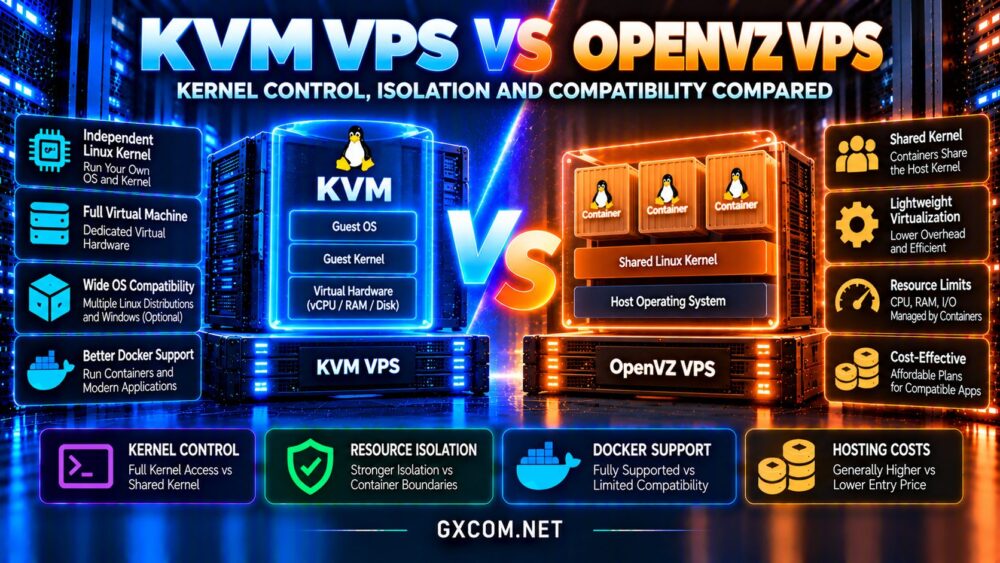
Kernel-based Virtual Machine, or KVM, is a virtualization technology built into Linux. It uses hardware virtualization capabilities to run separate virtual machines, each with its own guest operating system and kernel.
A KVM VPS generally behaves like an independent server. Administrators can install supported Linux distributions, configure kernel settings, and manage system services within the virtual machine.
Depending on the provider and available images, KVM infrastructure can also support Windows guests. However, Windows availability and licensing must be verified separately.
For buyers evaluating infrastructure fundamentals, our VPS vs shared hosting comparison explains how VPS resources differ from conventional website hosting.
What Is OpenVZ VPS Hosting?
OpenVZ is associated with operating-system-level virtualization, where isolated containers share the host’s Linux kernel instead of running separate guest kernels.
This architecture can reduce some virtualization overhead because containers do not require a complete independent virtual machine environment.
However, the shared kernel also creates restrictions. Container administrators cannot assume they can replace the host kernel, load arbitrary kernel modules, or enable every low-level operating system feature.
OpenVZ has evolved through different generations, and related Virtuozzo platforms may provide additional capabilities. Always confirm the specific virtualization implementation rather than assuming every OpenVZ-branded plan behaves identically.
Kernel Control: The Biggest Architectural Difference
Kernel independence is a major reason developers choose KVM.
Inside a KVM guest, administrators can typically update the guest kernel, adjust supported kernel parameters, and install software requiring compatible kernel functionality.
Some operations remain subject to provider policies and virtual hardware limitations, but the guest kernel is separate from the host kernel.
Why OpenVZ Kernel Restrictions Matter
In a traditional OpenVZ container, the operating system shares the host kernel. Kernel upgrades and module availability are controlled by the infrastructure administrator.
This may be acceptable for ordinary web applications but restrictive for specialized networking, filesystem tools, security software, or experimental development environments.
Before purchasing, check whether your application requires particular kernel modules, namespaces, or networking features.

Resource Isolation: KVM vs OpenVZ
KVM virtual machines receive virtual hardware resources managed by a hypervisor. Memory, virtual CPUs, and storage are presented to the guest operating system according to the provider’s configuration.
OpenVZ containers use operating-system-level controls to manage CPU time, memory, processes, and other resources.
Both approaches can enforce limits, and both can experience contention when providers oversubscribe physical hardware.
A plan advertising four vCPUs does not necessarily provide four dedicated physical CPU cores. Ask whether CPU resources are shared, dedicated, or subject to fair-use restrictions.
Our best VPS providers guide covers additional infrastructure purchasing criteria.
Security Isolation: Is KVM More Secure?
KVM separates guest operating systems through virtual machine boundaries, including independent guest kernels. This can reduce direct dependence on the host kernel interface exposed to applications.
OpenVZ containers share a kernel, making container isolation and host patching particularly important.
However, neither architecture is automatically secure. Hypervisor vulnerabilities, container escapes, outdated software, weak credentials, and insecure network configurations can create risks.
Providers must maintain their infrastructure, while customers remain responsible for securing applications and accounts according to their service agreement.
For sensitive workloads, review isolation architecture, patch management, backups, access controls, and the provider’s incident response practices.
Docker Compatibility and Nested Containers
Docker is a common reason buyers prefer KVM VPS hosting.
Because a KVM guest runs its own Linux kernel, administrators generally have more control over the namespaces, cgroups, networking, and filesystem features required by container software.
Docker can still require supported kernel versions, sufficient memory, and appropriate privileges. Nested virtualization is a separate capability and should not be assumed to be available.
Running Docker inside an OpenVZ-style container may be possible on certain modern platforms, but compatibility depends on kernel features and permissions granted by the host.
Never assume that Docker support is guaranteed merely because a provider advertises Linux VPS hosting. Ask whether the exact container runtime and networking configuration are supported.
Operating System Compatibility
KVM supports independent guest operating systems, making it suitable for users who need specific Linux kernels or distributions.
It also provides a clearer path for software requiring a full virtual machine rather than a shared-kernel container.
OpenVZ containers generally depend on the host’s Linux kernel. Available operating system templates and supported userspace distributions vary by platform.
Before ordering, verify the required distribution version, systemd support, kernel capabilities, and available recovery tools.
Performance: CPU, RAM and NVMe Storage
Container-based virtualization can avoid certain overhead associated with full virtual machines. However, modern KVM implementations are efficient, and the practical difference may be small for ordinary websites.
Storage latency, CPU generation, memory pressure, and neighboring workloads can have a greater impact on application responsiveness.
For WordPress or databases, benchmark uncached requests, database transactions, disk latency, and performance under concurrent traffic.
A cheap VPS with fast advertised NVMe storage can still perform poorly if shared CPU resources are heavily contested.
See our NVMe VPS performance guide for additional storage evaluation criteria.
Which Virtualization Works Better for WordPress?
Both KVM and appropriately configured OpenVZ containers can host WordPress websites.
For a simple website with predictable traffic, PHP, MySQL-compatible databases, caching, and adequate resources matter more than the virtualization label.
KVM becomes more attractive when the website owner needs custom server software, advanced security configuration, or greater operating system flexibility.
For growing WooCommerce stores or applications with unpredictable traffic, evaluate resource guarantees and upgrade options before choosing either technology.
Hosting Costs and Long-Term Value
OpenVZ-style container hosting may offer infrastructure efficiency, but lower technical overhead does not guarantee a lower retail price.
KVM hosting can also be affordable, especially when providers offer standardized Linux templates and shared CPU plans.
Compare the complete monthly cost, including storage, bandwidth, backups, IPv4 addresses, support, and renewal pricing.
For current buying considerations, review our cheap VPS providers comparison.
VPS Hosting Providers Worth Comparing
AlphaVPS: Budget Linux VPS Options
AlphaVPS is relevant for buyers evaluating affordable Linux virtual servers. Confirm the virtualization technology, CPU policy, storage allocation, and supported operating system images for each plan.

RackNerd: Entry-Level VPS Hosting
RackNerd is another option for cost-conscious customers comparing VPS configurations. Review the exact product specifications, virtualization platform, backup availability, and resource restrictions before purchasing.
Hostwinds: Managed and Unmanaged VPS
Hostwinds offers VPS hosting choices worth considering when support responsibilities and operating system management influence the buying decision.
Check the current virtualization architecture, available distributions, and differences between managed and unmanaged services.
Kamatera: Configurable Cloud Servers
Kamatera is relevant for organizations seeking configurable cloud infrastructure. Compare virtual machine resources, deployment regions, storage options, and management requirements against conventional VPS plans.
These providers should be compared using their current offerings rather than assuming every product uses the same virtualization technology.
Frequently Asked Questions
Is KVM VPS better than OpenVZ?
KVM generally offers greater kernel independence and operating system flexibility. OpenVZ containers may suit supported Linux applications with simpler requirements.
Can OpenVZ VPS run Docker?
Some environments may support Docker, but functionality depends on the platform generation, host kernel, and granted permissions.
Does KVM guarantee dedicated CPU cores?
No. KVM describes virtualization technology, not whether the provider allocates dedicated physical CPU resources.
Can I install Windows on OpenVZ?
Traditional shared-Linux-kernel containers cannot run an independent Windows kernel. A suitable virtual machine platform is required.
Final Verdict: KVM VPS or OpenVZ VPS?
The KVM VPS vs OpenVZ VPS decision should start with kernel requirements, application compatibility, and the level of infrastructure control you need.
Choose KVM for independent guest kernels, flexible operating system management, and workloads requiring broader virtualization capabilities.
Consider OpenVZ-style containers when your Linux applications are supported and the provider clearly documents available features and resource limits.
Compare AlphaVPS, RackNerd, Hostwinds, and Kamatera using verified specifications, performance testing, backup policies, and total costs before committing to a plan.