A website can look fast and still deliver a poor user experience.
Pages may take too long to display their main content, respond slowly when visitors click or tap, or unexpectedly move elements while users are trying to read or interact with them.
Google's Core Web Vitals are designed to measure these important aspects of real-world page experience.
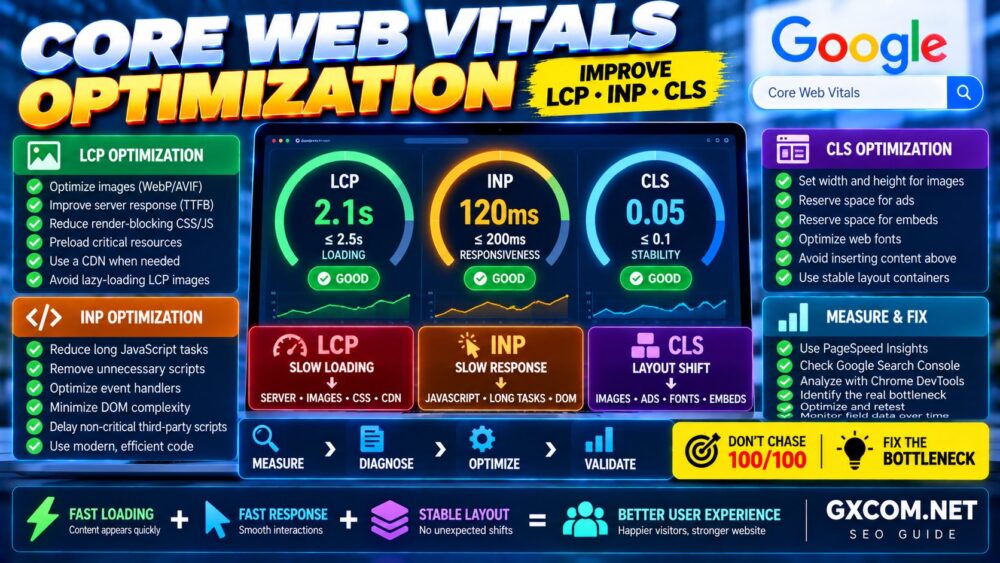
The three current Core Web Vitals are:
- LCP (Largest Contentful Paint) — loading performance
- INP (Interaction to Next Paint) — responsiveness
- CLS (Cumulative Layout Shift) — visual stability
This guide explains practical Core Web Vitals optimization techniques for diagnosing and improving LCP, INP and CLS without blindly installing optimization plugins or upgrading your server.
Performance Strategy: Measure → Identify the Metric → Find the Bottleneck → Optimize → Validate With Real Users.
What Are Core Web Vitals?
Core Web Vitals are performance metrics designed to evaluate important parts of the user experience on a webpage.
| Metric | Measures | Good |
|---|---|---|
| LCP | Loading performance | 2.5 seconds or less |
| INP | Interaction responsiveness | 200 milliseconds or less |
| CLS | Visual stability | 0.1 or less |
Google evaluates Core Web Vitals using the 75th percentile of page loads, segmented across mobile and desktop experiences.
That means passing Core Web Vitals is not about producing one perfect laboratory test.
The goal is to provide consistently good experiences to real visitors.
LCP vs INP vs CLS: What Is the Difference?
The easiest way to understand the three metrics is:
LCP: How quickly does the main content appear?
INP: How quickly does the page visually respond when the visitor interacts?
CLS: Does the page unexpectedly move while the visitor is using it?
A page can perform well in one metric and poorly in another.
For example:
- Fast server + huge hero image → Poor LCP
- Fast loading + heavy JavaScript → Poor INP
- Fast loading + advertisements without reserved space → Poor CLS
This is why Core Web Vitals should be optimized individually.
Metric → Root Cause → Targeted Fix.
How to Test Core Web Vitals
Before changing your website, establish a baseline.
Useful tools include:
- Google PageSpeed Insights
- Google Search Console
- Chrome DevTools
- Lighthouse
- Chrome User Experience Report data
Do not rely on only one test.
Performance can vary according to:
- Device
- Network connection
- Geographic location
- Server load
- Cache status
- Browser
- Third-party scripts
Field Data vs Lab Data
Understanding the difference between field and laboratory data is essential when optimizing Core Web Vitals.
Field Data
Field data comes from real users under real devices and network conditions.
It reflects what actual visitors experience and is the more relevant source when evaluating whether a URL or group of URLs passes Core Web Vitals in the real world.
Lab Data
Lab data is generated under controlled testing conditions.
It is extremely useful for diagnosing performance problems because tests can be repeated while changing specific components.
The correct workflow is:
Field Data → Find the Problem → Lab Testing → Fix → Monitor Field Data.
Do not panic when one Lighthouse run changes from 92 to 87.
Look for consistent patterns and real bottlenecks.
How to Improve LCP
Largest Contentful Paint measures how long it takes for the largest visible content element in the viewport to render.
The LCP element is often:
- A hero image
- A featured image
- A large heading
- A background image
- A large text block
- A video poster image
A good LCP is generally 2.5 seconds or less.
1. Identify the LCP Element
Do not optimize random images before identifying which element is actually being measured as LCP.
Use PageSpeed Insights or Chrome DevTools to determine the LCP element.
Once identified, investigate why it is late.
The delay may involve:
- Server response
- Resource discovery
- Image download
- CSS
- JavaScript
- Fonts
- Rendering
Find the LCP Element Before Optimizing LCP.
2. Improve Server Response Time
The browser cannot display important content until the server begins delivering the page.
A slow initial response can therefore delay everything that follows.
Potential server-side causes include:
- Slow hosting
- Slow PHP execution
- Database queries
- CPU saturation
- Insufficient application capacity
- Slow external API calls
- Missing caching
For WordPress, full-page caching can dramatically reduce processing for anonymous visitors.
However, do not assume that every LCP problem requires new hosting.
Slow TTFB → Investigate Server.
Fast TTFB + Slow LCP → Investigate Frontend.
If WordPress itself is responding slowly, see our slow WordPress troubleshooting guide.
3. Optimize the LCP Image
Large hero and featured images are common LCP elements.
Optimize them by:
- Using appropriate dimensions
- Compressing the image
- Using efficient formats such as WebP or AVIF where appropriate
- Serving responsive image sizes
- Avoiding unnecessarily huge source files
A 3000-pixel image displayed at 800 pixels may transfer much more data than necessary.
4. Do Not Lazy-Load the LCP Image
Lazy loading is useful for images farther down a page, but applying it to the main above-the-fold LCP image can delay its discovery and loading.
Prioritize important above-the-fold resources while lazy-loading non-critical content below the fold.
Below-the-Fold Image → Lazy Load.
Critical LCP Image → Load Early.
5. Preload Critical Resources Carefully
Preloading can tell the browser that a resource should be fetched with higher priority.
This can be useful for selected critical resources such as an important hero image or font.
But preloading too many files can create competition for bandwidth.
Use preload selectively rather than treating it as a universal speed optimization.
6. Reduce Render-Blocking Resources
CSS and JavaScript can delay the browser from rendering important content.
Potential improvements include:
- Reducing unused CSS
- Inlining limited critical CSS where appropriate
- Deferring non-critical JavaScript
- Removing unnecessary libraries
- Loading assets only where required
Test carefully after making changes because aggressive CSS or JavaScript optimization can break page functionality.
7. Use a CDN When Geography Matters
A Content Delivery Network can reduce network latency by serving cached resources from locations closer to visitors.
A CDN can be particularly useful when your audience is geographically distributed.
Depending on configuration, a CDN may deliver:
- Images
- CSS
- JavaScript
- Fonts
- Cached HTML
But remember:
CDN ≠ Fix for Slow Application Code.
If PHP or database processing at the origin is slow, investigate that bottleneck too.
How to Improve INP
Interaction to Next Paint measures the responsiveness of a page to user interactions during a visit.
Examples include:
- Clicking a menu
- Opening a dropdown
- Adding a product to a cart
- Clicking a button
- Using an interactive filter
A good INP is generally 200 milliseconds or less.
Poor INP often involves excessive work on the browser's main thread.
8. Reduce Long JavaScript Tasks
If JavaScript occupies the main thread for too long, the browser cannot respond quickly to user input.
Common causes include:
- Large JavaScript bundles
- Page builders
- Complex frontend frameworks
- Analytics
- Advertising
- Chat widgets
- Social widgets
- Popups
Use browser performance tools to identify long tasks instead of guessing which script is responsible.
9. Remove Unnecessary JavaScript
The fastest JavaScript is often the JavaScript you do not need to execute.
Audit scripts loaded by:
- Plugins
- Themes
- Analytics tools
- Advertising platforms
- Marketing tools
- Social media widgets
If a script provides little business or user value, consider removing it.
Every Script Should Justify Its Performance Cost.
10. Break Up Long Tasks
Large JavaScript tasks can block interaction for extended periods.
Breaking long work into smaller tasks can give the browser opportunities to respond to user input between operations.
This is especially important for complex interactive applications.
11. Avoid Excessive DOM Complexity
Very large and deeply nested DOM structures can increase browser processing work.
This can happen with:
- Complex page builders
- Large mega menus
- Repeated layout containers
- Hidden page elements
- Large product grids
Keep markup as simple as practical for the design and functionality required.
12. Optimize Event Handlers
User interactions can trigger expensive JavaScript operations.
For example, one button click might trigger:
- DOM updates
- Layout calculations
- API calls
- Analytics events
- Multiple plugin functions
Investigate slow interaction handlers and reduce unnecessary synchronous work.
13. Delay Non-Critical Third-Party Scripts
Third-party scripts can consume significant main-thread time.
Examples include:
- Advertising
- Analytics
- Heatmaps
- Chat
- Social embeds
- Marketing pixels
Where appropriate, load non-essential functionality later or after interaction.
Do not delay scripts blindly if they are required for essential functionality, consent, analytics accuracy, or business operations.
How to Improve CLS
Cumulative Layout Shift measures unexpected visual movement while users are viewing a page.
A good CLS score is generally 0.1 or less.
Imagine trying to click a button just as an advertisement appears above it and pushes the button downward.
That is exactly the kind of unstable experience CLS is designed to detect.
14. Add Width and Height to Images
When the browser knows an image's dimensions before it loads, it can reserve the correct amount of space.
Without reserved space, surrounding content may move when the image appears.
Make sure images have appropriate dimensions or aspect-ratio information.
15. Reserve Space for Advertisements
Advertisements are a common source of layout shifts.
If an advertisement loads into a space that previously had no defined height, the content below can suddenly move.
Reserve an appropriately sized container before the advertisement loads.
This is especially important for monetized content websites.
Ad Loads Into Reserved Space → Stable Layout.
Ad Creates New Space → Potential CLS.
16. Reserve Space for Embeds and Widgets
The same principle applies to:
- YouTube videos
- Social media embeds
- Maps
- Chat widgets
- Recommendation widgets
Define expected dimensions or aspect ratios so the browser can reserve space before the external content appears.
17. Optimize Web Fonts
Fonts can cause layout changes when fallback text is replaced by a web font with different dimensions.
Potential improvements include:
- Using fewer font families
- Reducing unnecessary font weights
- Preloading critical fonts carefully
- Using appropriate font-display behavior
- Choosing compatible fallback fonts
Fonts should be optimized for both loading performance and layout stability.
18. Avoid Inserting Content Above Existing Content
Unexpected banners, notices, forms, promotions, or widgets inserted above content after the page begins rendering can create significant layout shifts.
Where possible:
- Reserve the space in advance
- Use overlays that do not shift content
- Place dynamic content below existing content
Be particularly careful with cookie notices, promotional banners, affiliate advertisements, and notification bars.
Core Web Vitals Optimization for WordPress
WordPress websites can suffer from Core Web Vitals problems at several layers:
Hosting → PHP → WordPress → Theme → Plugins → Images → CSS → JavaScript → Third Parties
A sensible optimization sequence is:
- Measure Core Web Vitals
- Identify the failing metric
- Identify the responsible page element or process
- Fix the bottleneck
- Retest
- Monitor field data
For broader WordPress performance improvements, read our guide to speeding up WordPress.
Does Hosting Affect Core Web Vitals?
Yes—but primarily where server-side performance affects the delivery of page resources.
Hosting can influence:
- Server response time
- PHP execution
- Database processing
- Origin reliability
- Capacity during traffic spikes
This can contribute to LCP, especially when the initial HTML response is slow.
But hosting generally cannot directly fix:
- Huge frontend images
- Heavy JavaScript
- Advertisements causing layout shifts
- Incorrect image dimensions
- Complex DOM structures
Therefore:
Slow Server → Optimize Infrastructure.
Slow Frontend → Optimize Frontend.
Both Slow → Fix Both.
When Should You Upgrade Hosting for Core Web Vitals?
Consider infrastructure changes when testing shows that the origin server is consistently part of the bottleneck.
Signs include:
- Consistently slow uncached server responses
- CPU saturation
- Slow PHP execution
- Database resource constraints
- Performance degradation under normal traffic
- Frequent 5xx errors
For smaller WordPress websites, a well-optimized WordPress hosting environment may be sufficient. Growing dynamic sites may eventually benefit from managed VPS or cloud infrastructure.
If you reach that stage, compare your actual requirements before upgrading. Our WordPress hosting requirements guide explains how CPU, RAM and storage relate to different WordPress workloads.
Do Not Upgrade Hosting to Fix a JavaScript Problem.
Core Web Vitals and CDN Performance
A CDN can improve resource delivery by reducing the distance between visitors and cached content.
This can help especially with:
- Images
- CSS
- JavaScript
- Fonts
- Static resources
- Cached HTML where supported
However, CDN performance depends on configuration, cache hit rates, geographic coverage, origin performance, and the type of content being served.
Measure before and after enabling major CDN features.
Core Web Vitals and SEO
Core Web Vitals are part of Google's broader page experience signals.
But they should not be interpreted as:
Better Core Web Vitals = Automatic Higher Ranking.
Google evaluates many signals, and useful, relevant content remains fundamental.
The right objective is:
High-Quality Content + Strong Technical Foundation + Good User Experience.
For a broader site audit, use our Technical SEO Checklist.
Common Core Web Vitals Optimization Mistakes
- Chasing a 100/100 Lighthouse score
- Testing only the homepage
- Using only one performance test
- Ignoring field data
- Lazy-loading the LCP image
- Preloading too many resources
- Delaying critical JavaScript blindly
- Installing multiple optimization plugins
- Upgrading hosting without checking TTFB
- Ignoring third-party scripts
- Ignoring advertisements as a CLS source
- Optimizing desktop while ignoring mobile users
Optimize the Bottleneck—not the Score.
Core Web Vitals Troubleshooting Matrix
| Problem | Likely Area | What to Investigate |
|---|---|---|
| Poor LCP | Loading | TTFB, hero image, CSS, fonts, CDN |
| Poor INP | Responsiveness | JavaScript, long tasks, DOM, third parties |
| Poor CLS | Layout Stability | Images, ads, embeds, fonts, banners |
| Slow TTFB | Server | Hosting, PHP, database, caching |
| Fast TTFB + Poor LCP | Frontend | LCP resource, CSS, image loading |
| Fast Load + Poor INP | Browser | JavaScript/main-thread work |
Core Web Vitals FAQ
What are the three Core Web Vitals?
The current Core Web Vitals are Largest Contentful Paint (LCP), Interaction to Next Paint (INP), and Cumulative Layout Shift (CLS). They measure loading performance, responsiveness, and visual stability.
What is a good LCP score?
A good LCP is 2.5 seconds or less at the 75th percentile of page loads.
What is a good INP score?
A good INP is 200 milliseconds or less at the 75th percentile.
What is a good CLS score?
A good CLS score is 0.1 or less at the 75th percentile.
Does PageSpeed Insights affect Google rankings directly?
The PageSpeed Insights score itself should not be treated as a direct ranking score. Use the tool to diagnose performance, while paying particular attention to real-user Core Web Vitals data when available.
Does hosting affect LCP?
Hosting can affect LCP when slow server responses delay the initial HTML or important resources. However, LCP can also be caused by large images, CSS, fonts, resource prioritization, or frontend rendering.
Does JavaScript affect INP?
Yes. Heavy or long-running JavaScript can block the browser's main thread and delay visual responses to user interactions.
Do ads affect CLS?
Yes. Advertisements can cause layout shifts when space is not reserved before they load. Defining stable ad containers can reduce this problem.
Can a CDN improve Core Web Vitals?
A CDN can improve delivery latency and may help LCP when network distance or static resource delivery is a bottleneck. It does not automatically solve JavaScript, layout, database, or application problems.
Should I upgrade my VPS to improve Core Web Vitals?
Only if server monitoring and testing show that CPU, PHP, database, storage, or other infrastructure constraints are contributing to poor performance. A larger VPS will not fix frontend problems such as heavy JavaScript or layout shifts.
Core Web Vitals Optimization Checklist
LCP
- ✓ Identify the LCP element
- ✓ Check server response time
- ✓ Optimize the LCP image
- ✓ Avoid lazy-loading critical LCP content
- ✓ Prioritize critical resources
- ✓ Reduce render-blocking resources
- ✓ Use a CDN when appropriate
INP
- ✓ Identify slow interactions
- ✓ Reduce long JavaScript tasks
- ✓ Remove unnecessary scripts
- ✓ Reduce main-thread work
- ✓ Simplify excessive DOM structures
- ✓ Optimize interaction handlers
- ✓ Control third-party scripts
CLS
- ✓ Define image dimensions
- ✓ Reserve advertisement space
- ✓ Reserve embed/widget space
- ✓ Optimize web fonts
- ✓ Avoid inserting content above existing content
- ✓ Test dynamic banners and notices
Final Recommendation
Successful Core Web Vitals optimization is not about installing every performance plugin or buying the fastest server you can afford.
Start by identifying which metric is failing.
If LCP is poor, investigate the LCP resource, server response, images, CSS, fonts and resource loading.
If INP is poor, investigate JavaScript, main-thread work, event handlers and third-party scripts.
If CLS is poor, investigate images, advertisements, embeds, fonts and dynamically inserted content.
Then optimize the actual bottleneck and measure again.
LCP → Load Faster.
INP → Respond Faster.
CLS → Stay Stable.
And remember:
Measure → Diagnose → Optimize → Validate.
A fast website is not the one with the most optimization plugins or the biggest server. It is the one where every layer—from hosting and application code to images and JavaScript—is appropriate for the workload and the user experience.