Internal linking is one of the most practical ways to improve website navigation, help search engines discover related content, and organize pages around clear topics.
However, adding links without a strategy can create confusing site structures. Publishing multiple articles targeting the same search intent may also lead to keyword cannibalization.
This guide explains how to build SEO topic clusters, choose effective anchor text, and connect related pages without making them compete unnecessarily.
What Is Internal Linking for SEO?
An internal link connects one page to another page on the same website.
Internal links help visitors explore related information and allow search engines to discover pages and understand relationships between topics.
Quick answer: Build a clear topic hierarchy, assign a distinct search intent to each important page, and link between relevant articles using descriptive anchor text.
Internal linking supports SEO, but it does not guarantee higher rankings. Content quality, relevance, crawlability, and competition still matter.
What Are SEO Topic Clusters?
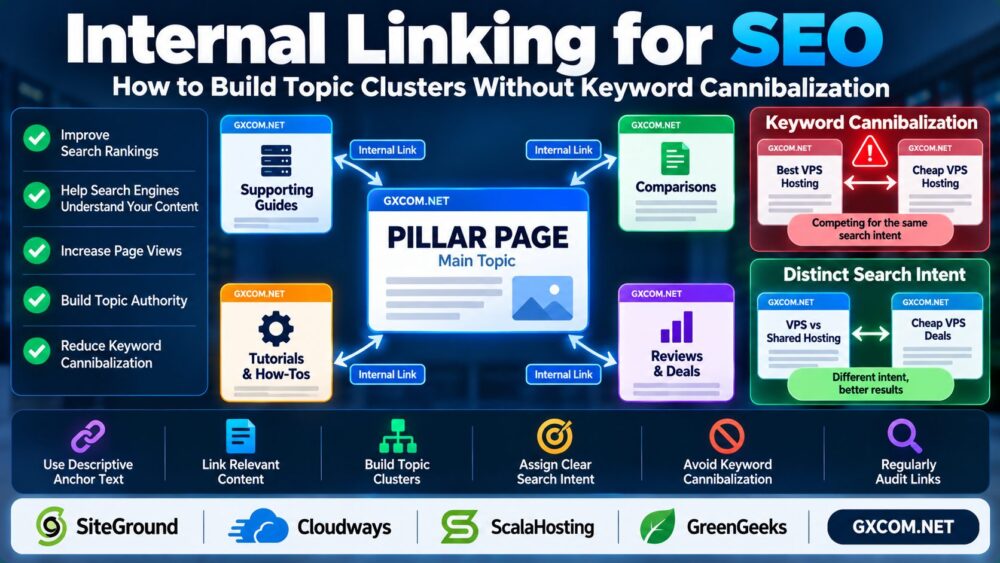
A topic cluster is a group of related pages organized around a central subject.
Typically, it includes one broad pillar page and several supporting articles that answer more specific questions.
| Content Type | Purpose | Example |
|---|---|---|
| Pillar page | Cover the main topic broadly | Dedicated Server Hosting |
| Supporting guide | Answer a focused question | Dedicated Server RAM Requirements |
| Technical tutorial | Solve a specific problem | Dedicated Server Backup Strategy |
| Comparison | Help readers evaluate options | Dedicated Server vs VPS |
For example, a dedicated server topic cluster can connect infrastructure selection, memory planning, backup procedures, and purchasing decisions.
See our Dedicated Server vs VPS Comparison for an example of content serving a specific buying decision.
How to Build a Topic Cluster Step by Step
1. Choose a Clear Main Topic
Select a subject broad enough to support multiple useful articles, such as WordPress hosting, cloud infrastructure, or dedicated servers.
Avoid creating a pillar page around a topic with little opportunity for meaningful supporting content.
2. Group Keywords by Search Intent
Organize related queries according to what users want to accomplish.
For example, “dedicated server RAM requirements” is primarily an educational query, while “dedicated server vs VPS” reflects a comparison decision.
These subjects can support separate pages because they answer different questions.
3. Assign One Primary Intent per Page
Create a content map recording each page's primary keyword, target audience, search intent, and canonical URL.
This reduces the risk of publishing multiple pages that offer nearly identical answers.

4. Connect Related Pages Naturally
Link from broad pages to relevant detailed guides, and link supporting articles back to useful overview or comparison content.
For instance, a server selection article can point readers toward our Dedicated Server RAM Requirements Guide when memory sizing becomes relevant.
5. Review the Cluster Regularly
When publishing a new article, update older relevant pages with contextual links. Check for broken links, unnecessary redirects, and outdated recommendations.
How to Avoid Keyword Cannibalization
Keyword cannibalization occurs when multiple pages compete for substantially the same search intent and create an unclear choice about which page should rank.
Two pages mentioning the same keyword do not automatically create a problem.
The important question is whether those pages provide meaningfully different answers.
Common Warning Signs
- Multiple articles target nearly identical primary queries.
- Titles and headings promise the same answer.
- Content sections overlap extensively.
- Search Console shows different URLs appearing for the same query without a clear reason.
- Internal links use inconsistent destination pages for the same intended topic.
How to Fix Overlapping Pages
Start by comparing search intent, page usefulness, and actual search performance.
If two pages answer the same question, consider consolidating their best content into one stronger resource and redirecting a retired URL when appropriate.
If their intents differ, clarify titles, headings, examples, and internal links rather than merging them automatically.
Use canonical tags only when they accurately represent duplicate or substantially similar content. They are not a universal fix for weak content differentiation.
Internal Linking Best Practices
Use Descriptive Anchor Text
Anchor text should explain what readers will find on the destination page.
For example, “WordPress migration without downtime” is generally more informative than “click here.”
Prioritize Contextual Links
Place links where they genuinely help readers understand the subject or continue a task.
A WordPress troubleshooting article might link to our WordPress 503 Error Guide when discussing hosting availability problems.
Avoid Excessive Exact-Match Anchors
Use natural wording instead of repeating the same keyword-heavy anchor text across every article.
Prevent Orphan Pages
Important pages should be reachable through relevant internal links or navigation, rather than existing without meaningful connections.
Maintain Crawlable Links
Use standard HTML links with valid destination URLs. Check that important pages are not unintentionally blocked from crawling or indexing.
How Many Internal Links Should a Blog Post Have?
There is no universal number of internal links required for Google rankings.
For a focused article of approximately 1,000–1,200 words, three to five relevant contextual links can be a practical editorial starting point.
Longer reference guides may need more, while short troubleshooting pages may need fewer.
The objective is usefulness, not reaching a fixed link quota.
Internal Linking for WordPress Websites
WordPress site owners can manage internal links through the editor, navigation menus, and suitable SEO tools.
Plugins such as Yoast SEO can help identify internal linking opportunities, but automated suggestions still require editorial review.
Site performance also matters for user experience. Large content websites should monitor caching, database activity, and hosting resources.
For WordPress hosting, SiteGround and Cloudways are relevant options for evaluating managed website environments.
ScalaHosting and GreenGeeks are additional providers to consider when comparing hosting requirements, support, and long-term operating costs.
Hosting upgrades do not replace a good internal linking strategy, and provider features should be verified against current plans.
Our Cloudways vs SiteGround Comparison offers additional hosting context.
How to Audit Your Internal Linking Structure
Review your website using a simple process:
- Export important indexed and published URLs.
- Group pages by topic and primary search intent.
- Identify pages with few relevant internal links.
- Review overlapping content and inconsistent anchors.
- Fix broken links and unnecessary redirect chains.
- Add contextual links from relevant existing articles.
- Monitor search queries and page performance over time.
For example, a dedicated server content cluster should connect memory planning with data protection. Our Dedicated Server Backup Strategy provides a focused supporting resource.

Frequently Asked Questions
Do internal links help SEO?
They help search engines discover pages and understand site structure while improving navigation for readers. Ranking outcomes depend on additional factors.
How many internal links should I add per article?
Add as many relevant links as genuinely help readers. Three to five can be a useful starting point for a focused article, not a Google requirement.
What is a pillar page in SEO?
A pillar page covers a broad subject and connects readers to more detailed supporting articles.
Can two pages target similar keywords?
Yes, when they serve different search intents and provide distinct value.
Should I merge pages with keyword cannibalization?
Only when their content and search intent overlap substantially. Otherwise, improve differentiation and linking.
Does internal linking replace backlinks?
No. Internal links and external backlinks serve different purposes and can both contribute to a broader SEO strategy.
Final Verdict
An effective internal linking strategy for SEO starts with clear search intent, useful topic clusters, and natural contextual links.
Give each important page a distinct purpose, connect related content logically, and review overlapping pages before publishing more articles.
Map Topics → Separate Search Intent → Build Clusters → Add Relevant Links → Audit Results.