Great content cannot perform at its full potential if search engines struggle to discover, crawl, render, index, or understand your website.
That is where technical SEO becomes important.
Technical SEO focuses on the infrastructure and technical signals that help search engines access and interpret your pages efficiently. It includes crawlability, indexing, robots.txt, XML sitemaps, canonical URLs, HTTPS, redirects, structured data, Core Web Vitals, mobile usability, internal linking, duplicate content, and server performance.
This technical SEO checklist walks through the most important areas to audit and optimize for Google.
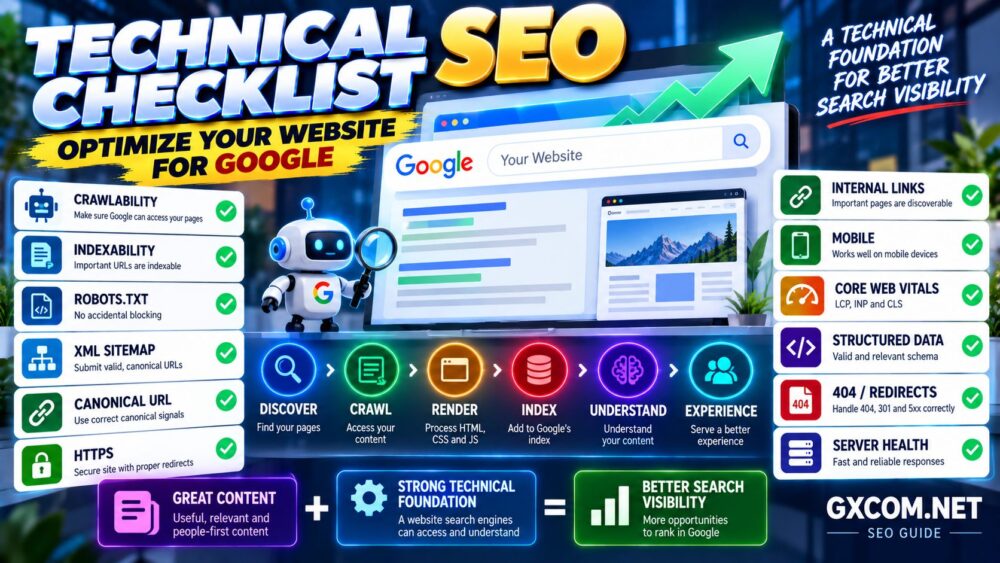
Technical SEO Framework: Discover → Crawl → Render → Index → Understand → Experience.
What Is Technical SEO?
Technical SEO is the process of optimizing a website's technical foundation so search engines can efficiently access, process, and understand its content.
It differs from content optimization and link building.
Content SEO focuses on what the page says.
Off-page SEO focuses largely on signals and references from outside the website.
Technical SEO focuses on whether search engines can successfully reach and process the page in the first place.
A technically healthy website should make it easy for search engines to:
- Discover important URLs
- Crawl pages efficiently
- Render content correctly
- Identify canonical URLs
- Understand site structure
- Process structured data
- Access mobile content
- Receive appropriate HTTP responses
Technical SEO alone does not guarantee rankings, but serious technical problems can prevent otherwise strong content from performing properly.
Technical SEO Checklist at a Glance
| SEO Area | What to Check | Priority |
|---|---|---|
| Crawlability | Googlebot can access important pages | Critical |
| Indexing | Important URLs are indexable | Critical |
| Robots.txt | No accidental blocking | Critical |
| XML Sitemap | Contains canonical indexable URLs | High |
| Canonical URLs | Correct canonical signals | High |
| HTTP Status Codes | 200, 301, 404 and 5xx handled correctly | High |
| HTTPS | Secure site with correct redirects | High |
| Internal Links | Important pages are discoverable | High |
| Core Web Vitals | LCP, INP and CLS | High |
| Mobile | Content works well on mobile devices | High |
| Structured Data | Valid and relevant schema markup | Medium–High |
| Server Performance | Fast and reliable responses | High |
1. Make Sure Google Can Crawl Your Website
The first step in technical SEO is ensuring that search engines can access your important pages.
If Googlebot cannot crawl a URL, Google may be unable to process its current content and signals effectively.
Check for:
- Robots.txt blocking important directories
- Authentication requirements
- Firewall rules blocking legitimate crawlers
- Server errors
- Broken internal links
- Incorrect redirects
- JavaScript-dependent navigation that hides important links
Use Google Search Console and server logs when necessary to understand how Google is accessing the site.
First Question in Technical SEO: Can Google Reach the Page?
2. Check Your Robots.txt File
The robots.txt file provides crawling instructions to compliant search engine crawlers.
A small mistake can unintentionally block important areas of a website.
For example:
User-agent: *
Disallow: /
This tells compliant crawlers not to crawl the entire site.
Review robots.txt after:
- Website migrations
- Staging-to-production launches
- Major redesigns
- CMS changes
- Security configuration changes
Also remember:
robots.txt Is Primarily a Crawling Control—not a Reliable Method for Removing a URL From Google's Index.
If you want an accessible page excluded from search results, an appropriate robots meta directive such as noindex is generally the more relevant mechanism.
3. Check for Accidental Noindex Tags
A page can be crawlable but explicitly tell search engines not to index it.
A common example is:
<meta name="robots" content="noindex, follow">
This can be useful for pages you intentionally do not want indexed, but it becomes a serious problem when applied to important content by mistake.
Check:
- Homepage
- Articles
- Product pages
- Category pages
- Landing pages
- Recently migrated pages
WordPress users should also verify that search engine visibility settings were not accidentally left in a discouraging state after development or staging.
4. Create and Maintain an XML Sitemap
An XML sitemap helps search engines discover important URLs on your website.
A good sitemap should generally contain URLs that are:
- Canonical
- Indexable
- Useful to search users
- Returning appropriate successful responses
Avoid filling the sitemap with:
- 404 pages
- Redirected URLs
- Duplicate URLs
- Noindex pages
- Unwanted parameter URLs
Submit the sitemap through Google Search Console and monitor whether important pages are being discovered and indexed.
An XML sitemap helps discovery, but:
Being in a Sitemap ≠ Guaranteed Indexing.
5. Use Canonical URLs Correctly
Duplicate or highly similar pages can exist under multiple URLs.
Canonical tags help indicate which URL you prefer as the representative version.
Example:
<link rel="canonical" href="https://www.example.com/page/">
Canonicalization becomes especially important with:
- URL parameters
- Tracking URLs
- Product variations
- HTTP and HTTPS versions
- www and non-www versions
- Duplicate archive structures
- Syndicated or duplicate content
Internal links, sitemap URLs, redirects, and canonical tags should send consistent signals whenever possible.
Canonical Tag + Internal Links + Sitemap + Redirects → Consistent URL Signals.
6. Standardize Your Preferred URL Version
Your website should have a consistent preferred URL structure.
Potential duplicates include:
- http://example.com
- https://example.com
- http://www.example.com
- https://www.example.com
Choose the intended version and redirect alternatives appropriately.
Also maintain consistency for:
- Trailing slashes
- Uppercase vs lowercase URLs
- Index files
- Duplicate parameters
For internal linking, link directly to the canonical destination rather than intentionally routing users and crawlers through unnecessary redirects.
7. Use HTTPS Across the Entire Website
HTTPS protects data transmitted between the visitor and your website.
Your technical SEO audit should verify:
- Valid SSL/TLS certificate
- HTTP redirects to HTTPS
- No important mixed content
- HTTPS canonical URLs
- HTTPS internal links
- HTTPS sitemap URLs
A partially migrated HTTPS site can create duplicate URLs, redirect chains, browser warnings, or inconsistent canonical signals.
If you are configuring HTTPS for the first time, see our SSL certificate installation guide once published.
8. Audit HTTP Status Codes
HTTP status codes tell browsers and crawlers what happened when a URL was requested.
Important examples include:
| Status | Meaning |
|---|---|
| 200 | Successful response |
| 301 | Permanent redirect |
| 302 | Temporary redirect |
| 404 | Not found |
| 410 | Gone |
| 500 | Internal server error |
| 503 | Service unavailable |
Look for important URLs returning unexpected 3xx, 4xx, or 5xx responses.
Do not redirect every deleted URL to the homepage simply to avoid 404 errors.
A legitimate 404 response can be completely appropriate when content no longer exists and there is no meaningful replacement.
9. Fix Broken Internal Links
Internal links help users and search engines discover related content and understand website structure.
Broken internal links waste that opportunity.
Regularly check for links pointing to:
- 404 pages
- Deleted posts
- Old URLs
- Redirect chains
- Incorrect domains
Whenever practical, update the link so it points directly to the correct final URL.
10. Build a Logical Website Architecture
Important content should not be buried unnecessarily deep inside the website.
A clear structure might look like:
Homepage → Category → Subcategory → Article
Logical architecture helps:
- Users navigate the site
- Crawlers discover pages
- Internal authority flow between pages
- Search engines understand topical relationships
For example, GXCOM.NET organizes related infrastructure content into major themes such as Hosting, VPS, Cloud, Dedicated, GPU, Comparisons, Deals, Reviews, and Guides.
Within Guides, related articles can then form smaller topic clusters.
11. Improve Internal Linking
Internal links are one of the most controllable SEO tools available to website owners.
Use them to connect:
- Related articles
- Supporting guides
- Category hubs
- Commercial pages
- Comparison pages
Use descriptive anchor text when it naturally explains the destination.
Avoid creating hundreds of repetitive keyword-rich links simply for SEO.
The objective is to create meaningful relationships between pages.
For WordPress performance topics, for example, our WordPress speed optimization guide connects performance problems with hosting, caching, PHP, database, and Core Web Vitals topics.
12. Check for Orphan Pages
An orphan page has no meaningful internal links pointing to it.
Even if the URL appears in an XML sitemap, a lack of internal links can make the page harder for users and crawlers to discover naturally and can weaken its place in the website architecture.
Important pages should normally be integrated into:
- Navigation
- Category pages
- Related articles
- Contextual internal links
- Hub pages
If a page is important enough to rank, it should usually have a clear role within the site.
13. Control Duplicate Content
CMS platforms can generate multiple URLs containing identical or very similar content.
Examples include:
- Tag archives
- Category archives
- Author archives
- Date archives
- Pagination
- Search pages
- URL parameters
- Printer versions
Duplicate content is not automatically a penalty, but uncontrolled duplication can create inefficient crawling and unclear canonical signals.
Decide which URL types provide search value and configure the rest appropriately.
14. Audit Pagination
Pagination is common on blogs, ecommerce sites, forums, and category archives.
Technical problems arise when paginated URLs:
- Produce duplicate content unexpectedly
- Canonicalize incorrectly
- Create infinite crawl spaces
- Generate empty pages
- Return misleading status codes
Test what happens when users or crawlers request pagination beyond the real number of pages.
Do not assume your CMS handles every edge case correctly.
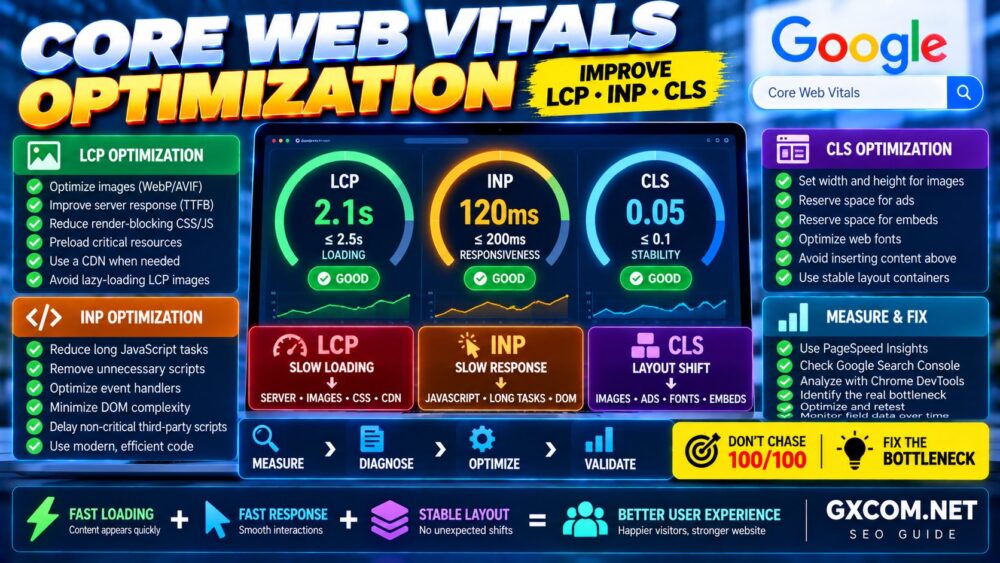
15. Optimize Core Web Vitals
Core Web Vitals measure important aspects of page experience.
The current core metrics are:
- LCP (Largest Contentful Paint) — loading performance
- INP (Interaction to Next Paint) — responsiveness
- CLS (Cumulative Layout Shift) — visual stability
Typical causes of poor Core Web Vitals include:
- Slow server response
- Large images
- Render-blocking resources
- Heavy JavaScript
- Third-party scripts
- Fonts
- Advertisements
- Layout elements without reserved dimensions
The correct process is:
Metric → Cause → Fix → Measure Again.
Do not optimize only to achieve a perfect synthetic score. Focus on real user experience and actual bottlenecks.
16. Improve Server Response and Hosting Performance
Technical SEO does not stop at WordPress or HTML.
The server must respond reliably enough for users and crawlers to access the site.
Infrastructure problems can include:
- Slow CPU processing
- Overloaded shared hosting
- Slow database queries
- Insufficient PHP capacity
- Storage I/O bottlenecks
- Network latency
- Frequent server errors
A CDN, page caching, optimized application stack, and appropriate hosting resources can improve delivery, but do not upgrade infrastructure blindly.
If you run WordPress and suspect hosting is the bottleneck, see our slow WordPress troubleshooting guide.
Measure First. Upgrade Second.
17. Make Sure Your Website Works Well on Mobile
Google primarily uses the mobile version of a site's content for indexing and ranking.
Important content should therefore remain accessible and usable on mobile devices.
Check:
- Responsive layouts
- Readable text
- Navigation
- Images
- Structured data
- Metadata
- Internal links
- Lazy-loaded content
Do not hide critical content from mobile users if that content is important to understanding the page.
18. Use Structured Data Where Appropriate
Structured data provides machine-readable information about page content.
Depending on the website, relevant schema types may include:
- Article
- Breadcrumb
- Product
- Organization
- LocalBusiness
- Event
- Video
Only use structured data that accurately represents visible page content and follows Google's applicable guidelines.
Adding schema markup does not guarantee a rich result.
Valid Schema ≠ Guaranteed Rich Result.
19. Optimize Images for Search and Performance
Images affect both page performance and search accessibility.
Good practices include:
- Use descriptive filenames
- Provide useful alt text when appropriate
- Compress images
- Use suitable dimensions
- Serve modern formats where appropriate
- Use responsive images
- Lazy-load non-critical images
Do not stuff keywords into alt attributes.
Alt text should primarily describe the image in a useful and contextual way.
20. Check JavaScript Rendering
Modern websites often rely heavily on JavaScript.
Google can process JavaScript, but JavaScript-heavy architectures can introduce additional complexity and failure points.
Check whether important content and links are accessible when rendered.
Pay particular attention to:
- Client-side navigation
- Lazy-loaded content
- Infinite scrolling
- JavaScript-generated links
- Content dependent on API responses
Do not assume that because users can see something in a browser, every crawler will necessarily process it exactly as intended.
21. Fix Redirect Chains and Loops
A redirect chain occurs when one URL redirects through multiple intermediate URLs.
For example:
URL A → URL B → URL C → URL D
When possible, update links so URL A points directly to URL D.
Also watch for redirect loops:
URL A → URL B → URL A
Redirect loops can make a page inaccessible entirely.
22. Use a Helpful 404 Page
Users will occasionally reach URLs that no longer exist.
A useful custom 404 page can provide:
- Clear explanation
- Navigation
- Search functionality
- Links to important content
But make sure genuinely missing URLs return an appropriate 404 or 410 HTTP status rather than returning a normal 200 response with a “not found” message.
Otherwise, search engines may interpret the page as a soft 404.
23. Monitor 5xx Server Errors
Server-side errors can prevent both visitors and crawlers from accessing pages.
Common examples include:
- 500 Internal Server Error
- 502 Bad Gateway
- 503 Service Unavailable
- 504 Gateway Timeout
Occasional temporary errors can happen, but persistent or widespread 5xx responses should be investigated quickly.
Possible causes include:
- Server overload
- Application errors
- PHP problems
- Database failures
- Proxy/CDN issues
- Infrastructure outages
24. Keep Important Pages Close to the Site Structure
There is no universal rule saying every page must be exactly three clicks from the homepage.
However, strategically important pages should generally be easy to discover through logical navigation and internal linking.
If an important article requires navigating through numerous obscure archives before any internal link reaches it, reconsider the architecture.
Think in terms of:
Homepage → Topic Hub → Supporting Content
This creates clearer topical relationships for users and search engines.
25. Monitor Google Search Console
Technical SEO is not a one-time setup.
Google Search Console can help you monitor:
- Indexing
- Sitemaps
- Core Web Vitals
- HTTPS
- Structured data enhancements
- Manual actions
- Security issues
- Search performance
If important pages suddenly disappear from Google, Search Console should be one of the first places you investigate.
Our upcoming guide on why Google is not indexing your website will cover indexing diagnostics in greater detail.
Technical SEO Audit: Recommended Order
If you are auditing a website for the first time, prioritize issues in this order:
| Priority | Check |
|---|---|
| 1 | Crawlability |
| 2 | Indexability |
| 3 | HTTP status codes |
| 4 | Canonicalization |
| 5 | XML sitemap |
| 6 | Internal linking |
| 7 | Site architecture |
| 8 | Mobile usability |
| 9 | Performance / Core Web Vitals |
| 10 | Structured data |
This priority matters.
Fixing a minor schema warning while your most important pages are accidentally marked noindex is solving the wrong problem first.
Critical Access Problems → Indexing Problems → Architecture → Performance → Enhancements.
Common Technical SEO Mistakes
- Blocking important pages in robots.txt
- Leaving production pages noindexed
- Submitting non-canonical URLs in sitemaps
- Creating unnecessary redirect chains
- Redirecting every 404 to the homepage
- Allowing important pages to become orphaned
- Using inconsistent HTTP/HTTPS or www/non-www URLs
- Ignoring mobile rendering
- Adding inaccurate structured data
- Ignoring repeated 5xx errors
- Optimizing scores instead of actual user experience
- Assuming technical SEO alone guarantees rankings
Technical SEO Checklist for WordPress
WordPress handles many SEO fundamentals well, but plugins, themes, hosting configuration, and site architecture can still introduce problems.
WordPress site owners should specifically check:
- Search engine visibility setting
- SEO plugin indexing rules
- XML sitemaps
- Canonical URLs
- Category and tag archives
- Author archives
- Pagination
- Attachment URLs
- Internal links
- Site speed
- Plugin-generated schema
- Redirects
- 404 handling
Avoid installing several SEO plugins that attempt to control the same metadata, sitemap, canonical, and schema functions simultaneously.
Technical SEO FAQ
What is technical SEO?
Technical SEO is the optimization of a website's technical foundation to help search engines discover, crawl, render, index, and understand its pages efficiently.
Is technical SEO important for Google rankings?
Yes, technical health can affect whether Google can properly access and process your pages. However, technical SEO is only one part of search performance and does not replace useful content, relevance, and other ranking signals.
Does an XML sitemap guarantee Google indexing?
No. A sitemap helps search engines discover URLs but does not guarantee that every submitted page will be indexed.
Does robots.txt remove pages from Google?
Robots.txt controls crawling. Blocking a URL from crawling is not the same as reliably requesting that the URL be excluded from Google's index.
Are 404 pages bad for SEO?
Normal 404 responses are not inherently an SEO problem when a URL genuinely no longer exists. Problems arise when important internal links are broken, large numbers of useful pages disappear unexpectedly, or missing pages return incorrect status codes.
Do Core Web Vitals affect SEO?
Core Web Vitals are part of Google's page experience signals, but they should not be treated as a substitute for relevant, useful content. Optimize them primarily to improve real user experience.
Does faster hosting improve SEO?
Better infrastructure can improve server response, reliability, and user experience when hosting is actually the bottleneck. Moving to a larger server will not fix indexing directives, poor content, broken internal links, incorrect canonicals, or other unrelated SEO problems.
How often should I perform a technical SEO audit?
Monitor important technical signals continuously and perform deeper audits after major migrations, redesigns, CMS changes, URL changes, or unexpected search traffic and indexing problems.
Technical SEO Checklist: Final Review
- ✓ Google can crawl important pages
- ✓ Robots.txt is configured correctly
- ✓ Important pages are indexable
- ✓ XML sitemap contains useful canonical URLs
- ✓ Canonical tags are consistent
- ✓ Preferred URL structure is standardized
- ✓ HTTPS works correctly
- ✓ HTTP status codes are appropriate
- ✓ Broken internal links are fixed
- ✓ Site architecture is logical
- ✓ Important pages have internal links
- ✓ Orphan pages are minimized
- ✓ Duplicate URLs are controlled
- ✓ Pagination behaves correctly
- ✓ Core Web Vitals are monitored
- ✓ Server performance is reliable
- ✓ Mobile content works correctly
- ✓ Structured data is accurate
- ✓ Images are optimized
- ✓ JavaScript content is accessible
- ✓ Redirect chains are minimized
- ✓ Missing pages return correct responses
- ✓ 5xx errors are monitored
- ✓ Important pages are easy to discover
- ✓ Google Search Console is monitored
A strong technical SEO checklist begins with the fundamentals: make sure search engines can reach, crawl, render, index, and understand your important pages.
Only after those foundations are working correctly should you prioritize secondary enhancements.
The process is simple:
Discover → Crawl → Render → Index → Understand → Experience.
Technical SEO will not turn weak content into the best result on Google, but strong content should not be held back by preventable technical problems.
Build Great Content on a Technical Foundation Search Engines Can Access and Users Can Trust.