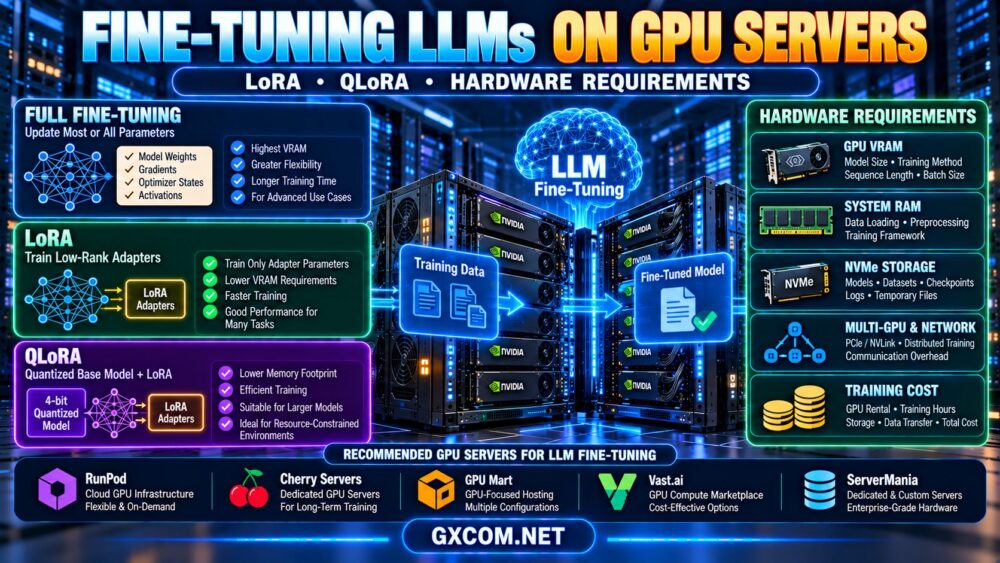
Choosing the right GPU infrastructure for large language model fine-tuning requires a different approach from ordinary LLM inference. Training workloads must account for model weights, gradients, optimizer states, activations, sequence length, and batch size. As a result, the GPU memory needed to fine-tune a model can be substantially greater than the memory required to run it.
Techniques such as LoRA and QLoRA make fine-tuning more accessible by reducing the number of trainable parameters and, in QLoRA's case, lowering the memory footprint of the frozen base model. However, neither technique eliminates the need for careful GPU server sizing.
This guide explains LLM fine-tuning GPU requirements, compares full fine-tuning with LoRA and QLoRA, and shows how to evaluate GPU VRAM, CPU, system RAM, NVMe storage, multi-GPU scaling, and total training costs.
What Is LLM Fine-Tuning?
LLM fine-tuning adapts a pretrained language model to a particular task, domain, instruction format, or desired behavior using additional training data.
Organizations may fine-tune models for customer support, document classification, specialized terminology, structured output, or domain-specific workflows.
Unlike inference, where a model generates predictions using its existing parameters, fine-tuning updates selected model parameters through a training process.
That training process requires additional memory for backward computation and optimization.
Fine-Tuning vs Inference
| Requirement | LLM Inference | LLM Fine-Tuning |
|---|---|---|
| Primary task | Generate predictions | Adapt model parameters |
| Backward pass | Not normally required | Required for trainable parameters |
| Optimizer states | Not normally needed | Required according to optimizer and method |
| Activation memory | Depends on serving workload | Important during backpropagation |
| Memory sensitivity | Weights, KV cache, concurrency | Weights, activations, gradients, optimizer states |
| Performance metric | Latency and tokens per second | Training throughput and time to target quality |
For a more general explanation of model loading and inference memory, see our LLM hosting requirements guide.
Full Fine-Tuning vs LoRA vs QLoRA
The choice of fine-tuning method is one of the largest factors affecting hardware requirements.
Full Fine-Tuning
Full fine-tuning updates all or nearly all parameters of a pretrained model.
It may offer greater flexibility for certain tasks, but usually requires substantial memory and compute resources because the training system must maintain gradients and optimizer states for the trainable weights.
Full fine-tuning can also increase checkpoint storage and distributed training complexity.
LoRA: Low-Rank Adaptation
LoRA is a parameter-efficient fine-tuning technique that introduces trainable low-rank matrices into selected model components while keeping the original pretrained weights frozen.
Instead of updating every parameter in a large weight matrix, LoRA trains a much smaller set of adapter parameters.
This can significantly reduce trainable parameter count, optimizer-state memory, and the size of saved adapters.
However, the frozen base model must still be loaded, and training still consumes memory for activations, gradients associated with adapters, and runtime operations.
QLoRA: Quantized Low-Rank Adaptation
QLoRA combines low-rank adapters with a quantized, typically 4-bit, frozen base model.
Its goal is to reduce base-model memory requirements while training adapter parameters.
The original QLoRA approach uses techniques including 4-bit NormalFloat quantization and other memory-saving mechanisms. Specific implementations may differ in supported quantization formats, optimizer configurations, and memory behavior.
QLoRA can make larger-model adaptation practical on more limited GPU hardware, but it does not guarantee that every model will fit on a particular GPU.
LoRA vs QLoRA vs Full Fine-Tuning: Comparison
| Factor | Full Fine-Tuning | LoRA | QLoRA |
|---|---|---|---|
| Updated parameters | Most or all model parameters | Selected adapter parameters | Selected adapter parameters |
| Base-model precision | Depends on training configuration | Commonly FP16/BF16 or another supported format | Typically quantized frozen base weights |
| Optimizer memory | Potentially substantial | Lower for adapter parameters | Lower for adapter parameters |
| GPU memory demand | Usually highest | Lower than full fine-tuning | Can be lower than conventional LoRA |
| Training complexity | Higher at large scale | Often simpler | Requires compatible quantization stack |
| Typical use | Broad parameter adaptation | Efficient task adaptation | Memory-constrained adapter training |
For many small teams, LoRA or QLoRA is a sensible starting point. Full fine-tuning should be justified by task requirements and evaluation results rather than assumed to be automatically superior.
How Much GPU VRAM Do You Need for LLM Fine-Tuning?
Fine-tuning memory depends on more than model parameter count.
A simplified planning formula is:
Training GPU memory ≈ model weights + trainable gradients + optimizer states + saved activations + temporary buffers + runtime overhead
The amount of memory required by each component changes with the training method.
Model Weight Memory
For a dense model, a simplified weight-storage estimate is:
Weight bytes ≈ parameter count × bytes per parameter
For example, a 7-billion-parameter model stored in 16-bit precision requires approximately 14 billion bytes for its weights alone.
That is approximately 14 decimal GB, or 13.0 GiB, before training overhead.
Gradient and Optimizer Memory
Full fine-tuning typically requires gradient storage and optimizer states for trainable parameters.
Adam-style optimizers commonly maintain additional state tensors, but exact memory use depends on optimizer precision, master-weight handling, sharding, and implementation.
LoRA reduces this requirement because only adapter parameters are trained.
Activation Memory
Training activations can consume significant GPU memory, particularly with longer sequences and larger micro-batches.
Activation checkpointing can reduce stored activation memory by recomputing selected values during the backward pass, trading additional computation for lower memory consumption.
Runtime Overhead
CUDA kernels, framework allocations, temporary tensors, memory fragmentation, and training-specific operations also affect peak memory usage.
Do not size a fine-tuning server using model file size alone.
GPU Memory Reference by Model Size
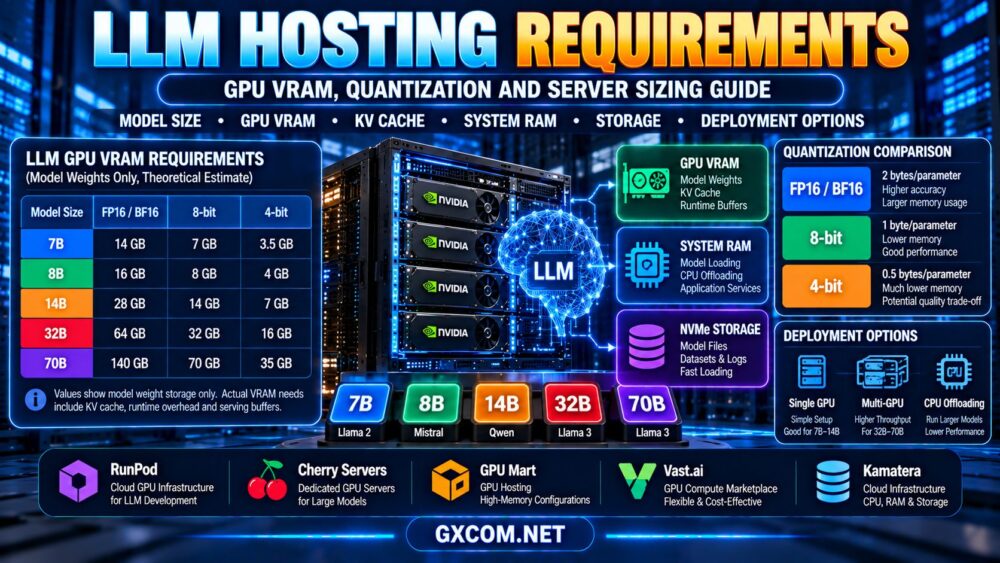
The following table compares theoretical base-model weight storage. It is useful for initial planning, but it does not represent the total VRAM required for training.
| Model Size | 16-bit Weights | Idealized 4-bit Weights | Fine-Tuning Consideration |
|---|---|---|---|
| 7B | 14 GB | 3.5 GB | LoRA and QLoRA are practical starting points |
| 8B | 16 GB | 4 GB | Activation memory and context length matter |
| 14B | 28 GB | 7 GB | Quantization may substantially reduce base weight memory |
| 32B | 64 GB | 16 GB | High-memory GPUs or carefully optimized setups |
| 70B | 140 GB | 35 GB | High-memory or distributed configurations may be needed |
Important: The 4-bit column is an idealized mathematical estimate. Actual quantized storage includes scales, metadata, and potentially higher-precision tensors. Training also requires activations, adapters, optimizer states, and working memory.

Therefore, a 32B model with 16 GB of idealized 4-bit weights is not guaranteed to fine-tune successfully on a 16 GB GPU.
Can You Fine-Tune a 7B Model on a 24GB GPU?
A 24GB GPU can be a useful starting point for some 7B-class LoRA and QLoRA configurations.
However, successful training depends on the exact model, quantization implementation, sequence length, micro-batch size, adapter configuration, and training framework.
For example, an instruction-tuning experiment with short sequences and a small micro-batch may require substantially less memory than training with long contexts and larger batches.
Before committing to a server, test the intended configuration with representative data and monitor peak allocated and reserved GPU memory.
How Sequence Length and Batch Size Affect VRAM
Two fine-tuning jobs using the same base model can have very different memory requirements.
Sequence Length
Longer sequences increase the amount of information processed during training.
Activation memory and attention-related computation can grow substantially with sequence length, depending on model architecture and attention implementation.
Do not assume that a configuration tested at 2,048 tokens will behave identically at 8,192 tokens.
Micro-Batch Size
Micro-batch size controls how many training examples are processed together in a forward and backward pass on a device.
Larger micro-batches can increase activation memory use.
Gradient Accumulation
Gradient accumulation combines gradients across multiple smaller steps before an optimizer update.
It can help achieve a larger effective batch size without requiring every example to be processed simultaneously.
However, it does not eliminate the memory required by the selected model, activations, and optimizer.
GPU Hardware Requirements Beyond VRAM
GPU memory is essential, but it is not the only specification that affects fine-tuning efficiency.
GPU Compute Performance
GPU architecture, supported tensor operations, precision formats, memory bandwidth, and software compatibility influence training throughput.
A GPU with more VRAM is not necessarily faster than another GPU on every training workload.
CPU and System RAM
The CPU supports tokenization, data loading, preprocessing, orchestration, and other host-side operations.
System RAM must accommodate the operating system, datasets, model-loading operations, data-loader workers, and any CPU offloading.
Insufficient RAM or CPU resources can leave an expensive GPU underutilized.
NVMe Storage
Fast storage is useful for loading model checkpoints, accessing datasets, saving adapters, and writing training outputs.
For repeated experiments, storage capacity should accommodate the base model, dataset copies, checkpoints, logs, and temporary files.
Networking
Network performance becomes especially important when training spans multiple servers or when large datasets and checkpoints are transferred frequently.
Single-node training generally has different networking requirements from multi-node distributed training.
Single GPU vs Multi-GPU Fine-Tuning
A single sufficiently capable GPU can simplify fine-tuning by avoiding distributed training complexity.
Multiple GPUs may be necessary when model size, throughput targets, or training methods exceed single-device capacity.
However, adding GPUs does not guarantee proportional reductions in training time.
Data Parallelism
Data parallelism distributes training examples across devices. Depending on the training strategy, model parameters or training states may be replicated or partitioned.
Synchronization introduces communication overhead.
Model and Tensor Parallelism
Model parallelism distributes model components or computations across GPUs.
Some approaches require frequent communication between devices, making GPU interconnect bandwidth and topology important.
FSDP and ZeRO-Style Sharding
Distributed training strategies can partition parameters, gradients, and optimizer states across devices to reduce per-GPU memory requirements.
These methods may increase communication or implementation complexity and should be evaluated using the selected framework.
For a detailed explanation of PCIe, NVLink, and scaling efficiency, see our multi-GPU server hosting guide.
Choosing a GPU Server for LoRA and QLoRA
The ideal server depends on whether you are conducting occasional experiments, training adapters regularly, or operating a sustained model-development pipeline.
| Workload | Infrastructure Starting Point | Key Buying Factor |
|---|---|---|
| Small-model QLoRA experiments | Compatible single-GPU cloud instance | Usable VRAM and software support |
| Regular LoRA fine-tuning | Higher-memory GPU instance or dedicated server | Throughput and sustained utilization |
| Larger-model adapter training | High-memory GPU or optimized multi-GPU system | Model fit and training memory |
| Full fine-tuning of large models | Distributed GPU infrastructure | Optimizer memory, interconnect and scaling |
| Recurring enterprise training | Cloud or dedicated infrastructure based on utilization | Total cost and operational reliability |
For teams still experimenting with model size and training settings, flexible cloud GPU resources may be more convenient than committing to fixed hardware immediately.
GPU Hosting Providers for LLM Fine-Tuning
GPU hosting companies offer different infrastructure models, including on-demand cloud GPUs, compute marketplaces, and dedicated servers.
The following providers are relevant candidates for evaluation. Their inclusion does not imply that every available plan supports the same GPU memory, multi-GPU topology, or training software.
| Provider | Infrastructure Focus | Fine-Tuning Considerations |
|---|---|---|
| RunPod | Cloud GPU infrastructure | GPU VRAM, environment, storage, billing |
| Cherry Servers | Dedicated GPU infrastructure | Accelerator configuration, RAM, NVMe, support |
| GPU Mart | GPU-focused hosting | Usable VRAM, GPU allocation, drivers, OS |
| Vast.ai | GPU compute marketplace | Listing-specific hardware, reliability, persistence |
| ServerMania | Dedicated and custom server infrastructure | Current GPU availability and custom hardware options |
RunPod: Flexible GPU Resources for Experiments
RunPod is relevant for developers evaluating GPU instances for LoRA and QLoRA experiments.
Compare available accelerator memory, deployment options, supported software environments, persistent storage, and billing conditions.
Also confirm whether the selected instance supports the CUDA, PyTorch, and quantization libraries required by your training stack.
For more information about the platform, read our RunPod GPU cloud review.
Cherry Servers: Dedicated GPU Infrastructure
Cherry Servers is worth evaluating for organizations that need dedicated GPU hardware for recurring training workloads.
Check the current accelerator models, GPU memory, CPU, system RAM, storage, network capabilities, and hardware support terms.
Dedicated servers may be attractive for predictable utilization, but training software installation and ongoing administration may remain the customer's responsibility.
GPU Mart: GPU Server Configuration Options
GPU Mart can be considered when comparing GPU-oriented hosting products.
Verify the exact GPU model, memory allocation, operating system, driver compatibility, and whether the configuration provides dedicated or virtualized GPU resources.
For QLoRA workloads, ensure the selected GPU and software stack support the intended quantization implementation.
Vast.ai: Marketplace GPU Compute
Vast.ai offers marketplace-style GPU compute listings that may be useful for experimentation and cost-sensitive training jobs.
Compare individual listings by GPU VRAM, CPU and RAM resources, storage persistence, network performance, host characteristics, and availability.
For important training runs, evaluate checkpoint persistence and interruption risks before relying on a particular listing.
ServerMania: Dedicated Hardware Evaluation
ServerMania can be considered when researching dedicated infrastructure or discussing custom server requirements.
Confirm whether appropriate GPU-equipped configurations are currently offered and whether they support the required accelerator count, memory, and training environment.
Do not assume that a standard dedicated server includes GPU acceleration.
How Much Does LLM Fine-Tuning Cost?
Fine-tuning cost depends on GPU rental rates, training duration, hardware efficiency, storage, data transfer, and operational overhead.
A useful simplified formula is:
Compute cost = billable GPU infrastructure rate × training hours
For a hypothetical example, suppose a GPU instance costs $1.50 per hour and a fine-tuning experiment takes 12 billable hours.
The compute-only cost would be:
$1.50 × 12 = $18
This example is illustrative and does not represent a current offer from any provider.
Real costs may include model preparation, failed runs, hyperparameter searches, evaluation, storage, and checkpoint management.
Cost Per Successful Training Run
Comparing only hourly rental prices can be misleading.
A more expensive GPU may complete a training job faster, potentially reducing the total compute cost. Conversely, an expensive configuration may offer little advantage if the workload cannot utilize it efficiently.
Compare:
- Cost per completed training run.
- Training tokens processed per second.
- Time to reach the target evaluation quality.
- GPU utilization and memory use.
- Checkpoint and recovery costs.
- Additional experimentation expenses.
For broader infrastructure economics, read our GPU server rental vs buying comparison.
How to Reduce LLM Fine-Tuning GPU Costs
Start with Parameter-Efficient Fine-Tuning
LoRA and QLoRA can reduce the hardware resources required for many adaptation tasks.
Evaluate whether adapters meet your quality targets before investing in full fine-tuning.
Use Appropriate Sequence Lengths
Avoid selecting a maximum sequence length far beyond what your training examples require.
Long sequences can increase memory use and training time.
Enable Compatible Memory Optimizations
Depending on the training framework, activation checkpointing, optimized attention implementations, lower-precision training, and memory-efficient optimizers may reduce memory consumption.
These optimizations can have trade-offs in speed, stability, and compatibility.
Improve Dataset Quality
High-quality, representative training examples can be more valuable than simply increasing dataset size.
Deduplicate data, validate labels, and maintain a separate evaluation set.
Save and Test Checkpoints
For longer training runs, checkpointing reduces the risk of losing all progress after an interruption.
However, checkpoints consume storage and may add overhead, so choose a suitable saving interval.
Stop Unused GPU Instances
On usage-based platforms, monitor instance states and billing rules.
Compute charges may stop when supported instances are terminated or stopped, but persistent storage and other resources may continue to generate charges.
Fine-Tuning vs RAG: Do You Need GPU Training?
Fine-tuning is not always the best solution for improving an LLM-powered application.

Retrieval-augmented generation, or RAG, provides external information to a model during inference without necessarily modifying its parameters.
RAG can be useful when the application needs access to frequently changing documents or an external knowledge base.
Fine-tuning may be more appropriate when the goal is to adapt output structure, task behavior, or specialized response patterns.
Some systems combine both approaches.
Before paying for GPU training, define the problem and evaluate whether prompting, retrieval, or fine-tuning provides the best result.
What Happens After Fine-Tuning?
Training is only one part of the model lifecycle.
After fine-tuning, teams may need to evaluate the adapter, merge it with a compatible base model, package the deployment, and serve the resulting model through an inference endpoint.
Inference hardware requirements may differ substantially from training requirements.
For production deployment considerations, see our AI inference server hosting guide.
LLM Fine-Tuning GPU Server Buying Checklist
- Choose the exact model: Confirm parameter count, architecture, and license.
- Select the training method: Full fine-tuning, LoRA, or QLoRA.
- Estimate peak VRAM: Include weights, activations, gradients, optimizer states, and buffers.
- Define sequence length: Use representative training examples.
- Set micro-batch size: Account for activation memory and gradient accumulation.
- Check GPU compatibility: Verify precision formats, CUDA, drivers, and libraries.
- Size CPU and RAM: Support data loading and preprocessing.
- Plan storage: Include models, datasets, adapters, checkpoints, and logs.
- Evaluate multi-GPU needs: Consider communication overhead and framework support.
- Calculate total costs: Include retries, storage, evaluation, and operational time.
Frequently Asked Questions
How much GPU VRAM is needed for LoRA fine-tuning?
LoRA memory requirements depend on model size, base-model precision, adapter configuration, sequence length, micro-batch size, and training software. LoRA reduces trainable parameter memory but does not eliminate base-model and activation memory.
Can I fine-tune a 7B model on a 24GB GPU?
Some 7B-class LoRA and QLoRA configurations can run on a compatible 24GB GPU. Success depends on the exact model, runtime, sequence length, batch settings, and memory optimizations.
What is the difference between LoRA and QLoRA?
LoRA trains low-rank adapters while freezing the base model. QLoRA additionally uses a quantized frozen base model to reduce memory requirements.
Is QLoRA always better than LoRA?
No. QLoRA can reduce memory use, but the best method depends on hardware, training throughput, software support, and model quality requirements.
Can a 70B model be fine-tuned on one GPU?
Some specialized quantized adapter-training configurations may work on sufficiently large single accelerators, but requirements vary considerably. Full fine-tuning of a 70B model generally requires much more substantial training infrastructure.
Does fine-tuning require NVLink?
No. Single-GPU training does not require GPU-to-GPU links, and some multi-GPU configurations operate over PCIe. Communication-intensive distributed training may benefit from higher-bandwidth interconnects.
Is fine-tuning cheaper than training an LLM from scratch?
Fine-tuning an existing model often requires substantially fewer resources than pretraining a comparable model from scratch, but actual cost depends on the method, model, data, and training objectives.
Should I use a cloud GPU or a dedicated GPU server?
Cloud GPUs may suit occasional experiments and variable demand. Dedicated GPU infrastructure may be worth evaluating for sustained, predictable workloads. Compare actual job performance and total operating cost.
Final Verdict: Match Fine-Tuning Methods to GPU Resources
The best GPU server for LLM fine-tuning is not necessarily the one with the most accelerators or the largest advertised memory capacity.
Start with the exact model and training objective. Then compare full fine-tuning, LoRA, and QLoRA based on memory use, software compatibility, training speed, and evaluation quality.
RunPod and Vast.ai are relevant options for flexible GPU experimentation. Cherry Servers and GPU Mart can be considered for suitable GPU infrastructure, while ServerMania may be evaluated for current dedicated hardware requirements.
Before purchasing, verify the exact GPU configuration, training framework compatibility, storage persistence, billing conditions, and operational responsibilities.
MODEL → TRAINING METHOD → GPU VRAM → SEQUENCE LENGTH → BATCH SIZE → SERVER CONFIGURATION → TRAINING COST → MODEL QUALITY
Choose hardware that supports reliable experimentation and measurable improvements rather than paying for unnecessary GPU capacity.