Choosing the right AI inference server hosting solution is essential for developers and businesses deploying large language models, AI chatbots, retrieval-augmented generation (RAG) applications, and production AI APIs.
Unlike AI training, inference focuses on running an existing model to generate predictions, text, images, or other outputs. The infrastructure must deliver sufficient GPU memory, acceptable response times, reliable throughput, and predictable operating costs.
However, choosing the most powerful GPU is not always the most economical solution. Model size, quantization, context length, concurrency, and GPU utilization can dramatically change the hardware requirements.
This guide explains how to compare AI inference servers by VRAM, latency, throughput, deployment model, and total cost. It also examines GPU hosting options from RunPod, Cherry Servers, GPU Mart, Vast.ai, and DediXLAB.

What Is AI Inference Server Hosting?
AI inference server hosting provides computing infrastructure for running trained AI models and serving their outputs to applications or users.
For large language models, an inference server typically loads model weights into available memory, processes incoming prompts, and generates tokens in response.
AI inference infrastructure can support:
- Self-hosted large language models and chatbots.
- AI-powered customer support applications.
- Retrieval-augmented generation systems.
- Text classification and embedding models.
- Image generation and computer vision workloads.
- Internal enterprise AI services.
- Production inference APIs.
The optimal server depends on the specific model, runtime, expected request volume, and service-level requirements.
AI Inference vs AI Training: Why Server Requirements Differ
AI training and inference use GPU acceleration differently.
Training updates model parameters and may require substantial GPU memory for gradients, optimizer states, and intermediate activations. Inference generally uses existing model weights without maintaining the same training state.
| Factor | AI Inference | AI Training |
|---|---|---|
| Primary task | Generate predictions or outputs | Optimize model parameters |
| GPU memory | Weights, KV cache, activations, runtime overhead | Weights, gradients, optimizer states, activations |
| Key performance metrics | Latency, tokens per second, throughput | Training speed, step time, scaling efficiency |
| Workload pattern | Interactive or batch requests | Training jobs and experiments |
| Infrastructure priority | Responsiveness and serving efficiency | Compute capacity and training efficiency |
For production inference, fast response times and predictable capacity may matter more than peak theoretical GPU performance.
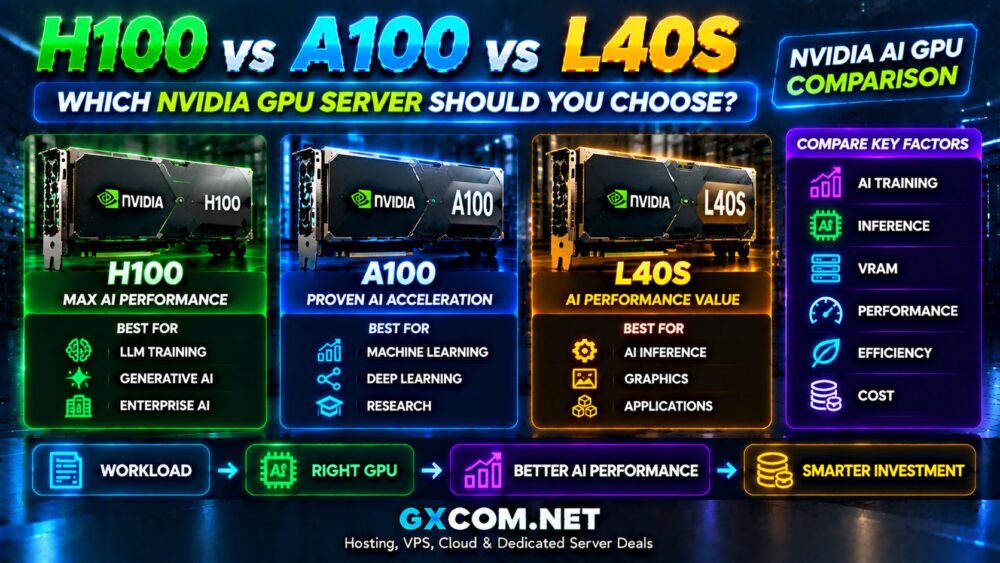
Our NVIDIA AI GPU servers guide provides additional background on accelerator selection for AI workloads.
GPU Memory Requirements for AI Inference
GPU VRAM is one of the first specifications to examine when choosing an AI inference server.
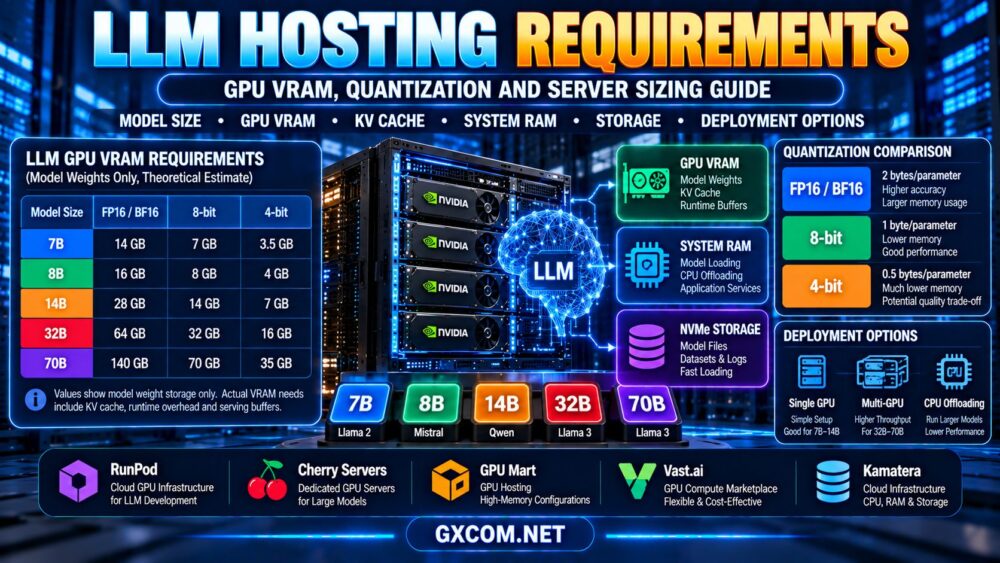
Model weights must be stored in memory accessible to the inference runtime. Additional memory is required for the key-value (KV) cache, intermediate computations, framework overhead, and concurrent requests.
How Model Size Affects VRAM
A simplified estimate of model weight memory is:
Model weight memory ≈ parameter count × bytes per stored parameter
For example, a 7-billion-parameter model stored using two bytes per parameter requires approximately 14 billion bytes for the weights alone.
That does not include the KV cache, temporary buffers, runtime overhead, or other memory requirements.
Quantization can reduce model weight memory, but actual savings depend on the quantization method, metadata, runtime, and model architecture.
Illustrative Model Weight Memory
| Model Size | FP16/BF16 Weights | Idealized 8-bit Weights | Idealized 4-bit Weights |
|---|---|---|---|
| 7B parameters | 14 GB | 7 GB | 3.5 GB |
| 14B parameters | 28 GB | 14 GB | 7 GB |
| 32B parameters | 64 GB | 32 GB | 16 GB |
| 70B parameters | 140 GB | 70 GB | 35 GB |
Important: These figures are theoretical weight-storage estimates using decimal gigabytes. Real GPU memory requirements are higher because of quantization overhead, runtime buffers, KV cache, and application-specific factors. They are not minimum server VRAM recommendations.
Context Length and KV Cache
Longer prompts and larger conversation histories can increase KV cache memory consumption.
The amount depends on model architecture, attention implementation, cache precision, batch size, and the number of concurrent sequences.
A server that successfully loads a model may still run out of memory when serving long-context requests or multiple users.
AI Inference Latency: TTFT, ITL and Response Time
Latency determines how quickly users receive responses from an AI application.
For language model serving, three measurements are particularly useful.
Time to First Token (TTFT)
TTFT measures the time between submitting a request and receiving the first generated token.
It is especially important for interactive chat applications, where users expect a prompt response.
Prompt length, queueing, network latency, and prefill processing can all affect TTFT.
Inter-Token Latency (ITL)
ITL describes the time between successive generated tokens during decoding.
Lower inter-token latency generally produces a smoother streaming experience.
End-to-End Response Time
Total response time includes request processing, queueing, model execution, token generation, and network transmission.
Buyers should evaluate percentile latency under realistic concurrency rather than relying only on the fastest single-request result.
Throughput vs Latency: Finding the Right Balance
Throughput measures how much work an inference server completes over time.
For LLM serving, common metrics include output tokens per second, total tokens processed per second, and requests completed per second.
However, throughput and latency are not interchangeable.
A server can achieve high aggregate throughput by batching requests while individual users experience longer waiting times.
| Workload | Primary Priority | Important Metrics |
|---|---|---|
| Interactive chatbot | Responsive user experience | TTFT, ITL, p95 latency |
| Batch document processing | High processing efficiency | Tokens/sec, jobs/hour |
| Enterprise AI API | Predictable service performance | Concurrency, p95 latency, throughput |
| Long-context RAG | Memory and prompt processing | KV cache usage, TTFT, context capacity |
| Image generation | Completed outputs per time period | Image latency, jobs/hour, memory |
Choose benchmarks that represent your application's actual request lengths, concurrency, and output requirements.

Dedicated GPU vs Shared GPU for AI Inference
AI inference can run on dedicated GPUs, shared GPU instances, or supported hardware partitions.
Dedicated GPU access may provide more predictable accelerator capacity for sustained workloads. Shared GPU configurations may reduce entry costs for smaller models and intermittent requests.
However, resource isolation, usable VRAM, scheduling policies, and performance consistency vary between products.
Our dedicated GPU vs shared GPU VPS comparison explains GPU passthrough, vGPU, MIG, and resource isolation in greater detail.
Cloud GPU vs Dedicated AI Inference Servers
There are several ways to host AI inference workloads, and each model offers different cost and operational characteristics.
On-Demand Cloud GPU
Cloud GPU infrastructure can be attractive for development, model evaluation, unpredictable demand, and temporary workloads.
Users should examine billing increments, instance availability, persistent storage, startup time, and charges that continue while compute is inactive.
Dedicated GPU Server Rental
Dedicated GPU servers can suit continuously running inference applications that need predictable access to physical accelerators.
However, monthly rental agreements may require minimum terms, and hardware configurations can be less flexible than certain cloud offerings.
Managed Inference Platforms
Managed inference services may simplify model deployment, scaling, monitoring, and API access.
But a GPU infrastructure provider is not automatically a fully managed inference platform. Check whether the service includes model serving software, autoscaling, API endpoints, and operational support.
Owning GPU Hardware
Buying GPU servers may be attractive for sustained, predictable workloads when an organization has the facilities and expertise to operate them.
Hardware ownership introduces capital expenditure, power, cooling, maintenance, and upgrade responsibilities.
For a detailed infrastructure cost analysis, see our GPU server rental vs buying guide.
AI Inference Server Hosting Providers to Compare
RunPod, Cherry Servers, GPU Mart, Vast.ai, and DediXLAB represent different approaches to GPU infrastructure procurement.
The following comparison focuses on how each provider might fit an inference deployment strategy. It does not imply that every company offers a managed inference API or identical GPU configurations.
| Provider | Comparison Role | What Buyers Should Verify |
|---|---|---|
| RunPod | Cloud GPU and inference deployment options | Selected service type, GPU access, scaling, billing |
| Cherry Servers | Dedicated GPU infrastructure | GPU hardware, contract terms, support responsibilities |
| GPU Mart | GPU-focused hosting products | Available VRAM, operating system, GPU allocation |
| Vast.ai | GPU compute marketplace | Host characteristics, availability, storage, reliability |
| DediXLAB | Dedicated infrastructure evaluation | Current GPU offerings, provisioning, management |
1. RunPod: Flexible GPU Infrastructure for AI Workloads
RunPod is a relevant starting point for developers comparing GPU computing resources for model deployment and inference.
Buyers should distinguish between available infrastructure and inference-oriented services, since deployment capabilities, billing, scaling, and operational responsibilities may differ.
For intermittent workloads, investigate whether the selected product can reduce idle compute costs without sacrificing unacceptable startup latency.
Best fit to evaluate: AI developers seeking flexible GPU resources and deployment options.
2. Cherry Servers: Dedicated GPU Hosting for Sustained Inference
Cherry Servers is relevant when comparing dedicated GPU infrastructure for applications with predictable or continuously running demand.
Evaluate the available GPU models, VRAM, networking, storage, hardware replacement policies, and support coverage.
A dedicated server may provide stable access to accelerator resources, but application deployment, monitoring, and scaling may still be the customer's responsibility.
Best fit to evaluate: Sustained inference workloads that benefit from dedicated physical infrastructure.
3. GPU Mart: GPU Hosting and Memory Configuration
GPU Mart is worth reviewing for GPU-focused hosting options.
Confirm the exact GPU allocation model, available VRAM, supported operating systems, driver compatibility, and whether the selected configuration can run the required inference framework.
For production applications, also check persistent storage, network connectivity, backups, and support responsibilities.
Best fit to evaluate: Teams comparing GPU server configurations and software compatibility.
4. Vast.ai: Marketplace-Based GPU Compute
Vast.ai provides a marketplace-oriented approach to GPU compute access.
When evaluating listings, review GPU specifications, available memory, host reliability, storage arrangements, networking, and operational terms.
Marketplace infrastructure can be useful for experimentation and cost-sensitive projects, but production suitability should be assessed at the individual offer and deployment level.
Best fit to evaluate: Developers willing to compare individual GPU offers and manage infrastructure trade-offs.
5. DediXLAB: Dedicated Infrastructure Comparison
DediXLAB can be included when evaluating dedicated server infrastructure for AI applications.
Before treating a plan as an AI inference server, confirm that the required GPU hardware is actually available and that the selected configuration supports the intended workload.
Review provisioning terms, networking, system administration, and any optional support services.
Best fit to evaluate: Buyers assessing dedicated infrastructure and custom hardware requirements.
AI Inference Hosting Cost: What Should You Calculate?
The cheapest advertised GPU rate does not necessarily produce the lowest cost per completed inference request.
A realistic comparison includes compute charges, storage, data transfer, idle capacity, software operations, and application performance.
Cost Per Million Output Tokens
For an LLM workload, one useful metric is:
Compute cost per million output tokens = compute cost during measurement ÷ output tokens generated × 1,000,000
This metric is meaningful only when comparing similar workloads and clearly identifying the costs included.
For a production estimate, include input processing, idle time, persistent storage, networking, and management costs as appropriate.
Illustrative Inference Cost Calculation
Consider a hypothetical GPU instance costing $1 per billable hour. This figure is used only to demonstrate the calculation and is not a current provider quote.
If the instance processes 360,000 output tokens during one billable hour, the compute-only cost is approximately $2.78 per million output tokens.
If the same instance processes only 36,000 output tokens in that hour, the compute-only cost rises to approximately $27.78 per million output tokens.
The example shows why GPU utilization and actual workload throughput can matter more than the advertised hourly price.
It does not account for input tokens, storage, networking, startup overhead, or other expenses.
GPU Utilization and the Cost of Idle Inference Servers
Production inference traffic is often uneven. A server sized for peak demand may remain underutilized during quieter periods.
Potential approaches to improving cost efficiency include:
- Right-sizing GPU memory and compute capacity.
- Using compatible quantization techniques.
- Applying continuous batching where supported.
- Separating interactive and batch workloads.
- Scaling capacity according to measured demand.
- Monitoring GPU memory and compute utilization.
- Evaluating idle charges and startup latency.
Scaling down can save money only when the selected infrastructure and billing model support it. Cold starts and model-loading delays can also affect user experience.
Single-GPU vs Multi-GPU Inference
A single GPU may be sufficient when the model, KV cache, and runtime overhead fit comfortably within available memory and performance requirements are met.
Multi-GPU inference may be necessary for larger models, higher concurrency, or greater throughput.
However, adding GPUs introduces additional considerations such as tensor parallelism, pipeline parallelism, communication overhead, interconnect bandwidth, and framework compatibility.
More GPUs do not guarantee proportionally faster inference.
Before scaling out, measure whether the bottleneck is model memory, prefill compute, decode throughput, networking, or request scheduling.
Network Latency and Server Location
GPU processing is only part of the user-visible response time.
Network distance, routing, API gateways, authentication, request queues, and data transfer can all contribute to end-to-end latency.
For interactive AI services, consider deploying inference infrastructure close to the application backend or primary user region when practical.

However, the nearest location is not always the fastest overall solution if it has less suitable GPU hardware or insufficient available capacity.
Production AI Inference Hosting Checklist
Before purchasing an inference server, confirm the following:
- Model compatibility: Verify the architecture, precision, and serving framework.
- Usable VRAM: Include weights, KV cache, buffers, and concurrency.
- Latency targets: Define TTFT, ITL, and percentile response-time requirements.
- Throughput targets: Measure realistic request volumes and output lengths.
- GPU allocation: Understand dedicated, shared, or partitioned resources.
- Storage: Check model downloads, persistent volumes, and backup needs.
- Networking: Review location, bandwidth, traffic costs, and API connectivity.
- Reliability: Plan health checks, recovery, capacity, and failover.
- Security: Protect model artifacts, credentials, logs, and sensitive prompts.
- Total cost: Compare cost per request or token under real utilization.
For broader GPU infrastructure purchasing options, review our affordable GPU servers guide.
Frequently Asked Questions
What is the best GPU for AI inference hosting?
There is no universal best GPU. The appropriate choice depends on model size, usable VRAM, memory bandwidth, runtime compatibility, concurrency, latency targets, and cost.
How much GPU memory is needed for a 7B model?
A 7B model requires approximately 14 GB for FP16/BF16 weights alone under a simplified two-byte-per-parameter calculation. Real inference requires additional memory, while compatible quantization can reduce weight storage.
Is 24GB VRAM enough for LLM inference?
It can be sufficient for many smaller or quantized models, but suitability depends on model architecture, context length, KV cache, concurrency, and serving software.
Is AI inference cheaper on cloud GPUs or dedicated servers?
Cloud GPU resources may suit variable demand, while dedicated rental can be competitive for sustained workloads. Compare total costs using actual utilization and measured throughput.
What is the difference between TTFT and tokens per second?
TTFT measures the delay before the first generated token appears. Tokens per second measures generation or aggregate processing speed, depending on how the metric is defined.
Can I run AI inference on a shared GPU VPS?
Yes, provided the instance offers sufficient usable VRAM, compatible drivers, adequate compute resources, and acceptable performance for the model.
Do I need multiple GPUs to host a large language model?
Not always. Some models fit on a single accelerator, particularly when quantized. Larger models or higher concurrency may require multiple GPUs or alternative deployment strategies.
What is the most important metric for AI inference hosting?
It depends on the application. Interactive services often prioritize latency and response consistency, while batch workloads may prioritize throughput and cost per completed job.
Final Verdict: Choose AI Inference Servers by Workload Efficiency
The best AI inference server hosting solution is not necessarily the one with the largest GPU or lowest advertised hourly rate.
Start with the model's memory requirements, expected context length, request concurrency, and latency targets. Then benchmark representative workloads and calculate the actual cost of serving requests.
RunPod and Vast.ai are relevant options for exploring flexible GPU compute. Cherry Servers, GPU Mart, and DediXLAB can be evaluated for suitable GPU-oriented or dedicated infrastructure, subject to current product availability.
For production applications, verify operational responsibilities, data protection, monitoring, recovery, and scaling before making a long-term commitment.
MODEL → VRAM → CONTEXT → LATENCY → THROUGHPUT → GPU UTILIZATION → COST PER REQUEST
Choose infrastructure that delivers reliable inference performance at a sustainable total cost, rather than optimizing a single hardware specification.