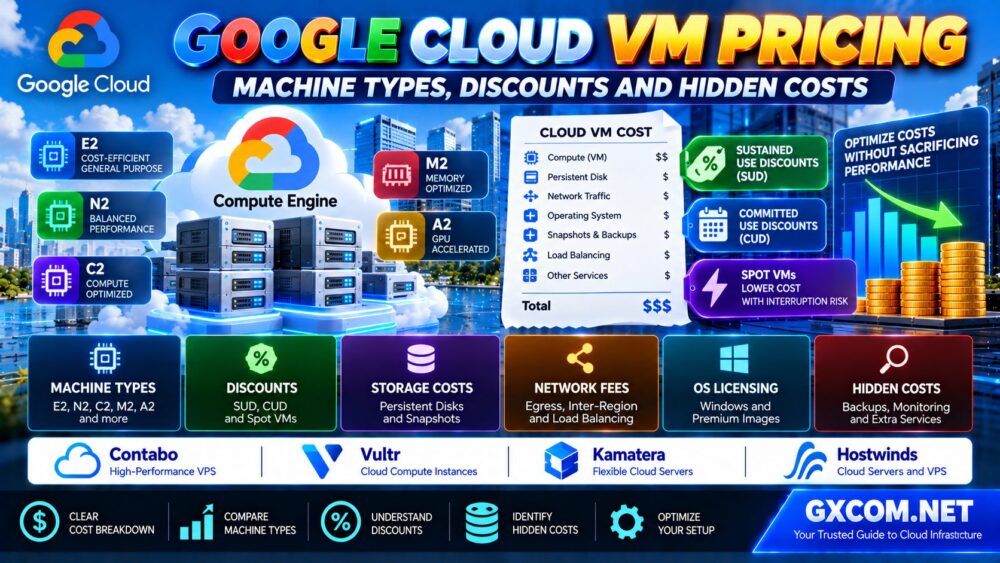
Google Cloud VM pricing can be confusing when you are comparing machine types, operating systems, storage, network traffic, and available discounts. The advertised cost of a virtual machine is only one part of the total bill.
Google Compute Engine offers multiple VM families for different workloads, including general-purpose web hosting, memory-intensive applications, compute-heavy processing, and specialized infrastructure. Choosing the right machine type can improve performance and control spending, but a poor configuration can create unnecessary costs.
This guide explains how Google Cloud VM pricing works, which machine types to consider, how sustained use and committed use discounts differ, and which hidden costs can increase your monthly cloud bill.
Google Cloud VM Pricing: Quick Overview
| Cost Component | What Determines the Cost? | What to Check |
|---|---|---|
| VM compute | Machine family, size, Region and running time | CPU and memory requirements |
| Operating system | Selected image and applicable licenses | Windows and premium image charges |
| Persistent storage | Disk type, capacity and provisioned performance | Disk sizing and I/O requirements |
| Snapshots | Stored backup data and applicable policies | Retention and recovery needs |
| Network traffic | Transfer direction, destination and architecture | Internet egress and inter-zone traffic |
| External IP | Address type and usage | Required public connectivity |
| Load balancing | Selected service and usage | Availability architecture |
| Discounts | Eligible usage and purchasing model | SUD, CUD and Spot eligibility |
Quick answer: The real cost of a Google Cloud VM is the combined expense of compute, storage, networking, licensing, backups and supporting services after applicable discounts.
1. How Does Google Cloud VM Pricing Work?
Google Compute Engine charges for virtual machine resources according to the selected configuration and usage.
Important pricing variables include:
- Machine family and machine type
- Number of virtual CPUs
- Memory allocation
- Google Cloud Region
- Operating system image
- Instance running time
- Attached storage
- Network usage
- Purchasing model and discounts
For eligible VM compute resources, Google Cloud generally uses per-second billing with a minimum charge period. However, other services may have different billing rules.
Do not assume that stopping a VM removes every charge. Persistent disks, reserved resources and other retained services may continue to incur costs.
2. Google Cloud Machine Types Explained
Compute Engine organizes VM configurations into machine families and series.
Each family targets different performance characteristics and workload requirements.
General-Purpose VMs
General-purpose machine families are designed for workloads that need a balance of processing power and memory.
Examples include supported E2, N-series and newer general-purpose machine series.
Common workloads include:
- Business websites
- Application servers
- Development environments
- Small and medium databases
- General cloud infrastructure
For many web applications, general-purpose machines are a practical starting point.
Compute-Optimized VMs
Compute-optimized configurations prioritize processing performance for demanding workloads.
They may be appropriate for scientific computing, selected batch workloads, CPU-intensive services and high-performance applications.
These configurations are not automatically more cost-effective for ordinary websites.
Memory-Optimized VMs
Memory-optimized machines provide larger memory capacity for workloads such as in-memory databases and memory-intensive enterprise applications.
They can be expensive when the application does not actually need the additional RAM.
Storage and Specialized Machines
Some machine families are designed for specialized processing, high-performance storage or accelerator-based workloads.
Availability and pricing vary by machine series and Region.
For a normal website, selecting specialized hardware without a clear performance requirement may increase spending unnecessarily.
3. E2 vs N2 vs Newer Machine Families
One common Google Cloud pricing question is whether an E2 instance is sufficient or a higher-performance machine family is worth the additional cost.
| Machine Category | Primary Consideration | Typical Evaluation |
|---|---|---|
| E2 | Cost-efficient general-purpose compute | Small websites and modest application workloads |
| N2 / N2D | Balanced performance with different processor options | Production application servers |
| Newer general-purpose series | Modern CPU and platform characteristics | Performance-sensitive applications |
| Compute-optimized series | Higher processing requirements | CPU-intensive applications |
| Memory-optimized series | Large memory capacity | In-memory and enterprise workloads |
The best machine type depends on application performance, software compatibility, and the complete pricing estimate.
A newer machine may deliver more useful work per unit of cost, even when its hourly price is higher.
Conversely, an E2 configuration may be sufficient for a lightweight application that does not require specialized performance.
4. How to Calculate Google Cloud VM Monthly Cost
A practical monthly estimate should include all resources required to operate the application.
Estimated monthly cost = VM compute + storage + operating system licenses + network charges + backups + supporting services – applicable discounts.
Step 1: Select the Machine Type
Choose the CPU and memory configuration based on workload requirements.
Step 2: Select the Region
VM prices and available machine types may differ by location.
Choose a Region based on latency, compliance, availability and cost.
Step 3: Estimate Running Hours
A production VM running continuously will have different compute usage from a development VM that operates only during business hours.
Step 4: Add Storage
Include boot disks, additional persistent disks and required performance characteristics.
Step 5: Include Network Traffic
Estimate outbound internet traffic and other potentially billable data transfers.
Step 6: Add Supporting Services
Include backup, monitoring, load balancing, database services and relevant software licenses.
Step 7: Apply Eligible Discounts
Use the correct purchasing model and discount eligibility for the selected resources.
For the most accurate estimate, use the official Google Cloud Pricing Calculator and verify the current price list.

5. Sustained Use Discounts: Automatic Savings for Eligible VMs
Google Cloud offers sustained use discounts, commonly called SUDs, for eligible Compute Engine resources.
These discounts reward sustained usage over a billing month.
For qualifying resources, the effective discount increases as monthly usage accumulates.
However, sustained use discounts do not apply to every machine series.
They also do not stack with committed use discounts on the same eligible resource usage.
When Sustained Use Discounts Make Sense
SUDs can be useful when:
- You run eligible VMs for substantial portions of the month.
- You do not want to make a long-term commitment.
- Your workload is relatively stable.
- Your selected machine series supports the discount.
Before relying on SUDs, verify eligibility for the exact machine family and configuration.
6. Committed Use Discounts: One-Year vs Three-Year Commitments
Committed use discounts, or CUDs, provide discounted pricing for eligible resources in exchange for a contractual commitment.
Google Cloud offers different commitment models, including resource-based and spend-based arrangements.
Commitment periods commonly include one-year and three-year options.
Resource-Based Commitments
Resource-based commitments are associated with eligible resource quantities and applicable configuration conditions.
They can suit predictable workloads with stable infrastructure requirements.
Spend-Based Commitments
Supported spend-based commitments apply to eligible consumption under the applicable purchasing terms.
They may provide flexibility across qualifying resources, but the exact scope must be reviewed before purchasing.
When Should You Buy a Commitment?
Consider CUDs when:
- Your workload has predictable long-term demand.
- You understand the eligible resource coverage.
- You have already right-sized your infrastructure.
- You expect to use the committed capacity or spend.
- Your organization can accept the commitment period.
Do not purchase a commitment simply because the advertised discount appears attractive.
Unused commitments can reduce or eliminate the expected financial benefit.
7. Spot VMs: Lower Prices With Interruption Risk
Google Cloud Spot VMs provide discounted access to spare compute capacity.
However, Spot resources can be preempted when Google Cloud needs the capacity.
Spot VMs are generally appropriate for:
- Batch processing
- Fault-tolerant worker jobs
- Restartable data processing
- Development and testing
- Distributed workloads with checkpointing
They are less appropriate for a single critical production server that cannot tolerate interruption.
Applications using Spot VMs should support retries, checkpointing, durable storage and graceful recovery.
Important: Spot pricing should not be treated as guaranteed long-term production capacity.
8. Hidden Cost: Persistent Disks and Storage
Persistent storage is one of the most frequently overlooked parts of Google Cloud VM pricing.
Compute Engine supports different persistent disk and storage options with different pricing and performance characteristics.
Costs can depend on:
- Provisioned disk capacity
- Disk type
- Provisioned IOPS and throughput where applicable
- Storage location
- Snapshot storage
- Additional attached volumes
A VM that is stopped may no longer generate ordinary running compute charges, but its persistent disks can remain billable.
Avoid Oversized Disks
Estimate actual application storage requirements and expected growth.
Do not provision excessive capacity without a clear reason.
Choose the Right Performance Tier
High-performance storage is useful when an application needs it, but unnecessary performance provisioning can increase costs.
Review Unused Storage
Identify unattached disks and obsolete snapshots.
Verify backup and recovery requirements before deleting any resource.
9. Hidden Cost: Network Egress and Data Transfer
Network usage can significantly affect the total cost of a cloud application.
Potential charges may include:
- Outbound internet traffic
- Traffic between certain Google Cloud locations
- Cross-zone or cross-region transfers
- Load balancing services
- External IP resources
- Network processing through additional services
Exact charges depend on the network path and selected services.
For traffic-heavy websites, a low compute price may not translate into a low overall hosting bill.
Use realistic monthly data transfer estimates and verify the applicable Google Cloud network pricing.
10. Hidden Cost: Windows and Premium Operating Systems
Operating system selection can change the cost of a Google Cloud VM.
Many standard Linux images do not carry the same licensing charges as premium operating system images.
Windows Server and certain commercial software images may introduce additional licensing costs.
Before deploying a Windows VM, review:
- Compute charges
- Operating system license charges
- Database licensing
- Remote access requirements
- Backup and security software
For some workloads, software licensing can materially change the economics of a VM deployment.
11. Hidden Cost: Snapshots, Backups and Monitoring
Production systems need backup and monitoring, but these services should be included in the budget from the beginning.
Snapshots may generate storage charges based on applicable usage and retention policies.
Monitoring, logging and related operational services may also have usage-based charges beyond included allowances.
Review:
- Snapshot frequency
- Retention duration
- Recovery objectives
- Log volume
- Monitoring data retention
- Alerting requirements
Reducing backup spending should never compromise essential recovery capabilities.
12. How to Reduce Google Cloud VM Costs
Effective VM cost optimization combines resource selection, workload measurement and operational controls.
Right-Size CPU and Memory
Review CPU utilization, memory pressure, disk performance and application response times.
Downsize only after confirming that the workload will retain sufficient performance headroom.
Stop Idle Development VMs
Schedule eligible nonproduction instances to stop when they are not needed.
Remember that retained storage and other resources may still generate charges.
Use Discounts Appropriately
Compare eligible SUDs, CUDs and Spot pricing based on workload stability and interruption tolerance.
Optimize Storage
Review disk type, capacity, snapshot retention and unused volumes.
Monitor Network Charges
Identify high-volume outbound traffic and inefficient data transfer patterns.
Review the Full Architecture
For applications with variable traffic, compare the cost of continuously running VMs with alternative deployment models.
Our Google Cloud Run vs Compute Engine Comparison explains when a managed container platform may be a better fit than a traditional virtual machine.
13. When Should You Compare Alternative Cloud VPS Providers?
Google Cloud offers extensive infrastructure capabilities, but some applications do not require its full ecosystem.
For straightforward web servers, development environments and portable applications, alternative cloud VPS providers may be worth evaluating.
Contabo is relevant when comparing bundled VPS resources for stable workloads.
Vultr is another candidate for evaluating cloud compute configurations, regional availability and infrastructure options.
Neither platform should be assumed to provide every Google Cloud service or feature.
For a wider infrastructure comparison, read our Best Cloud Hosting Solutions Guide.
14. Google Cloud vs Alternative VM Hosting
For workloads that do not depend heavily on Google Cloud-specific integrations, comparing other infrastructure models can help clarify total cost.
Kamatera may be worth evaluating when the workload requires configurable cloud server resources and supported operating system choices.
Hostwinds is another candidate for comparing cloud hosting configurations, management options and support requirements.
These services should be compared using equivalent workloads rather than advertised vCPU and RAM specifications alone.
| Provider | Primary Evaluation Angle | Important Consideration |
|---|---|---|
| Google Compute Engine | Flexible Google Cloud infrastructure | Compute, storage and network billing |
| Contabo | Bundled VPS resources | Plan limits and workload suitability |
| Vultr | Cloud compute alternatives | Instance options and regions |
| Kamatera | Configurable cloud servers | Resource selection and management |
| Hostwinds | Cloud hosting and support options | Configuration and support scope |
Include application migration, backups, network transfer, licensing and administration time in the comparison.
Our Cloud Hosting vs VPS Comparison explains the broader differences between cloud infrastructure and conventional VPS hosting.
15. Google Cloud VM Pricing: Which Option Is Best for Your Workload?
| Workload | Starting Point to Evaluate |
|---|---|
| Small business website | Appropriately sized general-purpose VM |
| Development server | Low-cost eligible VM with scheduled shutdown |
| Stable production application | Right-sized VM with applicable discounts |
| Fault-tolerant batch processing | Spot VMs |
| CPU-intensive processing | Compute-optimized machine family |
| Memory-intensive database | Memory-optimized configuration |
| Intermittent containerized API | Compare Cloud Run with Compute Engine |
| Portable, predictable VPS workload | Compare Google Cloud with third-party VPS providers |
The best choice depends on application requirements, not simply on which machine type has the lowest listed price.

For developers evaluating managed containers instead of virtual machines, our Docker on Google Cloud Run Tutorial explains how to deploy and secure a containerized application without managing a traditional VM.
16. Common Google Cloud VM Pricing Mistakes
- Comparing only the advertised VM compute rate.
- Ignoring persistent disk charges.
- Assuming every machine series receives sustained use discounts.
- Purchasing commitments before right-sizing resources.
- Using Spot VMs for applications that cannot tolerate interruption.
- Forgetting Windows and premium image licensing.
- Underestimating network egress.
- Keeping unnecessary snapshots and unused disks.
- Assuming stopped VMs have no remaining charges.
- Comparing VPS providers without accounting for operational differences.
Frequently Asked Questions
How much does a Google Cloud VM cost per month?
Monthly cost depends on machine type, Region, running hours, storage, network traffic, licensing and applicable discounts. Use the official Google Cloud Pricing Calculator for a workload-specific estimate.
What is the cheapest Google Cloud VM?
Entry-level shared-core or cost-efficient general-purpose configurations may be among the lowest-cost options, but availability, eligibility and pricing vary. The cheapest VM may not provide sufficient performance for your application.
Are Google Cloud VMs billed hourly or monthly?
Eligible Compute Engine VM compute resources generally use per-second billing with a minimum billing period. Monthly costs reflect accumulated usage and other applicable charges.
Does Google Cloud offer sustained use discounts?
Yes. Eligible Compute Engine resources can receive automatic sustained use discounts based on qualifying monthly usage. Not every machine family is eligible.
What is the difference between SUD and CUD?
Sustained use discounts reward eligible usage during a billing month without a separate long-term commitment. Committed use discounts require an eligible one-year or three-year commitment under the applicable terms.
Are Spot VMs cheaper than regular VMs?
Spot VMs can offer discounted compute pricing, but they may be preempted. They are best suited to workloads that can tolerate interruption and restart.
Do stopped Google Cloud VMs cost money?
Stopped VMs generally stop accruing ordinary running compute charges, but persistent disks, reserved resources and other retained services may continue to generate costs.
Does Google Cloud charge for outbound bandwidth?
Many outbound network transfers are billable, depending on the destination and service. Check current network pricing for the exact architecture.
Is Google Cloud cheaper than traditional VPS hosting?
Not necessarily. Traditional VPS plans may have different resource bundles and billing structures, while Google Cloud offers broader infrastructure services. Compare total cost, performance and management responsibilities.
Final Verdict: Calculate Total Cost Before Choosing a Google Cloud VM
Google Cloud VM pricing depends on more than CPU and memory.
Machine family, storage, operating system licensing, network traffic, backup requirements and discount eligibility all influence the final bill.
For predictable workloads, appropriate committed use discounts may improve long-term economics. For eligible sustained workloads, automatic discounts may reduce costs without a separate commitment. For fault-tolerant jobs, Spot VMs can be worth considering.
For portable applications, Contabo, Vultr, Kamatera and Hostwinds are additional infrastructure providers worth evaluating, but their services should not be treated as direct equivalents to the complete Google Cloud platform.
MACHINE TYPE → RESOURCE USAGE → DISCOUNTS → STORAGE → NETWORK → TOTAL COST.
The best Google Cloud VM is not simply the one with the lowest hourly rate. It is the configuration that delivers the required performance and reliability at a sustainable total operating cost.