Choosing between NVIDIA H100, H200, and B200 GPU servers is an important infrastructure decision for organizations running large language models, AI training pipelines, and high-throughput inference services. Although all three accelerators target demanding data center workloads, they differ significantly in memory capacity, bandwidth, architecture, and server deployment requirements.
The H100 vs H200 vs B200 comparison is not simply about choosing the newest GPU. An H100 server may deliver better rental value for a workload that fits comfortably within its memory. The H200 offers substantially more HBM capacity and bandwidth, while the Blackwell-based B200 introduces a newer architecture designed for demanding AI computation.
This guide compares verified GPU specifications, explains which workloads benefit from each accelerator, and shows how to evaluate GPU server rental value using real application performance rather than advertised hardware specifications alone.
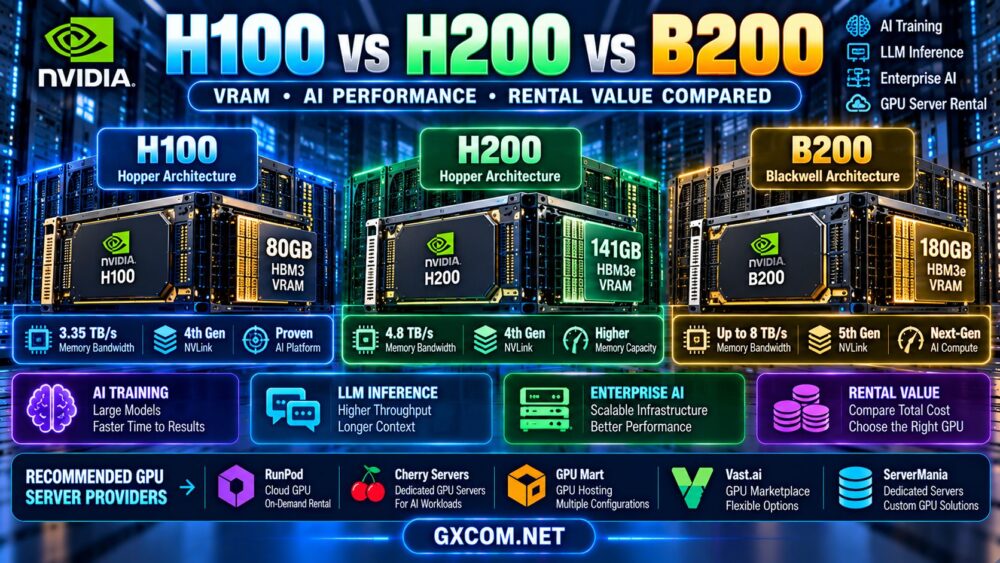
NVIDIA H100 vs H200 vs B200: Quick Comparison
For a meaningful hardware comparison, the following table focuses on the H100 SXM, H200 SXM, and NVIDIA HGX B200 SXM configurations.
| Specification | NVIDIA H100 SXM | NVIDIA H200 SXM | NVIDIA B200 SXM |
|---|---|---|---|
| Architecture | Hopper | Hopper | Blackwell |
| GPU memory | 80GB HBM3 | 141GB HBM3e | 180GB HBM3e |
| Memory bandwidth | 3.35TB/s | 4.8TB/s | Up to 8TB/s |
| NVLink generation | Fourth generation | Fourth generation | Fifth generation |
| Primary advantage | Established Hopper compute platform | Higher memory capacity and bandwidth | Newer architecture and advanced AI compute |
| Potential best fit | Cost-conscious training and inference | Memory-intensive LLM workloads | Advanced training and high-throughput inference |
Sources: NVIDIA H100 and H200 product specifications and NVIDIA HGX reference architecture documentation. Specifications are for the identified form factors, not every product variant.
These figures describe hardware capabilities, not guaranteed performance or rental availability. Actual results depend on the server platform, GPU allocation, model, precision, software, and workload.
NVIDIA H100: A Mature Hopper GPU for AI Servers
The NVIDIA H100 is based on the Hopper architecture and remains a relevant accelerator for AI training, large language model inference, and high-performance computing.
The H100 SXM provides 80GB of HBM3 memory and 3.35TB/s of memory bandwidth. It also supports Tensor Core operations designed for AI workloads.
Why Choose an H100 Server?
- Established support across major CUDA-based AI software stacks.
- Suitable for models and training configurations that fit within available GPU memory.
- Useful for FP16, BF16, and supported FP8 workloads.
- Potentially attractive when the rental rate is sufficiently lower than newer alternatives.
- Available in different server configurations, subject to provider inventory.
The main limitation is memory capacity. An 80GB accelerator may require more aggressive quantization, reduced batch sizes, or additional GPUs for workloads that exceed its available memory.
Nevertheless, an H100 can offer strong value when the application is compute-bound rather than memory-capacity-bound.
NVIDIA H200: More VRAM and Memory Bandwidth
The NVIDIA H200 uses the Hopper architecture but significantly expands memory capacity compared with the H100 SXM.
With 141GB of HBM3e memory and 4.8TB/s of bandwidth, the H200 is particularly relevant for large language models, memory-intensive inference, and applications where memory bandwidth limits throughput.
H200 vs H100: What Changes?
Comparing the stated SXM specifications:
- H100 memory: 80GB.
- H200 memory: 141GB.
- Memory capacity increase: approximately 76%.
- H100 memory bandwidth: 3.35TB/s.
- H200 memory bandwidth: 4.8TB/s.
- Memory bandwidth increase: approximately 43%.
These improvements can reduce the need for model partitioning or aggressive quantization in some workloads.
However, H200 is not a completely new compute architecture. Applications that are not limited by memory capacity or bandwidth may see a smaller benefit than the headline memory specifications suggest.
When Is H200 Worth the Rental Premium?
An H200 server becomes more attractive when:
- The model does not fit comfortably within H100 memory.
- Larger inference batches improve useful throughput.
- Longer contexts or higher concurrency increase memory pressure.
- Memory bandwidth is a meaningful performance bottleneck.
- Reducing multi-GPU model partitioning simplifies deployment.
Before paying more, test whether the larger memory capacity translates into lower cost per completed inference request or training job.
NVIDIA B200: Blackwell Architecture for Advanced AI
The NVIDIA B200 belongs to the Blackwell generation and introduces a newer architecture for large-scale AI computing.
In NVIDIA HGX B200 configurations, each GPU provides 180GB of HBM3e memory and up to 8TB/s of memory bandwidth.
Blackwell also introduces newer Tensor Core capabilities and fifth-generation NVLink technology, making the platform relevant for demanding training and inference systems.
B200 vs H200: The Main Advantages
- Higher GPU memory capacity: 180GB versus 141GB.
- Higher peak memory bandwidth: up to 8TB/s versus 4.8TB/s.
- Newer Blackwell compute architecture.
- Support for advanced low-precision AI operations in compatible software.
- High-bandwidth GPU interconnects in supported systems.
These improvements may benefit large-scale model training, high-throughput inference, and memory-intensive workloads.
However, a B200 server is not automatically the best economic choice. The GPU must deliver enough additional useful throughput to justify its rental premium and any differences in server configuration.
Why Server Architecture Matters for B200
Many B200 deployments are built around integrated multi-GPU platforms rather than simple single-card server configurations.
When evaluating a rental offer, determine whether the product provides an entire GPU node, an individual allocated GPU, a partitioned environment, or another access model.
Also confirm the CPU, system RAM, NVMe storage, networking, and GPU interconnect topology.
H100 vs H200 vs B200 for LLM Inference
LLM inference performance depends on model size, quantization, batch size, context length, concurrency, and the inference framework.
For smaller models that fit comfortably within H100 memory, upgrading to H200 or B200 may not provide proportional economic benefits.
For larger models, additional VRAM can reduce the need for offloading or partitioning. Higher memory bandwidth may also improve token-generation throughput when memory movement is a bottleneck.
H100 for Cost-Sensitive Inference
H100 can be attractive when the model fits in available memory and the rental price is competitive.

It is especially worth evaluating for established inference stacks that already perform well on Hopper GPUs.
H200 for Larger Models and Higher Concurrency
H200 provides more memory headroom for model weights, KV cache, and concurrent requests.
This can be valuable when memory capacity constrains the number of users or the maximum practical context length.
B200 for Advanced High-Throughput Deployments
B200 can be attractive when the software supports its architecture and the application benefits from increased compute capability, bandwidth, and memory capacity.
Production decisions should use measured throughput, latency, and infrastructure cost under representative traffic.
For a broader explanation of serving performance and GPU utilization, read our AI inference server hosting guide.
Which GPU Is Better for AI Training?
Training workloads place different demands on GPU infrastructure from inference workloads.
Training performance depends on numerical precision, activation memory, optimizer states, batch size, communication overhead, and data pipeline efficiency.
H100 for Established Training Workflows
H100 can be suitable for supported AI training frameworks, particularly when the model and optimizer configuration fit within the available memory budget.
It can also be attractive for organizations optimizing training cost rather than seeking the newest hardware.
H200 for Memory-Constrained Training
The additional memory of H200 may enable larger micro-batches, longer sequences, or reduced model sharding in some training configurations.
Its higher memory bandwidth can also help workloads sensitive to data movement.
B200 for Large-Scale AI Training
B200 is relevant when training workloads can exploit Blackwell's architecture and supported precision formats.
Large distributed training systems must also account for network fabric, GPU topology, framework support, and communication overhead.
For adapter training rather than full-model training, see our LoRA and QLoRA GPU hardware requirements guide.
Multi-GPU H100, H200 and B200 Server Configurations
When a workload exceeds the memory or performance of one accelerator, a multi-GPU server may be required.
However, the total GPU count is not the only consideration.
Important questions include:
- How many physical GPUs are allocated?
- Are they connected through NVLink or another supported topology?
- Does the server include NVSwitch?
- How much system RAM and CPU capacity is available?
- What networking is provided for multi-node training?
- Does the application benefit from tensor, pipeline, or data parallelism?
- Are GPUs dedicated, partitioned, or shared?
Eight GPUs do not automatically deliver eight times the performance of one GPU.
Communication overhead, synchronization, memory access, and software efficiency can reduce scaling performance.
Our multi-GPU server hosting comparison explains PCIe, NVLink, NVSwitch, and scaling costs in greater detail.
H100 vs H200 vs B200 Rental Pricing: What Determines Value?
GPU rental rates vary by provider, accelerator allocation, region, server configuration, billing model, and availability.
Rather than publishing fixed prices that can quickly become outdated, buyers should compare current quotations against measurable workload results.
Hourly GPU Rental
Hourly GPU rental can suit development, experimentation, temporary training, and workloads with irregular demand.
Before ordering, confirm the minimum billing interval, resource state charges, storage costs, and whether the GPU is exclusively allocated.
Monthly GPU Rental
Monthly rental may be worth evaluating for continuous AI inference, scheduled training pipelines, and predictable workloads.
However, a monthly contract is not necessarily cheaper if the hardware remains unused for much of the billing period.
Dedicated Multi-GPU Server Rental
Dedicated servers can provide a known hardware configuration and greater control over the operating environment.
Check the exact accelerator model, GPU count, memory topology, network bandwidth, support arrangements, and contract duration.
For a detailed comparison of rental billing structures, read our cheap GPU server rental pricing guide.
How to Calculate GPU Rental Value
The best rental value depends on the total cost of completing the intended workload.
A simple formula is:
Cost per completed job = billable infrastructure rate × job duration + applicable additional charges
Consider a hypothetical comparison:
| GPU Server | Illustrative Hourly Rate | Job Duration | Compute Cost |
|---|---|---|---|
| H100 configuration | $2.00 | 10 hours | $20.00 |
| H200 configuration | $2.80 | 7 hours | $19.60 |
| B200 configuration | $4.00 | 4 hours | $16.00 |
These figures are hypothetical calculations, not current supplier prices or measured GPU benchmarks. They assume the same completed workload and exclude additional charges.
The example demonstrates why a higher hourly rate can sometimes produce a lower total compute cost.
It does not establish that B200 will complete real workloads at the illustrated speed.
Compare Inference Cost per Output
For inference, consider cost per million generated tokens, cost per completed request, or cost at a required latency and throughput target.
Include concurrency, context length, and any capacity reserved to meet service-level requirements.
Compare Training Cost per Completed Run
For training, measure the time and cost required to complete the same training objective.
Where possible, compare time to target evaluation quality rather than only raw training tokens per second.
Include Hidden Infrastructure Costs
Storage, data transfer, software licensing, checkpoint retention, management, and idle resources can affect total cost.
A low hourly GPU quote may be less attractive after these charges are included.
Where to Rent NVIDIA H100, H200 or B200 GPU Servers
Different hosting providers serve different AI infrastructure needs. Some focus on flexible cloud GPU capacity, while others specialize in dedicated servers or configurable hardware.
The following providers are relevant candidates for evaluation. Inclusion does not mean that every provider currently offers all three GPU models.
| Provider | Infrastructure Focus | What to Verify |
|---|---|---|
| RunPod | Cloud GPU computing | Available GPU model, allocation, billing and storage |
| Cherry Servers | Dedicated GPU infrastructure | GPU model, server topology, contract and support |
| GPU Mart | GPU-oriented hosting | Exact accelerator, VRAM, virtualization and OS |
| Vast.ai | GPU compute marketplace | Listing-specific hardware, host terms and persistence |
| ServerMania | Dedicated and custom server infrastructure | Current GPU-equipped configurations and availability |
RunPod: Flexible AI GPU Computing
RunPod is relevant for developers comparing cloud GPU compute options for model training and inference.
Check the currently available GPU configurations, memory, instance type, storage persistence, and billing conditions.
When comparing H100, H200, or B200 offerings, confirm that the exact selected configuration is available rather than relying on general platform descriptions.
Cherry Servers: Dedicated GPU Infrastructure
Cherry Servers is worth evaluating for dedicated GPU server requirements, particularly when hardware isolation and predictable server configuration are important.
Review the current accelerator options, GPU count, CPU, RAM, storage, networking, support, and provisioning conditions.
For large multi-GPU deployments, verify the interconnect topology and whether the quoted system meets the intended training architecture.
GPU Mart: GPU Server Specifications
GPU Mart can be considered when researching GPU-oriented hosting configurations.
Confirm the exact GPU model, available memory, operating system, drivers, and whether the plan provides dedicated or virtualized GPU resources.
Do not assume that every GPU hosting product includes an H100, H200, or B200 accelerator.
Vast.ai: Marketplace GPU Rental
Vast.ai offers marketplace-style GPU compute listings that may vary in hardware, resource allocation, storage, networking, and host conditions.
For high-value training jobs, consider reliability, checkpoint persistence, interruption exposure, and total cost alongside the advertised rate.
ServerMania: Dedicated Server Procurement
ServerMania can be evaluated for dedicated infrastructure or custom server discussions.
Confirm current GPU product availability and request a detailed specification before treating a quoted system as suitable for H100, H200, or B200 workloads.
Standard dedicated servers should not be assumed to include data center GPUs.
H100 vs H200 vs B200: Which Should You Choose?
| Buying Scenario | Starting Recommendation | Reason |
|---|---|---|
| Model fits comfortably within 80GB | Evaluate H100 first | Potentially sufficient without paying for unused memory |
| Memory-constrained LLM inference | Evaluate H200 | 141GB memory and higher bandwidth |
| Advanced high-throughput AI workloads | Evaluate B200 | Newer architecture and greater compute potential |
| Short experimental jobs | Compare available hourly configurations | Flexibility may matter more than ownership model |
| Continuous production workloads | Compare monthly and dedicated options | Utilization and predictable capacity influence value |
| Large distributed training | Compare complete multi-GPU systems | Interconnect, memory and networking are critical |
These are starting points, not universal performance rankings. The best choice depends on the model, precision, software stack, and actual rental terms.

GPU Server Buying Checklist
- Confirm the GPU variant: H100 SXM, H100 PCIe, H100 NVL, H200 SXM, H200 NVL, or B200 system configuration.
- Verify physical memory: Check usable VRAM and whether the allocation is dedicated or partitioned.
- Measure workload requirements: Include model weights, KV cache, activations, and optimizer states as applicable.
- Check precision support: Confirm the software can use the intended GPU capabilities.
- Inspect multi-GPU topology: Verify NVLink, NVSwitch, PCIe and network connectivity.
- Review CPU and system RAM: Avoid host-side bottlenecks.
- Check storage: Include model checkpoints, datasets, persistent volumes and backups.
- Compare billing terms: Hourly, monthly, reserved and dedicated arrangements.
- Account for hidden charges: Include traffic, software licenses and administration.
- Benchmark the actual workload: Compare throughput, latency and cost per completed job.
Frequently Asked Questions
Is NVIDIA H200 better than H100 for LLM inference?
H200 offers more GPU memory and higher memory bandwidth than H100 SXM, which can benefit memory-intensive inference. However, actual performance improvements depend on the model, batch size, context length and inference framework.
How much VRAM does the NVIDIA B200 have?
The NVIDIA HGX B200 SXM configuration provides 180GB of HBM3e memory per GPU. Other Blackwell products and server configurations should not be assumed to have identical specifications.
Is B200 always faster than H200?
B200 provides a newer architecture and higher peak capabilities in several areas, but application performance depends on software optimization, precision, model characteristics and server configuration. Benchmarks should use comparable workloads.
Is H100 still worth renting?
Yes, H100 can be a cost-effective choice when the workload fits its memory and the rental price is attractive relative to newer hardware.
Can one H200 GPU run a 70B model?
Some quantized 70B-class inference configurations may fit within a 141GB GPU, depending on weight precision, KV cache, runtime overhead, context length and concurrency. A 70B model stored entirely in 16-bit precision requires approximately 140 decimal GB for weights alone, leaving insufficient practical headroom for many single-GPU deployments.
Does B200 require NVLink?
GPU-to-GPU communication requirements depend on the workload and deployment architecture. NVIDIA HGX B200 systems use high-bandwidth interconnects, but the application determines how much benefit they provide.
Which GPU has the best rental value?
The best rental value is the configuration that meets performance and reliability requirements at the lowest total cost per useful output. Hourly rental price alone is insufficient.
Should I rent H100, H200 or B200 for AI training?
Start with the training method, model size, GPU memory requirements, precision support and throughput target. Then compare complete server configurations and current rental quotations.
Final Verdict: Choose H100, H200 or B200 by Workload Value
The NVIDIA H100 vs H200 vs B200 decision should be based on application requirements rather than GPU generation alone.
H100 remains relevant for established AI workloads where 80GB of GPU memory is sufficient and rental economics are favorable.
H200 is particularly attractive when larger memory capacity and higher bandwidth address real inference or training bottlenecks.
B200 offers a newer architecture, greater memory capacity, and advanced AI computing capabilities for demanding workloads that can use them effectively.
RunPod, Cherry Servers, GPU Mart, Vast.ai, and ServerMania provide different infrastructure procurement paths to investigate, subject to exact product availability and current terms.
Before committing to a server, confirm the accelerator variant, allocation method, software compatibility, interconnect topology, billing conditions, and measured workload performance.
MODEL REQUIREMENTS → GPU VRAM → MEMORY BANDWIDTH → COMPUTE PERFORMANCE → SERVER TOPOLOGY → RENTAL COST → REAL WORKLOAD VALUE
The best NVIDIA GPU server is the one that delivers the required AI performance at a sustainable total cost.