Cheap GPU server rental can make AI development, machine learning, 3D rendering, and other GPU-intensive workloads more accessible without purchasing expensive hardware. However, choosing between hourly and monthly GPU hosting is not as simple as comparing advertised prices.
An hourly GPU instance may appear inexpensive but become costly when left running continuously. A monthly dedicated GPU server may offer better value for sustained workloads, yet become wasteful when the hardware sits idle. Storage, data transfers, software licensing, setup fees, and interruptions can further change the total cost.
This guide compares hourly vs monthly GPU server rental, explains how to calculate break-even usage, and examines infrastructure options from RunPod, Cherry Servers, GPU Mart, Vast.ai, and DediXLAB.
What Is Cheap GPU Server Rental?
GPU server rental allows users to access graphics processing hardware hosted by a third-party provider without buying, installing, or maintaining the physical accelerator themselves.
Depending on the service, customers may rent an entire dedicated GPU server, a cloud instance with exclusive GPU access, or a virtualized GPU environment.
These products are not interchangeable. A GPU cloud container, GPU VPS, and dedicated bare-metal server may differ in operating system access, isolation, storage persistence, networking, and management responsibilities.
For budget-conscious buyers, the goal should be to find the lowest effective cost for a completed workload, rather than simply selecting the lowest advertised hourly rate.
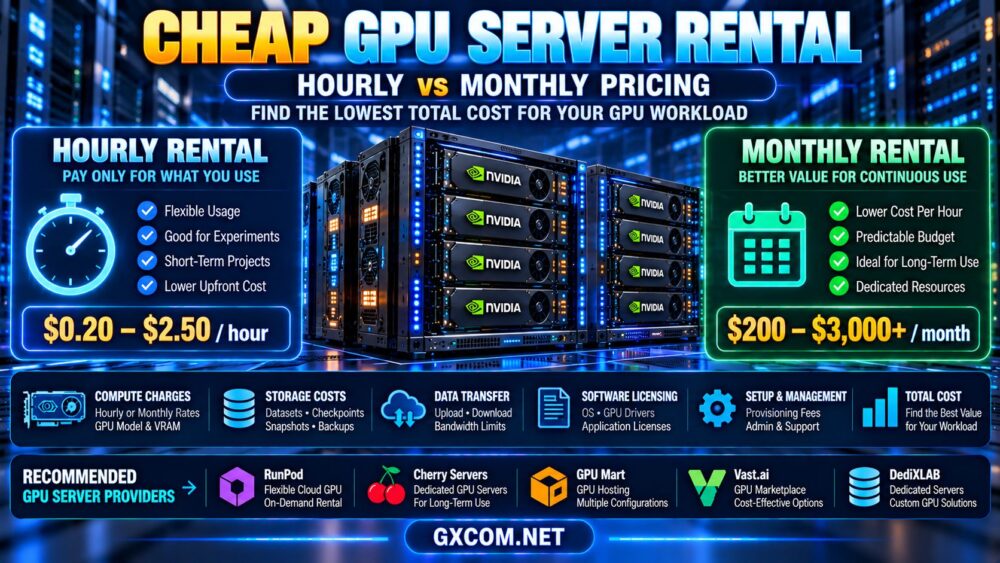
Hourly vs Monthly GPU Server Rental: Key Differences
The billing model affects flexibility, financial predictability, and the consequences of unused capacity.
| Factor | Hourly GPU Rental | Monthly GPU Rental |
|---|---|---|
| Billing basis | Billable usage time | Recurring monthly commitment |
| Best suited for | Occasional or variable workloads | Regular or continuous workloads |
| Idle resource cost | May continue while resources are running | Monthly charge generally remains payable |
| Flexibility | Often easier to scale usage up or down | Depends on contract and upgrade terms |
| Cost predictability | Depends on actual billable hours | Usually more predictable base compute cost |
| Hardware availability | Depends on current instance capacity | Depends on provisioning and reservation terms |
| Additional expenses | Storage, transfers, reserved resources | Licensing, setup, traffic, management |
Neither model is universally cheaper. The better choice depends on workload duration, GPU performance, utilization, and the complete billing terms.
When Is Hourly GPU Rental Cheaper?
Hourly GPU hosting can be cost-effective when GPU demand is temporary, unpredictable, or concentrated into short periods.
AI Development and Experimentation
Developers testing model architectures, evaluating inference performance, or experimenting with GPU software may only need accelerated computing for a limited number of hours.
Hourly infrastructure can help avoid paying for an entire month of unused GPU capacity.
Occasional 3D Rendering
Designers and studios with irregular rendering projects can rent GPU compute for specific jobs instead of maintaining permanently allocated hardware.
The key comparison is cost per completed rendering project, including setup, file transfer, and output storage.
Short-Term Model Fine-Tuning
LoRA and QLoRA experiments can sometimes be completed using temporary GPU instances, depending on model size, memory requirements, and training duration.
RunPod and Vast.ai are relevant platforms to evaluate for flexible GPU compute, although their deployment models, available hardware, and billing conditions differ.
Before selecting a GPU, estimate the actual memory requirements using our LLM fine-tuning GPU requirements guide.
Important: Stopped Does Not Always Mean Free
Some providers stop compute billing when an instance is properly terminated or stopped under supported conditions. However, persistent storage, reserved resources, or other services may continue generating charges.
Always verify what happens to data and billing when the GPU instance is no longer running.
When Is Monthly GPU Rental More Cost-Effective?
Monthly GPU rental becomes attractive when workloads run regularly and the infrastructure remains highly utilized.
Continuous AI Inference
An AI application serving requests throughout the day may require persistent GPU availability.
For a stable workload, a monthly or dedicated hosting arrangement may simplify capacity planning and reduce the uncertainty associated with usage-based billing.
However, compare the monthly commitment against actual throughput and expected request volume.
Production Rendering and Media Processing
Studios processing large volumes of frames, videos, or graphics tasks may benefit from consistent access to GPU resources.
Dedicated capacity can also simplify scheduling, provided the hardware meets the application's performance requirements.
Recurring Enterprise GPU Workloads
Organizations running regular analytics, model training, or internal AI services may prefer predictable infrastructure costs and greater control over their operating environment.
Cherry Servers is relevant for dedicated GPU infrastructure evaluations, while GPU Mart and DediXLAB can be considered when researching suitable GPU-oriented or dedicated server configurations.
For these providers, verify the exact accelerator, rental terms, software environment, and available GPU-equipped products before comparing costs.
GPU Rental Break-Even Calculator: Hourly vs Monthly
The simplest starting point is to calculate how many billable hours would make a monthly plan equal to an hourly alternative.
Break-even hours = monthly GPU rental cost ÷ hourly GPU rental rate
Consider two hypothetical options with comparable effective GPU performance:
- Hourly GPU instance: $0.75 per billable hour.
- Monthly GPU server: $225 per month.
The break-even point is:
$225 ÷ $0.75 = 300 billable hours
Under these simplified assumptions, the hourly option costs less below 300 hours, while the monthly option has a lower base compute cost above 300 hours.

| Monthly GPU Usage | Hourly Rental at $0.75/hour | Monthly Rental | Lower Base Cost |
|---|---|---|---|
| 50 hours | $37.50 | $225 | Hourly |
| 100 hours | $75 | $225 | Hourly |
| 200 hours | $150 | $225 | Hourly |
| 300 hours | $225 | $225 | Equal |
| 400 hours | $300 | $225 | Monthly |
| 600 hours | $450 | $225 | Monthly |
All prices in this example are hypothetical and do not represent current supplier offers. The calculation excludes storage, network traffic, licenses, setup fees, taxes, and other charges.
Most importantly, this comparison is valid only if both configurations deliver sufficiently similar performance for the intended workload.
Calculate Total GPU Server Rental Cost
A more useful financial model includes the expenses that may not appear in the advertised GPU rate.
Total rental cost = compute charges + storage + data transfer + licensing + setup fees + backup costs + management + other applicable charges
1. Compute Charges
For hourly infrastructure, determine exactly which resource states are billable. A running instance can continue accumulating charges even when the GPU is idle.
For monthly infrastructure, check the commitment period, renewal terms, and whether hardware upgrades change the contract.
2. Persistent Storage
GPU workloads frequently require large datasets, model checkpoints, application files, and output artifacts.
Persistent volumes and backup storage may be billed separately from compute.
3. Network Traffic
Uploading datasets, downloading model checkpoints, and transferring rendering results can affect total costs.
Review included bandwidth, outbound transfer pricing, and any relevant regional traffic charges.
4. Operating System and Software Licenses
Windows, professional graphics software, virtualization platforms, and specialized applications may require additional licensing.
Do not assume that a GPU server rental includes every operating system or application license.
5. Setup and Provisioning Fees
Some dedicated infrastructure products may involve one-time setup charges or minimum rental commitments.
These costs can be significant when comparing a short project with a longer deployment.
6. Backups and Checkpoint Storage
Long training jobs may require checkpoints to recover from interruptions. Backup retention and storage consumption should be included in the budget.
7. Administration and Support
Unmanaged servers may require customers to configure GPU drivers, CUDA libraries, security controls, monitoring, and application environments.
Technical labor is part of the real cost, even when it is not listed on the hosting invoice.
Cheap GPU Rental Providers: Comparing Infrastructure Models
Different GPU hosting companies offer different approaches to acquiring compute capacity. Comparing their infrastructure models can help buyers avoid choosing the wrong product category.
| Provider | Infrastructure Focus | Cost Factors to Evaluate | Potential Use Case |
|---|---|---|---|
| RunPod | Cloud GPU computing | Compute state, storage, deployment terms | Flexible AI development |
| Vast.ai | GPU compute marketplace | Listing terms, host reliability, storage | Experimental GPU workloads |
| Cherry Servers | Dedicated GPU infrastructure | Hardware configuration, contract, support | Sustained GPU workloads |
| GPU Mart | GPU-focused hosting | GPU allocation, OS, RAM, storage | GPU server configuration comparison |
| DediXLAB | Dedicated hosting infrastructure | GPU hardware availability, setup, management | Custom infrastructure evaluation |
Important: The table compares provider categories, not live inventory or verified current prices. Check each supplier's exact GPU product and billing terms before ordering.
RunPod: Flexible GPU Cloud Rental
RunPod is relevant when developers want to compare GPU compute options for AI inference, experimentation, and training.
Evaluate available GPU models, memory capacity, deployment type, persistent storage, and compute billing rules.
Our RunPod GPU cloud review provides additional platform-specific context.
Vast.ai: Marketplace-Based GPU Compute
Vast.ai provides a GPU marketplace where listings can differ in hardware specifications, pricing, storage, networking, and host conditions.
Compare the total cost of a usable configuration rather than selecting the lowest visible GPU rate.
For workloads sensitive to interruptions, review availability and checkpoint recovery requirements.
Cherry Servers: Dedicated GPU Rental
Cherry Servers is worth evaluating for workloads requiring dedicated GPU infrastructure and predictable access to physical hardware.
Check available accelerator models, CPU and RAM, local storage, network terms, provisioning, and support responsibilities.
A dedicated server may be attractive for high utilization, but it should still be compared against cloud GPU alternatives using completed workload cost.
GPU Mart: GPU-Oriented Server Configurations
GPU Mart can be evaluated when comparing GPU hosting configurations with particular operating system, graphics, or compute requirements.
Confirm whether the selected product includes a dedicated physical GPU or virtualized resources, and review usable VRAM, drivers, storage, and licensing.
DediXLAB: Dedicated Server Procurement
DediXLAB can be considered for dedicated infrastructure procurement where hardware specifications and service terms are important.
Before treating a product as a GPU rental option, confirm that a suitable GPU-equipped configuration is currently available and obtain the complete quote.
GPU Rental Cost per Completed Job vs Cost per Hour
A cheaper GPU hourly rate does not necessarily mean cheaper computing.
Suppose two hypothetical GPU configurations complete the same rendering workload:
- GPU A costs $0.60 per hour and finishes in 10 hours.
- GPU B costs $1.00 per hour and finishes in 4 hours.
The compute cost would be:
- GPU A: $0.60 × 10 = $6.
- GPU B: $1.00 × 4 = $4.
GPU B has a higher hourly rate but a lower cost per completed job.
This example demonstrates why GPU architecture, memory bandwidth, software compatibility, and real workload performance should be considered alongside pricing.
The same principle applies to model training, inference, video encoding, and other accelerated tasks.
How GPU Utilization Changes Rental Economics
Utilization measures how effectively rented resources are used during the paid period.
For planning purposes, distinguish between billable infrastructure hours and productive GPU workload hours.
For example, a server may be billed for 200 hours while only performing useful GPU work for 80 hours.
That represents 40% productive-time utilization under this simplified definition.
Low utilization can make a monthly commitment unattractive. However, a continuously available inference service may legitimately require idle capacity to meet latency or availability requirements.
Therefore, utilization should be interpreted in the context of the application's service requirements.
Cheap GPU Servers for Different Workloads
AI Inference
For AI inference, compare usable VRAM, request throughput, latency, model-loading time, and the cost of keeping an endpoint available.
Bursty workloads may benefit from flexible infrastructure, while sustained traffic can justify dedicated capacity.
Read our AI inference server hosting guide for a deeper look at production requirements.
LLM Fine-Tuning
For fine-tuning, estimate training hours, GPU memory, dataset size, checkpoint frequency, and the likelihood of repeated experiments.
Short experiments may fit usage-based billing, while recurring training can change the economics.
3D Rendering
For rendering, compare GPU performance using the actual rendering engine, scene complexity, memory requirements, and output format.
Hourly rental can suit irregular projects, but regular production may favor persistent capacity.
Video Processing
For video transcoding or AI-assisted media processing, verify hardware encoding capabilities, codec support, storage throughput, and data transfer costs.
Not every GPU instance exposes the same media features.
Should You Rent a GPU Server or Buy Your Own?
Hourly versus monthly rental is only one part of a broader infrastructure decision.
Organizations with sustained GPU demand may eventually compare rental expenses with hardware ownership, including depreciation, electricity, cooling, maintenance, and replacement cycles.
Our GPU server rental vs buying comparison explains the broader ownership trade-offs.
How to Avoid Hidden GPU Rental Expenses
- Calculate expected billable hours: Include setup, testing, processing, and idle time.
- Check resource shutdown rules: Determine what remains billable after stopping compute.
- Compare usable GPU resources: Verify the exact model, VRAM, and allocation method.
- Review persistent storage: Include datasets, checkpoints, snapshots, and backups.
- Estimate network traffic: Account for large downloads and output transfers.
- Verify software compatibility: Confirm drivers, frameworks, and licensing.
- Read contract terms: Look for setup fees, minimum periods, and cancellation conditions.
- Benchmark representative workloads: Compare completed-job cost, not just hourly price.
- Consider interruptions: Include recovery time and lost work when evaluating lower-cost capacity.
- Monitor spending: Use budget alerts and usage reports where available.
Frequently Asked Questions
Is hourly GPU server rental cheaper than monthly rental?
Hourly rental can be cheaper for limited or irregular use. Monthly rental may offer better base compute economics when GPU demand is sustained. The answer depends on utilization, comparable hardware performance, and additional charges.

How many hours make monthly GPU rental worthwhile?
Divide the monthly rental cost by the hourly rate for a comparable configuration. Then adjust for storage, licenses, bandwidth, and other differences. There is no universal break-even number.
What is the cheapest way to rent a GPU for AI?
Choose hardware that meets the model's memory and compute requirements, minimize unused billable time, and compare the total cost of completing the intended AI workload.
Are cloud GPU containers the same as dedicated GPU servers?
No. They can differ in hardware access, operating system control, resource isolation, networking, storage persistence, and management responsibilities.
Do GPU rental providers charge for storage separately?
Some do. Persistent disks, volumes, snapshots, and backups may generate charges independently of GPU compute usage. Review the selected provider's current pricing rules.
Can I rent a GPU server for only a few hours?
Some cloud GPU services support short-term usage-based billing. Dedicated GPU server products may have different minimum commitments and provisioning terms.
Is a dedicated GPU server better for continuous AI workloads?
It may be a strong option when hardware requirements and utilization are predictable. However, cloud GPU infrastructure can also be suitable for production, depending on availability, scaling, and total cost.
What matters more: GPU hourly price or performance?
Both matter, but cost per completed workload is usually more useful. A faster GPU may justify a higher hourly rate if it finishes the same task at a lower total cost.
Final Verdict: Choose GPU Rental by Total Workload Cost
The best cheap GPU server rental option depends on how frequently you need GPU compute, how much performance your applications require, and what the provider includes in the quoted price.
Hourly GPU rental is worth considering for short experiments, irregular rendering, and temporary training jobs. Monthly or dedicated GPU rental may be more attractive for continuous workloads and predictable resource demand.
RunPod and Vast.ai offer different ways to evaluate flexible GPU compute. Cherry Servers, GPU Mart, and DediXLAB are relevant candidates when comparing suitable GPU hosting or dedicated infrastructure configurations, subject to current product availability.
Before renting, confirm the exact GPU, usable VRAM, billing state, storage, network charges, software licensing, and contract conditions.
GPU REQUIREMENTS → BILLABLE HOURS → UTILIZATION → HIDDEN COSTS → COMPLETED WORKLOAD COST → BEST RENTAL MODEL
The cheapest GPU server is the one that reliably completes your workload at the lowest sustainable total cost—not necessarily the one advertising the lowest hourly rate.