Cloud hosting pricing models can look straightforward until the first invoice arrives. A provider may advertise hourly billing, another may offer a fixed monthly plan, and a third may combine usage-based charges with a monthly spending cap. These differences can significantly affect the total cost of running a website or application.
The cheapest option depends less on the advertised rate and more on how long your resources remain allocated, how traffic fluctuates, and which services generate additional charges.
In this guide, we explain pay-as-you-go vs fixed monthly cloud hosting, compare their advantages and limitations, examine real billing scenarios, and help you choose the right pricing model for your workload.
What Are Cloud Hosting Pricing Models?
Cloud hosting pricing models determine how providers charge customers for computing resources such as virtual CPUs, RAM, storage, bandwidth, and managed services.
Unlike traditional shared hosting, where customers usually purchase a predefined package, cloud infrastructure may allow resources to be provisioned, resized, or removed independently.
Three common approaches are:
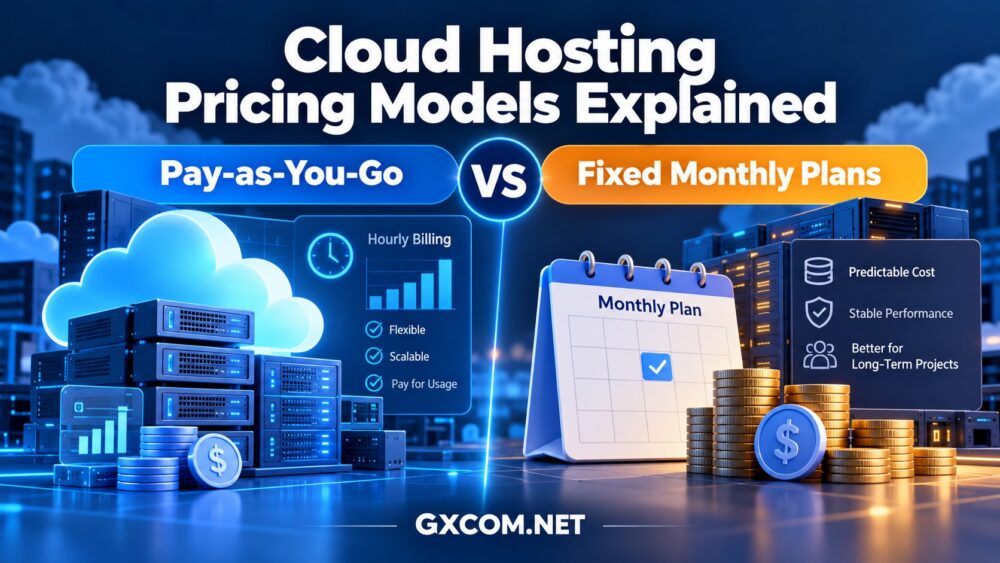
- Pay-as-you-go: Charges are calculated according to allocated resources, metered usage, or both.
- Fixed monthly plans: Customers pay a recurring amount for a defined resource package, subject to the provider's limits and additional charges.
- Hybrid pricing: Hourly charges apply until a monthly cap is reached, or a fixed base plan is combined with usage-based extras.
These models do not determine whether a service is technically superior. Architecture, resource allocation, storage performance, network quality, and support remain important.
For a broader infrastructure overview, explore our best cloud hosting solutions guide.
How Does Pay-as-You-Go Cloud Hosting Work?
Pay-as-you-go cloud hosting charges customers according to defined billing units. These may include instance-hours, provisioned storage, outbound data transfer, requests, or application execution time.
For a virtual machine, the basic compute calculation is:
Compute Cost = Billable Instance Hours × Applicable Hourly Rate
However, this formula does not necessarily represent the entire invoice. Storage volumes, backups, public IP addresses, and network services may be billed separately.
Advantages of Pay-as-You-Go Pricing
- Flexible deployment: Launch temporary servers without necessarily paying for an entire month.
- Better fit for intermittent workloads: Development environments and short-lived projects can benefit when billable resources are released after use.
- Scalable capacity: Resources can often be adjusted as demand changes.
- Granular cost visibility: Usage-based billing can make individual infrastructure expenses easier to attribute.
Disadvantages of Usage-Based Billing
- Monthly spending can fluctuate as infrastructure consumption changes.
- Data transfer, snapshots, and attached storage can increase costs.
- Unused but allocated resources may continue generating charges.
- Forecasting costs requires monitoring and operational discipline.
Important: Pay-as-you-go does not always mean you pay only when your application processes traffic. Many virtual machines remain billable while stopped because the underlying resources are still reserved.
How Do Fixed Monthly Cloud Hosting Plans Work?
Fixed monthly hosting packages generally provide a predefined combination of CPU, memory, storage, and included data transfer for a recurring charge.
This approach resembles traditional VPS hosting, although some providers offer cloud infrastructure features such as snapshots, scalable resources, or additional networking services.
Advantages of Fixed Monthly Pricing
- Predictable budgeting: Core hosting expenses are easier to forecast.
- Simple purchasing: Buyers can compare packages without calculating continuous resource consumption.
- Suitable for persistent workloads: Production websites and business applications often operate continuously.
- Bundled allowances: Some packages include defined storage and traffic allocations.
Limitations of Monthly Plans
- Unused resources generally do not generate refunds.
- Upgrades may require moving to a larger package.
- Some providers charge separately for backups, licensing, or additional traffic.
- Billing terms, renewal conditions, and cancellation policies vary.
For stable applications, fixed monthly pricing can simplify financial planning. However, a low monthly fee does not automatically mean lower total ownership costs.
Pay-as-You-Go vs Fixed Monthly Cloud Hosting: Key Differences
| Feature | Pay-as-You-Go | Fixed Monthly |
|---|---|---|
| Billing basis | Metered usage or allocated resource time | Recurring plan charge |
| Budget predictability | Variable | Generally higher |
| Short-term projects | Often advantageous | May involve unused capacity |
| 24/7 websites | Depends on effective monthly cost | Often easier to budget |
| Scaling flexibility | Frequently granular | Depends on plan options |
| Idle resource charges | May continue | Usually included in plan |
| Bandwidth charges | Metered or included allowance | Included allowance or overages |
| Best starting point | Temporary or variable workloads | Stable, continuously running workloads |
Some providers combine these approaches through hourly billing with monthly caps. Therefore, the distinction is not always strictly binary.

If you are deciding between different infrastructure types, our cloud hosting vs VPS comparison explains how architecture and resource management affect hosting decisions.
How Much Does Cloud Hosting Really Cost?
Comparing cloud hosting requires calculating the complete bill rather than focusing exclusively on compute pricing.
A useful total-cost framework is:
Total Cloud Cost = Compute + Storage + Network + Backups + Licensing + Management + Other Billable Services
Scenario 1: A Development Server Used Occasionally
Imagine a development environment that only needs to operate during scheduled testing sessions.
If the provider allows temporary deployment and complete resource deletion afterward, hourly billing may avoid paying for unused days.
However, persistent disks, snapshots, and reserved addresses can still generate charges. Teams must also consider the time required to recreate environments.
Scenario 2: A Business Website Running 24/7
A company website needs continuous availability, database access, scheduled backups, and predictable performance.
Because the server remains active throughout the billing period, an hourly rate may accumulate to approximately the same cost as a monthly-capped plan.
A fixed monthly package can simplify budgeting, especially when resource requirements remain relatively stable.
Scenario 3: An eCommerce Store With Traffic Spikes
An online store experiences predictable baseline traffic but occasional surges during marketing campaigns.
Maintaining maximum server capacity continuously may waste resources. A scalable architecture can provide additional capacity when demand increases.
However, autoscaling is not automatically cheaper. Additional instances, load balancers, database resources, and outbound bandwidth can increase the total bill.
Our cloud hosting for high-traffic websites comparison explains how to evaluate scalability, reliability, and infrastructure performance.
Cloud Hosting Providers With Different Billing Approaches
Several established cloud hosting providers offer different combinations of hourly billing, monthly packages, and managed infrastructure.
The following providers are useful comparison candidates rather than universal recommendations.
Cloudways: Managed Cloud Hosting With Usage-Based Billing
Cloudways is particularly relevant for WordPress websites, agencies, and businesses seeking managed cloud infrastructure without handling every aspect of server administration.
Its Flexible offering calculates server usage according to the applicable infrastructure billing rules and generally consolidates charges into monthly invoices. Some configurations have monthly caps, while others use hourly calculations without the same cap structure.
Cloudways Autonomous introduces an application-oriented approach with autoscaling and usage-based components.
Cloudways is worth considering when operational convenience, managed features, and flexible capacity matter more than obtaining the lowest unmanaged server cost.
Before selecting a plan, review its backup charges, bandwidth policies, scaling costs, and management features.
Kamatera: Configurable Cloud Servers
Kamatera offers configurable cloud servers with monthly and hourly billing options.
It can suit developers and businesses that need control over CPU, RAM, storage, operating systems, and infrastructure configurations.
The important distinction is that monthly and hourly servers can have different billing and cancellation conditions.
Kamatera is worth evaluating for custom infrastructure requirements, but buyers should verify the exact billing mode and included services before deployment.
Vultr: Hourly Cloud Compute With Monthly Caps
Vultr provides cloud compute infrastructure using hourly billing with product-specific monthly caps.
This hybrid structure can be useful for temporary deployments while retaining a defined compute billing ceiling for continuously allocated eligible instances.
However, stopping an instance does not necessarily stop charges. Customers may need to destroy billable resources to end the associated compute billing.
Additional storage, networking, and other services should be evaluated separately.
Contabo: Resource-Focused Monthly Hosting
Contabo is a relevant comparison option for buyers seeking predefined VPS and cloud server resource packages with recurring billing.
Its approach may appeal to projects requiring consistent RAM, storage, and server availability rather than frequently changing infrastructure.
Buyers should examine CPU performance characteristics, traffic policies, storage options, support scope, and applicable setup or renewal terms.
For users primarily comparing affordable virtual infrastructure, see our affordable cloud VPS deals guide.
Hidden Cloud Hosting Costs to Watch
Even an apparently inexpensive cloud server can become costly when additional services are overlooked.
1. Outbound Data Transfer
Some providers include a traffic allowance, while others charge for outbound data transfer. High-traffic websites, downloads, and media applications should estimate bandwidth consumption carefully.
2. Storage and Snapshots
Block storage, retained volumes, automated backups, and snapshots may be billed independently from compute resources.
3. Operating System Licensing
Windows Server and certain commercial software licenses can add recurring costs beyond the underlying virtual machine.
4. Managed Support
Unmanaged infrastructure may have a lower headline cost but require additional administration time or external technical support.
5. Scaling and Network Services
Load balancers, additional instances, private networking features, and application services can increase spending as infrastructure grows.
6. Cancellation and Resource Retention
Stopping a server, deleting an application, and removing all billable resources are not necessarily equivalent actions.
Always review the provider's cancellation process and verify that unused resources no longer appear on the billing dashboard.
How to Choose the Right Cloud Hosting Pricing Model
The most reliable approach is to match the billing model to the actual workload rather than choosing solely by the advertised hourly or monthly rate.
- Estimate operating hours: Determine whether the application runs continuously or intermittently.
- Measure resource demand: Identify realistic CPU, RAM, storage, and bandwidth requirements.
- Calculate effective monthly cost: Include compute, storage, network services, backups, and management.
- Review scaling behavior: Understand how upgrades, additional instances, and autoscaling affect charges.
- Check billing termination: Confirm which resources must be deleted to stop charges.
- Allow for growth: Evaluate whether the pricing structure remains suitable as traffic increases.
For a broader comparison of managed infrastructure options, read our managed cloud hosting providers comparison.

Frequently Asked Questions
Is pay-as-you-go cloud hosting cheaper than monthly hosting?
Not necessarily. Usage-based billing can be economical for temporary workloads, but continuously allocated resources may cost as much as or more than comparable monthly packages. Compare complete invoices rather than hourly rates alone.
Does stopping a cloud server stop billing?
Not always. Some providers continue charging for reserved compute resources, disks, and IP addresses. Others may stop compute charges while retaining storage charges. Review the provider's exact billing policy.
Is fixed monthly cloud hosting better for WordPress?
Fixed monthly pricing is often easier to budget for a WordPress website running continuously. However, managed cloud services with hourly accounting and monthly invoices can also be suitable, particularly when scaling or management features are important.
What is a monthly billing cap?
A monthly cap limits certain usage charges after a specified billing threshold is reached. It does not necessarily cap the entire invoice because additional storage, bandwidth, and services may remain separately billable.
Which pricing model is best for a growing business?
A stable business website may benefit from predictable monthly costs, while an application with fluctuating demand may benefit from flexible capacity. The best choice depends on baseline usage, traffic variation, technical requirements, and total cost.
Final Verdict: Pay-as-You-Go or Fixed Monthly Cloud Hosting?
Neither cloud hosting pricing model is universally better.
Pay-as-you-go hosting is often a practical starting point for temporary environments, variable workloads, and applications that benefit from flexible resource allocation.
Fixed monthly hosting can be easier to manage financially for websites and applications that operate continuously with relatively stable resource requirements.
Hybrid models can provide a useful middle ground, combining hourly flexibility with a monthly compute cap.
Before choosing a provider, compare the actual workload, resource specifications, billing conditions, network allowances, support requirements, and expected monthly spending.
The best cloud hosting plan is not simply the cheapest per hour. It is the one that delivers the required performance and reliability at a sustainable total cost.