Finding the best GPU servers for AI startups is about more than choosing a powerful NVIDIA or AMD accelerator. Early-stage AI companies must balance model performance, GPU memory, infrastructure costs, deployment speed, and the ability to scale as customer demand grows. One of the most important decisions is whether to use flexible cloud GPU infrastructure or rent dedicated GPU servers.
Cloud GPU services can help startups launch experiments without committing to long-term hardware capacity. Dedicated GPU servers may offer better operational control and predictable infrastructure for stable, heavily utilized workloads. However, neither approach is universally cheaper or faster.
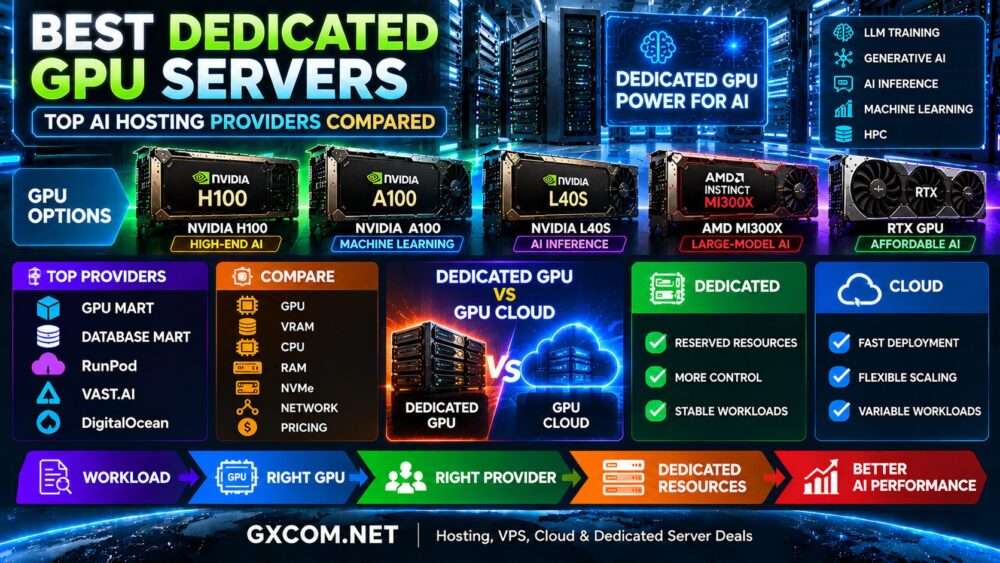
This guide compares cloud GPU hosting and dedicated GPU infrastructure, examines relevant providers such as RunPod, Cherry Servers, GPU Mart, Vast.ai, and Database Mart, and explains how AI startups can select infrastructure based on real workload requirements and total cost.

Best GPU Servers for AI Startups: Quick Comparison
The best GPU infrastructure depends on the startup's development stage, workload predictability, and operational requirements.
| Factor | Cloud GPU Servers | Dedicated GPU Servers |
|---|---|---|
| Deployment flexibility | Often suitable for temporary or changing workloads | Typically involves provisioning a defined server configuration |
| Billing model | Frequently usage-based, with service-specific charges | Often recurring or contract-based |
| Hardware control | Depends on the cloud service and instance type | Generally greater control over allocated physical hardware |
| Scaling | Can be flexible when suitable capacity is available | May require additional hardware or provisioning |
| Idle capacity | Compute may be released when no longer needed | Committed capacity can remain payable when idle |
| Performance consistency | Depends on allocation, isolation, and platform design | Dedicated hardware can simplify resource predictability |
| Best potential fit | Experimentation and variable demand | Stable, sustained production workloads |
These are general infrastructure characteristics. Some cloud services offer dedicated GPU instances, while some dedicated server providers support flexible commercial terms. Buyers should compare the exact product rather than relying on the category name alone.
What Do AI Startups Need From a GPU Server?
AI startups often face different infrastructure requirements from established enterprises. Their workloads can change quickly as products move from prototypes to production services.
GPU Memory for AI Models
GPU memory, commonly called VRAM, determines how much model data and runtime state can be held on an accelerator.
LLM inference may require memory for model weights, KV cache, temporary buffers, and concurrent requests. Fine-tuning adds further requirements depending on the training method.
A startup should estimate actual memory needs before selecting a GPU. Paying for unused VRAM can waste budget, while insufficient memory may require offloading or multi-GPU deployment.
Our LLM hosting requirements guide explains GPU memory, quantization, and server sizing in more detail.
Compute Performance and Throughput
GPU architecture, numerical precision, memory bandwidth, and software optimization all affect useful performance.
For inference, relevant metrics include tokens per second, requests per second, time to first token, and latency under concurrent demand.
For training, startups should consider time to complete an experiment or reach a target evaluation result.
CPU, RAM, Storage, and Networking
GPU performance alone does not determine application speed. CPU preprocessing, system RAM, NVMe storage, and network throughput can create bottlenecks.
Large datasets and model checkpoints may also require persistent storage that is billed separately from GPU compute.
Software Compatibility
Teams should verify support for their operating system, GPU drivers, CUDA or ROCm environment, AI frameworks, containers, and required inference libraries.
Compatibility becomes particularly important when migrating between GPU generations or accelerator vendors.
Cloud GPU Servers: Flexible Infrastructure for Early-Stage AI
Cloud GPU infrastructure allows startups to access accelerated computing without purchasing and maintaining physical servers.
Depending on the provider, deployments may use GPU instances, containers, virtual machines, or managed execution environments.
Advantages of Cloud GPU Hosting
- Flexible experimentation: Rent GPU compute for testing and release it when no longer required.
- Lower initial commitment: Avoid purchasing expensive physical accelerators.
- Workload flexibility: Evaluate different GPU models when available.
- Faster iteration: Deploy temporary development and training environments.
- Variable capacity: Adapt infrastructure usage to changing workloads, subject to availability.
Limitations of Cloud GPU Hosting
- Usage-based charges can accumulate during continuous operation.
- Persistent storage and outbound traffic may generate additional costs.
- Desired GPU models may not always be available.
- Infrastructure control varies by deployment model.
- Interruptible capacity can create recovery and scheduling challenges.
RunPod and Vast.ai represent different approaches to obtaining flexible GPU compute. RunPod is relevant for AI cloud workloads, while Vast.ai offers marketplace-style GPU capacity with listing-specific conditions.
Neither platform should be selected solely on advertised hourly pricing. Startups should also review usable VRAM, storage persistence, networking, availability, and workload reliability.
Dedicated GPU Servers: Predictable Infrastructure for Growing Startups
Dedicated GPU servers allocate defined physical server resources to a customer, subject to the provider's product terms.
They can be useful when a startup requires sustained GPU availability, a controlled operating environment, or predictable hardware configuration.
Advantages of Dedicated GPU Servers
- Defined hardware resources: A known GPU, CPU, RAM, and storage configuration.
- Greater system control: Often suitable for customized operating environments.
- Predictable capacity: Useful for applications with steady demand.
- Long-running workloads: Avoid repeatedly provisioning temporary compute.
- Potential cost efficiency: High utilization may justify a recurring commitment.
Limitations of Dedicated GPU Servers
- Recurring costs may continue when the server is underutilized.
- Hardware upgrades may require provisioning changes.
- Some products involve setup fees or minimum commitments.
- Capacity expansion may take longer than adding available cloud instances.
- Unmanaged servers require internal administration expertise.
Cherry Servers is relevant when evaluating dedicated GPU infrastructure. GPU Mart and Database Mart are also candidates for comparing suitable GPU-oriented hosting configurations and server requirements.

Before choosing any provider, verify the exact accelerator, physical allocation, operating system support, networking, and commercial terms.
Best GPU Servers for AI Startups by Development Stage
The best GPU servers for AI startups often change as a company moves from experimentation to production.
Stage 1: Prototype and Proof of Concept
At the prototype stage, demand is uncertain. Developers may need GPU compute for only a few hours while testing models, evaluating frameworks, or building a demonstration.
Starting recommendation: Consider flexible cloud GPU capacity with minimal commitments and clear shutdown procedures.
RunPod and Vast.ai may be relevant options to evaluate for temporary compute, depending on current hardware availability and application requirements.
Stage 2: Product Validation and Early Customers
As users begin testing the product, infrastructure requirements become more measurable.
Startups should monitor inference throughput, peak demand, latency, GPU utilization, and the cost of serving each customer.
Starting recommendation: Compare cloud GPU instances with dedicated infrastructure once traffic patterns become predictable.
Stage 3: Production Growth
At this stage, the startup may operate continuous inference endpoints, scheduled training pipelines, or high-volume media processing.
Starting recommendation: Benchmark dedicated GPU servers against cloud deployments using actual utilization and service-level requirements.
Cherry Servers, GPU Mart, and Database Mart can be evaluated for suitable infrastructure configurations, provided the required GPU products are available.
Stage 4: Scaling and Infrastructure Optimization
Growing companies may benefit from combining dedicated baseline capacity with cloud GPU resources for occasional peaks or experiments.
This hybrid approach can help balance predictable demand against temporary capacity requirements, although it introduces additional operational complexity.
GPU Server Requirements for Different AI Startup Workloads
LLM Chatbots and AI Assistants
LLM applications need sufficient VRAM for model weights and runtime state, plus enough throughput to serve users at acceptable latency.
A cloud deployment can suit early testing, while a dedicated server may become attractive for sustained inference demand.
For production planning, read our AI inference server hosting guide.
Model Fine-Tuning
Fine-tuning workloads may run for defined periods rather than continuously.
LoRA and QLoRA can reduce some memory requirements compared with full-parameter training, but the GPU choice still depends on model size, sequence length, optimizer, and training configuration.
Cloud GPU infrastructure may be practical for occasional experiments. Recurring training may justify reserved or dedicated capacity.
Computer Vision and Video AI
Computer vision startups should consider image throughput, video codec support, inference latency, and storage bandwidth.
Some workloads require specific GPU media engines, so a high-end AI accelerator is not automatically the best choice for video processing.
Generative Image and Video Applications
Generative media applications can be sensitive to GPU memory, batch size, and processing time.
Cost per completed image or video task is often more useful than comparing GPU hourly rates alone.
AI Training and Research
Training workloads can require large memory capacity, fast storage, multi-GPU communication, and substantial system RAM.
For larger projects, startups should evaluate complete server topology rather than choosing infrastructure based only on the number of GPUs.
Cloud vs Dedicated GPU Server Pricing: Calculate the Real Cost
Cost is one of the most important factors when choosing the best GPU servers for AI startups.
However, comparing hourly and monthly prices without considering utilization can produce misleading conclusions.
Cloud GPU Cost Formula
Cloud GPU cost = billable compute hours × compute rate + storage + network transfer + additional service charges
Dedicated GPU Server Cost Formula
Dedicated GPU cost = recurring server commitment + setup fees + licensing + support and other applicable charges
For an illustrative comparison, assume two configurations provide sufficiently similar useful performance:
- Cloud GPU rental: $1.20 per billable hour.
- Dedicated GPU server rental: $360 per month.
The simplified break-even point is:
$360 ÷ $1.20 = 300 billable hours per month
| Monthly GPU Usage | Cloud GPU Compute Cost | Dedicated Server Base Cost | Lower Base Cost |
|---|---|---|---|
| 50 hours | $60 | $360 | Cloud |
| 100 hours | $120 | $360 | Cloud |
| 200 hours | $240 | $360 | Cloud |
| 300 hours | $360 | $360 | Equal |
| 500 hours | $600 | $360 | Dedicated |
| 700 hours | $840 | $360 | Dedicated |
All prices are hypothetical examples, not current provider quotations. The calculation excludes additional charges and assumes comparable workload performance. Real break-even points depend on the exact hardware and contract.
For a more detailed breakdown of usage-based billing, see our hourly vs monthly GPU rental cost comparison.
GPU Performance per Dollar: The Metric Startups Should Track
Low hourly pricing does not necessarily mean low operating cost.
A more powerful GPU may complete an AI workload faster, while a lower-cost accelerator may provide better value when performance requirements are modest.
Useful financial metrics include:
- Cost per million generated tokens.
- Cost per completed inference request.
- Cost per model training run.
- Cost per processed video hour.
- Cost per generated image.
- Monthly cost per active customer at the required service quality.
For production AI, these metrics should be measured at a defined latency, throughput, and reliability target.
Also distinguish productive GPU time from total billable infrastructure time. A server that is powered on but rarely used may have poor financial efficiency even if its hourly rate is competitive.
Best GPU Server Providers for AI Startups: Five Options to Evaluate
The following providers represent different infrastructure approaches rather than a universal performance ranking.
| Provider | Primary Evaluation Focus | Potential Startup Use Case |
|---|---|---|
| RunPod | Cloud GPU compute | AI development and flexible workloads |
| Cherry Servers | Dedicated GPU infrastructure | Sustained production and controlled environments |
| GPU Mart | GPU-focused hosting configurations | GPU server specifications and deployment needs |
| Vast.ai | GPU compute marketplace | Experimental and cost-sensitive compute |
| Database Mart | GPU-related hosting and server solutions | Configuration and hosting comparisons |
Provider inclusion is based on infrastructure relevance, not verified current inventory, benchmark rankings, or live pricing. Confirm specific products before making a purchase.
RunPod: Flexible GPU Cloud Computing
RunPod is worth evaluating for AI startups that need flexible compute for experimentation, model development, and inference workloads.
Compare GPU availability, deployment type, storage persistence, billing states, and the software environment required by the application.
Cherry Servers: Dedicated GPU Infrastructure
Cherry Servers is relevant for startups evaluating dedicated hardware for predictable AI workloads.
Check GPU models, server specifications, network configuration, provisioning, and contract terms before comparing dedicated hosting against cloud compute.
GPU Mart: GPU Hosting Configurations
GPU Mart can be considered when evaluating GPU-focused hosting with specific hardware, operating system, and storage requirements.
Verify physical GPU allocation, usable VRAM, drivers, and any licensing requirements.
Vast.ai: Marketplace GPU Compute
Vast.ai provides marketplace-based GPU capacity where listings can differ in hardware, pricing, host conditions, and storage options.
Startups should consider reliability and recovery requirements alongside the advertised compute cost.
Database Mart: Server and GPU Hosting Evaluation
Database Mart is another candidate for comparing GPU-related hosting and server configurations.
Review the exact GPU-equipped product, available memory, CPU resources, storage, software compatibility, and commercial terms before selecting a configuration.
When Should an AI Startup Move From Cloud to Dedicated GPU Hosting?
There is no universal migration point. The decision should be based on measured demand and operating costs.
Consider dedicated infrastructure when:
- GPU usage remains consistently high across the month.
- Workloads require predictable hardware availability.
- The company needs greater control over the operating environment.
- Dedicated capacity offers a lower cost per completed workload.
- Production reliability requirements justify a defined server configuration.
Remain with flexible cloud infrastructure when:
- Demand is highly variable or difficult to forecast.
- GPU experiments are infrequent.
- The team needs to test multiple accelerator types.
- Hardware requirements change rapidly.
- Maintaining a dedicated environment would create unnecessary operational overhead.
Some startups benefit from a hybrid model: dedicated infrastructure for baseline production traffic and cloud GPU compute for temporary peaks or development.

Common GPU Infrastructure Mistakes AI Startups Should Avoid
- Buying more VRAM than necessary: Estimate the actual model and runtime memory requirements.
- Choosing by GPU name alone: Compare architecture, memory, software support, and useful performance.
- Ignoring idle charges: Monitor billable hours and persistent resources.
- Overlooking data transfer: Include dataset uploads, model downloads, and application traffic.
- Skipping compatibility checks: Validate drivers, frameworks, and required GPU features.
- Ignoring operational labor: Account for server administration, monitoring, and security.
- Assuming cloud is always cheaper: High utilization can change the economics.
- Assuming dedicated is always faster: Actual performance depends on hardware and software configuration.
- Scaling before benchmarking: Measure bottlenecks before adding GPUs.
- Locking into unsuitable commitments: Check upgrade, cancellation, and provisioning conditions.
Frequently Asked Questions
What are the best GPU servers for AI startups?
The best GPU servers for AI startups depend on model size, workload duration, budget, and production requirements. Cloud GPU infrastructure can suit experimentation and variable demand, while dedicated GPU servers may offer better value for stable, highly utilized workloads.
Should an AI startup use cloud GPUs or dedicated servers?
Start with workload predictability. Cloud GPUs are often convenient for irregular use, while dedicated servers can be attractive when continuous demand justifies a recurring commitment.
How much GPU VRAM does an AI startup need?
Required VRAM depends on the model, precision, batch size, context length, and application. Estimate weights and runtime memory before selecting a GPU configuration.
Is a dedicated GPU server cheaper than cloud GPU hosting?
It can be cheaper for sustained workloads, but not universally. Compare total infrastructure charges and cost per completed job using equivalent performance requirements.
Can AI startups use GPU marketplaces for production?
Some marketplace configurations may support production workloads, but teams must evaluate reliability, resource isolation, persistence, host terms, and recovery requirements.
Do AI startups need NVIDIA H100 or B200 GPUs?
Not necessarily. Many applications can run on less expensive accelerators if memory and performance requirements are satisfied. Premium GPUs should be justified by measured workload benefits.
What is the most important GPU cost metric for startups?
Cost per useful output is often more meaningful than the advertised hourly price. The appropriate metric may be cost per request, token, training run, or completed processing task.
When should a startup consider multiple GPUs?
Multi-GPU infrastructure becomes relevant when one accelerator cannot satisfy memory, throughput, or training requirements. Evaluate software scaling and communication overhead before increasing GPU count.
Final Verdict: Choosing the Best GPU Servers for AI Startups
The best GPU servers for AI startups are not necessarily the most expensive accelerators or the lowest-priced cloud instances. The right infrastructure must match actual model requirements, utilization patterns, operational capabilities, and growth plans.
Cloud GPU servers are a strong starting point for experimentation, unpredictable demand, and teams that need flexibility.
Dedicated GPU servers deserve serious consideration when workloads become predictable, hardware utilization is high, and greater infrastructure control provides measurable value.
RunPod and Vast.ai are relevant for comparing flexible GPU compute models. Cherry Servers, GPU Mart, and Database Mart offer additional infrastructure paths to investigate, subject to exact product specifications and availability.
Before committing to any provider, benchmark a representative workload, calculate total monthly expenses, confirm software compatibility, and review the operational responsibilities.
AI WORKLOAD → GPU MEMORY → PERFORMANCE → UTILIZATION → CLOUD VS DEDICATED → TOTAL COST → SCALABILITY
The best long-term strategy is to choose GPU infrastructure that supports today's product requirements without creating unnecessary costs or limiting tomorrow's growth.