Artificial intelligence workloads are becoming more demanding as organizations train larger models, deploy generative AI applications, run high-volume inference, and process increasingly complex datasets.
Cloud GPUs provide excellent flexibility, but workloads that run continuously can benefit from another infrastructure model: dedicated GPU servers.
A dedicated GPU server gives your workload access to reserved GPU resources along with CPU, RAM, storage, and networking configured for demanding computing tasks. Depending on the provider, available accelerators can range from affordable RTX-class GPUs to NVIDIA A100, L40S, H100, H200, and AMD Instinct hardware.
This guide compares the best dedicated GPU server options for AI, machine learning, LLMs, inference, rendering, and other GPU-intensive workloads. We also examine GPU Mart, Database Mart, RunPod, Vast.ai, DigitalOcean, and the differences between dedicated servers and GPU cloud infrastructure.
Best Dedicated GPU Servers at a Glance
| Provider / Platform | Infrastructure Style | Best For |
|---|---|---|
| GPU Mart | GPU-focused hosting | Persistent GPU workloads |
| Database Mart | Server and GPU infrastructure | Traditional server deployments |
| RunPod | GPU cloud / AI infrastructure | Flexible AI workloads |
| Vast.ai | GPU marketplace | Cost-focused GPU computing |
| DigitalOcean | Cloud, dedicated and bare-metal GPU options | Cloud-native AI infrastructure |
These providers use different infrastructure models, so they should not be compared only by advertised GPU price. The right choice depends on whether you need dedicated hardware, flexible cloud capacity, marketplace pricing, or a combination of these approaches.
What Is a Dedicated GPU Server?
A dedicated GPU server is infrastructure where GPU resources are reserved for your workloads rather than being divided among unrelated customers at the compute level.
A typical dedicated AI server combines:
- One or more GPUs
- Dedicated CPU resources
- System RAM
- NVMe or SSD storage
- High-speed networking
- Linux or another supported operating system
- GPU drivers and AI software
Depending on the service, the infrastructure may be delivered as a traditional physical dedicated server, bare-metal GPU server, reserved GPU instance, or another dedicated-resource model.
Always check the provider's exact architecture rather than assuming that every product described as “dedicated GPU” is identical.
Why Choose a Dedicated GPU Server?
Dedicated GPU infrastructure can be attractive when GPU demand is stable and predictable.
Common advantages include:
- Reserved GPU resources
- Predictable hardware access
- Greater infrastructure control
- Persistent storage
- Custom software environments
- Long-running workloads
- Multi-GPU configurations
The trade-off is flexibility. A dedicated server usually has a fixed hardware configuration, while GPU cloud infrastructure can make it easier to add or remove capacity.
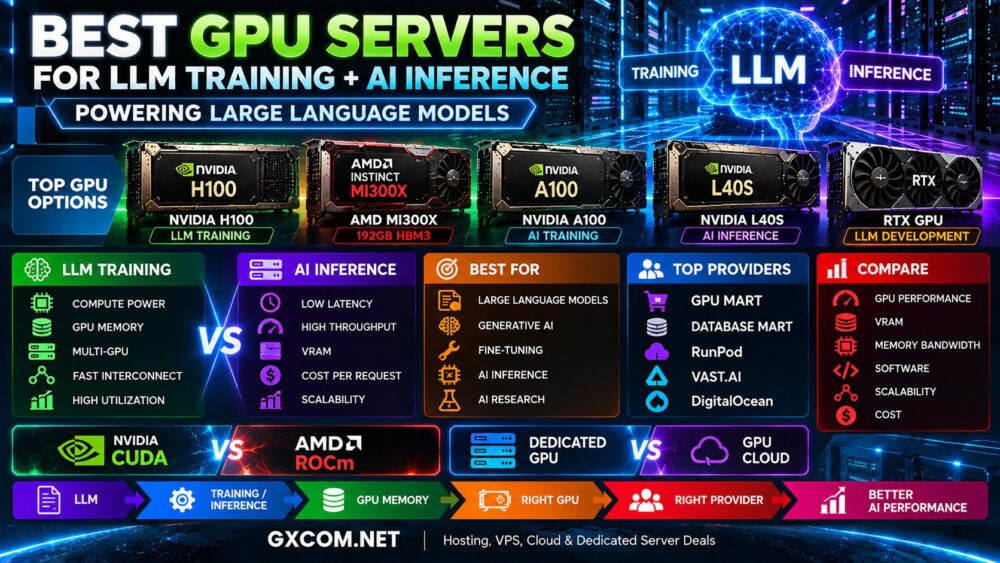
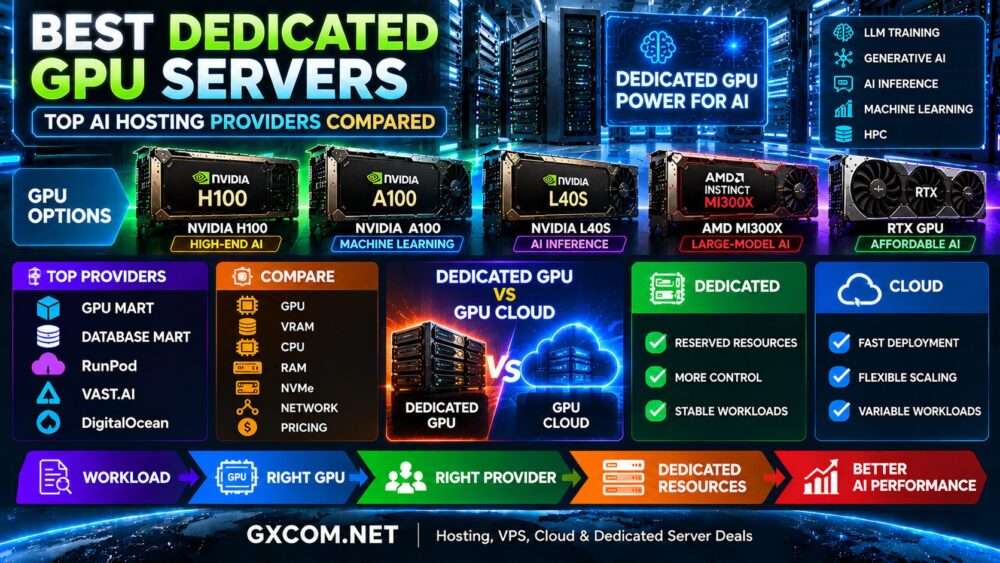
Best GPUs for Dedicated AI Servers
The GPU is the most important component of an AI server, but there is no single accelerator that is best for every workload.
| GPU | Best For | Main Strength |
|---|---|---|
| NVIDIA H100 | LLM training and high-end AI | High AI performance |
| NVIDIA A100 | Machine learning and deep learning | Mature AI ecosystem |
| NVIDIA L40S | Inference and graphics | AI + visualization |
| AMD Instinct MI300X | Large-model AI | Large GPU memory |
| RTX-Class GPU | Development and affordable AI | Lower entry cost |
NVIDIA H100 Dedicated Servers
NVIDIA H100 remains an important option for high-end AI infrastructure.
It is particularly relevant for:
- Large language model training
- Generative AI
- Large-scale inference
- Deep learning
- Scientific computing
- High-performance computing
H100 servers are available in different configurations, so buyers should check the exact GPU variant, memory, interconnect, number of GPUs, CPU platform, RAM, and storage.
For a dedicated look at H100 infrastructure, see our
NVIDIA H100 Server Hosting
guide.
NVIDIA A100 Dedicated Servers
A100 remains useful for established machine-learning environments and can be attractive when provider pricing makes it more economical than newer accelerators.
A100 80GB configurations are particularly relevant for:
- Machine learning
- Deep learning
- Fine-tuning
- AI research
- Data science
- Inference
Do not dismiss an accelerator simply because a newer generation exists. Price-performance for the actual workload matters more than GPU age.
NVIDIA L40S Dedicated Servers
NVIDIA L40S combines AI acceleration with graphics capabilities, making it an interesting alternative for workloads that do not require premium H100-class training infrastructure.
L40S is particularly relevant for:
- AI inference
- Generative AI
- Image generation
- Computer vision
- Rendering
- Visualization
For mixed AI and graphics workloads, this versatility can be valuable.
AMD MI300X Dedicated AI Servers
Organizations should also consider AMD rather than limiting infrastructure evaluation to NVIDIA.
AMD Instinct MI300X provides 192GB of HBM3 memory, making it particularly interesting for memory-intensive AI and large language model workloads.
The main consideration is software compatibility. NVIDIA infrastructure centers around CUDA, while AMD Instinct uses ROCm.
Read our
AMD Instinct MI300X Server
guide for a deeper comparison.
Top Dedicated GPU Server Providers
GPU hosting providers differ substantially in infrastructure design, billing, GPU selection, regions, networking, storage, and support. The following platforms represent several different ways to access GPU computing.
GPU Mart
GPU Mart specializes in GPU-focused hosting and targets customers who need persistent GPU computing resources for AI, machine learning, rendering, and related workloads.
Its server-oriented model makes it particularly relevant when comparing long-running GPU infrastructure rather than only temporary cloud instances.
Before ordering, compare:
- Exact GPU model
- Dedicated GPU allocation
- CPU specifications
- System RAM
- NVMe storage
- Network port speed
- Bandwidth allowance
- Deployment time
- Contract period
Database Mart
Database Mart provides a broader server-hosting portfolio that includes traditional server infrastructure alongside GPU computing options.
This makes it worth evaluating for users who prefer conventional server management and persistent infrastructure rather than purely usage-based GPU cloud computing.
When comparing Database Mart with GPU-focused services, look at the complete server configuration and not simply the installed graphics card.
RunPod
RunPod represents a different approach. It is primarily an AI-focused GPU cloud platform rather than a conventional monthly dedicated-server host.
Its infrastructure is attractive when users want access to multiple GPU classes while maintaining the ability to change capacity as workloads evolve.
RunPod can be especially relevant for:
- AI development
- LLM training
- Fine-tuning
- AI inference
- Temporary GPU workloads
- Testing different GPUs
This flexibility makes RunPod useful as a comparison point against traditional dedicated GPU hosting.
Vast.ai
Vast.ai operates a marketplace for GPU computing resources.
Instead of functioning exactly like a conventional dedicated server company, its marketplace model allows users to compare GPU machines from different hosts.
This can create attractive opportunities for cost-sensitive AI computing, but users should evaluate more than price.
Check:
- Host characteristics
- GPU model
- GPU count
- Reliability
- CPU and RAM
- Storage performance
- Network performance
- Availability
DigitalOcean
DigitalOcean combines GPU infrastructure with a larger cloud ecosystem.
Its GPU portfolio includes cloud GPU deployments as well as dedicated and bare-metal GPU options, making it relevant for teams that want GPU acceleration integrated with cloud compute, storage, networking, databases, and application services.
This model can be particularly useful for cloud-native AI applications where the GPU server is only one component of the overall architecture.
Dedicated GPU Hosting Provider Comparison
| Provider | Model | Primary Advantage | Good Fit For |
|---|---|---|---|
| GPU Mart | GPU-focused hosting | Persistent GPU infrastructure | Dedicated-style workloads |
| Database Mart | Server hosting | Traditional infrastructure model | Long-running servers |
| RunPod | GPU cloud | Flexible GPU access | Variable AI workloads |
| Vast.ai | Marketplace | Broad price competition | Cost-sensitive workloads |
| DigitalOcean | Cloud + dedicated GPU | Broader cloud ecosystem | Cloud-native AI |
Dedicated GPU Server vs GPU Cloud
The most important infrastructure decision may not be which provider to use, but whether you need dedicated infrastructure at all.
| Factor | Dedicated GPU Server | GPU Cloud |
|---|---|---|
| GPU Access | Reserved | Service dependent |
| Deployment | Provider dependent | Usually fast |
| Scaling | Hardware dependent | Flexible |
| Billing | Often monthly or reserved | Often usage based |
| Control | High | Platform dependent |
| Best Workload | Stable utilization | Variable utilization |
For continuous AI workloads, a dedicated server can provide predictable access to GPU resources. For temporary training jobs, experiments, and highly variable demand, cloud infrastructure can be more flexible.
See our
NVIDIA GPU Server vs GPU Cloud
comparison for a detailed explanation.
Dedicated GPU Server vs Buying Hardware
Dedicated GPU hosting can also be an alternative to purchasing an AI server.
Buying hardware gives an organization physical ownership but also creates responsibilities for:
- Capital expenditure
- Power
- Cooling
- Rack space
- Networking
- Hardware maintenance
- Replacement parts
- Future upgrades
Renting dedicated GPU infrastructure transfers much of the data center operation to the hosting provider.
The correct choice depends on expected utilization, project duration, capital budget, technical staff, and long-term infrastructure requirements.
Best Dedicated GPU Server for LLM Training
Large language model training can require multiple high-memory GPUs running continuously for long periods.
Important factors include:
- GPU compute performance
- VRAM
- Memory bandwidth
- Multi-GPU interconnect
- System RAM
- NVMe throughput
- Network performance
H100-class and other high-end AI accelerators are natural candidates for large training workloads, but the complete server architecture matters as much as the GPU model.
Our
Best GPU Servers for LLM Training
guide covers this workload in greater detail.
Best Dedicated GPU Server for AI Inference
Inference infrastructure should be optimized around actual production requirements rather than training benchmarks.
Important metrics include:
- Latency
- Throughput
- GPU memory
- Batch size
- Context length
- Utilization
- Cost per request
Depending on the model, H100, L40S, A100, MI300X, or lower-cost accelerators may provide better economics.
Best Dedicated GPU Server for Generative AI
Generative AI covers a wide range of workloads, from large language models to image and video generation.
The correct GPU therefore depends on the application.
Large LLM workloads may prioritize GPU memory and multi-GPU scaling, while image generation may achieve excellent performance on less expensive GPU hardware.
Avoid paying for premium accelerator capacity that the workload cannot use.
How Much Does a Dedicated GPU Server Cost?
Dedicated GPU server pricing varies widely because the GPU is only one component of the system.
Cost depends on:
- GPU model
- Number of GPUs
- CPU configuration
- System RAM
- NVMe storage
- Network speed
- Bandwidth allowance
- Data center region
- Contract length
- Managed services
A server with the same GPU can have a very different total price depending on the rest of the hardware and network configuration.
For this reason, compare total workload cost rather than only GPU rental price.
Monthly Dedicated GPU vs Hourly GPU Rental
| Usage Pattern | Model to Evaluate |
|---|---|
| Occasional experiments | Hourly GPU |
| Short AI projects | GPU cloud |
| Variable training demand | GPU cloud |
| Continuous AI workload | Dedicated GPU server |
| Stable production inference | Compare dedicated and reserved cloud |
There is no universal utilization point at which dedicated hosting automatically becomes cheaper. Provider rates, GPU generation, utilization, storage, bandwidth, and workload efficiency all affect the calculation.
What to Check Before Renting a Dedicated GPU Server
Before selecting a provider, verify the complete infrastructure specification.
- Confirm the exact GPU model.
- Check whether GPU resources are truly dedicated.
- Verify VRAM capacity.
- Check CPU model and core allocation.
- Compare system RAM.
- Check NVMe storage performance and capacity.
- Verify network port speed and transfer limits.
- Check data center location.
- Confirm CUDA or ROCm compatibility.
- Review contract and cancellation terms.
- Check technical support.
- Evaluate upgrade and scaling options.
Common Dedicated GPU Server Mistakes
Choosing by GPU Name Alone
Two H100 servers can deliver different overall results if their CPUs, RAM, storage, networking, or multi-GPU architecture differ.
Buying More GPU Than the Workload Needs
The most powerful accelerator can become the least economical option when utilization is low.
Ignoring VRAM
For many AI workloads, GPU memory determines whether a model can run efficiently.
Ignoring Network Performance
Distributed training and data-intensive AI can require substantial network throughput.
Comparing Monthly Price Only
Performance, utilization, bandwidth, storage, support, and workload completion time all affect real cost.
Who Should Choose a Dedicated GPU Server?
Dedicated GPU infrastructure is worth evaluating when you have:
- Continuous AI workloads
- Predictable GPU utilization
- Long-running LLM inference
- Regular machine-learning training
- Persistent datasets
- Custom software requirements
- Greater infrastructure control requirements
If GPU demand is occasional or unpredictable, flexible cloud GPU services may provide better resource efficiency.
Final Thoughts
The best dedicated GPU server is not simply the server with the most powerful graphics accelerator.
NVIDIA H100 targets demanding AI and LLM workloads, A100 remains useful for established machine-learning environments, L40S provides an attractive combination of AI inference and graphics, and AMD Instinct offers another path for large-model computing.
Provider models also differ. GPU Mart and Database Mart emphasize server-oriented GPU infrastructure, while RunPod and Vast.ai provide more flexible ways to access GPU compute. DigitalOcean combines GPU resources with a broader cloud ecosystem and dedicated GPU options.
Start by defining the workload, required VRAM, software ecosystem, utilization, and deployment duration. Then compare the complete server — GPU, CPU, RAM, NVMe storage, networking, support, and total cost.
The better decision path is:
Workload → GPU → VRAM → Utilization → Provider → Server → Total Cost.