GPU hosting has become more accessible, but the terminology surrounding virtual GPU servers remains confusing. A provider may advertise a GPU VPS, shared accelerator, virtual GPU, or dedicated GPU instance without explaining exactly how physical resources are allocated.
This GPU VPS Hosting Review examines GPU sharing, VRAM limits, virtualization, and workload isolation. It also explains how to evaluate providers before deploying AI inference, machine learning, rendering, or CUDA applications.
The most important question is not simply which NVIDIA GPU appears in a plan. It is how much of that GPU your application can reliably use.
GPU VPS Hosting Review: Quick Verdict
GPU VPS hosting can be useful for developers who need accelerator access without purchasing expensive physical hardware. However, different products offer substantially different levels of resource control.
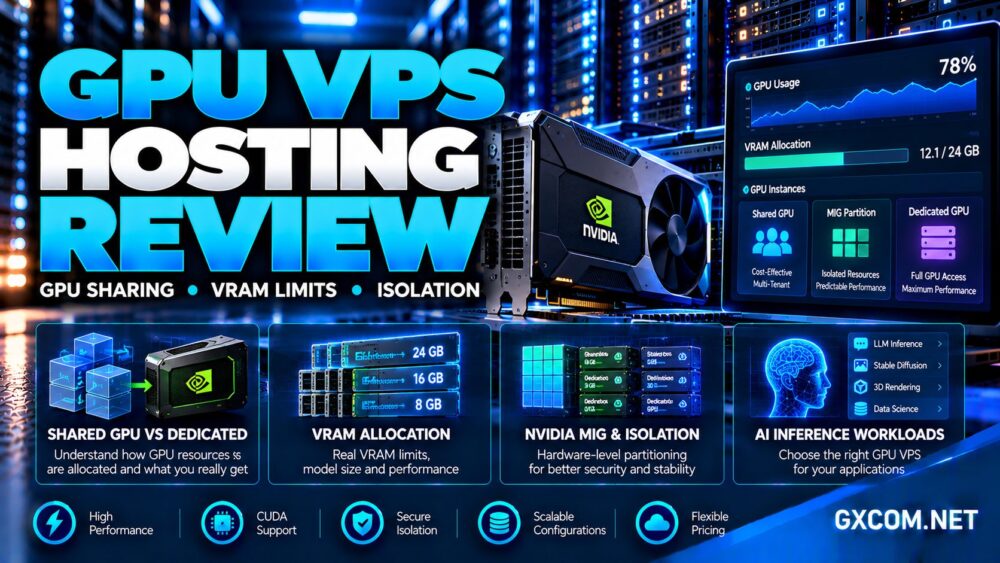
Some environments share GPU execution time. Others provide hardware-partitioned GPU instances, while dedicated GPU clouds assign complete accelerator devices to individual customers.
Our verdict: Choose a GPU VPS only after verifying usable VRAM, compute allocation, virtualization technology, CUDA support, and whether other tenants can affect performance.
For experimentation, flexible cloud GPU access may be sufficient. Production inference and predictable workloads often justify stronger isolation.
What Is GPU VPS Hosting?
A GPU VPS is generally a virtual server environment with access to graphics or compute acceleration. Unlike a conventional CPU-only VPS, it exposes GPU capabilities for workloads such as machine learning, video processing, and rendering.
However, GPU access does not necessarily mean exclusive ownership of a physical accelerator.
Providers can implement GPU services through virtualization, hardware partitioning, device passthrough, or container-based allocation. The precise implementation determines performance consistency and available features.
Our AI GPU VPS providers comparison explores hosting options for different deployment requirements.
GPU Sharing: Three Technologies Buyers Should Understand
1. GPU Time-Slicing
Time-slicing allows multiple workloads to use a GPU through scheduled execution. It can improve overall utilization when applications do not require continuous accelerator access.
However, time-slicing alone does not guarantee dedicated VRAM bandwidth, compute throughput, or predictable latency.
When another tenant runs a demanding job, competing workloads may experience performance variation.
2. NVIDIA CUDA MPS
CUDA Multi-Process Service, or MPS, enables multiple CUDA processes to execute concurrently on supported NVIDIA GPUs.
MPS can improve utilization for cooperating workloads, but it does not provide the same hardware partitioning and fault isolation as NVIDIA Multi-Instance GPU technology.
Memory bandwidth, cache capacity, and other physical resources may remain shared between clients.
3. NVIDIA Multi-Instance GPU
NVIDIA MIG divides supported accelerators into smaller GPU instances with allocated compute and memory resources.
Each supported MIG configuration provides a defined resource profile, helping improve performance predictability and isolation between workloads.
Not every NVIDIA GPU supports MIG, and available partition sizes depend on the accelerator generation and configuration.
Buyers should request the exact MIG profile instead of assuming that a fractional GPU listing guarantees hardware-level isolation.
VRAM Limits: Why Advertised GPU Memory Matters
VRAM is the accelerator’s local memory used for model weights, intermediate calculations, tensors, and other GPU workloads.
A GPU may physically contain substantial memory while exposing only a smaller allocation to a virtual instance.
For example, a hardware-partitioned instance may receive only the memory assigned to its specific MIG profile.
Other sharing arrangements may enforce different memory limits, making the advertised GPU model insufficient for determining usable capacity.

AI Model Size and Memory Headroom
Large language models require memory for weights, context handling, and the key-value cache used during inference.
Training additionally requires memory for gradients, optimizer states, and intermediate activations.
A model that appears to fit based on weight size alone may fail when batch size, context length, or framework overhead increases.
Before purchasing, estimate peak memory requirements and retain headroom for application processes and temporary allocations.
Multiple GPUs Do Not Automatically Combine VRAM
Two GPUs with separate memory pools do not automatically behave like one accelerator with their combined capacity.
Applications need appropriate model parallelism, tensor parallelism, or other distributed execution techniques to use memory across devices.
Communication overhead can also reduce the benefits of additional GPUs.
Our NVIDIA GPU server providers guide helps compare accelerator configurations.
GPU Isolation: What Does Dedicated Actually Mean?
GPU isolation operates at several levels, including the operating system, virtual machine, device assignment, compute scheduling, and memory subsystem.
A virtual machine can isolate software environments without guaranteeing exclusive access to the physical GPU.
Conversely, a provider may allocate an entire GPU to one customer while sharing the physical server’s CPU, storage, and networking resources.
Hardware passthrough can provide direct access to an assigned accelerator, but customers should still verify host-level security and resource policies.
MIG offers stronger partition-level resource isolation on supported GPUs, although it remains different from renting an entire physical server.
Questions to Ask Before Ordering
- Is the GPU shared, partitioned, or exclusively assigned?
- Which virtualization or partitioning technology is used?
- How much VRAM is guaranteed to the instance?
- Are compute and memory bandwidth resources reserved?
- Can other tenants affect latency or GPU utilization?
- Are CUDA, drivers, and required frameworks supported?
- What happens when the host or GPU experiences a failure?
Clear answers are more valuable than vague descriptions such as “enterprise GPU performance.”
GPU VPS vs Dedicated GPU vs Bare Metal
| Factor | Shared GPU VPS | Dedicated GPU Instance | GPU Bare Metal |
|---|---|---|---|
| GPU access | Shared or partitioned | Complete assigned GPU | Physical server GPUs |
| VRAM | Limited by allocation | Assigned GPU capacity | Installed GPU capacity |
| Isolation | Implementation-dependent | GPU device exclusivity | Physical host exclusivity |
| Best use | Development and smaller workloads | Production GPU applications | Specialized sustained workloads |
A dedicated GPU instance is not necessarily a dedicated server. Buyers should distinguish exclusive accelerator allocation from exclusive physical host access.
Our affordable GPU servers comparison covers broader infrastructure choices.
GPU Hosting Providers Worth Comparing
Different providers serve different accelerator requirements, so comparisons should focus on allocation models rather than treating every offering as identical.
GPU Mart: VPS and GPU Infrastructure
GPU Mart is relevant to customers exploring GPU-enabled virtual servers and dedicated GPU infrastructure.
Buyers should verify the precise accelerator model, available VRAM, operating system support, and whether their selected configuration provides shared or exclusive GPU access.
It is particularly important to confirm whether a plan supports the intended CUDA framework and remote administration workflow.
RunPod: GPU Pods and AI Deployment
RunPod offers GPU Pods, serverless inference, and additional GPU infrastructure options.
Its Pods are positioned around dedicated GPU instances, making them different from products that divide one physical accelerator between unrelated customers.
RunPod is relevant for model experimentation, inference deployment, and workloads requiring flexible GPU access.
Vast.ai: Marketplace-Based GPU Rentals
Vast.ai operates a GPU marketplace where available configurations, host reliability, and prices vary.
Its documentation states that assigned GPUs are exclusive to running instances, even though different customers may rent separate GPUs within the same host machine.
Customers should evaluate host reliability, storage charges, networking, and interruption policies.
Vultr and OVHcloud: Cloud GPU Alternatives
Vultr and OVHcloud provide additional GPU infrastructure options for buyers considering cloud instances and dedicated hardware.
They are useful comparison points when deployment regions, networking, infrastructure integration, or predictable resource allocation matter more than the lowest advertised GPU rental rate.
Our Vultr NVIDIA GPU cloud review examines another accelerator deployment model.
Performance: How to Test a GPU VPS
GPU performance cannot be evaluated from VRAM capacity or theoretical compute specifications alone.
For inference, measure tokens per second, time to first token, request latency, and performance under concurrent traffic.
For training, examine samples per second, GPU utilization, memory consumption, and data-loading bottlenecks.
For rendering, test representative scenes and record completion times across repeated runs.

Compare results at different times to identify possible resource contention. Also monitor CPU utilization, disk throughput, and network transfer speeds.
A poorly configured data pipeline can leave an expensive accelerator idle.
GPU VPS Pricing and Hidden Costs
Shared GPU access may reduce entry costs, but a low advertised rate does not guarantee good value.
Compute time, storage, network transfers, persistent volumes, and idle resource reservations can contribute to the final bill.
Marketplace offerings may also vary according to host location, hardware availability, and reliability.
For predictable production workloads, compare total monthly utilization against the cost of a dedicated GPU instance.
Our GPU vs CPU server comparison explains when acceleration is economically justified.
Frequently Asked Questions
Is GPU VPS hosting always shared?
No. Some products use shared or partitioned accelerators, while others provide exclusive access to an assigned physical GPU.
Does MIG provide dedicated VRAM?
Yes. Supported MIG profiles allocate defined GPU memory resources and provide stronger hardware-level isolation than ordinary time-slicing.
Can a GPU VPS run large language models?
Yes, provided the available VRAM, compute resources, software stack, and performance characteristics satisfy the model’s requirements.
Is a dedicated GPU faster than a shared GPU?
Dedicated allocation generally reduces cross-tenant GPU contention, but actual performance depends on accelerator hardware, workload design, and system configuration.
Final Verdict: Which GPU Hosting Model Should You Choose?
This GPU VPS Hosting Review shows why accelerator allocation matters as much as the GPU model itself.
Shared GPU environments can support experimentation and smaller workloads. MIG partitions provide defined resources on supported hardware, while dedicated GPU instances offer exclusive accelerator access.
GPU Mart, RunPod, Vast.ai, Vultr, and OVHcloud deserve comparison for different deployment needs, but their products should not be treated as interchangeable.
Before buying, verify usable VRAM, isolation technology, CUDA compatibility, performance consistency, and complete billing terms. The best GPU hosting choice is the one that reliably fits your workload—not simply the one advertising the largest accelerator.