WordPress PHP worker limits can become a hidden performance bottleneck when a website receives multiple dynamic requests at the same time. A site may load quickly during quiet periods but slow down during checkout activity, membership logins, or sudden traffic spikes.
The problem is not always insufficient CPU power or memory. Sometimes, the hosting environment simply cannot process enough simultaneous PHP requests. Understanding how PHP workers operate helps website owners distinguish temporary traffic pressure from infrastructure limitations and make better hosting decisions.
What Are PHP Workers in WordPress?
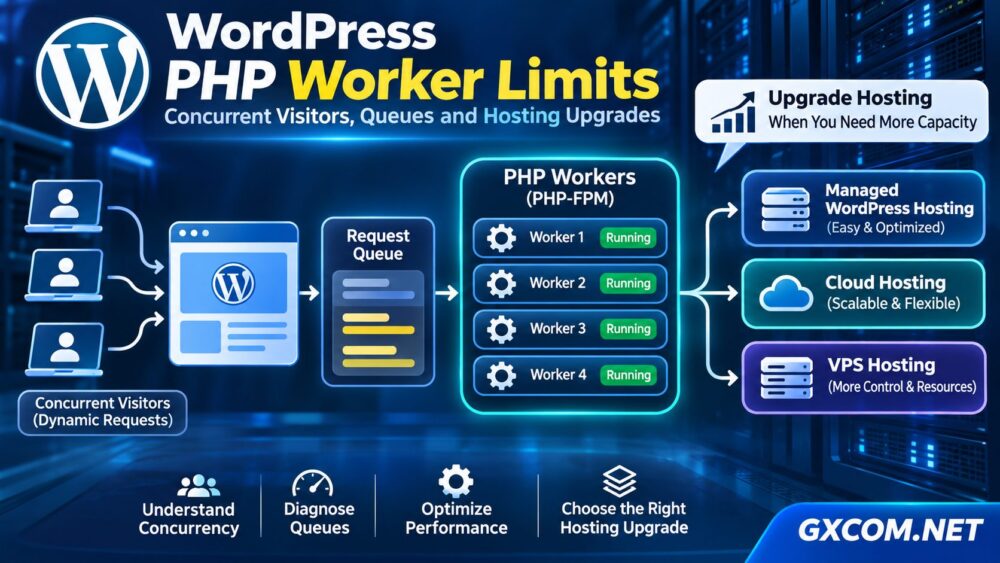
A PHP worker is a server process capable of executing PHP code for a request. WordPress relies on PHP to generate dynamic content, authenticate users, process forms, execute plugin functions, and interact with databases.
When a visitor requests an uncached WordPress page, the web server generally passes the request to PHP. An available worker executes the application code and returns a response.
If every worker is busy, additional requests may wait in a queue. Depending on server configuration, queue capacity, and timeout settings, visitors may experience delays or failed requests.
PHP workers are especially important for:
- WooCommerce shopping carts and checkout pages.
- Membership dashboards and authenticated sessions.
- WordPress administration and AJAX requests.
- REST API endpoints and dynamic search functions.
- Uncached pages generated by resource-intensive plugins.
Cached pages may bypass PHP execution entirely, reducing worker demand. However, personalized and transactional requests often require application processing.
How PHP Worker Limits Affect Concurrent Visitors
A common misconception is that four PHP workers can support only four website visitors. In reality, workers handle requests rather than permanently serving individual visitors.
A visitor reading a cached article may consume no PHP worker capacity. Another visitor completing a checkout could generate several dynamic requests.
Consider a simplified example:
- Available PHP workers: 4.
- Average dynamic request processing time: 1 second.
- Theoretical processing capacity: approximately 4 requests per second.
This example assumes continuously available workers and stable processing times. Actual throughput depends on database performance, external API calls, CPU scheduling, caching, and request variability.
If incoming dynamic requests consistently exceed processing capacity, queues can grow. Increasing worker counts may help, but only when sufficient CPU and memory remain available.
Signs Your WordPress Site Is Running Out of PHP Workers
PHP worker exhaustion often produces symptoms that resemble other performance problems.
1. Slow Pages During Traffic Spikes
Pages may respond normally with a few visitors but become noticeably slower during promotions or simultaneous logins.
2. Delayed WooCommerce Checkout
Checkout requests may wait behind other PHP operations, increasing response times and potentially interrupting transactions.
3. High TTFB on Uncached Pages
Time to First Byte can increase when requests wait for available workers. However, high TTFB alone does not prove worker exhaustion.
4. Intermittent 502 or 504 Errors
Gateway errors can appear when upstream processing fails or exceeds configured timeouts. Worker saturation is one possible cause among several.

5. Slow WordPress Administration
The WordPress dashboard may remain sluggish even when cached public pages appear fast.
For broader infrastructure troubleshooting, see our VPS vs Shared Hosting comparison to understand how hosting environments differ in resource allocation and control.
How to Check PHP Worker Usage and Queues
Before purchasing a larger hosting plan, collect evidence that worker capacity is actually the bottleneck.
- Check hosting metrics: Look for active PHP processes, worker saturation, request queues, CPU usage, and memory consumption.
- Review PHP-FPM logs: On supported servers, investigate warnings about reaching the maximum number of child processes.
- Inspect slow requests: Identify expensive database queries, plugins, external API calls, and uncached endpoints.
- Compare traffic periods: Examine whether response-time spikes coincide with concurrent dynamic requests.
- Ask your provider: Confirm whether the hosting plan enforces a fixed PHP worker limit or uses another concurrency-control mechanism.
On self-managed PHP-FPM servers, administrators can inspect pool settings such as pm.max_children and, when enabled, the PHP-FPM status endpoint.
Do not increase worker counts blindly. Each process consumes memory, and excessive concurrency can overload the database or CPU.
How Many PHP Workers Does WordPress Need?
There is no universal PHP worker requirement based solely on monthly visitors. The correct capacity depends on the rate and duration of dynamic requests.
A useful starting estimate is:
Required workers ≈ Peak dynamic requests per second × Average processing time in seconds
For example, eight dynamic requests per second with an average processing time of 0.5 seconds would require approximately four busy workers under ideal steady-state conditions.
Real production workloads need additional headroom for unpredictable traffic bursts and slower requests.
| Website Type | Primary Consideration |
|---|---|
| Cached content blog | Low dynamic request frequency |
| Business WordPress site | Forms, administration, plugin activity |
| WooCommerce store | Checkout and session-dependent requests |
| Membership platform | Authenticated traffic and database operations |
| High-traffic application | Peak concurrency and response-time consistency |
These categories describe workload characteristics, not fixed worker-count recommendations. Measure real traffic before setting production limits.
How to Reduce PHP Worker Pressure
Hosting upgrades should not be the first response to every concurrency problem. Several optimizations can reduce the amount of PHP processing required.
- Enable full-page caching: Serve eligible anonymous visitors without repeatedly executing WordPress.
- Use persistent object caching: Reduce repeated database operations where Redis or another supported cache is appropriate.
- Optimize slow plugins: Remove unnecessary processing and investigate expensive hooks or queries.
- Improve database performance: Review slow queries, indexes, and resource contention.
- Move heavy background tasks: Schedule expensive operations carefully to avoid competing with visitor requests.
Optimization should be verified through monitoring rather than assumed to solve every workload.
When Should You Upgrade WordPress Hosting?
If worker queues remain saturated after application optimization, upgrading the infrastructure may be justified.
Start by determining whether your current plan offers additional PHP worker capacity, more CPU resources, greater memory allocation, or better application-level monitoring.
For a broader purchasing perspective, read our Managed WordPress vs Shared Hosting guide.
Managed WordPress Hosting
SiteGround and KnownHost are relevant options for website owners who prefer managed environments and technical assistance. Compare actual plan limits, caching features, support scope, and resource policies before choosing.
Managed Cloud Hosting
Cloudways provides a managed cloud hosting approach worth evaluating when workloads require more flexible infrastructure resources. Its suitability depends on the selected server configuration and application requirements.
Our Managed Cloud Hosting comparison explains the broader differences between managed cloud environments.
Managed VPS Hosting
ScalaHosting and UltaHost offer managed VPS-related options for businesses considering a more configurable hosting environment. Review available CPU, RAM, management features, and PHP configuration access.

For additional guidance, see Managed vs Unmanaged VPS.
PHP Workers vs CPU and RAM: What Actually Matters?
More PHP workers do not automatically produce a faster website.
CPU determines how effectively processing tasks can execute, while RAM limits how many application processes can operate safely. Database performance and external services can also constrain throughput.
If CPU is already saturated, increasing workers may create more contention. If memory is insufficient, additional processes can trigger swapping or termination.
The best upgrade addresses the measured bottleneck rather than simply maximizing a single configuration value.
For infrastructure planning, our Cloud Hosting vs VPS comparison explores resource flexibility and management tradeoffs.
Frequently Asked Questions
Do More PHP Workers Make WordPress Faster?
They can improve simultaneous dynamic request handling when worker saturation is the limiting factor. They do not necessarily reduce the execution time of an individual request.
Does WooCommerce Need More PHP Workers?
WooCommerce often generates more uncached activity than a simple blog, particularly during checkout and authenticated sessions. Actual requirements depend on measured peak demand.
Can a CDN Fix PHP Worker Exhaustion?
A CDN can reduce origin requests for cacheable content. It generally cannot eliminate PHP processing for personalized transactions and other uncached operations.
Final Verdict
WordPress PHP worker limits matter most when simultaneous dynamic requests exceed available processing capacity. Diagnose queues, optimize application workloads, and verify CPU and memory headroom before upgrading.
When infrastructure becomes the confirmed bottleneck, compare managed WordPress hosting, cloud hosting, and managed VPS solutions based on actual resource policies, workload requirements, and operational support.
GXCOM.NET recommends choosing hosting resources through measurable performance needs rather than relying on advertised worker counts alone.