AWS EC2 vs Lightsail: Which Should You Choose?
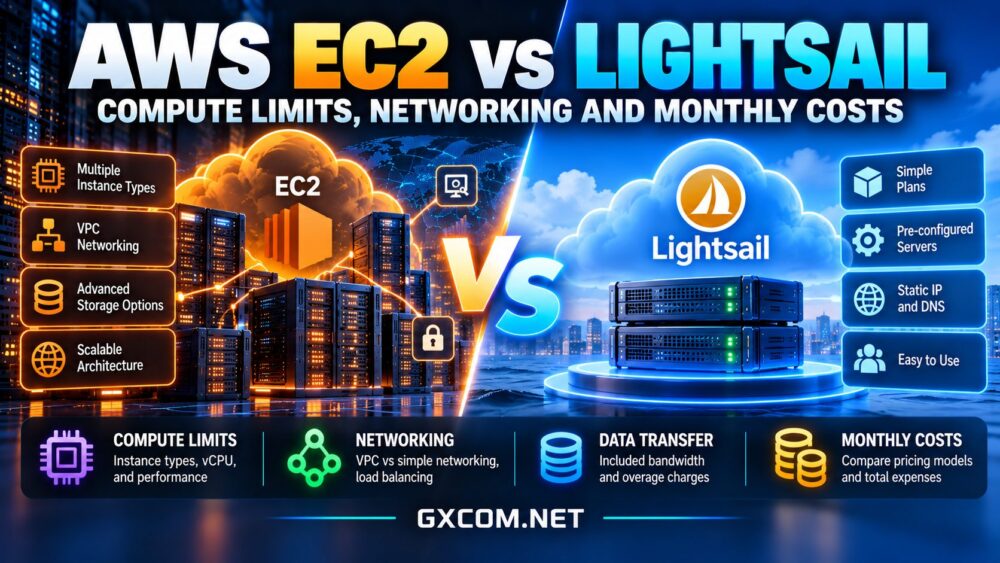
Comparing AWS EC2 vs Lightsail starts with a practical question: does your application need highly configurable cloud infrastructure, or would a simpler virtual server be enough? Both services run on Amazon Web Services, but their pricing models, networking options, and operational complexity differ.
Amazon Lightsail packages compute, storage, and data transfer into predefined plans. Amazon EC2 provides broader instance selection and integration with AWS infrastructure services. Neither option is universally cheaper. The right decision depends on sustained resource usage, network architecture, and the total monthly bill.
Compute Limits and CPU Performance
EC2 offers instance families optimized for different combinations of CPU, memory, storage, and networking. Teams can select configurations for databases, application servers, compute-intensive processing, and specialized workloads.
Lightsail also offers multiple instance sizes and workload-oriented plans, but its purchasing experience is more standardized. Some Lightsail instances use burstable CPU performance, providing a baseline with temporary capacity above that level.
Why CPU Bursting Matters
A small website may operate comfortably within its CPU baseline and occasionally benefit from bursts. A continuously busy application, however, can encounter performance limitations when sustained demand exceeds what its plan supports.
Monitor CPU utilization, burst capacity where applicable, memory consumption, and application response times. EC2 has burstable instance families too, so choosing EC2 alone does not guarantee unrestricted CPU performance. Compare specific instance types and test representative workloads.
Networking: Simplicity vs Flexibility
Lightsail includes straightforward networking features such as static IP options, DNS management, and simplified load balancing. It can suit websites and smaller applications that do not require elaborate private networking.
EC2 operates within Amazon Virtual Private Cloud, supporting more detailed subnet design, routing, security groups, private connectivity, and integration with other AWS networking services. These capabilities are useful for complex applications but require more planning.
Load Balancers and High Availability
Lightsail offers load balancing for supported web traffic, while EC2 can use AWS Elastic Load Balancing services with broader protocol and architecture options. Neither service makes a single virtual machine automatically highly available.
Redundant application instances, database recovery, and failure testing remain important. Our high-availability cloud servers guide explains the infrastructure required to reduce single points of failure.
Data Transfer Allowances and Overage Fees
Lightsail instance bundles include a monthly data transfer allowance. AWS counts both incoming and outgoing transfer toward that allowance, although qualifying excess inbound traffic is not billed as overage. Outbound overage charges depend on traffic destination and regional terms.

EC2 internet data transfer is generally evaluated separately from instance compute charges, subject to applicable AWS allowances and pricing rules. Traffic between services, availability zones, or regions can also affect costs.
Lightsail allowances vary by region, so a plan advertised with one transfer amount may provide a smaller allowance in certain locations. Before buying, estimate monthly downloads, API traffic, backups, and internal communication.
Our cloud VPS bandwidth costs comparison explains why included transfer and network port speed should never be treated as equivalent.
EC2 vs Lightsail Monthly Cost Comparison
Lightsail makes initial budgeting easier because a bundle combines several basic resources. However, additional block storage, snapshots, managed databases, load balancers, and excess data transfer may still generate charges.
EC2 pricing requires buyers to account for the instance purchasing model, operating system, attached EBS volumes, public IPv4 addresses, networking, and optional supporting services. Reserved commitments or Savings Plans can change eligible compute expenses.
A Practical Budget Example
Imagine a hypothetical Lightsail deployment with a $25 monthly instance, $5 in snapshot storage, and a $15 additional service charge. Its estimated total would be $45 per month.
Now imagine an EC2 configuration with $30 in compute, $8 in storage, and $12 in networking and supporting services. Its estimated total would be $50 monthly. These are illustrative assumptions, not current AWS quotations.
Under those assumptions, Lightsail saves $60 annually. But the result could reverse if EC2 uses discounted compute commitments, the Lightsail application needs additional resources, or either architecture generates unexpected transfer charges.
Four Cloud VPS Alternatives Worth Comparing
Before committing to either AWS product, consider whether another cloud provider offers a simpler fit. The following options are relevant for conventional websites, development environments, and applications that do not depend heavily on AWS-specific services.
Vultr: Multiple Cloud Compute Choices
Vultr offers cloud compute options for developers seeking flexible deployment locations and instance families. Compare sustained CPU performance, transfer allowances, backup charges, and networking features against your intended EC2 or Lightsail configuration.
Hostwinds: Flexible VPS and Cloud Hosting
Hostwinds offers VPS and cloud hosting options for businesses and developers seeking conventional virtual server infrastructure. Its services may suit websites, development environments, and applications that do not require extensive AWS-specific integrations. Compare the relevant plan’s CPU allocation, storage configuration, bandwidth policies, and backup options before making a purchasing decision.
Kamatera: Configurable Cloud Servers
Kamatera may appeal to teams requiring adjustable CPU, memory, and storage resources. Confirm bandwidth billing, administration responsibilities, backup options, and the cost of maintaining additional servers.
Contabo: VPS and Virtual Dedicated Servers
Contabo offers VPS and Virtual Dedicated Server (VDS) products for workloads that can operate on conventional virtual server infrastructure. These options may appeal to buyers seeking defined resource configurations without adopting the full complexity of AWS EC2. Compare CPU allocation, memory, storage, network policies, backup services, and management responsibilities against your expected workload. Contabo VPS and VDS products should be evaluated separately because their resource characteristics and pricing structures can differ.
For a wider commercial shortlist, review our affordable cloud VPS deals and evaluate renewal terms alongside the complete infrastructure budget.
When Lightsail Makes More Sense
Lightsail is often a practical starting point for small WordPress sites, development servers, simple business applications, and projects with predictable resource requirements. Its packaged pricing and streamlined console can reduce the time spent assembling infrastructure.

Choose it when supported bundle sizes, networking capabilities, and application architecture meet your needs without extensive customization.
When EC2 Is the Better Choice
EC2 becomes more attractive when applications need specialized compute, sophisticated VPC networking, autoscaling fleets, or deep integration with other AWS services. It can also fit organizations already managing infrastructure through AWS automation and governance tools.
These advantages introduce operational decisions. Our AWS EC2 vs VPS hosting guide examines when a simpler server model can reduce unnecessary complexity.
Consider Migration Before You Commit
Moving from Lightsail to a more complex environment may require changes to storage, networking, deployment scripts, and database management. Estimate the labor and potential downtime before selecting a platform solely for its introductory simplicity.
Our cloud server migration guide covers data transfer, cutover planning, and switching costs.
Final Verdict
Lightsail can be the more economical and manageable choice for straightforward applications with predictable demand. EC2 offers greater architectural flexibility for specialized or growing infrastructure. Compare sustained compute behavior, network requirements, and complete monthly costs before deciding. The best cloud server is the one that satisfies real workload requirements without forcing you to pay for complexity you do not need.