

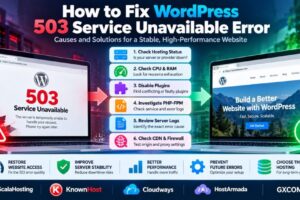
How to Fix WordPress 503 Service Unavailable Error: Causes and Solutions
Is your WordPress website showing a 503 Service Unavailable error? This HTTP status code means the server cannot temporarily handle the request. Visitors may see a blank page, an error message, or a website that…

How Much RAM Does a Dedicated Server Need? Workload Sizing Guide
How much RAM does a dedicated server need? Is 16GB enough, or should you choose 32GB, 64GB, or even 128GB? The answer depends on your workload. Too little memory can cause slow applications, excessive swapping,…


How to Migrate WordPress to a New Host Without Downtime
Moving a WordPress website to a new hosting provider can improve performance, support, scalability, or operating costs. But a poorly planned migration can also cause downtime, broken pages, missing images, lost orders, email disruption, and…

Website Caching Explained: Browser, Server, CDN and Object Cache Compared
Website caching is one of the most effective ways to improve performance, but the word “cache” can describe several very different technologies. Browser cache, CDN cache, server page cache and object cache all reduce repeated…
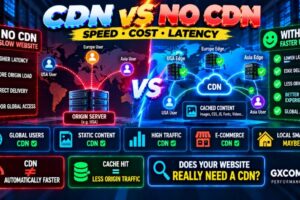
CDN vs No CDN: Performance, Cost and When Your Website Needs One
Does every website need a CDN? No. But for the right website, a Content Delivery Network can reduce latency, decrease origin-server traffic, improve resilience and deliver static content faster to visitors around the world. The…


How to Speed Up a Website: 15 Proven Ways to Improve Performance
A fast website is no longer just a technical advantage. Website speed affects user experience, conversions, engagement and how efficiently visitors can interact with your content. When a website feels slow, the cause is rarely…

SSH Security Best Practices: How to Protect Your Linux Server
SSH is one of the most important administrative interfaces on a Linux server—and one of the first services attackers may probe when a server receives a public IP address. A weak password, exposed root account,…

Best DDoS Protected VPS Providers: Hosting With DDoS Protection Compared
A powerful VPS is not much use if a traffic attack can knock your website, application or game server offline. That is why DDoS protection should be part of the buying decision when choosing VPS…

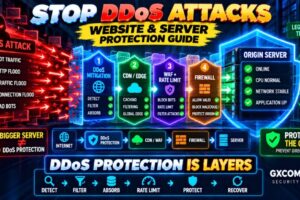
How to Prevent DDoS Attacks: Website and Server Protection Guide
A distributed denial-of-service attack can make a website, VPS or application unavailable by overwhelming network capacity, connections or server resources with more traffic than the infrastructure can handle. There is no single firewall rule or…

How to Secure a VPS: 15 Essential Server Security Best Practices
A VPS gives you far more control than shared hosting—but that control also means you are responsible for protecting the server. A newly deployed VPS can be exposed to automated scans, brute-force login attempts, vulnerable…

How to Troubleshoot a Slow Server: CPU, RAM, Disk and Network Bottlenecks
A slow server does not always need more CPU or RAM. Performance problems can come from CPU saturation, memory pressure, slow disk I/O, network latency, database queries, overloaded applications or resource limits imposed by the…

Linux Server Setup Guide: Security, SSH, Firewall and Essential Configuration
A fresh Linux server may be online within minutes, but that does not mean it is ready for production. Before deploying WordPress, a database, API, web application or other workload, you should configure the operating…

How to Set Up a VPS Server: Step-by-Step Guide for Beginners
You have purchased a VPS, received an IP address and login credentials, and now you are looking at an empty server wondering what to do next. Setting up a VPS correctly involves much more than…
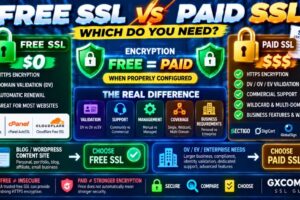
Free SSL vs Paid SSL Certificates: Differences, Security and Which Do You Need?
Do you really need to pay for an SSL certificate, or is a free SSL certificate good enough? This is one of the most common questions website owners ask when enabling HTTPS. Free SSL certificates…
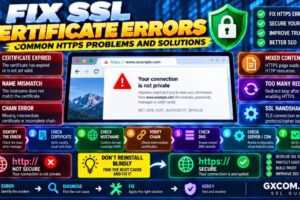
How to Fix SSL Certificate Errors: Common HTTPS Problems and Solutions
You install an SSL certificate, open your website, and expect to see a secure HTTPS connection. Instead, the browser displays a warning such as “Your connection is not private,” “Certificate expired,” “Certificate name mismatch,” or…